
Technical SEO
Schema Markup with Codex: Find, Fix and Generate JSON-LD
Use Codex to detect, validate and generate schema markup: fix broken JSON-LD, add missing types, and apply the fixes in your own codebase.
Schema markup with Codex works in two passes: Codex reads the structured data a page already has, tells you what is broken or missing, and then writes the corrected JSON-LD straight into your project, where you can review the diff before it ships. With RankCue's Codex SEO kit, that whole job is one command, $seo schema <url>, and the Codex Blog kit adds $blog schema <file> for blog posts. This guide explains what structured data does, how both commands work inside Codex, how to read the report, and how to let Codex apply the fixes safely.
Key takeaways
$seo schema <url>finds JSON-LD, Microdata and RDFa on a page, validates each block, and generates replacement JSON-LD in a report plus a ready-to-use JSON file.$blog schema <file>reads a blog post and builds one linked@graphwith BlogPosting, Person, Organization, BreadcrumbList, ImageObject and, when present, FAQPage and VideoObject.- The most common errors are boring ones: a missing
@context, relative URLs, wrong date formats and placeholder text left in production.- Because Codex works inside your repository, it can put the fixed markup into the template that renders it, then run your build so you catch mistakes before deploy.
- Structured data helps search engines understand a page and can make it eligible for rich results. It doesn't guarantee rankings or that rich results will appear.
The schema command at a glance
| Item | Details |
|---|---|
| Command | $seo schema <url> for any page, $blog schema <file> for a blog post |
| What you give it | A live URL, or the path to a post file in your project |
| What Codex reads | The page HTML (rendered in a headless browser when the page is a JavaScript app) or the post's text and front matter |
| What you get back | A schema report, generated JSON-LD, and a list of missing opportunities |
| Needs | Internet access for live URLs; no third-party API keys |
| Best for | Fixing broken markup, adding missing types, and keeping blog schema consistent |
Why schema markup matters for search
Schema markup is a vocabulary from Schema.org that labels what a page is about in a form machines can read without guessing. A human sees a product page and understands the price, the brand and the reviews. A crawler sees text. Structured data closes that gap by saying, in code, "this is a Product, this number is its price, this is the organization that sells it."
Google uses structured data in two ways. It helps Google understand the entities on a page, and it makes the page eligible for rich results, the enhanced listings with stars, prices, breadcrumbs or event dates. Eligibility is the key word. Google's own structured data documentation is clear that valid markup doesn't force a rich result to appear.
JSON-LD, Microdata and RDFa
There are three ways to add structured data to HTML:
- JSON-LD sits in a
<script type="application/ld+json">tag, separate from the visible content. It's the easiest to read, generate and maintain. - Microdata adds attributes such as
itemscopeanditempropto visible HTML elements. - RDFa uses attributes such as
typeofandpropertyin the same inline way.
Google supports all three but recommends JSON-LD, and so does the skill. When it finds Microdata or RDFa, it still validates it, then recommends moving to JSON-LD.
Which types are worth adding
Not every Schema.org type earns anything in search. The skill keeps a status list and sorts types into groups. Types such as Organization, LocalBusiness, Product, Offer, Article, BlogPosting, BreadcrumbList, Person, VideoObject, Event, JobPosting and Course are recommended freely. FAQPage is a special case: FAQ rich results are now heavily restricted in Google, so the skill reports existing FAQPage markup as low priority rather than as an error, and suggests QAPage for pages where real users post questions and answers. Types whose rich results Google has retired, such as HowTo, are never recommended.
That last rule matters more than it sounds. Old SEO checklists still tell people to add HowTo markup to every tutorial. The skill won't, which saves you from shipping markup that does nothing.
How the schema command runs inside Codex
When you type $seo schema https://example.com/pricing in a Codex task, the skill takes over and works through a fixed sequence. You see each step in the task log, and the outputs land as files in your project.
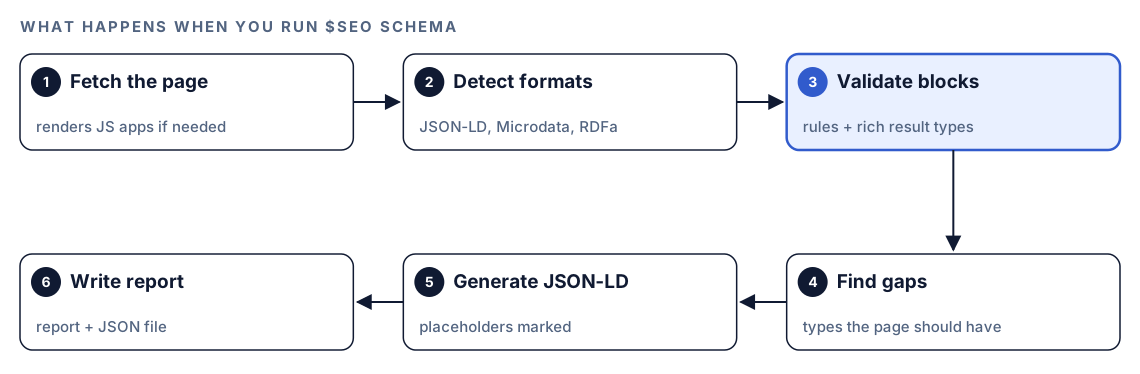
- Fetch the page. Codex downloads the HTML. If the page looks like a single-page app shell, it renders it in a headless browser so it can see markup that JavaScript injects.
- Detect every format. It looks for JSON-LD script tags, Microdata attributes and RDFa attributes, so nothing hides in an old template.
- Validate each block. Every block is checked against the rules in the next section and against the types Google supports for rich results.
- Find gaps. Based on what the page actually is, it lists schema types that are missing. A local service page without LocalBusiness markup is the classic case.
- Generate JSON-LD. It writes valid JSON-LD with the required and recommended properties. Any value it can't verify from the page becomes a clearly marked placeholder for you to fill in.
- Write the report. You get a schema report and a JSON file with the generated snippets, ready to review.
For JavaScript sites, the skill compares the raw HTML with the rendered page. That tells you whether your markup is in the server response or only appears after scripts run. The skill treats server-rendered JSON-LD as the safer choice, especially for markup that changes often, such as Product and Offer data.
What Codex checks in every schema block
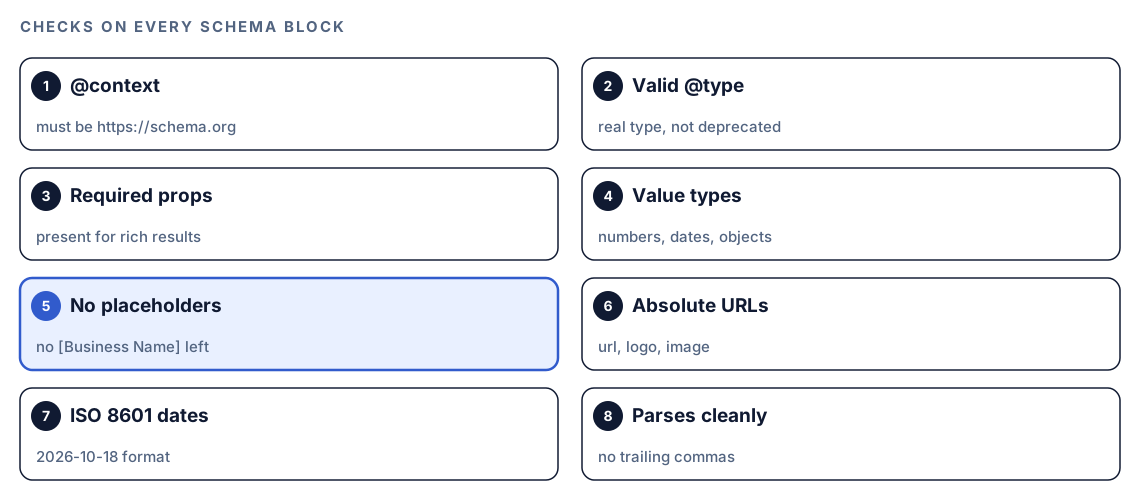
The validation step is where most of the value sits. The same checklist runs on every block, whether a plugin, a theme or a developer added it.
Context and type
The @context must be https://schema.org, and the skill prefers the https form. The @type must be a real Schema.org type and must not be on the deprecated list. A typo such as "Organisation" leaves a block that describes nothing Google recognizes, and it's a surprisingly common mistake.
Required properties and value types
Each type has properties Google requires before it will consider the markup for a rich result. The skill checks that they're present and that each value has the right kind of data: a number where a number belongs, a date where a date belongs, an object where an object belongs.
Placeholders, URLs and dates
Three checks catch most real-world damage:
- Placeholder text. Templates often ship with values like
[Business Name]orYour Company. The skill flags any placeholder left in live markup. - Absolute URLs. Properties such as
url,logoandimageneed full URLs that start withhttps://. A relative path like/logo.pngis flagged. - ISO 8601 dates.
datePublishedshould look like2026-10-18, notOctober 18thor18/10/2026.
Syntax errors
If a JSON-LD block won't parse, the skill reports the exact problem, such as a missing bracket, a trailing comma or an unquoted key, and gives you a corrected version.
Run it in Codex, step by step
- Install the kit using the setup steps in the install section, restart Codex, and open a new task in your website's project folder. Our guide to installing SEO skills in Codex covers this in detail.
- Check your permission mode. The command fetches a live page, so depending on your mode, Codex may ask before it uses the internet. Approve it for the site you're checking.
- Run the command with the page you want to check:
$seo schema https://example.com/pricing- Or just ask in plain language. Codex picks the skill when your request matches it:
Check the structured data on https://example.com/pricing. Tell me which blocks are invalid and generate fixed JSON-LD.- For a blog post that lives in your repository, point the blog command at the file:
$blog schema content/blog/how-we-price.mdThe blog command reads the post itself and pulls out the title, author, dates, meta description, FAQ section, images, organization details, approximate word count, tags and slug.
Reading the report
The page command writes two files. The report holds the findings, and the JSON file holds the generated snippets. The core of the report is a validation table with one row per block:
## Validation Results
| Schema | Type | Status | Issues |
|--------|------|--------|--------|
| Block 1 | Organization | ⚠️ | logo uses a relative URL |
| Block 2 | BreadcrumbList | ✅ | none |
| Block 3 | HowTo | ❌ | deprecated type, recommend removal |

## Recommendations
- Missing opportunities: [types that fit this page]
- Validation fixes: [one line per issue]
- Generated code: see generated-schema.json
Work through it in this order:
- Parse errors first. A block that doesn't parse contributes nothing, so fixing it is the quickest win.
- Wrong or deprecated types next. Remove or replace them before you polish properties.
- Missing required properties. These block rich result eligibility for that type.
- Hygiene issues. Relative URLs, date formats and leftover placeholders.
- New opportunities last. Add missing types once the existing markup is clean.
For blog posts, $blog schema runs its own checks on the graph it builds. Every @id reference must point to an entity inside the graph. dateModified can't be earlier than datePublished. The headline must stay within 110 characters, and the description must be between 50 and 160 characters. URLs must be absolute, image dimensions must be positive whole numbers, breadcrumb positions must count up from 1, and an FAQPage needs at least two questions.
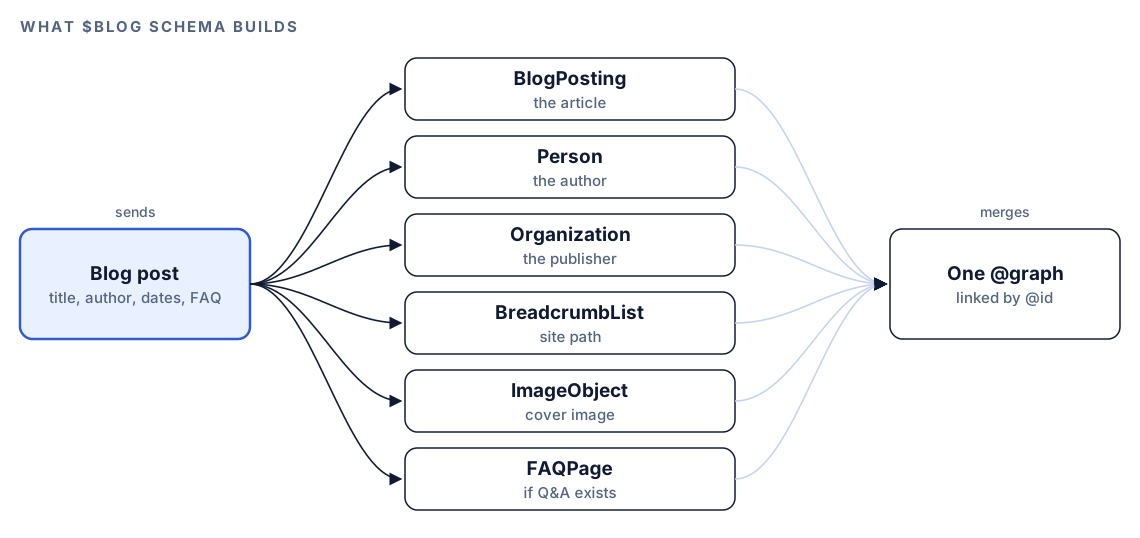
The @graph pattern is the reason blog output stays tidy. Instead of six separate script tags, you get one, and the entities point at each other by @id. The BlogPosting names its author by reference to the Person entity, and its publisher by reference to the Organization entity, so the relationships stay explicit.
Apply the fixes with Codex
This is where working in Codex beats pasting markup into a validator. Codex can find the template that prints the markup, change it once, and fix every page that uses it.
A typical fix looks like this. Before:
{
  "@context": "http://schema.org",
  "@type": "Organization",
  "name": "[Company Name]",
  "url": "/",
  "logo": "/logo.png"
}
After:
{
  "@context": "https://schema.org",
  "@type": "Organization",
  "name": "Example Co",
  "url": "https://example.com/",
  "logo": "https://example.com/logo.png"
}
Then ask Codex to put it in place:
Use generated-schema.json from the schema report. Add the Organization and BreadcrumbList JSON-LD to the template that renders our pricing page, in the server-rendered HTML rather than client-side code. Replace every placeholder with real values from the codebase, and ask me if a value isn't there. Show me the diff, then run the build.Read the diff before you accept it. Check that the values are true for your business, not merely well formed. After deploy, confirm the result with Google's Rich Results Test and run $seo schema again on the same URL. A clean second report is your proof that the fix landed.
Make it repeatable
Schema rots quietly. Someone adds a review widget that injects its own markup, or a new template copies an old block with a relative logo URL. A short rule in your project's AGENTS.md file keeps Codex applying the same standard every time it touches a template:
## Structured data
- Use JSON-LD only, in server-rendered HTML.
- @context is always "https://schema.org"; all URLs are absolute; dates are ISO 8601.
- Never add HowTo markup. Don't add new FAQPage markup unless asked.
- After changing any template that outputs JSON-LD, run $seo schema on one affected URL and include the result in your summary.
Codex reads AGENTS.md before it starts work, so the rule applies to every future task in that project without you repeating it. Keep the file short; the combined instructions have a size cap. Our guide to AGENTS.md rules for SEO shows a fuller example, and if you'd rather run the check on a schedule, see automating SEO checks with codex exec.
Without the skill: a plain Codex prompt
You can get a useful first pass from Codex with no kit installed:
Fetch https://example.com/pricing and extract every JSON-LD, Microdata and RDFa block. For each one, check @context, @type, required properties for Google rich results, absolute URLs and ISO 8601 dates. Then propose corrected JSON-LD and tell me which template in this repo outputs it.For blog posts:
Read content/blog/how-we-price.md and write one JSON-LD @graph with BlogPosting, Person, Organization and BreadcrumbList. Use stable @id values and only facts that appear in the file.What the skill adds is consistency: the same checklist and deprecated-type list on every run, rendering for JavaScript sites, a fixed report format, and a separate JSON file you can hand straight to Codex for the fix.
Pitfalls to avoid
- Shipping template placeholders.
[Business Name]in live markup is worse than no markup. - Marking up content that isn't on the page. Reviews, prices and FAQs in your JSON-LD must match what visitors can see.
- Relying on client-side injection for prices and stock. Put time-sensitive markup in the server response.
- Adding HowTo markup because an old checklist says so.
- Using several plugins that each print their own Organization block, so the page sends conflicting signals.
- Treating a green validator as the finish line. Valid markup can still be untrue, so read the values.
Keep going
- Run a full SEO audit with Codex, which includes schema alongside technical, content and performance checks.
- E-commerce SEO with Codex goes deeper on Product and Offer markup for stores.
- Local SEO audit with Codex covers LocalBusiness markup alongside your Google Business Profile.
- The full list of Codex SEO and Codex Blog skills shows every command in both kits.
FAQ
What is schema markup used for?
Schema markup labels the content of a page, such as a product, an article, a business or an event, in a format search engines can read reliably. Google uses it to understand the page and to decide whether it's eligible for rich results like breadcrumbs, prices or star ratings.
Does schema markup improve rankings?
Google describes structured data as a way to understand a page and to make it eligible for rich results, not as a ranking boost. In practice, the benefit comes from clearer understanding and richer listings that can earn more clicks, so treat it as hygiene rather than a ranking trick.
Is JSON-LD better than Microdata?
Google supports both, but it recommends JSON-LD because it sits apart from your visible HTML and is easier to generate and maintain. The Codex SEO schema command validates all three formats and recommends JSON-LD for anything new.
Can Codex add schema markup to my site automatically?
Yes, with you in the loop. The schema command generates the JSON-LD, and Codex can edit the template that outputs it when your permission mode allows edits. You review the diff and run your build before anything ships.
How do I test schema markup after fixing it?
Use Google's Rich Results Test to see which rich result types a page is eligible for, and the Schema Markup Validator for general Schema.org validity. Then run $seo schema on the same URL again to confirm the report comes back clean.