
Technical SEO
SEO Drift Monitoring with Codex: Catch Regressions
Set up SEO drift monitoring in Codex: snapshot key pages, compare after every deploy with 17 rules, and trace each regression to the commit that caused it.
SEO drift monitoring means saving a known-good snapshot of a page's SEO elements and checking it again after every change, so you spot a lost title, a stray noindex or missing schema before rankings fall. In Codex, $seo drift baseline <url> takes that snapshot and $seo drift compare <url> checks the live page against it with 17 rules sorted into three severity levels. This guide explains why regressions slip through, how the drift commands work inside Codex, how to read the report, and how to have Codex trace a regression to the commit that caused it.
Key takeaways
$seo drifthas three actions:baselinesaves a snapshot,comparechecks the live page against it, andhistoryshows every snapshot and comparison over time.- A baseline records the title, meta description, canonical, robots directives, H1 to H3 headings, JSON-LD, Open Graph tags, Core Web Vitals, status code and content hashes.
- Changes are graded Critical, Warning or Info. A new
noindex, a changed canonical or a page that starts returning an error is Critical.- Baselines live in a local database on the machine that runs Codex, so run comparisons from the same machine.
- Once drift is found, Codex can search your Git history for the change that caused it, fix it, and run your build.
The drift command at a glance
| Item | Details |
|---|---|
| Command | $seo drift baseline <url>, $seo drift compare <url>, $seo drift history <url> |
| What you give it | A public URL, ideally one of your most important pages |
| What Codex reads | The live page's HTML, its status code, and Core Web Vitals from PageSpeed Insights when available |
| What you get back | A stored snapshot, a comparison report with old and new values, and an optional HTML report |
| Needs | Internet access; optionally a Google API key so Core Web Vitals can be included |
| Best for | Checks before and after a deploy, routine monitoring, and working out why traffic dropped |
What is SEO drift?
SEO drift is any unplanned change to the parts of a page that search engines rely on. Nobody decides to remove the pricing page's canonical tag. It happens when a layout is refactored, a plugin changes a default, or a staging setting leaks into production. Visitors see nothing wrong, so nobody notices.
Why regressions slip through
Most deploys are checked by eye: does the page load and look right? That never shows you a meta robots tag or a JSON-LD block. Search engines notice the change long before a person does, and by the time traffic falls, several more deploys have shipped. You're left guessing which one did the damage.
Drift monitoring fixes the order of events. You record what "good" looks like while it's still good, then compare after each change. The question shifts from "why did traffic drop last month?" to "what changed in today's deploy?"
The changes that hurt most
Some changes can remove a page from search almost on their own:
- A `noindex` directive. It tells search engines to drop the page from their index. Google's documentation on blocking indexing explains how Google handles it.
- A changed or missing canonical tag. The canonical tells search engines which version of a page to index. Point it at the wrong URL and you ask them to index something else. Google's guide to canonicalization covers how it's chosen.
- An error status code. A page that keeps returning 404 or 500 can drop out of search results.
- A removed title or H1. These are among the clearest on-page signals of what a page is about.
- Removed structured data. It can cost the page its eligibility for rich results.
Monitoring is not auditing
An audit asks whether a site is in good shape; drift monitoring asks whether a page is still the way it was. Audits are broad and occasional, drift checks narrow and frequent. The audit finds what to fix, and drift monitoring keeps the fixes in place.
How $seo drift runs inside Codex
The command has three actions. baseline records the current state of a page. compare fetches it again and diffs it against the most recent baseline. history lists every baseline and comparison for that URL, newest first.
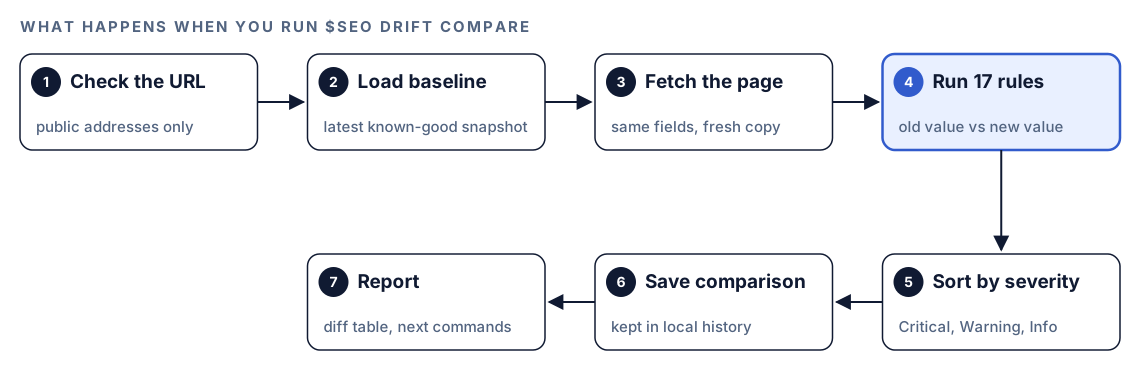
When you run a comparison, Codex works through these steps:
- Check the URL. The skill refuses private, loopback and reserved network addresses, so it only fetches public pages.
- Load the baseline. It picks the most recent snapshot for the URL, unless you ask for a specific earlier one by its ID.
- Fetch the page. It downloads the current version and extracts the same fields the baseline holds.
- Run the rules. All 17 comparison rules check old values against new ones.
- Sort by severity. Each triggered rule is labeled Critical, Warning or Info.
- Save the comparison. The result is stored next to the baseline, which builds the history.
- Report. You get the changes with old and new values, a recommended action for each, and the next command to run.
URLs are normalized before matching, so small differences don't create separate histories. The scheme and host are lowercased, default ports are dropped, query parameters are sorted, UTM tracking parameters are removed and trailing slashes are stripped. https://Example.com/pricing/?utm_source=x and https://example.com/pricing count as the same page.
What a baseline captures
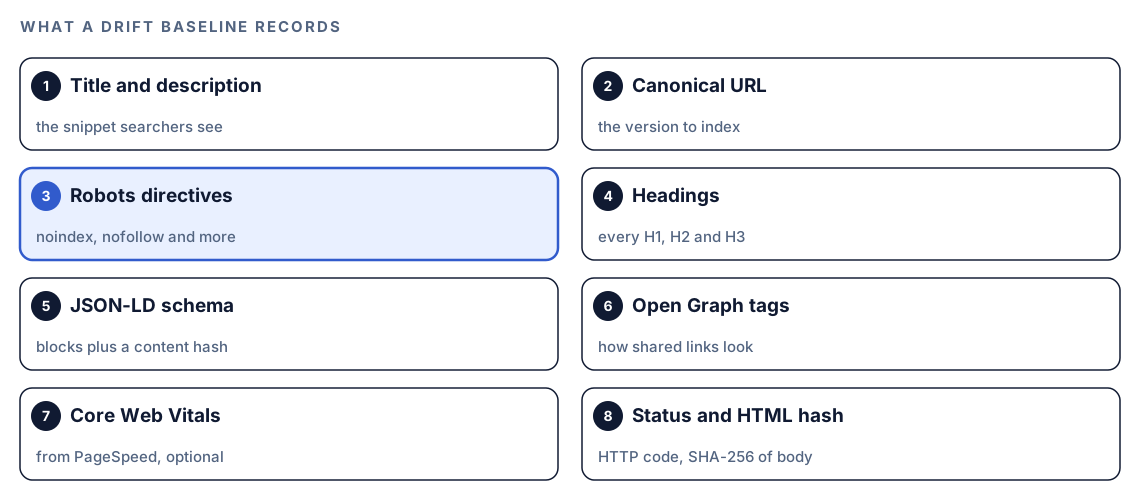
A baseline is a snapshot of every element that affects how a page is indexed and shown in search.
Head tags
The title, meta description, canonical URL, meta robots directives and Open Graph tags. Together these decide whether a page is indexed, which URL represents it, and how it looks in search results and in shared links.
Headings and structured data
Every H1, H2 and H3 is stored as a list, so the comparison can tell a reworded H1 from a removed one. JSON-LD blocks are stored in full, along with a SHA-256 hash of the schema content. A hash is a short fingerprint of the content: if a single character changes, the fingerprint changes.
Status, content and performance
The HTTP status code is recorded even when it's an error, because a 404 or 500 is exactly what you want on file. A hash of the HTML body flags any content change. Core Web Vitals come from PageSpeed Insights. If that lookup fails, for example because no Google API key is set up, the vitals are stored as empty and the comparison skips the vitals rules instead of failing.
How drift is graded
The 17 rules sort every change into one of three levels, each with its own urgency:
| Level | What it means | Respond |
|---|---|---|
| Critical | A change that can break search visibility | Immediately |
| Warning | A change that may hurt and needs a look | Within a week |
| Info | A change worth knowing about, often intentional | When convenient |
Critical triggers include removed schema, a changed or removed canonical, a newly added noindex, a removed title or H1, an H1 that changed by more than 50%, and a status code that became a 4xx or 5xx error.
Warning triggers include a changed title or meta description, Core Web Vitals that got more than 20% worse, a performance score that fell by 10 points or more, removed Open Graph tags, and modified schema.
Info triggers include newly added schema, a changed H2 structure and a changed content hash.
These thresholds are skill settings. A reworded title is a Warning, not a Critical, because it may be exactly what you meant to do.
Run it in Codex, step by step
- Install the Codex SEO kit from the install section, restart Codex, and open a new task in your website's project folder.
- Check your permission mode. Drift commands fetch live pages, so depending on your mode, Codex may ask before it uses the internet. Approve it for your site.
- Take a baseline while the page is in good shape:
$seo drift baseline https://example.com/pricing- After your next deploy, compare:
$seo drift compare https://example.com/pricing- Or ask in plain language. Codex picks the skill when your request matches it:
We just deployed. Did anything break on https://example.com/pricing compared with the last baseline?- Review the timeline whenever you need it:
$seo drift history https://example.com/pricing- Adjust as needed in plain language. Ask Codex to skip the Core Web Vitals lookup for a faster run, to compare against a specific earlier baseline by its ID, or to show only the most recent entries in the history.
If you run compare on a URL with no baseline, Codex tells you and suggests taking one first. The database is created automatically the first time you use the command. For Core Web Vitals in your snapshots, set up a Google API key; our guide to Search Console and PageSpeed data in Codex covers it, and Google's own terms apply.
Reading the drift report
A comparison opens with a one-line count, then a table of every triggered rule. The shape looks like this:
Drift summary: X CRITICAL, X WARNING, X INFO

| Severity | Element | Old value | New value | Action |
|----------|---------|-----------|-----------|--------|
| CRITICAL | meta_robots | [none] | noindex | Remove noindex from the template |
| CRITICAL | canonical | https://example.com/pricing | [new value] | Restore the canonical |
| WARNING | title | [old title] | [new title] | Confirm the change was intended |
| INFO | h2 | [old list] | [new list] | Review if unplanned |
Work through it from the top. Fix every Critical before the next deploy, check each Warning against what the release was meant to change, and skim the Info rows for surprises.
For Critical and Warning findings, the report also points you to a deeper check:
| If drift shows | Run next |
|---|---|
| Schema removed or modified | $seo schema <url> |
| Canonical changed, noindex added or an error status | $seo technical <url> |
| Core Web Vitals got worse | $seo technical <url> or $seo google for PageSpeed data |
| Title, meta description or Open Graph tags changed | $seo page <url> |
| Heading structure changed | $seo content <url> |
After a comparison, Codex offers an HTML version of the report, which is easier to share with people who don't read JSON.
Fix regressions with Codex
Because Codex works in your repository, it can also find out why the page changed.

A classic regression is an environment check that misfires. The layout prints staging settings in production. Before:
<meta name="robots" content="noindex, nofollow">
<link rel="canonical" href="https://staging.example.com/pricing">
After:
<link rel="canonical" href="https://example.com/pricing">The noindex is gone and the canonical points at the production host again. Ask Codex to find the cause, not just patch the symptom:
The drift report for https://example.com/pricing shows a new noindex tag and a canonical pointing at staging.example.com since the last baseline. Use git log and git diff on the layout and config files to find the commit that introduced this, explain the cause, and fix it so production can never output noindex or the staging host. Show me the diff, then run the build and tests.Read the diff before you accept it. After the fix is deployed, run compare again. When it comes back clean, or the only changes left are ones you intended, take a fresh baseline so future comparisons start from the new known-good state.
Make it repeatable
Drift checks earn their keep when they run after every deploy without anyone remembering to start them. codex exec runs Codex without the interactive interface, which suits a post-deploy script or a scheduled job:
codex exec --sandbox workspace-write 'Run $seo drift compare on https://example.com/, https://example.com/pricing and https://example.com/blog/. List CRITICAL and WARNING findings first.' -o drift-summary.mdSingle quotes stop your shell from treating $seo as a variable, and -o writes Codex's final message to drift-summary.md for the next step in your script. The default codex exec sandbox is read-only, and drift saves every comparison, so the command adds --sandbox workspace-write. Make sure your sandbox and permission setup also allows the network access and local storage the task needs; the Codex non-interactive mode docs cover the details.
One rule matters more than any flag: run comparisons on the machine that holds your baselines. They live in a local database, so a CI runner that starts from a clean slate each time won't find them. A scheduled job on a persistent server or your own machine works. Our guide to automating SEO checks with codex exec covers scheduling in more depth.
Without the skill: a plain Codex prompt
You can build a simple version of drift monitoring with plain Codex by keeping snapshots as JSON files in your repository:
Fetch https://example.com/pricing and save its status code, title, meta description, canonical, meta robots, H1 to H3 headings, JSON-LD blocks and Open Graph tags to seo-snapshots/pricing-[today's date].json. Then compare it with the most recent earlier file in that folder and list every change. Treat a new noindex, a changed canonical, a removed title, H1 or schema block, and an error status as critical.What the skill adds is rigor: a fixed set of 17 rules with documented thresholds, content hashes, URL normalization, optional Core Web Vitals, history across every run, an HTML report, and a pointer to the right follow-up command for each finding.
Pitfalls to avoid
- Taking the baseline after the damage. Capture it while the page is known to be good.
- Pointing drift at a staging server on your internal network. The skill only fetches public addresses, so private hosts are refused.
- Running comparisons on a fresh CI runner that has none of your baselines.
- Never refreshing the baseline. After an intended change, take a new one, or every comparison will keep flagging the same edit.
- Ignoring Warnings because they aren't Critical. A rewritten title can be a bigger problem than it looks.
- Monitoring only the homepage. Add the pages that earn traffic or revenue.
Keep going
- Run a full SEO audit with Codex. When a baseline exists for the URL, the audit adds a drift comparison automatically.
- Schema markup with Codex helps when drift reports removed or modified structured data.
- On-page SEO analysis with Codex digs into title, description and heading changes.
- The full list of Codex SEO and Codex Blog skills shows every follow-up command the drift report can point you to.
FAQ
What is SEO drift monitoring?
SEO drift monitoring is the practice of saving a snapshot of a page's SEO elements and comparing the live page against it after changes. It catches regressions such as a new noindex, a changed canonical or removed schema soon after they ship, instead of weeks later in your traffic reports.
How do I check if a deploy broke my SEO?
Take a baseline of your key pages before the deploy, then compare them after it. In Codex, that's $seo drift baseline <url> before and $seo drift compare <url> after. The report lists every change with old and new values and a severity level.
Can Codex monitor SEO changes automatically?
Yes, with a scheduled or post-deploy codex exec run that calls $seo drift compare on your key URLs and saves a summary with -o. Run it on the machine that holds your baselines, and make sure your sandbox setup allows the network access the check needs.
How often should I take a new baseline?
Take a new baseline whenever you deliberately change a page and have confirmed the change is right. If you don't, every comparison keeps flagging the same intended edit. Between deliberate changes, keep the old baseline so real regressions stand out.
Does drift monitoring need an API key?
No. Baselines and comparisons work without one. Core Web Vitals come from PageSpeed Insights, which may need a Google API key under Google's own terms. If that lookup fails, the vitals are stored as empty and those rules are skipped.