
Analytics
Search Console with Codex: GSC, GA4 and PageSpeed Data
Connect Codex to Search Console, GA4, PageSpeed and CrUX data, find quick wins and index problems, and fix the affected pages in your own repo.
Using Search Console with Codex means your SEO work starts from Google's own numbers instead of a crawler's guesses: clicks, impressions, CTR and position from Search Analytics, index status from URL Inspection, real-user Core Web Vitals from CrUX, and organic sessions from GA4. RankCue's $seo google command, and $blog google in the Codex Blog kit, connect Codex to these Google APIs with your own credentials, so you can question real data and fix pages in the same project. This guide covers what each source tells you, how credential tiers work, and how to turn the numbers into changes.
Key takeaways
$seo googlereaches Search Console, URL Inspection, PageSpeed Insights, CrUX, GA4, the Indexing API and a few other Google APIs.$blog googlecovers what bloggers need.- What you can run depends on your credential tier: an API key covers PageSpeed and CrUX, a service account or OAuth adds Search Console, a GA4 property ID adds traffic reports, and Google Ads credentials add Keyword Planner data.
$seo google gscdefaults to the last 28 days by query and page, and flags quick wins: queries at positions 4 to 10 with high impressions.- Field data (CrUX, real Chrome users) and lab data (Lighthouse) answer different questions. Reports label the source and add a data freshness note.
- You use your own Google Cloud project, so Google's quotas and pricing apply. The Indexing API is officially only for job posting and livestream video pages.
The Google data command at a glance
| Item | Details |
|---|---|
| Command | $seo google [command] [url or property] in the SEO kit, $blog google [command] [args] in the Blog kit |
| What you give it | A subcommand plus a URL, a Search Console property, a GA4 property ID, a keyword seed or a file of URLs |
| What Codex reads | Responses from Google's APIs: Search Analytics, URL Inspection, PageSpeed Insights, CrUX, GA4 and others |
| What you get back | Tables with traffic-light Core Web Vitals ratings, query and page tables, index verdicts, a markdown report, and optional PDF or HTML reports |
| Needs | A Google Cloud project with an API key; a service account or OAuth for Search Console; a GA4 property ID for traffic; Google Ads credentials for keyword data; internet access |
| Best for | Grounding audits in real Google data, finding quick wins, and confirming index status |
What Search Console, GA4 and PageSpeed data tell you
Crawlers show what a page looks like. Google's data shows how it performs in Google: whether it's indexed, which queries show it, how often people click, and how fast it feels.
Search Analytics: what people searched before they found you
Search Console's performance report rests on four numbers. Impressions count how often a page appeared in results, clicks how often someone chose it, CTR is clicks divided by impressions, and position is the average rank. Together they diagnose: lots of impressions and few clicks point to a title or snippet that misses the query, and an average rank just below the top few results marks a page within reach. Expect the figures to trail reality by two to three days.
URL Inspection: Google's view of one URL
URL Inspection answers what a crawler can't: is this page in Google's index, and if not, why? It tells you whether the URL passes, how Google describes its coverage, whether robots.txt blocks it, whether Google could fetch it, which canonical Google chose, and how it does on mobile usability and rich results. Watch the canonical. If Google chose a different one than you declared, the page you're optimizing may not be the page Google shows.
Sitemap reports are weaker evidence. They count submitted URLs and list errors, but the skill treats URL Inspection as the final word on whether a given URL is indexed.
Field data versus lab data
PageSpeed Insights mixes two kinds of performance data, and mixing them up leads to wrong conclusions:
- Lab data comes from a Lighthouse run: one simulated visit, at one moment, on one device profile. It's repeatable, which makes it good for debugging.
- Field data comes from CrUX, the Chrome User Experience Report: real Chrome visitors over a rolling 28-day window, reported at the 75th percentile. This is what Google's Core Web Vitals assessment uses.
The Core Web Vitals thresholds for a good experience are LCP (Largest Contentful Paint) at 2.5 seconds or less, INP (Interaction to Next Paint) at 200 ms or less, and CLS (Cumulative Layout Shift) at 0.1 or less. Poor starts above 4 seconds, 500 ms and 0.25. INP replaced FID as the responsiveness metric, so the skill never reports FID. CrUX is queried for the URL first, then the whole origin; a page with too little Chrome traffic has no field data, which isn't an authentication error.
GA4: what happens after the click
Search Console stops at the click. GA4 picks up from there with organic sessions, users, pageviews, bounce rate and engagement, filtered to the Organic Search channel group over the last 28 days by default. Pair it with Search Console to see whether the pages that win clicks also hold on to the visitors they bring.
How the Google command runs inside Codex
When you run $seo google gsc sc-domain:example.com, the skill checks what it's allowed to do before it calls anything.
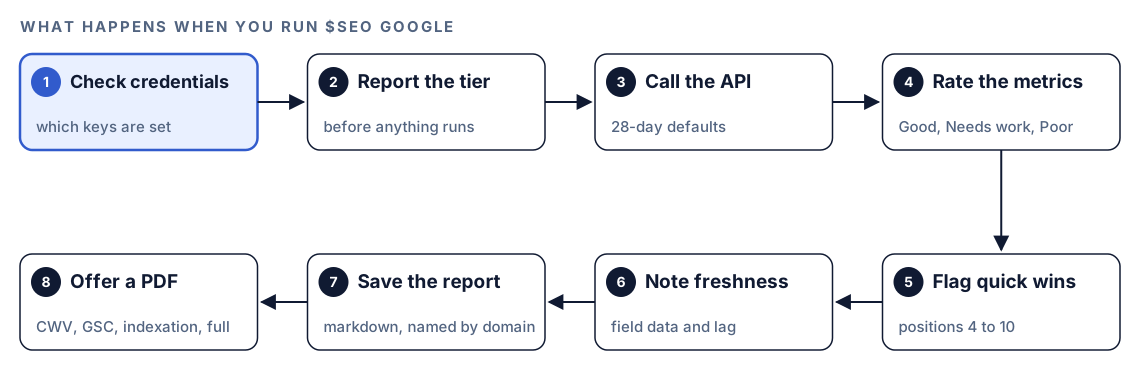
- Check credentials. Before any command, the skill looks at which Google credentials are configured.
- Report the tier. It tells you the detected tier first, so you know which commands will work.
- Call the API. For Search Analytics the defaults are 28 days, query and page dimensions, web results and up to 1,000 rows.
- Rate the metrics. Core Web Vitals get traffic-light ratings: Good, Needs Improvement or Poor.
- Flag quick wins. Search Analytics results include queries at positions 4 to 10 with high impressions.
- Note freshness. Reports label the source as Google API field data and state the lag for each source.
- Save the report. Findings land in your project as a markdown report named for the domain.
- Offer a formatted report. It offers a PDF or HTML version: a Core Web Vitals audit, a Search Console performance report, an indexation report, or all three.
If a call fails, the skill says what worked and what didn't instead of failing silently. On a rate limit it waits, retries, and names the API that hit the limit.
What each credential tier can run
The skill sorts your setup into tiers, and each tier adds commands on top of the one before.
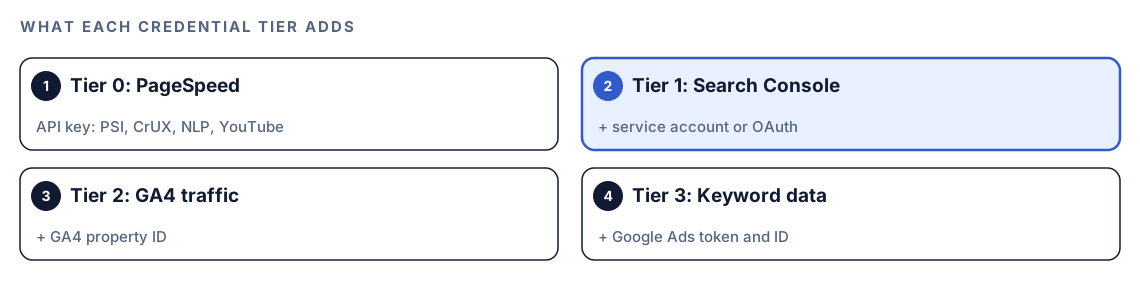
| Subcommand | What it returns | Tier |
|---|---|---|
pagespeed <url> | Lighthouse lab scores plus CrUX field data, mobile and desktop | 0 |
crux <url> | CrUX field data only, faster | 0 |
crux-history <url> | 25-week Core Web Vitals trend with direction and weekly p75 values | 0 |
nlp <url-or-text> | Entities, sentiment and content classification | 0 |
youtube <query> | Video search results with views, likes and duration | 0 |
gsc <property> | Clicks, impressions, CTR and position, plus quick wins | 1 |
inspect <url> | Index verdict, coverage, canonical and fetch details | 1 |
sitemaps <property> | Submitted sitemaps with status, errors and warnings | 1 |
index <url> | An Indexing API notification, for eligible pages only | 1 |
ga4 [property-id] | Organic sessions, users, pageviews and engagement | 2 |
ga4-pages [property-id] | Top organic landing pages by sessions | 2 |
keywords <seed> | Keyword ideas from Google Ads Keyword Planner | 3 |
The SEO kit also has inspect-batch and index-batch for URL files, volume for search volume, entities, entity (Knowledge Graph), safety (Web Risk) and quotas. The NLP API needs billing enabled on your Cloud project, and Google's own pricing and quotas apply to every API.
Run it in Codex, step by step
- Install the kit using the install section, restart Codex, and open a new task in your site's project. The guide to installing SEO skills in Codex has the details.
- Set up credentials. The setup subcommand checks what's configured and walks you through the rest. With nothing configured, it lists what works with an API key alone.
$seo google setup- Give the service account access by adding its email address as a user in your Search Console property's settings. For GA4, find the property ID under Admin and Property Details.
- Check your permission mode. These commands call Google's APIs over the internet, so depending on your mode, Codex may ask first. Approve it for the task.
- Run the command you need:
$seo google gsc sc-domain:example.com
$seo google inspect https://example.com/pricing
$seo google pagespeed https://example.com/pricing
$seo google crux-history https://example.com/
$seo google ga4-pages- Or ask in plain language:
Pull our Search Console data for the last 28 days and show me queries ranking 4 to 10 with lots of impressions, grouped by page.- For many URLs, put one per line in a text file and run
$seo google inspect-batch urls.txt. The skill works within URL Inspection's limit of 2,000 inspections per site per day, so list your most important pages first.
The Blog kit's $blog google reads the same Google credentials as the SEO kit, so you only set them up once. It offers pagespeed, crux, crux-history, gsc, inspect, index, ga4, nlp, youtube, keywords, report and quotas. Other blog commands call it behind the scenes: $blog seo-check pulls live Core Web Vitals for a published post, $blog audit batch-checks speed and indexation, and $blog rewrite uses entity analysis. Without credentials, those commands fall back gracefully and run without the Google data.
Reading the report
The sections depend on which commands you ran. A combined run looks roughly like this:
## Google API Report: example.com
Credential tier: [0-3]   Source: Google API (field data)

### Core Web Vitals (CrUX, p75)
| Metric | Mobile | Desktop | Rating |
|---|---|---|---|
| LCP | [X.X s] | [X.X s] | [Good / Needs Improvement / Poor] |
| INP | [XXX ms] | [XXX ms] | [rating] |
| CLS | [0.XX] | [0.XX] | [rating] |

### Search performance (last 28 days)
| Query | Page | Clicks | Impressions | CTR | Position |
|---|---|---|---|---|---|
| [query] | [/page] | [XX] | [XXXX] | [X.X%] | [X.X] |

### Quick wins (positions 4-10, high impressions)
- [query] on [/page]: position [X.X], [XXXX] impressions

### Data freshness
CrUX: 28-day rolling window. Search Console: 2-3 day lag. GA4: about 1 day lag.
Prioritize in this order:
- Index problems. A page that fails URL Inspection earns nothing, however good it is. Fix robots, canonical and fetch problems first.
- Quick wins. Pages already ranking 4 to 10 usually need the least work to gain clicks.
- Poor Core Web Vitals in field data. Fix the metric rated Poor on mobile before anything rated Needs Improvement.
- Trends. Use
crux-historyto see whether a metric is improving, stable or getting worse before you spend time on it.
Apply the fixes with Codex
The data says where to look; Codex makes the change. A quick-win page often has a title that misses the queries it appears for. Before:
<title>Pricing</title>
<meta name="description" content="Our pricing page.">
After:
<title>[Product] Pricing: Plans for [audience], Compared</title>
<meta name="description" content="[What each plan includes, who it suits, and the detail searchers ask about most.]">
For a page with a Poor LCP rating, the usual suspect is the hero image. Give it explicit dimensions, don't lazy-load it, and hint that it's the priority:
<img src="/img/hero.webp" alt="[Describe the image]" width="1200" height="630" fetchpriority="high">Then hand the work to Codex:
Here is the quick-win table from the Google report. For the top five queries, find the page in this repo that targets each one and propose a new title and meta description that match the query wording without stuffing. Don't touch any other pages. Show me the diff, then run the build.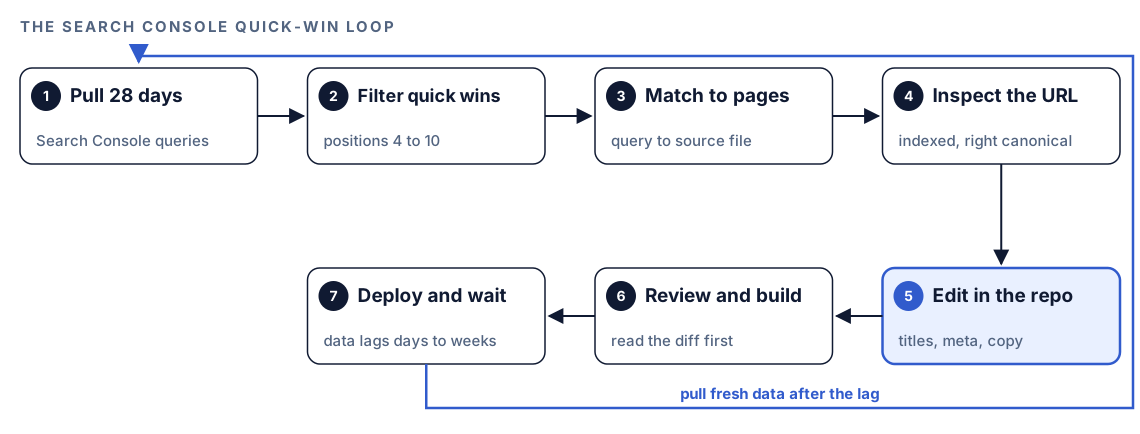
After you deploy, be patient. Search Console trails by a few days and CrUX averages 28 days, so judge a change over weeks. Run $seo google inspect on the changed URL to confirm Google still selects the canonical you expect.
Make it repeatable
A weekly Search Console snapshot saved to the repository gives you a history you can diff:
mkdir -p reports
codex exec '$seo google gsc sc-domain:example.com and list the quick wins as a table' -o "reports/gsc-$(date +%F).md"
codex exec runs Codex without the interactive UI, and -o writes the final message to the file you name. Run it inside your Git repository on a machine where $seo google setup reports the tier you need, and make sure your sandbox and permission setup allows the network access the API calls need. In CI that runs repository code, don't set CODEX_API_KEY as a job-level environment variable, and keep Google credentials out of the repository. A monthly crux-history snapshot pairs well with it. The guide to automating SEO checks with codex exec covers schedules and CI.
Without the skill: a plain Codex prompt
You can still get a lot from Codex with exported data and no kit:
I exported Search Console performance data to data/gsc.csv with columns query, page, clicks, impressions, ctr and position. Find queries with an average position between 4 and 10 whose impressions are in the top quarter of the file. Group them by page. For each page, find its source file in this repo and suggest a title that better matches those queries.Read data/psi-pricing.json, a saved PageSpeed Insights result. Separate the field data from the lab data, rate LCP, INP and CLS against the Core Web Vitals thresholds, and tell me which element is the LCP element and how to speed it up in our code.What the skill adds is the live connection: direct API calls with tier detection, defaults, quick-win flags, freshness notes and ready-made reports.
Pitfalls to avoid
- Using the Indexing API for ordinary pages. Google supports it only for job postings and livestream video pages, and the command reminds you of that every time.
- Treating a Lighthouse score as your Core Web Vitals result. Google's assessment uses field data.
- Reading a CrUX "no data" response as a broken key. It means the URL doesn't have enough Chrome traffic.
- Judging a change after three days. The data lags, and field metrics move over a 28-day window.
- Committing API keys or service account files to the repository. Keep credentials out of version control.
- Trusting sitemap counts as index status. Use URL Inspection for the URLs that matter.
Keep going
- Spot content decay in Search Console data compares two periods to find posts that are slipping.
- Run Lighthouse on every page of a site adds lab data across a whole site.
- XML sitemap audit with Codex checks the URLs you submit before Google sees them.
- Every command in both kits is listed on the skills page.
FAQ
Can Codex connect to Google Search Console?
Yes, through the Codex SEO kit. $seo google gsc queries the Search Console API with your own service account or OAuth credentials and returns clicks, impressions, CTR, position and quick wins. $seo google setup walks you through the Google Cloud side once.
What is the difference between lab data and field data?
Lab data is one simulated Lighthouse visit, repeatable and good for debugging. Field data is real Chrome users over 28 days at the 75th percentile, and it's what Google's Core Web Vitals assessment uses.
Why does CrUX show no data for my page?
CrUX only covers URLs and origins with enough real Chrome traffic. If a URL has too little, the skill falls back to origin data, and if that's missing too, use PageSpeed's lab data until traffic builds.
Should I use the Indexing API to index blog posts faster?
Google says the Indexing API is only for pages with job posting or livestream video markup, and the command tells you so each time. For ordinary posts, rely on sitemaps, internal links and URL Inspection to confirm indexing.
How long does Search Console data take to update?
Search Analytics data usually runs two to three days behind. CrUX field data covers a rolling 28-day window, so a performance fix takes weeks to show fully. GA4 typically lags about a day.
Do I need GA4 to use the Google commands?
No. An API key alone runs PageSpeed and CrUX checks, a service account or OAuth adds Search Console, and GA4 reports need only the property ID on top.