
Integrations
IndexNow with Codex: Submit URLs to Bing and Check Links
Use IndexNow with Codex to submit new and changed URLs to Bing and other engines, verify your key, and read Bing Webmaster Tools link data.
IndexNow with Codex lets you tell Bing and other participating search engines about new or changed URLs as soon as you ship them, from the same task where you wrote the page. RankCue's Codex SEO kit includes $seo bing [cmd], an extension that submits URLs through IndexNow, checks your IndexNow key, and reads inbound link data from Bing Webmaster Tools. This guide explains how IndexNow works, why Bing matters beyond Bing search, where Google fits, how each subcommand runs in Codex, and how to make submission part of publishing.
Key takeaways
$seo binghas five subcommands:linksandcompareread Bing Webmaster Tools link data, whilesubmit,submit-batchandverify-indexnowhandle IndexNow.- IndexNow pings Bing, Yandex, Seznam, Naver and the other participating engines whenever a page appears, changes or disappears. Google hasn't adopted it, so your sitemap still does that job for Google.
- You need the optional Bing extension and a Bing Webmaster Tools API key. Submissions also need an IndexNow key of at least 32 characters, published on your own site.
- Microsoft Copilot draws on the Bing index, so getting fresh pages into Bing matters for Copilot answers too.
- Codex can build the list of changed URLs from your repository, so you submit exactly what you shipped, once it's live.
The Bing command at a glance
| Item | Details |
|---|---|
| Command | $seo bing links <url>, $seo bing compare <urlA> <urlB>, $seo bing submit <url>, $seo bing submit-batch <file>, $seo bing verify-indexnow |
| What you give it | One URL, two URLs to compare, or a file that lists the URLs to submit |
| What Codex reads | Link data from the Bing Webmaster Tools API, and your IndexNow key setup |
| What you get back | Inbound link data or a side-by-side comparison, and the result of each submission or key check |
| Needs | The optional Bing extension, a Bing Webmaster Tools API key, an IndexNow key published on your site for submissions, and internet access. Bing's own terms and limits apply |
| Best for | Getting new and updated pages in front of Bing and other IndexNow engines, Copilot visibility, and a second source of link data |
What is IndexNow, and how does it work?
IndexNow is a protocol that lets a website tell search engines that a URL has changed. Without it, an engine usually learns about a change the next time its crawler visits, which can be a while for pages it rarely checks. With it, your site sends a short request the moment something changes.
One submission, several engines
A submission lists URLs that were added, updated or deleted. The engine that receives it shares the submission with the other participating engines, so one request reaches all of them. The protocol is documented at indexnow.org. A batch submission is a small JSON body like this:
{
  "host": "www.example.com",
  "key": "your-indexnow-key",
  "keyLocation": "https://www.example.com/your-indexnow-key.txt",
  "urlList": [
    "https://www.example.com/blog/new-post",
    "https://www.example.com/pricing"
  ]
}
The key proves you own the host
Anyone could send URLs for any site, so IndexNow asks for proof. You choose a key, a long random string, and publish it in a text file on your host. The usual spot is the site root, in a file named after the key whose only content is the key itself. If you keep it elsewhere on the same host, you send its location with each submission, as keyLocation does above. When an engine receives your URLs, it can fetch that file and check the match. The skill expects a key of at least 32 characters.
Your IndexNow key isn't a secret. It sits on your site where anyone can read it, which is fine, because all it proves is that you control the host. The Bing API key is a real secret and should never appear in your repository.
What IndexNow doesn't do
Think of a submission as a nudge. It says a URL changed. It doesn't guarantee a crawl, indexing or rankings, and it doesn't replace an XML sitemap, internal links or useful content. Each engine still decides what to fetch and when.
Where Google fits
Google hasn't adopted IndexNow. For Google, discovery still runs through your XML sitemap, internal links and Search Console, and Google's Indexing API covers only job posting and livestream video pages. The kit handles the Google side with $seo google, which our guide to Search Console data in Codex covers.
Why Bing matters beyond Bing search
It's easy to treat Bing as an afterthought. The skill exists because Bing feeds more than its own results page:
- Microsoft Copilot. Copilot draws on the Bing index when it answers with web sources. Getting new pages into Bing promptly is the first step toward appearing in those answers.
- Other engines. Through IndexNow, the same submission reaches Yandex, Seznam and Naver, which matter in their own markets.
- Link data. Bing Webmaster Tools offers inbound link data through its API, which Google's Search Console API doesn't. That gives you a second, independent view of who links to you and to the sites you compete with.
If AI answers are part of your plan, our guide to generative engine optimization explains how pages earn citations once they're indexed.
How $seo bing runs inside Codex
Every subcommand follows the same short path, whether you name it or describe the job in plain words.
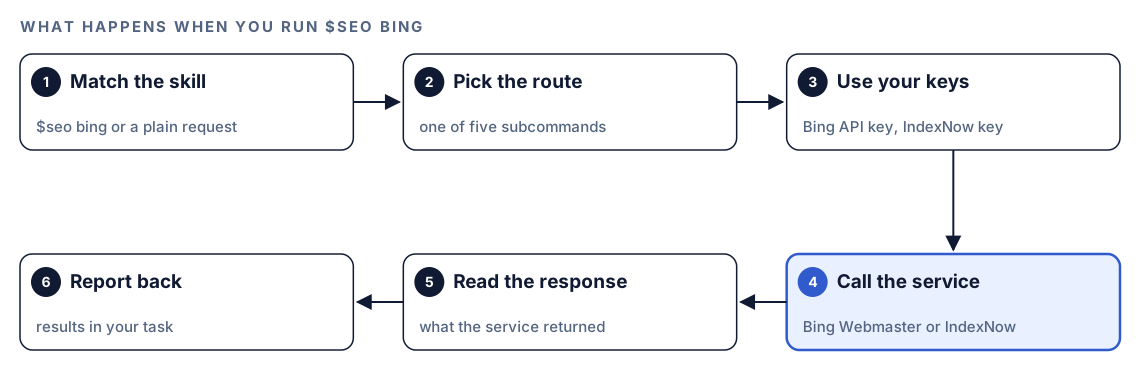
- Match the skill. You type
$seo bingwith a subcommand, or ask something like "submit these URLs to Bing", and Codex picks the skill from its description. - Pick the route.
linksandcomparego to the Bing Webmaster Tools API.submit,submit-batchandverify-indexnowgo through IndexNow. - Use your keys. The skill uses the Bing API key and IndexNow key you set when you installed the extension, so you don't paste secrets into the task.
- Call the service. Codex sends the request over the internet.
- Read the response. It reads what Bing or the IndexNow endpoint sent back.
- Report back. You get link data, a comparison, or the outcome of each submission or key check in the task.
What each subcommand does
The five subcommands split cleanly between two services: link data from Bing Webmaster Tools, and URL submission through IndexNow.
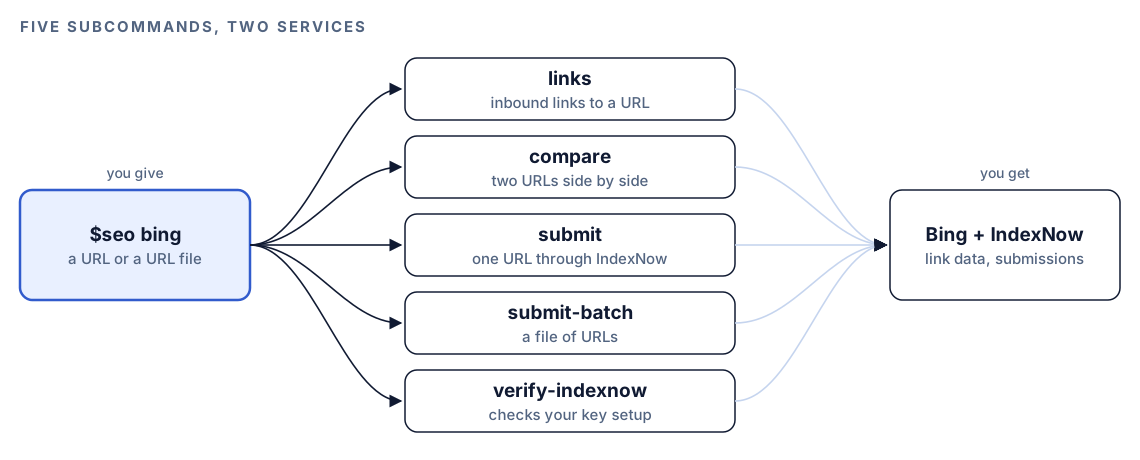
links: who links to a URL
$seo bing links <url> returns the inbound links Bing has recorded for a URL. Run it on your key pages to see which sites send links, and to find pages that attract none at all.
compare: two URLs side by side
$seo bing compare <urlA> <urlB> puts Bing's link data for two URLs next to each other, such as your pricing page and a competitor's page that outranks it. The comparison helps you see where their links come from and yours don't. For a link profile weighed across several sources, $seo backlinks combines Bing with other link data; see backlink analysis with Codex.
submit and submit-batch: tell engines what changed
$seo bing submit <url> sends one URL through IndexNow. $seo bing submit-batch <file> sends every URL listed in a file, which suits a release that touched many pages.
verify-indexnow: check before you send
$seo bing verify-indexnow checks your IndexNow key setup without submitting anything. Run it after you first publish the key file, and again whenever you move hosts or change your setup.
What to check before you submit
Most failed submissions come down to a handful of setup mistakes. Run through this list before the first batch.
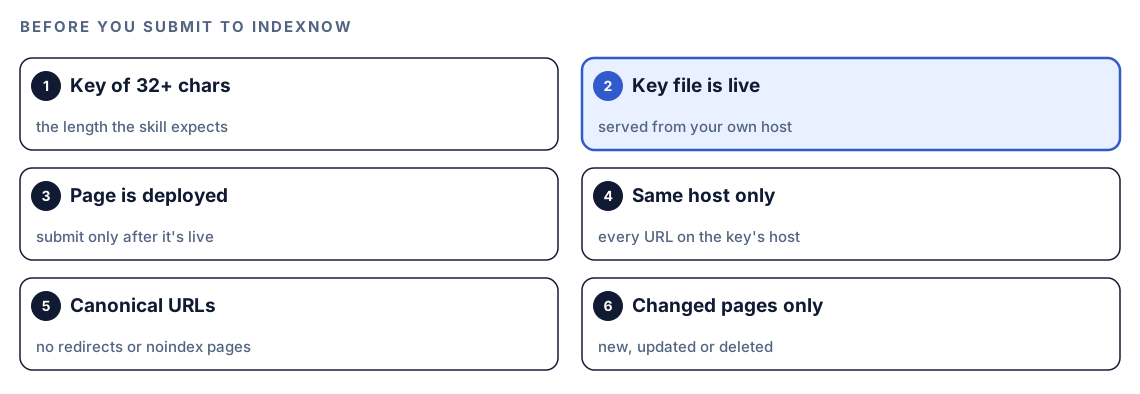
- A key of 32 or more characters. That's the length the skill expects.
- A live key file. It must be reachable on your own host at the location you set up.
verify-indexnowconfirms it. - A deployed page. Engines may fetch soon after a ping. Submit before the deploy and they find the old page or a 404.
- One host per submission. Every URL must belong to the host where the key lives, and
www.example.comandexample.comcount as different hosts. - Canonical URLs only. Skip redirects, noindex pages and parameter variants. Submit the version you want indexed.
- Changed pages only. New, updated or deleted pages, where a deleted page now returns 404 or 410. Resubmitting unchanged URLs adds nothing.
Run it in Codex, step by step
- Install the Codex SEO kit from the install section, restart Codex, and open a new task in your website's project.
- Add your site to Bing Webmaster Tools and verify ownership. You can verify with an XML file, a meta tag or a DNS record, or import a site you've already verified in Google Search Console. Then generate an API key in your account settings.
- Install the Bing extension that ships with the kit, using the installer for your system (one for Linux and macOS, one for Windows), and enter your API key. If you plan to submit URLs, also set up your IndexNow key and the address where its key file will live.
- Publish the key file. Codex can create it for you, and then you deploy:
Generate a random IndexNow key of 32 hexadecimal characters. Save it in our public folder as a text file named after the key, containing only the key, so it is served at https://www.example.com/<key>.txt. Show me the diff.- Check your permission mode. Depending on your mode, Codex may ask before it uses the internet. Approve it for this task.
- Verify the key, then submit:
$seo bing verify-indexnow
$seo bing submit https://www.example.com/blog/new-post
$seo bing submit-batch urls-to-submit.txt- Read link data:
$seo bing links https://www.example.com/pricing
$seo bing compare https://www.example.com/pricing https://competitor.example/pricing- Or ask in plain language:
Check that our IndexNow key file is live, then submit the three blog posts I published today to Bing through IndexNow.Reading the results
If a submission fails, the response code tells you why. The IndexNow protocol defines these:
| Response | Meaning | What to do |
|---|---|---|
| 200 OK | Request accepted | No action needed |
| 202 Accepted | Accepted while the engine still validates your key | Leave the key file in place |
| 400 Bad Request | The engine couldn't parse the request | Look for typos or stray text in the list |
| 403 Forbidden | The key is missing, or the file's content doesn't match it | Run verify-indexnow, then repair the file |
| 422 Unprocessable Entity | A URL sits on another host, or the key breaks the format rules | Drop off-host URLs and recheck the key |
| 429 Too Many Requests | The engine sees too many requests, possibly spam | Slow down and send only changed URLs |
A 200 means the engine got your list. It says nothing about indexing. To keep a record you can audit later, ask Codex to log each submission in a fixed shape:
## IndexNow log
| Date | Host | URLs | Response | Notes |
|---|---|---|---|---|
| YYYY-MM-DD | www.example.com | X | 200 | new posts: [slug], [slug] |
For links and compare, look at which of your pages attract links at all, which sites link to a competitor but not to you, and whether that changes after you publish something worth linking to.
Apply the fixes with Codex
Codex has an edge here that a dashboard doesn't: it knows which files changed in your repository and how your routes turn them into URLs. That makes the list of URLs to submit accurate, and it makes setup errors easy to fix at the source.
A typical 422 comes from a list that mixes hosts and protocols. Before:
https://example.com/blog/new-post
https://www.example.com/pricing
http://www.example.com/blog/updated-post
After, with every URL on the canonical host:
https://www.example.com/blog/new-post
https://www.example.com/pricing
https://www.example.com/blog/updated-post
Rather than build that list by hand, let Codex derive it from what you shipped:
List every page added, changed or deleted in the last commit under content/blog/ and src/pages/. Convert each file to its canonical live URL on https://www.example.com using our routing rules. Skip drafts, noindex pages and redirects, and write the URLs to urls-to-submit.txt. Show me the list. After I confirm the deploy is live, run $seo bing verify-indexnow and then $seo bing submit-batch urls-to-submit.txt.Check the list before you approve the submission, especially for pages that redirect or carry a noindex tag. Then keep your XML sitemap in step with the same change, because Google and Bing both still read it. Our XML sitemap audit guide shows how to check it.
Make it repeatable
The useful habit is simple: every change to a public page ends with a submission, but only after the deploy. A short block in your project's AGENTS.md makes Codex follow that on every task:
## Bing and IndexNow
- When a task adds, updates or deletes a public page, add its canonical URL to urls-to-submit.txt.
- Never submit before the change is live. After I confirm the deploy, run $seo bing verify-indexnow, then $seo bing submit-batch urls-to-submit.txt, then clear the file.
- Only submit indexable URLs on https://www.example.com. Skip drafts, redirects and noindex pages.
- The IndexNow key file stays in public/. Never write the Bing Webmaster Tools API key into the repo or reports.
- IndexNow doesn't reach Google. Update sitemap.xml in the same task.
Codex reads AGENTS.md before it starts work, so the routine holds without reminders. Keep it short, since combined instructions have a size cap. Our guide to AGENTS.md rules for SEO shows a fuller file.
Without the skill: a plain Codex prompt
IndexNow is simple enough that Codex can write a working submitter without the kit:
Our IndexNow key file is public/<key>.txt and our host is www.example.com. Write a small script that reads urls-to-submit.txt and sends one POST request to https://api.indexnow.org/indexnow with host, key, keyLocation and urlList as JSON. Print the HTTP status and explain what it means. Don't run it until I confirm the deploy is live.What the skill adds is key verification before you submit, single and batch submission behind one command, Bing Webmaster Tools link data and comparisons in the same place, and keys handled by the extension instead of pasted into prompts.
Pitfalls to avoid
- Expecting IndexNow to reach Google. It doesn't, so keep your sitemap and Search Console in order.
- Submitting before the deploy, so engines fetch the old page or a 404.
- Resubmitting the whole sitemap every day instead of only what changed.
- Mixing
wwwand non-www, orhttpandhttps, in one submission. - Confusing the public IndexNow key with the secret Bing API key.
- Reading a 200 response as a sign the page is indexed.
Keep going
- XML sitemap audit with Codex keeps the sitemap that Google and Bing both read in good shape.
- Backlink analysis with Codex combines Bing's link data with other sources into one report.
- The generative engine optimization guide covers how indexed pages earn citations in AI answers.
- See every skill in both kits, including the other optional extensions.
FAQ
What is IndexNow?
IndexNow is a shared protocol for telling search engines that pages on your site have appeared, changed or been removed. You host a key file to prove the site is yours, then send the changed URLs to one participating engine, which passes them on to the rest.
Does Google support IndexNow?
No. Google doesn't use IndexNow. For Google, keep your XML sitemap current, link new pages from existing ones, and use Search Console to check indexing.
How long does Bing take to index a URL after an IndexNow submission?
There's no fixed time. IndexNow tells Bing a URL changed, but Bing still decides when to crawl and whether to index it. Use Bing Webmaster Tools to check how Bing treats your pages afterward.
Can Codex submit URLs to IndexNow automatically?
Yes, with RankCue's Bing extension. $seo bing submit and $seo bing submit-batch send URLs through IndexNow, and an AGENTS.md rule can make Codex queue changed URLs on every task and submit them after you confirm the deploy.
Do I need Bing Webmaster Tools to use IndexNow?
The protocol itself only needs a key hosted on your site. The kit's extension also asks for a Bing Webmaster Tools API key, which powers the link data and comparisons, and Webmaster Tools is where you check how Bing sees your site.