
Integrations
Firecrawl Codex Guide: Crawl and Map JavaScript Sites
Use the Firecrawl Codex extension to crawl, map and scrape JavaScript sites, find broken links and sitemap gaps, and fix them in your own code.
With the Firecrawl Codex extension from RankCue, Codex can crawl, map and scrape websites whose content only appears after JavaScript runs, then turn what it finds into fixes in your own project. The command is $seo firecrawl [cmd] <url>, and it gives Codex four tools: a full-site crawl, a fast URL map, a deep single-page scrape and a search inside one site. Below: why JavaScript trips up crawlers, what each subcommand does, what Codex checks in the results, and how to fix problems at the source while keeping credit use low.
Key takeaways
$seo firecrawlhas four subcommands:crawlfor content and links across a site,mapfor a fast URL list,scrapefor one fully rendered page, andsearchfor a topic inside one site.- Firecrawl runs a page's JavaScript before it extracts anything, so single-page apps and lazy-loaded sections come back the way a browser shows them.
- It needs the optional Firecrawl extension and a Firecrawl API key. Firecrawl bills in credits at its own prices, and the skill estimates credit use before a large crawl.
- Crawl data feeds the kit's other checks: broken links, redirect chains, sitemap coverage, thin pages and schema coverage.
- Map first, then crawl only the sections you plan to fix.
Firecrawl in Codex at a glance
| Item | Details |
|---|---|
| Command | $seo firecrawl crawl <url>, $seo firecrawl map <url>, $seo firecrawl scrape <url>, $seo firecrawl search <query> <url> |
| What you give it | A start URL, one page URL, or a search phrase plus the site to search |
| What Codex reads | Pages Firecrawl has rendered with JavaScript: markdown or HTML content, metadata and links, through Firecrawl's MCP server |
| What you get back | A URL inventory with a pattern breakdown, page content for analysis, and findings such as broken links, orphan candidates and thin pages |
| Needs | The optional Firecrawl extension, a Firecrawl API key and internet access. Firecrawl's own pricing applies |
| Best for | JavaScript-heavy sites, single-page apps, and site-wide inventories a one-page fetch can't cover |
MCP (Model Context Protocol) is a standard way for a service to offer tools to an AI agent; the extension connects Firecrawl's server so Codex can use them.
Why JavaScript sites are hard to crawl
A crawler downloads a page, reads it, and follows its links to find more pages. That breaks down on many JavaScript applications, where the server sends a nearly empty HTML document and the browser builds the real page afterward: the text, the navigation, and sometimes the title and meta description too.
Raw HTML versus the rendered page
Every page has two versions. The raw HTML is what the server returns to a plain request. The rendered page, or rendered DOM, is what exists after the browser runs the scripts. On a server-rendered site they look almost the same. On a client-rendered app, the raw HTML may hold little more than an empty container.
Google crawls first and renders later. Its JavaScript SEO documentation describes three phases, crawling, rendering and indexing, with pages waiting in a queue before rendering. Other crawlers may not render JavaScript at all. So content that matters for search is safest in the server's HTML, and you need to see both versions: a raw fetch shows what a non-rendering crawler gets, and Firecrawl shows what a browser builds.
Links that crawlers can follow
Crawlers find pages through links, and Google says it can reliably follow <a> elements that have an href attribute. Menus built from buttons or click handlers can work perfectly for visitors and still hide whole sections from crawlers.
<!-- A crawler can follow this -->
<a href="/pricing">Pricing</a>

<!-- A crawler may never discover /pricing from this -->
<span onclick="router.push('/pricing')">Pricing</span>
When a page sits in your sitemap but never turns up while a crawl follows links, a missing or non-standard link is the first thing to suspect.
When a plain fetch is enough
Firecrawl costs credits, so the skill doesn't use it for every page:
| Situation | Better choice |
|---|---|
| A static HTML page | The kit's built-in page fetch, with no API cost |
| A JavaScript-rendered app | Firecrawl scrape, which runs the scripts |
| You need response headers | The built-in page fetch, which returns them |
| A plain request gets rate-limited | Firecrawl scrape |
How $seo firecrawl runs inside Codex
The skill follows the same sequence on every run, visible in the task log.
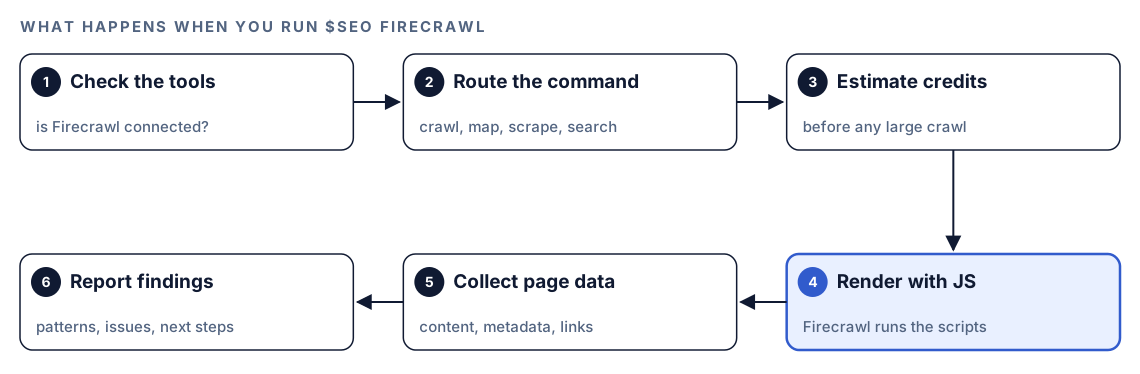
- Check the tools. The skill first confirms that Firecrawl's tools are available in the session. If they aren't, it tells you the extension isn't installed and how to add it.
- Route the command. Your subcommand picks the Firecrawl tool: crawl, map, scrape or search.
- Estimate credits. Before a large crawl, it tells you how many credits it expects to use. A map is the cheaper way to size a site first.
- Render with JavaScript. Firecrawl loads each page in a browser, runs its scripts and waits for dynamic content.
- Collect page data. Codex receives markdown, HTML, links and metadata, or a screenshot.
- Report findings. Codex summarizes URL patterns, link and content issues, and next steps.
Without Firecrawl, the skill suggests the kit's single-page fetch or basic HTML retrieval instead, plus the install steps.
What each subcommand does
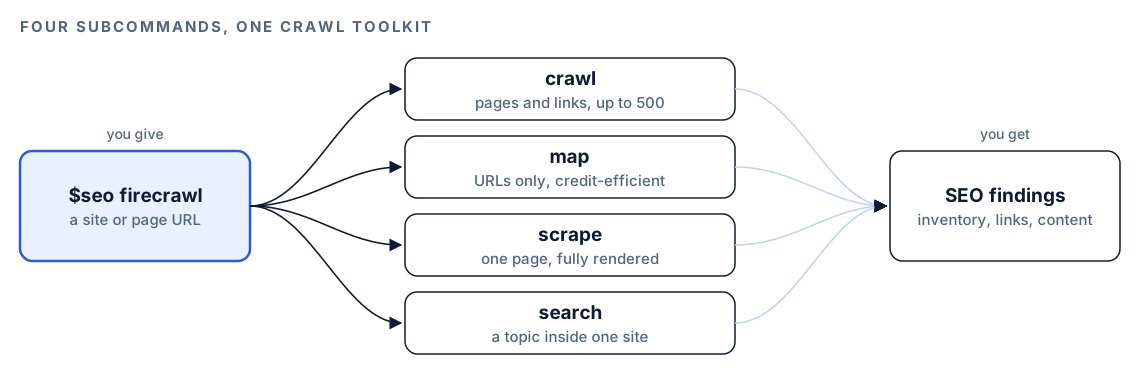
Mapping, crawling and scraping are different jobs, and most SEO work uses them in that order: map to see the whole site, crawl the sections that matter, scrape the pages that need a closer look.
map: every URL, fast
$seo firecrawl map <url> lists URLs without downloading content, up to 5,000 by default, with an optional search term to filter them. Use it to set discovered URLs against your XML sitemap, spot parameter bloat or duplicate paths, and plan a targeted crawl. On big sites it also hints at crawl budget, the amount of crawling a search engine will spend on you, by setting indexable pages against what the homepage links to.
crawl: content and links for a site or section
$seo firecrawl crawl <url> follows links from your start URL and returns content, metadata and links for every page it reaches. By default it stops at 100 pages and three links deep, and the limit goes up to 500 pages. Include and exclude patterns narrow it, such as only /blog/*, or everything except /admin/* and /api/*. Ask for the scope in plain words and Codex sets the matching options.
scrape: one page, in depth
$seo firecrawl scrape <url> renders a single page fully. By default it keeps only the main content, without navigation, footer or sidebar. It can wait for a CSS selector or a set time, click or scroll before capture, and save a screenshot. The default timeout is 30 seconds. Use it for React, Vue or Angular pages, lazy-loaded sections, and spotting content locked behind a login or paywall.
search: a topic inside one site
$seo firecrawl search <query> <url> returns up to 10 matching pages by default. Use it to check whether you already cover a keyword, find pages that should link to each other, catch near-duplicate passages, or research a competitor's coverage of a subject.
What Codex checks in the crawl data
The value of a crawl comes from the checks Codex runs over it. With Firecrawl connected, the technical, sitemap, content and schema skills can work from the crawled pages instead of fetching them one at a time.
Broken links, redirects and canonicals
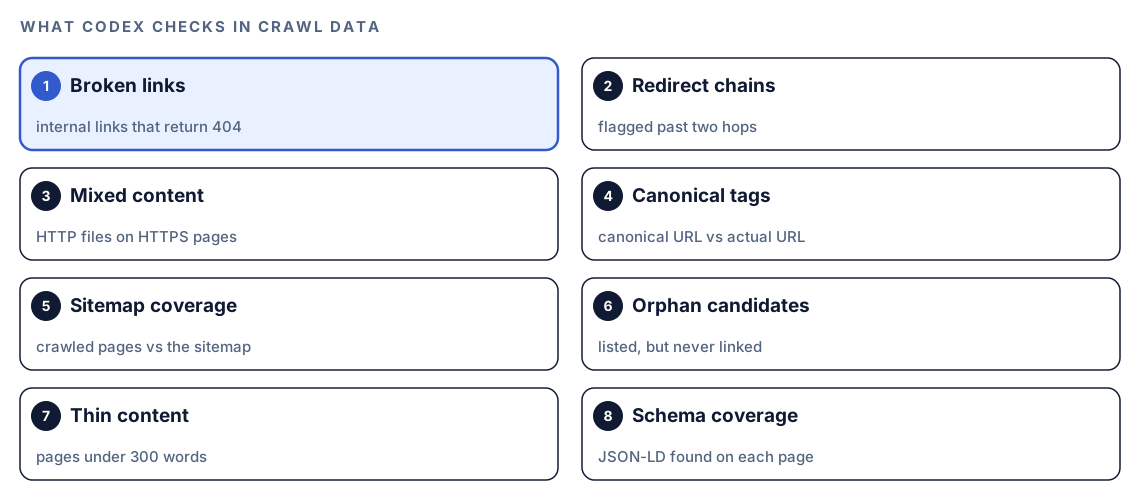
Codex requests each internal link and lists the dead ones (404s). It traces redirects and flags any chain with more than two hops, finds secure pages that still pull files over plain HTTP (mixed content), and checks each canonical tag against the address the page was served from.
Sitemap coverage and orphan pages
A crawl compared with your XML sitemap gives two lists. Pages the crawl finds but the sitemap leaves out are sitemap gaps. Pages in the sitemap that no link leads to are orphan candidates: search engines can reach them, but nothing on your site sends them visitors or link signals. The skill also flags sitemap entries that now return 404 or 410 and reports how much of the crawl the sitemap covers.
Thin content, duplicates and schema
The skill flags pages under 300 words as possible thin content and compares pages for near-duplicates. A short contact page is fine; a short product page of copied manufacturer text usually isn't. Codex can also pull JSON-LD from every crawled page, report how many pages carry structured data, and validate the blocks in one batch.
Inside the full audit
With Firecrawl connected, $seo audit maps the site, checks it against the sitemap, and hands the key pages to its technical, content, schema and AI search specialists. Our guide on how to run a full SEO audit with Codex covers that workflow.
Run it in Codex, step by step
- Install the Codex SEO kit from the install section, restart Codex, and open a new task in your website's project. Our guide to installing SEO skills in Codex walks through it.
- Install the Firecrawl extension that ships with the kit and give it your Firecrawl API key. If the key is missing, the skill says so and points you back to the extension setup.
- Check your permission mode. Depending on your mode, Codex may ask before it uses the internet. Approve it for the site you're checking.
- Map the site first:
$seo firecrawl map https://example.com- Crawl the section that matters, and say how far to go:
$seo firecrawl crawl https://example.com/blogCrawl https://example.com with Firecrawl, only /blog/* pages, at most 50 pages. List every internal link that returns a 404.- Scrape one JavaScript page, or search the site for a topic:
$seo firecrawl scrape https://example.com/pricing
$seo firecrawl search "pricing calculator" https://example.com- Or ask in plain language. Requests such as "map site", "find all pages" or "broken links" match the skill's description, so Codex picks it on its own:
Find all pages on https://example.com, compare them with the XML sitemap, and tell me which pages are missing from the sitemap and which sitemap URLs nothing links to.Reading the report
A map comes back as a URL inventory grouped by pattern:
Site: example.com
Pages discovered: XXX

URL Pattern Breakdown:
  /blog/*          - XX pages (XX%)
  /products/*      - XX pages (XX%)
  /category/*      - XX pages (XX%)
  / (root pages)   - XX pages (XX%)
Work through the findings in this order:
- Total against expectation. Far more URLs than you publish usually means filters or parameters are creating pages. Far fewer suggests links hidden behind JavaScript.
- Sitemap gaps and orphan candidates. They decide what search engines can find.
- Broken links and long redirect chains. Usually template fixes that clear many errors at once.
- Thin and duplicate pages. Improve, merge or leave each one, case by case.
- Schema coverage. Fill template gaps once the basics are clean.
If a run fails, the error tells you why:
| Error | Meaning | What to do |
|---|---|---|
| API key not set | The extension isn't configured | Run the extension setup again |
| 402 Payment Required | Credits are used up | Check usage in your Firecrawl account |
| 429 Too Many Requests | Rate limited | Wait about a minute, lower concurrency |
| 408 Timeout | A page rendered too slowly | Raise the timeout or skip JavaScript rendering |
| 403 Forbidden | The site refuses crawlers | Read its robots.txt; leave it alone if it says no |
Apply the fixes with Codex
Here Codex has the edge over any crawler: your repository is open, so it can trace a dead link or a hidden menu item back to the component that renders it.
Say the crawl shows /pricing in the sitemap but never reached through links, and a homepage scrape shows a menu built from click handlers. Before:
<nav>
  <span class="nav-item" onclick="router.push('/pricing')">Pricing</span>
  <span class="nav-item" onclick="router.push('/docs')">Docs</span>
</nav>
After:
<nav>
  <a class="nav-item" href="/pricing">Pricing</a>
  <a class="nav-item" href="/docs">Docs</a>
</nav>
Most frameworks have a link component that renders a real <a href> and still navigates on the client. Then give Codex the whole job:
Use the Firecrawl crawl results for https://example.com. For each dead internal link, and each link that hops through more than two redirects, find the file in this repo that prints it and point it at the final destination. Replace navigation built from click handlers with our framework's link component so it renders a real <a href>. Show me the diff and run the build. After I deploy, run $seo firecrawl scrape on the homepage and confirm the links appear.Read the diff before you accept it, and check that each new target is the page you meant, not just any URL that returns 200. Then crawl the same section again. A shorter error list is your proof.
Make it repeatable
With Firecrawl, protect two things: your credits, and a consistent crawl scope so each month's results compare with the last. A short block in your project's AGENTS.md keeps Codex disciplined on every future task:
## Crawling with Firecrawl
- Run $seo firecrawl map before any crawl and show me the URL count first.
- Tell me the estimated credit use and ask before any crawl over 100 pages.
- Scope crawls with include patterns, and always exclude /admin/* and /api/*.
- For one static page, or when response headers matter, use a plain fetch instead.
- Save URL inventories to reports/crawl/ with the date in the file name.
- Never write the Firecrawl API key into the repo, reports or logs.
Codex reads AGENTS.md before it starts work, so these rules hold without you repeating them. Keep the file short, since combined instructions have a size cap. Our guide to AGENTS.md rules for SEO shows a fuller example.
Without the skill: a plain Codex prompt
Codex can do a smaller version with no kit installed, if a headless browser is available in your environment:
Fetch https://example.com/pricing twice: once as raw HTML with a plain HTTP request, and once rendered in a headless browser such as Playwright. List the title, meta description, headings, links and JSON-LD that only appear after JavaScript runs, and tell me which component in this repo renders each one on the client.For a small link audit:
Starting at https://example.com, follow internal <a href> links up to three levels deep and stop at 100 pages. Record each URL's status code, title, meta description, H1 and word count in crawl.csv. Then list 404s, redirect chains longer than two hops, pages under 300 words, and URLs in sitemap.xml the crawl never reached.What the skill adds is rendering at scale, credit estimates before big jobs, a fixed inventory format, clear error handling, and crawl data the kit's other checks can use directly.
Pitfalls to avoid
- Crawling the whole site before you map it, and spending credits on URLs you don't need.
- Crawling a large site without include or exclude patterns.
- Using Firecrawl for static pages and header checks, where a plain fetch costs nothing.
- Assuming every crawler sees the rendered page. Keep key content and links in server-rendered HTML.
- Crawling sites you don't own without reading robots.txt. A 403 means skip it.
- Mixing up sitemap gaps and unlinked sitemap URLs. They need different fixes.
Keep going
- How to run a full SEO audit with Codex puts crawl data to work across every check.
- Technical SEO audit with Codex goes deeper on rendering, canonicals and redirects.
- XML sitemap audit with Codex fixes the gaps a crawl comparison reveals.
- See every skill in both kits, including the other optional extensions.
FAQ
What is Firecrawl used for in SEO?
Firecrawl crawls, maps and scrapes websites with JavaScript rendering, so you see pages the way a browser builds them. SEO teams use it for URL inventories, broken link checks and auditing single-page apps.
Can Codex crawl JavaScript websites?
Yes. With the Firecrawl extension from RankCue's Codex SEO kit, $seo firecrawl renders pages before it reads content and links. Without it, Codex can compare raw and rendered HTML for a few pages if a headless browser is installed.
What is the difference between crawling and mapping a site?
Mapping lists URLs without downloading content, so it's fast and light on credits. Crawling follows links from a start page and collects each page's content, metadata and links.
Do I need a Firecrawl account to use $seo firecrawl?
Yes. The extension needs your Firecrawl API key, and Firecrawl's own pricing applies. The skill estimates credit use before large crawls.
Does Google render JavaScript?
Yes, but in a separate step after crawling, and pages can wait in a queue first. Server-rendered content and real <a href> links remain the safest choice.