
Technical SEO
Full SEO Audit with Codex: Crawl, Score and Fix
Run a full SEO audit with Codex: crawl up to 500 pages, get a 0-100 health score and a prioritized action plan, then fix issues in your own codebase.
A full SEO audit with Codex starts from one command, $seo audit <url>. Codex crawls your site, hands each area to a specialist check, scores the site from 0 to 100, and saves a prioritized action plan in your project. Because Codex also works inside your codebase, the same task can go from finding a problem to fixing the template behind it. This guide covers what a full audit should include, how the command runs, how to read the output, and how to apply the fixes safely.
Key takeaways
$seo audit <url>crawls up to 500 pages, detects your business type, and runs eight specialist checks every time, plus up to seven more when your site or setup calls for them.- You get a folder of files: a full report, an action plan, per-category findings, audit data and screenshots.
- The 0 to 100 health score leans hardest on content, technical and on-page SEO. Use it to track progress, not as the goal.
- No API keys are required. Google, DataForSEO, Firecrawl and backlink accounts are optional extras.
- Codex can trace each finding to the code that causes it, fix it, show you the diff and run your build before anything ships.
The audit command at a glance
| Item | Details |
|---|---|
| Command | $seo audit <url> |
| What you give it | The homepage URL of the site you want to audit |
| What Codex reads | The rendered homepage, up to 500 crawled pages, robots.txt, sitemaps, structured data and performance signals |
| What you get back | A domain audit folder with a full report, an action plan, audit data, findings files and screenshots |
| Needs | Internet access; optional Google API credentials, DataForSEO, Firecrawl, or Moz and Bing keys |
| Best for | A baseline before a redesign or migration, a site you just inherited, or a periodic health check |
What is a full SEO audit?
A full SEO audit reviews everything that decides whether search engines can find, understand and trust your pages. A single-page check tells you about one URL. A full audit looks for patterns, because most SEO problems live in templates and configuration. One missing canonical tag in a shared layout affects every page built on it, and only a sitewide crawl shows that.
Crawling, indexing and rendering
A page can't rank until a crawler reaches it, gets a healthy status code, and finds nothing telling it to stay away. That means checking robots.txt, XML sitemaps, noindex directives, canonical tags, redirects and HTTPS. It also means checking rendering: if content only appears after JavaScript runs, a crawler reading raw HTML may see an empty shell. Google's guide to how Search works explains how crawling, indexing and serving fit together.
Content and on-page signals
Once a page is indexed, its content decides what it can rank for. Auditors check titles, meta descriptions, headings and internal links, then the writing itself. Google's quality rater guidelines describe quality through E-E-A-T: experience, expertise, authoritativeness and trustworthiness. Thin pages, duplicates and pages with no visible author are the usual problems.
Performance and page experience
Core Web Vitals measure how a page feels to real visitors. Largest Contentful Paint (LCP) covers loading and should be 2.5 seconds or less. Interaction to Next Paint (INP) covers responsiveness and should be 200 ms or less. Cumulative Layout Shift (CLS) covers visual stability and should be 0.1 or less. Google judges these at the 75th percentile of visits, so most visitors need a good experience for a page to pass. The web.dev Web Vitals guide explains each metric.
Structured data and AI search
Structured data tells machines what a page is, such as a product or a local business. A newer layer asks whether AI search systems can reach and quote your content, which depends on crawler access and clear, self-contained answers.
How $seo audit runs inside Codex
When you type the command in a Codex task, the skill follows a fixed sequence, and each step shows in the task log.
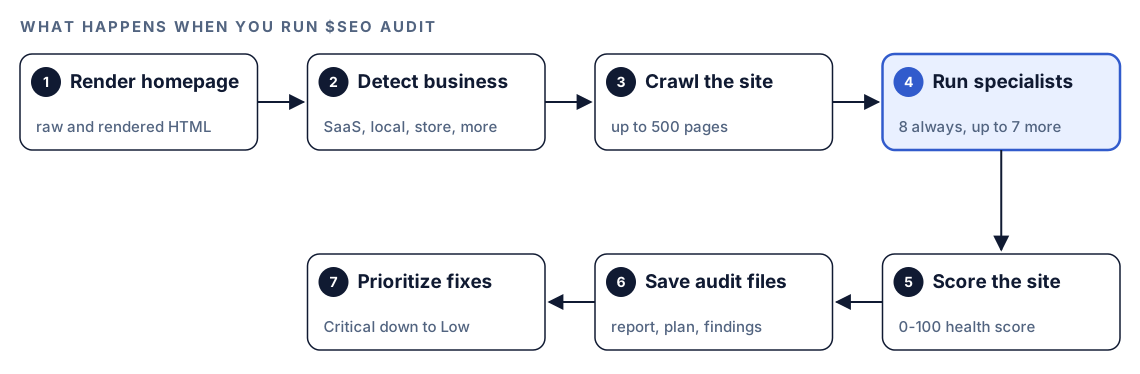
- Render the homepage. Codex captures raw and rendered HTML, pulls out the visible text, and notes whether the site is a single-page app that needs a headless browser.
- Detect the business type. Homepage signals decide whether the site looks like SaaS, a local service, a store, a publisher or an agency. Pricing and sign-up pages suggest SaaS; an address, phone number and map embed suggest a local business. If two types look equally likely, Codex shows you the evidence and asks you to pick.
- Crawl the site. It follows internal links up to 500 pages and obeys robots.txt. The settings are polite on purpose: at most 3 redirect hops, 30 seconds per page, 5 requests at a time and a 1-second pause between requests.
- Run the specialists. Each area goes to its own specialist agent. If parallel agents aren't available, the same checks run one after another.
- Score the site. Category results roll up into one health score from 0 to 100.
- Save the audit files. Everything goes into a folder named after your domain.
- Prioritize the fixes. Findings are sorted from Critical to Low and turned into an action plan.
The audit is honest about gaps. An unreachable URL is reported, not guessed at. Paths blocked by robots.txt are listed and skipped. If the server rate-limits the crawl, it slows down and marks incomplete sections. If one specialist fails, the rest still report.
What Codex checks in a full audit
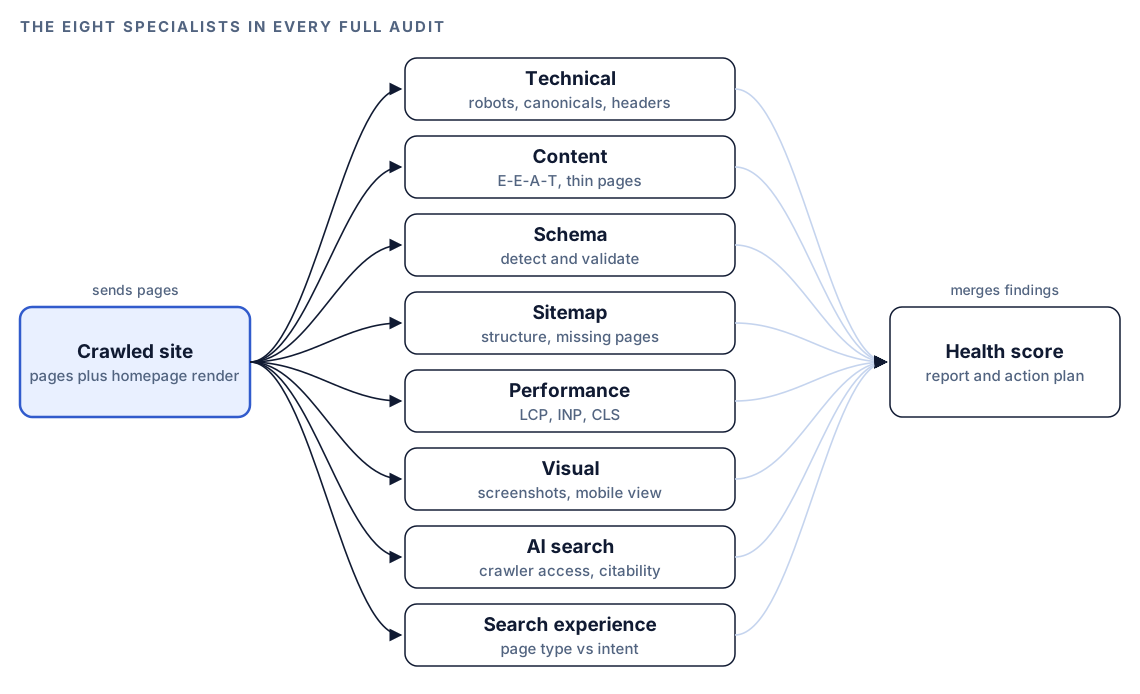
Eight specialists run on every full audit, each writing its own findings file.
Technical SEO
The technical specialist covers nine areas, from robots rules and canonicals to HTTPS and security headers, clean URLs and redirect chains, viewport and tap targets, structured data, client-side versus server-side rendering, and IndexNow support. Each area gets a pass or fail, and the specialist adds its own 0 to 100 technical score with fixes ranked by priority.
Performance
The performance specialist rates LCP, INP and CLS against the thresholds above. When it can, it uses PageSpeed Insights and prefers Chrome UX Report field data, a 28-day picture of real visitors, over a single lab run. Sites with too little traffic for field data fall back to lab results. Findings name the likely cause, such as a heavy hero image, render-blocking scripts, slow server response, long JavaScript tasks, or images and embeds with no reserved space.
Content, schema and sitemaps
The content specialist rates E-E-A-T, readability, thin pages and how quotable each page is for AI answers. The schema specialist validates structured data and follows the kit's rules: it never suggests HowTo markup and treats existing FAQPage markup as a low-priority note. The sitemap specialist checks structure, coverage and missing pages.
Visual, AI search and search experience
The visual specialist screenshots pages on desktop and mobile and reviews what shows above the fold. The AI search specialist looks at AI crawler access, llms.txt and brand signals. The search experience specialist asks whether each page's type fits what searchers expect. A product page chasing a query where Google shows guides has a mismatch no keyword tweak will fix.
The conditional specialists
Seven more join only when they apply:
| Specialist | Joins the audit when |
|---|---|
| Local SEO | The site looks like a local service, storefront or service-area business |
| Maps | A local business is detected and DataForSEO is connected |
| Google data | Google API credentials are set up |
| Backlinks | Moz or Bing credentials are found; domain-level link metrics can be added without them |
| Topic clusters | The site has a blog, pillar pages or topic clusters |
| Drift | A drift baseline already exists for the URL |
| E-commerce | The site looks like an online store |
Connected Firecrawl maps every URL first; connected DataForSEO adds live SERP positions, backlink spam scores and AI visibility data. Both need your own accounts, and the providers' pricing applies.
How the health score is weighted
The health score is a weighted average of seven categories. The weights are fixed settings in the skill, so every audit scores sites the same way.
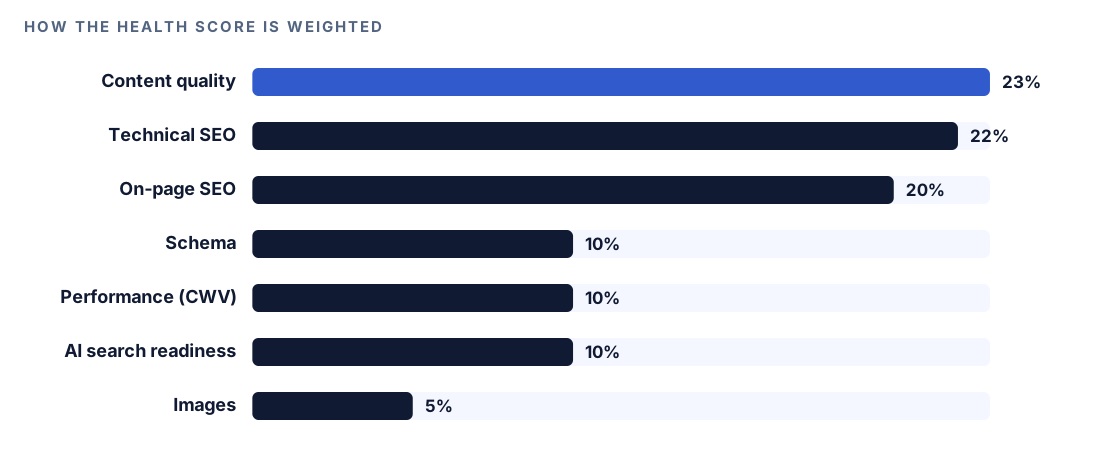
Content quality counts for 23%, technical SEO 22% and on-page SEO 20%. Schema, performance and AI search readiness count for 10% each, and images 5%. Perfect markup can't rescue weak content. Treat the number as a progress tracker.
Run it in Codex, step by step
- Install the Codex SEO kit from the install section, restart Codex, and open a new task in your website's project folder. Our guide to installing SEO skills in Codex walks through it, and
$seo doctorconfirms the runtime and browser are ready. - Check your permission mode. The audit fetches live pages, so depending on your mode, Codex may ask before it uses the internet. Approve it for the site you're checking.
- Run the command with your homepage:
$seo audit https://example.com- Or ask in plain language, and Codex picks the skill because the request matches it:
Run a full SEO audit of https://example.com and give me a prioritized action plan.- Confirm the business type if Codex asks. It decides which extra specialists run.
- Optionally add Google API credentials so field Core Web Vitals and Search Console index status join the report. Our guide to Search Console and PageSpeed data in Codex covers the setup.
- When the audit ends, Codex offers a PDF version of the report for sharing.
Reading the report
The audit writes a folder named after your domain:
example.com-audit/
  FULL-AUDIT-REPORT.md
  ACTION-PLAN.md
  audit-data.json
  findings/technical.md
  findings/content.md
  findings/schema.md
  findings/performance.md
  findings/visual.md
  screenshots/
Start with the executive summary at the top of the full report:
## Executive Summary
- SEO Health Score: XX/100
- Business type: [detected type]
- Top 5 critical issues: [issue 1] ... [issue 5]
- Top 5 quick wins: [fix 1] ... [fix 5]

## Technical SEO
- Crawlability: [findings]
- Indexability: [findings]
- Core Web Vitals: LCP X.Xs, INP XXXms, CLS 0.XX
The action plan ranks every recommendation, and the levels mean something specific:
- Critical: stops pages being indexed or invites a penalty. Fix it now.
- High: a real drag on rankings. Fix it within a week.
- Medium: room to improve. Fix it within a month.
- Low: nice to have. Backlog it.
The audit data file groups the work into four phases: critical fixes in week 1, high-impact work in weeks 2 and 3, content and authority in month 2, then ongoing monitoring.
Each recommendation should also state its evidence, what it depends on, how you'd know the fix failed, and a leading indicator to watch. That turns "rewrite titles" into a plan you can check.
Apply the fixes with Codex
The findings sit next to your code, so Codex can find the template behind a problem and fix every page that uses it at once.
Here is a typical batch of fixes in a shared layout. Before:
<head>
  <meta name="robots" content="noindex">
  <script src="/js/chat-widget.js"></script>
</head>
<img src="/images/hero.jpg">
After:
<head>
  <link rel="canonical" href="https://example.com/pricing">
  <link rel="preload" as="image" href="/images/hero.webp">
  <script src="/js/chat-widget.js" defer></script>
</head>
<img src="/images/hero.webp" width="1200" height="630" alt="[describe what the image shows]">
The stray noindex is gone, the canonical is declared, the widget no longer blocks rendering, and the hero image loads early with fixed dimensions. Then hand Codex the plan:
Read example.com-audit/ACTION-PLAN.md and findings/technical.md. Work through the Critical items only. For each one, find the template, component or config file in this repo that causes it, make the smallest change that fixes it, and name the finding it addresses. Show me the diff, then run the build and the tests.Read the diff before you accept it. Some findings, like server headers set in a hosting dashboard, don't live in code, and Codex should say so. After deploy, re-run the narrower check, such as $seo technical https://example.com, and run the full audit again once a batch of fixes is live.
Make it repeatable
An audit is most useful as a series. Run it on a schedule with codex exec and you get a comparable report each time:
codex exec --sandbox workspace-write '$seo audit https://example.com' -o audit-summary.mdSingle quotes stop the shell from reading $seo as a variable. The codex exec sandbox is read-only by default, so --sandbox workspace-write lets the run save the audit folder, and -o saves Codex's closing summary to a file. The audit fetches live pages, so make sure your sandbox and permission setup allows the network access it needs; the Codex sandboxing docs explain the options. To act on the result in the same session:
codex exec resume --last "List the Critical items in ACTION-PLAN.md that have no fix in this repo yet"Commit each audit folder so diffs between runs show what changed. Our guide to automating SEO checks with codex exec covers schedules and CI.
Without the skill: a plain Codex prompt
You can get a useful first pass with no kit installed:
Crawl https://example.com, following internal links up to 50 pages and respecting robots.txt. For each page, record the status code, title, meta description, H1, canonical, meta robots and whether JSON-LD is present. List sitewide problems first, then page-level ones, sorted into Critical, High, Medium and Low. Save the result as audit.md.Then connect it to your code:
For each Critical issue in audit.md, find the file in this repo that generates the affected HTML and propose a fix. Don't edit anything yet.The skill adds consistency: the same specialists and weighted score on every run, business-type detection that picks the extra checks, browser rendering for JavaScript sites, screenshots, and fixed output files you can compare between audits.
Pitfalls to avoid
- Auditing staging and treating it as production. Staging often has
noindexor a password wall the live site doesn't. - Chasing the score while a Critical indexing issue stays open.
- Doing the easy Low items first. Work the plan in priority order.
- Assuming 500 pages covers a large site. Audit key sections separately or connect Firecrawl to map every URL.
- Trusting one lab run over field data when your site has enough traffic for both.
- Accepting code changes without a build. Ask for the diff and the tests every time.
Keep going
- Technical SEO audit with Codex goes deeper on evidence, redirects, canonicals and rendering.
- Schema markup with Codex shows how to fix the structured data findings from your audit.
- SEO drift monitoring with Codex catches regressions between full audits.
- The full list of Codex SEO and Codex Blog skills covers every command you can run next.
FAQ
What should a full SEO audit include?
It should cover crawling and indexing, technical health, content quality, on-page elements, structured data, Core Web Vitals, images and AI search readiness. It should also rank the findings, because a hundred issues with no order is hard to act on.
Can Codex run a full SEO audit on its own?
Yes. With the Codex SEO kit installed, $seo audit <url> crawls the site, runs the specialist checks and saves the report and action plan in your project. You approve internet access when Codex asks, and you choose which fixes to apply.
Do I need API keys to run the audit?
No. The audit runs without third-party accounts. Google credentials, DataForSEO, Firecrawl and Moz or Bing keys are optional and add data such as field Core Web Vitals, index status or backlink metrics. Each provider's own pricing applies.
What is a good SEO health score?
There's no universal cutoff, and a high score is not a promise of rankings. Compare against your own previous audit, and watch the count of Critical and High findings as closely as the score.
How often should I run a full SEO audit?
Run one before and after any redesign, migration or big template change, then on a schedule that matches how often your site changes. Between audits, drift monitoring on key URLs catches regressions after each deploy.