
SEO Automation
Codex Exec SEO Automation: Cron Jobs, Reports and CI
Automate SEO checks with codex exec: save reports with -o, gate posts with --output-schema, schedule drift checks with cron, and keep API keys safe in CI.
Codex can run your SEO checks while nobody is at the keyboard: codex exec starts a task from a script, a cron job or a CI step, and prints only the final message so you can save it, compare it or fail a build on it. That makes codex exec SEO automation a short shell script around commands you already know, such as $seo drift, $seo audit and $blog seo-check. This guide shows saved reports, sandbox settings, logs, pass/fail gates, schedules and CI.
Key takeaways
codex execruns Codex without the interactive UI. Progress goes to stderr, only the final message goes to stdout, and-osaves that message as a report.- The default sandbox is read-only. Add
--sandbox workspace-writeonly when the task should write files, such as an audit that saves its report folder.--output-schemagives a skill's verdict a fixed JSON shape that a script can test, while--jsonrecords the run as a JSON Lines log.- Drift baselines live on the machine that captured them, so schedule drift checks there rather than on a fresh CI runner.
- Unattended live checks need network access, and in CI that runs repository code, the API key must never be a job-level environment variable.
codex exec at a glance
| Item | Details |
|---|---|
| Command | codex exec with a task such as $seo drift compare <url>, $seo audit <url> or $blog seo-check <file> |
| What you give it | A task in quotes, plus optional flags for the sandbox, the output file or the output format |
| What Codex reads | Your Git repository, the skill's instructions, and the live pages or files the task names |
| What you get back | The final message on stdout, a saved copy with -o, a JSON Lines log with --json, or schema-shaped JSON with --output-schema |
| Needs | Your saved CLI sign-in or CODEX_API_KEY for one run; network access for live checks; the kits installed on that machine |
| Best for | Post-deploy regression checks, monthly audits, and pass/fail gates for new blog posts |
Why automate SEO checks?
A lot of SEO damage comes from routine deploys. A template change drops the canonical tag. A staging setting leaks noindex into production. A plugin update strips the JSON-LD. The page still looks fine to visitors, so nobody notices until traffic falls and the cause is buried under weeks of commits. A check that runs after every deploy, or every morning, reports the change while the commit behind it is still fresh.
Match the command to the question
Pick the command that answers your question:
- Did anything break since the last good state? Use
$seo drift compare. It compares a page with a stored baseline and sorts changes by severity, so it suits daily and post-deploy runs. - How healthy is the whole site? Use
$seo audit. It crawls up to 500 pages, so it's better as a monthly job. - Is this post ready to publish? Use
$blog seo-checkon the post's file. Its pass/fail checklist fits a pre-merge gate.
Report on a schedule, fix by hand
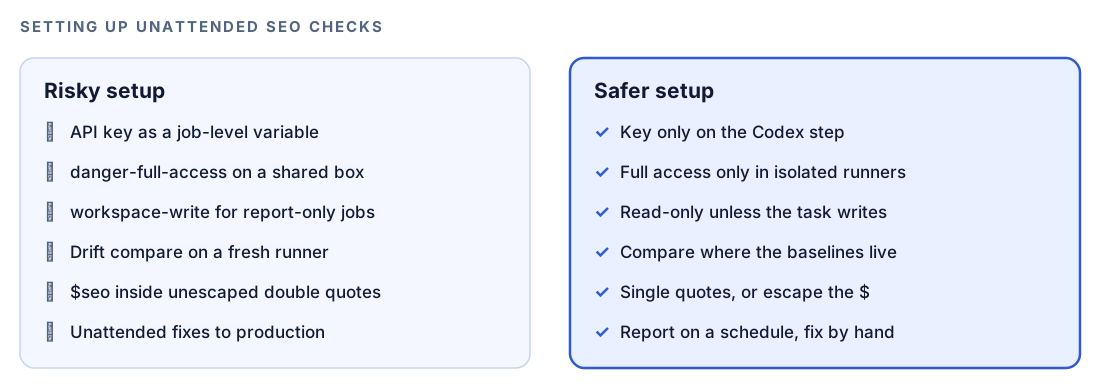
A scheduled run should describe problems, not quietly change production. Keep unattended jobs to reporting, and make fixes in an interactive task where you read the diff. The exception is a job that exists to write a file, such as an audit saving its report folder.
How codex exec runs an SEO check
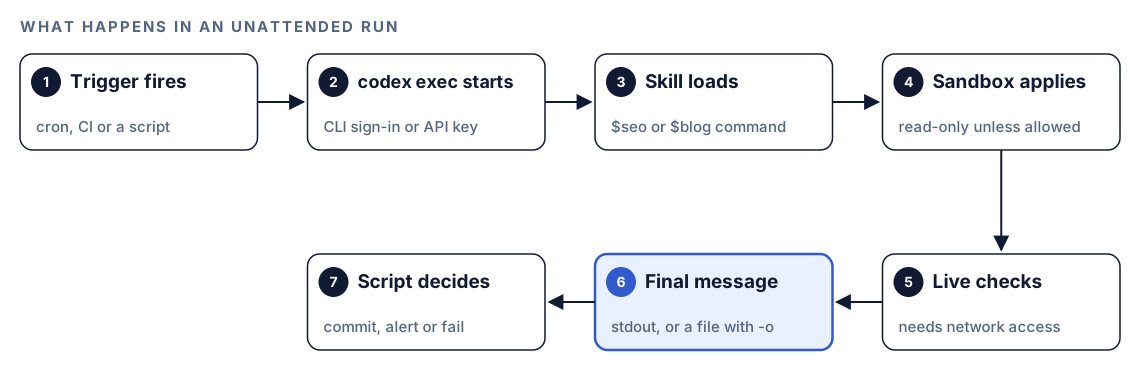
- A trigger fires. Cron, a CI pipeline or your own shell script starts the job.
- Codex signs in.
codex execreuses your saved CLI sign-in. For a single run you can supply a key withCODEX_API_KEYinstead. - The skill loads. The task names
$seoor$blogand a command, so Codex loads that skill's full instructions. - The sandbox applies. The run is read-only by default. With
--sandbox workspace-write, Codex can edit files in the project. - Live checks run. Commands like
$seo drift comparefetch the live page, which needs network access. - The final message is written. Progress streams to stderr and only the final message reaches stdout.
-oalso saves it to a file. - Your script decides. It commits the report, compares it with the last one, sends an alert or fails the build.
codex exec expects to run inside a Git repository, which suits SEO work: commit each report, and git diff shows exactly what changed between two runs. If you must run outside a repository, --skip-git-repo-check turns that check off. OpenAI's non-interactive mode docs list every option.
Pattern 1: save a report with -o
Start with a report that saves itself, such as a monthly audit:
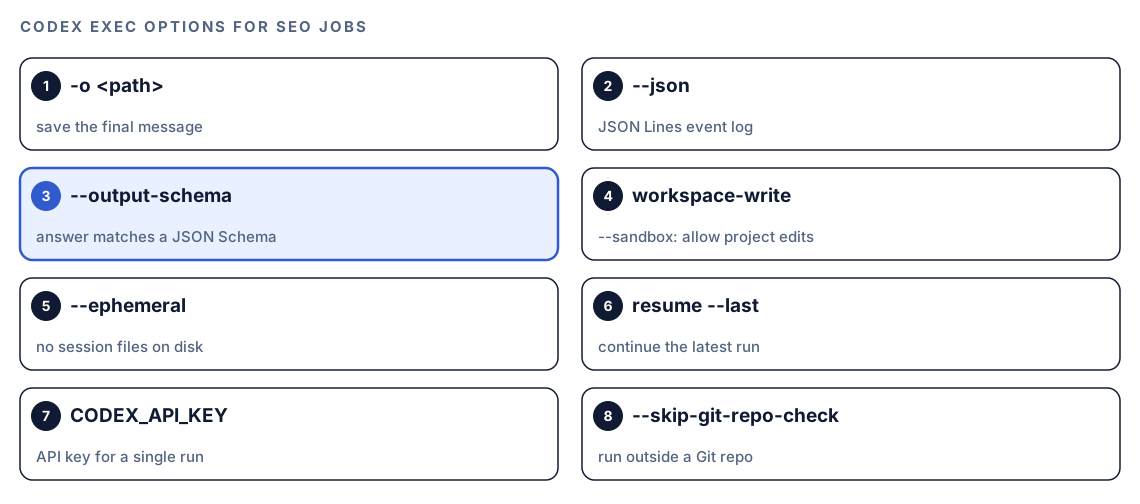
codex exec --sandbox workspace-write '$seo audit https://example.com' -o audit-summary.mdThree details matter. First, the quotes: inside double quotes your shell reads $seo as an empty variable, so use single quotes or escape it as \$seo. Second, the sandbox: the audit writes a folder named after your domain, with the full report, the action plan, per-category findings and a JSON data file, so it needs --sandbox workspace-write. Third, -o saves Codex's closing summary to audit-summary.md and still prints it.
A task that only reads can keep the read-only default and let -o capture the result:
codex exec '$blog seo-check content/blog/standing-desk-guide.md' -o seo-check-standing-desk.mdTo act on a report later, codex exec resume --last continues the most recent run with a follow-up request, such as asking which commit introduced each Critical issue.
Pattern 2: catch regressions after each deploy with $seo drift
Drift monitoring answers one narrow question: what changed on this page since it was last known to be good? Capture a baseline for each important URL first, in an interactive task where you can approve anything Codex asks about:
$seo drift baseline https://example.com/pricingA baseline records the title, meta description, canonical URL, robots directives, H1 to H3 headings, JSON-LD, Open Graph tags, Core Web Vitals, the HTTP status code, and hashes of the HTML and the schema. Each later $seo drift compare fetches the page again and applies 17 comparison rules across three severity levels: CRITICAL for SEO-breaking changes, WARNING for changes to investigate within a week, and INFO for changes that may be intentional.
Core Web Vitals come from PageSpeed data. If that fetch fails, for example because no API key is set up, compare skips the Core Web Vitals rules and runs the rest.
One detail decides where this job should live. Baselines are stored in a local database on the machine that captured them, outside your project files. A compare on another machine, such as a fresh CI runner, finds no baseline and asks you to capture one first. Schedule drift checks on the machine that holds the baselines. Compare also records each result in that local store, so run the scheduled command once by hand and make sure your sandbox setup allows it.
Turn the verdict into pass or fail
A report is for people. A script needs a yes or no. --output-schema asks Codex for a final answer that matches a JSON Schema, so every run returns the same shape. Save this as drift-gate.schema.json:
{
  "type": "object",
  "properties": {
    "url": { "type": "string" },
    "status": { "type": "string", "enum": ["pass", "fail"] },
    "critical": { "type": "array", "items": { "type": "string" } },
    "warnings": { "type": "array", "items": { "type": "string" } }
  },
  "required": ["url", "status", "critical", "warnings"],
  "additionalProperties": false
}
Then run the comparison against it and test the result:
codex exec '$seo drift compare https://example.com/pricing and set status to fail if any CRITICAL rule triggered' --output-schema drift-gate.schema.json -o drift-pricing.json
jq -e '.status == "pass"' drift-pricing.json > /dev/null || echo "SEO drift on /pricing, see drift-pricing.json"
jq -e exits with an error when the test is false, so the second line can send an alert or fail a pipeline step.
Pattern 3: a pass/fail gate for new blog posts
$blog seo-check is built for the moment before you publish. It reads a post file and checks the title (40 to 60 characters, primary keyword in the first half), the meta description (150 to 160 characters), heading hierarchy, internal and external links, the canonical URL, Open Graph and Twitter Card tags, and the URL slug. Each check comes back PASS, FAIL, WARN or N/A, and the report ends with an overall verdict of PASS, NEEDS WORK or FAIL.
That verdict maps neatly onto a schema. Save this as seo-check.schema.json:
{
  "type": "object",
  "properties": {
    "file": { "type": "string" },
    "overall": { "type": "string", "enum": ["PASS", "NEEDS WORK", "FAIL"] },
    "failed_checks": { "type": "array", "items": { "type": "string" } }
  },
  "required": ["file", "overall", "failed_checks"],
  "additionalProperties": false
}
This script checks every post added or changed on the current branch. Change content/blog to wherever your posts live:
#!/usr/bin/env bash
set -euo pipefail
mkdir -p reports/seo-check
status=0
for file in $(git diff --name-only --diff-filter=AM origin/main -- 'content/blog/*.md'); do
  name=$(basename "$file" .md)
  codex exec "\$blog seo-check $file" --output-schema seo-check.schema.json -o "reports/seo-check/$name.json"
  if ! jq -e '.overall != "FAIL"' "reports/seo-check/$name.json" > /dev/null; then
    echo "SEO check failed: $file"
    status=1
  fi
done
exit $status
The gate fails only on FAIL, so a post marked NEEDS WORK passes with its report attached for the writer to read. The read-only default fits, because the check reads the file. One part of the checklist does go online: it confirms that the post's main external links are reachable, so give the run network access if you want that check.
Keep machine-readable logs with --json
When a scheduled job fails overnight, the final message alone may not explain why. --json turns stdout into a JSON Lines event stream, one JSON object per line, recording the run as it happens:
mkdir -p logs
codex exec --json '$seo drift compare https://example.com/pricing' > logs/drift-pricing.jsonl
Keep it as a record of the run, and open it when a report looks wrong. Use --json for logs and --output-schema for results your script tests. On shared machines, --ephemeral stops a run from saving session files to disk.
Run it on a schedule with cron
A shell script plus one crontab line covers most sites. Keep the logic in the script and only the timing in cron. Save this as scripts/seo-nightly.sh in your repository and make it executable:
#!/usr/bin/env bash
set -euo pipefail
cd "$(dirname "$0")/.."
day=$(date +%F)
mkdir -p reports/drift
for url in https://example.com/ https://example.com/pricing https://example.com/blog/; do
  name=$(echo "$url" | sed 's#https://##; s#[/.]#-#g')
  codex exec "\$seo drift compare $url and set status to fail if any CRITICAL rule triggered" --output-schema drift-gate.schema.json -o "reports/drift/$day-$name.json"
done
git add reports/drift
git commit -m "SEO drift check $day" || true
Then add one line with crontab -e:
40 6 * * * /home/you/sites/example/scripts/seo-nightly.sh >> /home/you/sites/example/reports/cron.log 2>&1That runs the script at 6:40 every morning. Cron treats % specially, so the date lives in the script. Cron also starts with a minimal environment, so use full paths, and make sure codex is on the PATH cron sees.
codex exec reuses the CLI sign-in saved for the user who runs it, so schedule the job as the user who signed in. To supply a key for a single run instead, set it on that command only:
CODEX_API_KEY="your-api-key" codex exec --sandbox workspace-write --json '$seo audit https://example.com' > logs/audit.jsonlSet this way, the key exists for that one command, not for everything else the script or the machine runs. Load it from wherever you keep secrets on that machine, and never commit it.
Run it in CI and GitHub Actions
CI suits the $blog seo-check gate, because it runs against the files in each pull request. Keep these rules in mind:
- Use the official action on GitHub. For GitHub Actions, OpenAI recommends the Codex GitHub Action,
openai/codex-action, over installing the CLI yourself. Follow its documentation for the inputs and workflow file. - Keep the key out of the job environment. In CI that runs repository code, don't set
CODEX_API_KEYas a job-level environment variable, where build scripts, tests or dependency install hooks in the same job could read it. Give it only to the step that runs Codex. - Install the kits on the runner. A runner needs the skills just like your laptop, so start with cron on a machine where the kits already work, then move gates into CI.
- Allow the network access the task needs. Live checks need it in CI too. The Codex sandboxing docs explain the options.
--sandbox danger-full-access removes the sandbox boundaries entirely. OpenAI's docs say to use it only in a controlled environment, such as an isolated CI runner or container.
Make it repeatable with AGENTS.md
Scheduled reports are only useful if each one looks like the last. Codex reads AGENTS.md before it starts work, so a short section there keeps unattended runs consistent:
## Scheduled SEO checks
- Save reports in reports/, named YYYY-MM-DD-<page>.md or .json.
- During scheduled checks, never edit source files. Report only.
- List CRITICAL findings first, then WARNING, then INFO.
- Quote the old and the new value for every change you report.
- If a page can't be fetched, say so in the first line. Never guess its content.
Our guide to AGENTS.md rules for SEO covers the rest of the file.
Without the skill: a plain Codex prompt
You can automate a basic regression check with plain Codex and no kit:
Fetch https://example.com/pricing and report the HTTP status, title, meta description, canonical URL, robots meta tag, every H1, and the @type of each JSON-LD block. Compare them with reports/pricing-last.json, list anything that changed, then overwrite that file with today's values.Run it with codex exec --sandbox workspace-write so it can update the file. What the kits add is a fixed set of captured fields, 17 comparison rules with severities instead of an improvised diff, a stored baseline history, a post checklist with set thresholds, and the same report format on every run. The skills page lists every command you can schedule, and the install section has the setup command for the machine that runs your jobs.
Pitfalls to avoid
- Writing
$seoinside unescaped double quotes. The shell swaps it for an empty variable, and Codex never sees the command. - Granting
--sandbox workspace-writeto report-only jobs. Use it only when the task should write files. - Running
--sandbox danger-full-accesson a shared machine. Keep it for isolated runners and containers. - Comparing drift on a machine that never captured a baseline.
- Setting the API key as a job-level environment variable in CI that runs repository code.
- Forgetting network access. A live check that can't reach the site produces an error, not a report.
- Letting a schedule change production unattended. Report on a schedule, then fix in an interactive task.
Keep going
- Catch SEO regressions early with drift monitoring explains the drift rules and severities in depth.
- Run a full SEO audit with Codex shows how to read the audit folder your scheduled job saves.
- The blog SEO checklist with Codex walks through every check behind
$blog seo-check. - Install SEO skills in Codex covers getting the kits onto the machine that runs your jobs.
FAQ
What is codex exec?
codex exec runs Codex without its interactive interface. You pass the task as a quoted string. Progress goes to stderr and only the final message goes to stdout, so you can save it, pipe it or test it in a script.
Can codex exec edit files?
Yes, if you allow it. The default sandbox is read-only, so add --sandbox workspace-write when the task should change files in the project, such as an audit that saves its report folder.
How do I run SEO checks on a schedule?
Put the codex exec commands in a shell script, run it from your Git repository, and call it from cron or your CI scheduler. Save each result with -o and commit it, so a diff shows what changed between runs.
How do I get a pass or fail result from Codex in CI?
Use --output-schema with a JSON Schema that includes a status field, save the answer with -o, then test that field with a tool such as jq. When the test fails, your script exits with an error and the CI step fails.
Does codex exec need an API key?
Not always. It reuses your saved CLI sign-in, and for a single run you can set CODEX_API_KEY on the command itself. In CI that runs repository code, never set the key as a job-level environment variable.
Do automated SEO checks need internet access?
Yes, for anything that checks live pages, such as drift comparisons and audits. Make sure your sandbox and permission setup allows the network access the task needs. A check on a local file, like $blog seo-check on a draft, mostly reads from disk, though its external link check goes online.