
On-Page SEO
Blog SEO Checklist: Check Every Post with Codex
A blog SEO checklist you can run in Codex: titles, meta descriptions, headings, links, canonical and social tags, with a pass/fail report and fixes.
A blog SEO checklist turns "is this post ready?" into a set of yes-or-no questions: does the title fit, does the meta description earn the click, do the headings nest, do the links work, and do the canonical and sharing tags point where they should? In Codex, RankCue's $blog seo-check <file> answers those questions for a finished post and hands back a pass/fail table with a concrete fix beside every failure. Below, we go through each item on the checklist, how the command runs, how to read the report, and how to let Codex make the repairs in your files.
Key takeaways
$blog seo-checkaudits one finished post, from a file in your repository or a live URL, across title, meta description, headings, links, canonical, Open Graph, Twitter Card and slug.- Results are PASS, FAIL, WARN or N/A, each failure carries a fix, and the report closes with the three most important repairs.
- The skill's limits are exact: 40 to 60 characters for titles, 150 to 160 for meta descriptions, 3 to 10 internal links, and a sharing image of at least 1200 by 630 pixels.
- It catches the same URL linked twice and tests every statistic for a year, a named publisher and a dated source entry.
- The check reports but never edits. Codex applies fixes in a separate step that you approve as a diff.
The seo-check command at a glance
| Item | Details |
|---|---|
| Command | $blog seo-check <file> |
| What you give it | A finished post in your project, or its published URL |
| What Codex reads | Front matter, headings, links and their anchor text, meta tags, body text, and your other posts to see which link back |
| What you get back | An SEO validation report with a pass/fail table, a summary and three priority fixes |
| Needs | Internet access only to test external links or a live URL; optional Google API credentials for a PageSpeed add-on |
| Best for | A last gate before publishing, and spot checks on older posts |
What belongs on a blog SEO checklist?
On-page SEO is everything on the page that you control yourself. For a blog post it comes down to five areas. Getting them right won't save a thin article, but getting them wrong can sink a good one.
Title and meta description
The title tag usually becomes the blue headline in search results, and long titles get cut off. Putting the topic first means searchers still see what the page is about after the cut. Google may replace titles it finds unhelpful, and its title link guidance asks for titles that are descriptive, concise and unique to each page.
The meta description isn't a ranking factor, but it often supplies the snippet under the title, which makes it your sales line. Google sometimes picks other text from the page, as its snippet documentation explains. An accurate summary of the post gives you the best odds that your wording is what people see.
Headings
Headings are the outline of a post. A single H1 for the title, H2s for sections and H3s within them help readers scan, and they help search engines and AI tools match each passage to the question it answers. Jumping from an H2 straight to an H4 leaves a hole in that outline.
Links
Internal links help search engines discover your posts and see how topics connect. Their anchor text, the clickable words, should describe the destination. External links to strong sources show where your facts come from.
Canonical, sharing tags and slug
A canonical tag names the preferred URL for a page, which matters when one post can be reached at several addresses. Open Graph and Twitter Card tags decide the title, text and image in a link preview when someone shares the post. They don't affect rankings, but a broken preview loses clicks. The slug, the readable last part of the URL, should be short and lowercase so the address ages well.
How $blog seo-check runs inside Codex
When you point the command at a post, the skill first pulls out every element it needs, then runs its checks in a fixed order and writes a single report.
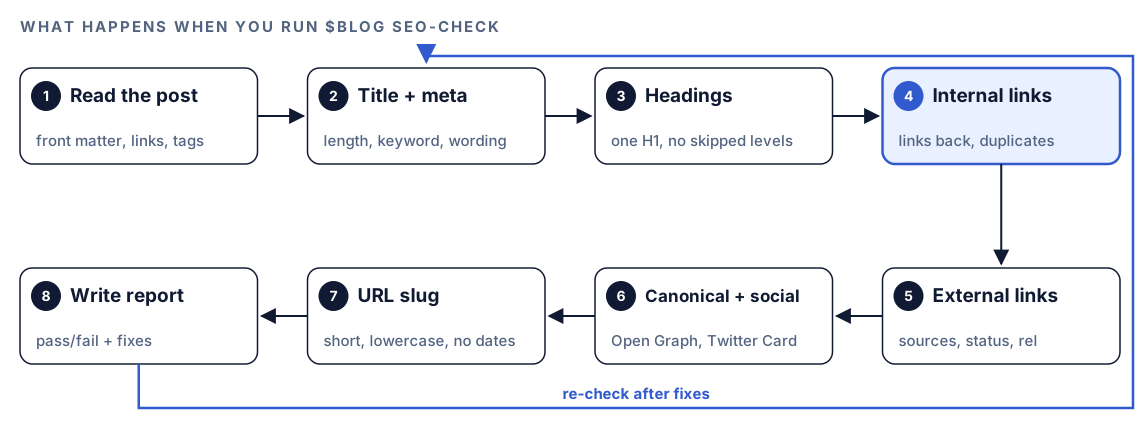
- Read the post. Codex collects the front matter, the heading tree, every link and anchor, the meta tags and the body text. Given a URL, it fetches the page and extracts the same things.
- Title and meta description. Length, keyword position and wording.
- Headings. H1 count, skipped levels, keywords and question headings.
- Internal links. Count, anchors and spread. Codex searches your other posts to see whether the pages you link to link back, and flags one-way links. It also strips trailing slashes, query strings and fragments from each URL to spot any address linked twice.
- External links and sources. Source quality, whether outbound links load, rel attributes and statistic citations.
- Canonical and social tags. The canonical, Open Graph and Twitter Card.
- URL slug. Length, keyword, dates, characters and filler words.
- Write the report. One row per check, an overall verdict and three priority fixes.
What Codex checks on every post
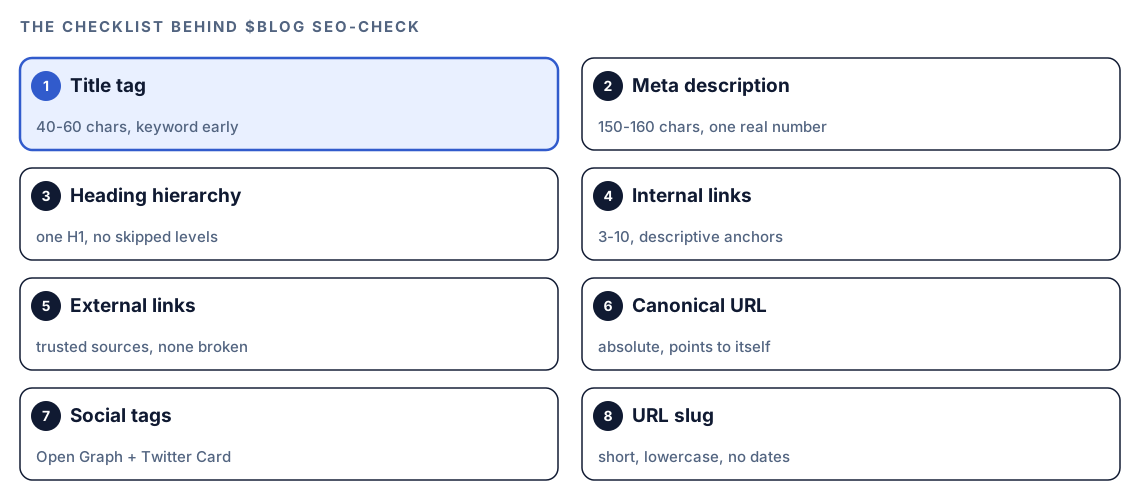
Each checklist item becomes a test with a clear threshold. These are the skill's own settings, and several are stricter than a typical checklist.
Title tag
Between 40 and 60 characters passes, as long as the main keyword shows up early, in the first half. The skill also looks for a power word such as Guide, How or Complete, checks that the title survives being trimmed at 60 characters, and rejects generic wording.
Meta description
The sweet spot is 150 to 160 characters. The keyword should appear once, naturally, never twice. The skill also expects a concrete number taken from the post, wording that invites action, such as learn or find out, and a closing line that tells readers what they'll gain.
Heading hierarchy
One H1, and levels that step down without gaps. Beyond that, the skill wants the keyword in two or three headings, six to eight H2 sections, no heading over 70 characters, and 60 to 70% of H2s written as questions, which matches how people phrase searches and AI prompts. The report prints your heading tree so you can see where it breaks.
Internal links and duplicates
The pass range is 3 to 10 internal links to at least three different pages, spread through the post, with anchors that describe the target. "Click here" and "read more" fail, and so does a post linking to itself. When a URL appears twice in the body, the skill keeps the copy with the clearest anchor and suggests deleting the other. Header and footer navigation is ignored.
External links and statistics
The skill wants at least three outbound links, all to authoritative sources (its tiers 1 to 3) rather than other SEO blogs or direct competitors. Each should load, and sponsored or user-generated links need the right rel attribute, such as nofollow.
Statistics face a three-part test. The year appears in the sentence itself, before the figure rather than in parentheses, the citation names both the publisher and the report title, and a source list at the bottom gives each URL with the date it was retrieved. Any figure that misses a part should be replaced with a verified one or dropped.
Canonical, Open Graph and Twitter Card
The canonical has to exist, use a full absolute URL, follow the site's trailing slash habit and point back at the same page. For sharing, the skill expects the complete Open Graph set: title, a description of 150 to 160 characters, an absolute image URL at 1200 by 630 pixels or larger, a type of article, a URL that matches the canonical, and the site name. Twitter Card tags need the large-image card, a title under 70 characters, a description under 200 and an image. If your templates add these tags to plain Markdown posts, N/A is a fair result.
URL slug
Keep the path under 75 characters, include the keyword or a close variant, and use only lowercase letters, digits and hyphens. Date folders, file extensions such as .html and filler words such as "the" or "of" all count against it.
Run it in Codex, step by step
- Install the Codex Blog kit from the install section, restart Codex so it finds the new skills, and start a task in your blog's project folder, so the skill can search your other posts.
- Check your permission mode. Testing outbound links or a live URL means reaching the web, and your mode decides whether Codex asks first. Say yes for the pages being checked.
- Run the command on a post:
$blog seo-check content/blog/accounting-software.md- Or describe the job in your own words. The request matches the skill's description, so Codex loads it:
Run an SEO check on content/blog/accounting-software.md before I publish it. The primary keyword is "accounting software for agencies".- To test what visitors actually receive, including the tags your templates add to the page head, give it the published URL:
$blog seo-check https://example.com/blog/accounting-software- For performance data, set up Google API credentials with
$blog google. On a published post, the report then adds Lighthouse scores, Core Web Vitals field data for LCP, INP and CLS, and the top three speed opportunities. Without credentials, that section is simply left out. Google's own terms and any usage pricing apply, and our guide to Search Console, GA4 and PageSpeed data in Codex walks through the setup.
Reading the report
The report starts with a one-line verdict, then lists every check. With placeholders:
## SEO Validation Report: [Post title]

**File**: content/blog/[slug].md
**Date**: [check date]
**Overall**: [X/Y checks passed] - NEEDS WORK

| # | Check | Status | Details | Fix |
|---|-------|--------|---------|-----|
| 1 | Title length | PASS | [N] chars | - |
| 2 | Title keyword | FAIL | keyword in second half | Move "[keyword]" to the front |
| 3 | Meta description length | WARN | [N] chars | Extend to 150-160 characters |
| 4 | Heading hierarchy | FAIL | H2 followed by H4 under "[heading]" | Change the H4 to an H3 |
| 5 | Twitter Card | N/A | no X account | - |

### Priority Fixes
1. [Most impactful fix and where to make it]
2. [Second fix]
3. [Third fix]

### Notes
- [Observations beyond the checklist]
The verdict is PASS, NEEDS WORK or FAIL. WARN marks a partial pass, and N/A marks a check that doesn't apply, like Twitter Card tags on a site with no X account.
Begin with the three priority fixes, which the skill orders by impact. After those, we work in this order:
- Indexing and sharing. A canonical aimed at the wrong URL, or a missing sharing image, affects the whole page.
- Title and meta description. These shape whether anyone clicks.
- Headings. Repair skipped levels and extra H1s.
- Links. Delete duplicates, replace dead outbound links, and add links back from related posts.
- Polish. Power words, question headings and filler words in the slug.
Apply the fixes with Codex
The report says what to change. Codex can make that change in the right file, which isn't always the post itself.
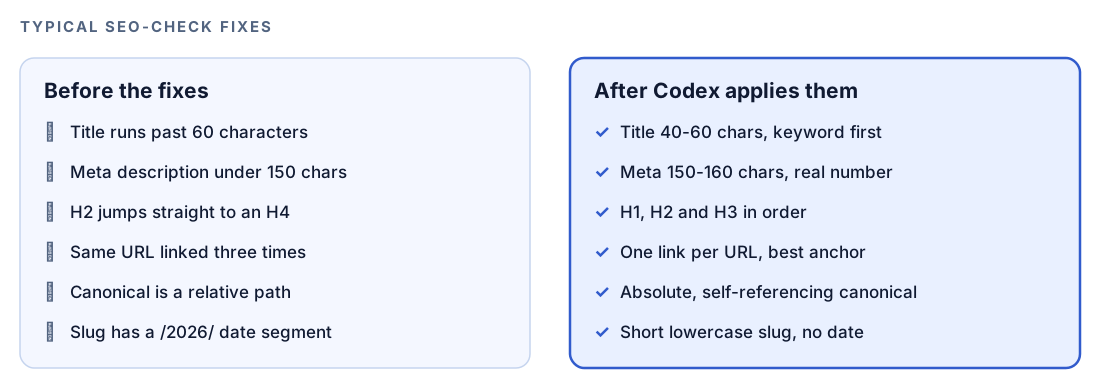
Most fixes land in front matter. Before:
title: "Everything You Need to Know About Picking Accounting Software as an Agency"
description: "Tips for choosing software."
canonical: /blog/accounting-software
ogImage: /images/cover.png
After:
title: "Accounting Software for Agencies: A Complete Guide"
description: "Compare 6 accounting tools for small agencies on invoicing, time tracking and payroll, and learn which features matter most before you commit to a plan."
canonical: https://example.com/blog/accounting-software
ogImage: https://example.com/images/accounting-software-1200x630.png
The six in that description is only there because the example post compares six tools. Pull your number from the post, never make one up to satisfy the check.
Sharing-tag failures usually come from the layout. If every post is missing the same tag, one template change fixes them all:
<link rel="canonical" href="https://example.com/blog/accounting-software">
<meta property="og:type" content="article">
<meta property="og:title" content="Accounting Software for Agencies: A Complete Guide">
<meta property="og:url" content="https://example.com/blog/accounting-software">
<meta property="og:image" content="https://example.com/images/accounting-software-1200x630.png">
<meta property="og:site_name" content="Example">
<meta name="twitter:card" content="summary_large_image">
Then hand Codex the whole job:
Use the SEO validation report for content/blog/accounting-software.md. Fix every FAIL: rewrite the title and description to the report's limits using only facts from the post, make the canonical and ogImage absolute, fix the heading levels, and remove duplicate links but keep the most descriptive anchor. If tags are missing on every post, change the layout that renders the page head instead of this file. Don't change the slug. Show me the diff, run the build, then run $blog seo-check on the file again.That second run is the proof: no FAILs, and only WARNs you've chosen to accept.
Make it repeatable
The check works best as part of "done", not as an afterthought. A few lines in your project's AGENTS.md make it the default whenever Codex touches a post:
## Blog posts: definition of done
- Before you report a new or edited post in content/blog/ as finished, run $blog seo-check on it.
- Fix every FAIL. List any WARN you left in place and why.
- Titles: 40-60 characters, primary keyword in the first half. Meta descriptions: 150-160 characters.
- Link each URL once in the body, with descriptive anchor text. Never link a post to itself.
- Never change the slug of a published post without adding a redirect.
Because Codex loads AGENTS.md at the start of a task, this applies whether you asked for a new post, a refresh or a one-word fix. Keep the rules brief, since all instruction files together have a size limit. Our guide to AGENTS.md rules for SEO shows how to organize rules for a whole site.
Without the skill: a plain Codex prompt
Without the kit, a detailed prompt still gets you a useful pass:
Read content/blog/accounting-software.md and check it like an SEO editor. Report a table with PASS or FAIL and a fix for each: title length (40-60 characters) and whether the main keyword is in the first half; meta description length (150-160); exactly one H1 and no skipped heading levels; internal link count and any URL linked more than once; whether each external link loads; an absolute canonical URL; og:title, og:description, og:image, og:type and twitter:card present; a short lowercase slug with no date. Don't edit the file.The skill adds a fixed standard on top: identical thresholds on every post, URL clean-up before duplicate detection, the link-back search across your project, the three-part statistic test, a stable report layout and the optional PageSpeed section.
Pitfalls to avoid
- Writing to the character count instead of the reader. A title can hit 58 characters and still be dull.
- Stuffing the keyword. The skill fails a meta description that repeats it.
- Making up a number for the meta description. Use a real one from the post, or keep the WARN.
- Renaming the slug of a live post without a redirect, which breaks every link pointing at it.
- Patching sharing tags one post at a time when the layout is the cause.
- Accepting N/A on faith. Check the live URL to confirm your templates really print the canonical and Open Graph tags.
- Reading a clean report as a ranking promise. It confirms the basics, nothing more.
Keep going
- On-page SEO analysis for any URL gives a scored review of a whole page, not only a post.
- Score a blog draft before you publish to judge writing quality next to SEO.
- Fact-check blog statistics against sources when the statistic test flags figures you can't trace.
- Every Codex SEO and Codex Blog skill is listed in one place, so you can see what pairs with this check.
FAQ
What should be on a blog SEO checklist?
Cover the title tag, meta description, heading structure, internal and external links, canonical URL, sharing tags and slug. Image alt text and properly cited statistics are worth adding. Give each item a clear pass rule so everyone applies it the same way.
How long should a blog post title be for SEO?
The Codex Blog check passes titles of 40 to 60 characters with the main keyword in the first half. Results pages trim long titles, so lead with the words that matter.
How long should a meta description be?
The skill aims for 150 to 160 characters. Google may show other text from the page, but an accurate summary that uses the keyword once and ends on a clear benefit gives your wording the best chance of appearing.
How many internal links should a blog post have?
The skill passes 3 to 10 internal links, spread through the post, with descriptive anchors and no URL repeated in the body. Longer posts sit toward the top of that range.
Can Codex check SEO on every post before I publish?
Yes. Run $blog seo-check on a file or URL in any Codex task, or add a rule to AGENTS.md so Codex runs it whenever it finishes writing or editing a post. Codex can then fix what failed and show you the diff before anything goes live.