
Content Operations
Fact-Check Blog Posts: Verify Statistics with Codex
Fact-check blog posts with Codex: extract every statistic, fetch each cited page, score how well it supports the claim, and fix weak numbers in place.
To fact-check blog posts properly, you have to open every cited source and confirm that the number in your sentence actually appears there, in the same context. In Codex, RankCue's $blog factcheck <file> command does that legwork for you: it pulls every statistic out of a post, fetches each cited page, looks for the exact value, and scores how well the source supports the claim. This guide covers why blog statistics go wrong, how the command works inside Codex, how to read its verification report, and how to fix weak claims in your own repository.
Key takeaways
$blog factcheck <file>collects every claim built on a number, a share, a price or a named source, and notes where each one sits and what it links to.- For each linked claim, Codex fetches the page, searches for the value, checks the surrounding context, and scores support from 1.0 (VERIFIED) down to 0.0 (NOT FOUND).
- Claims with no link are marked UNVERIFIED and come with a suggested search query.
- It checks up to 10 URLs per run, one at a time, and notes paywalls, script-heavy pages and PDFs that need a human look.
- Codex can then fix the post in place: link the original source, reword a claim to match it, or cut a number nothing supports.
The factcheck command at a glance
| Item | Details |
|---|---|
| Command | $blog factcheck <file> |
| What you give it | The path to a blog post in your project |
| What Codex reads | Every sentence with a number, percentage, dollar figure or named source, then each cited page |
| What you get back | A verification report with counts per status, a claims table with scores and notes, and recommended actions |
| Needs | Internet access to fetch cited pages; no third-party API keys |
| Best for | Data-heavy drafts before publishing, AI-assisted drafts, and new numbers added during a refresh |
Why fact-check blog posts before publishing?
A statistic makes a sentence feel solid, which is exactly why a wrong one does so much harm. Most bad numbers aren't lies. They're copies of copies. One article quotes a study, a second article quotes the first, a third rounds the figure, and a fourth drops the year. By the end of the chain, the number and its supposed source no longer match, yet every writer along the way linked something.
Other errors are simpler. A link points to a publisher's homepage rather than the page with the data. A page that once held the figure has moved or died. A number from an older edition gets presented as current. And drafting tools, human or machine, sometimes produce precise-looking figures that come from nowhere.
Trust carries the most weight
Google's guidance on helpful, people-first content describes E-E-A-T, which stands for experience, expertise, authoritativeness and trust, and says trust matters most of the four. Accurate, checkable claims are the most direct way to earn it. A reader who catches one wrong figure starts doubting the rest of the page, and probably the rest of your blog.
AI answers repeat what they quote
AI answer engines lift passages, and passages with numbers are attractive to quote. That raises the stakes. A wrong statistic in a well-structured post can travel further than the post itself, with your name attached as the source.
What counts as a claim
The skill looks for three shapes of claim:
- Fully cited: a number with a parenthetical source and year, a number next to a link, or a sentence that starts "According to [Source]".
- Uncited statistics: a standalone percentage, a "3x more" style multiplier, or a dollar figure with no attribution.
- Weak signals: phrases such as "studies show" or "research indicates" near a number. Vague round figures like "millions of users" are skipped unless they're specific.
Primary sources and the evidence triple
The strongest citation points to whoever collected the data, not to an article that passed it along. The Codex Blog kit sorts sources into tiers. Tier 1 covers official bodies such as Google Search Central plus government and university sites. Tier 2 is established research publishers, and tier 3 is major trade and tech press. Generic blogs, affiliate sites and content farms don't count. For each public figure, the kit also wants three things together: the year stated in your sentence, a citation that names both publisher and title, and a link recorded with the day you looked it up.
How $blog factcheck runs inside Codex
Run the command on a post and the skill works through a fixed pipeline. The task log shows each step, and the result is a report rather than an edit.
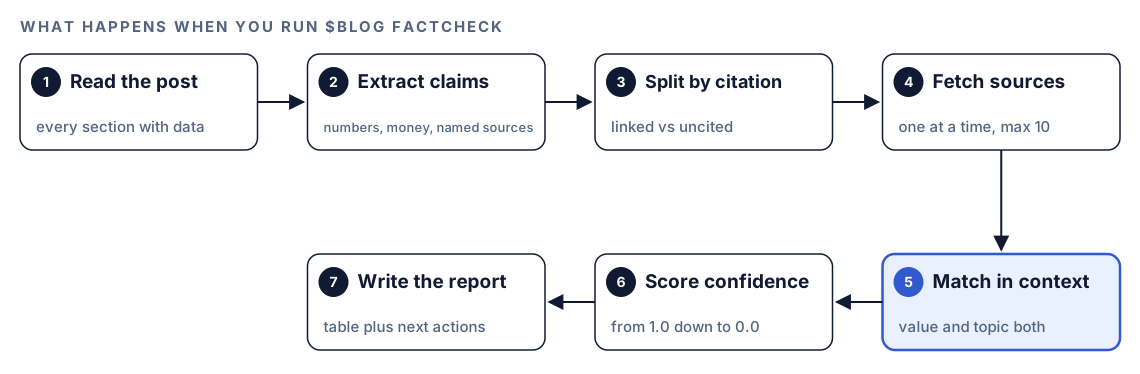
- Read the post. Codex opens the file and notes which sections lean on data.
- Extract claims. Every claim turns into a row: the sentence word for word, the figure itself, who it's credited to, the link behind it, and the heading or line number where you'll find it.
- Split by citation. Linked claims move on to checking. Unlinked ones wait for the report.
- Fetch sources. Pages are requested one after another, never in parallel, which keeps the load on source sites low. A run covers 10 links at most; anything past that is marked SKIPPED.
- Match in context. It searches the page for the specific value. Finding the number isn't enough: the text around it has to be about the same thing your sentence claims.
- Score confidence. Each claim gets a score and a status, explained in the next section.
- Write the report. You get a results table, summary counts and recommended actions. Uncited claims get a suggested search query, and if the claim names an organization, Codex suggests that organization's own website as the place to look.
What the verification scores mean
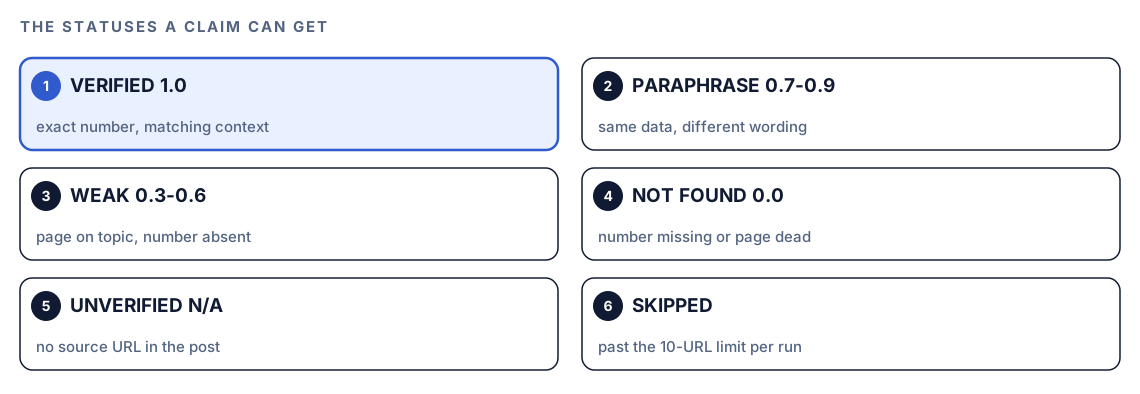
Scores run from 1.0 to 0.0, and each range maps to a status. The status tells you what kind of fix the claim needs.
VERIFIED and PARAPHRASE
VERIFIED (1.0) means the exact number appears on the cited page in a matching context. PARAPHRASE (0.7 to 0.9) means the data is there, but with different wording, rounding or timeframe. The skill's guidance gives examples: a precise percentage where the source only says "nearly half" scores 0.8, and a claim labeled as one year's data when the source only covers the year before scores 0.7. Both are usually fine to keep once you align the wording with the source.
WEAK
WEAK (0.3 to 0.6) means the page exists and covers the topic, but the specific number isn't visible. Citing a homepage when the figure lives on a subpage scores 0.3. Paywalled pages land here too, at 0.5 with a note, because Codex can't see behind a login.
NOT FOUND
NOT FOUND (0.0) means the cited page doesn't contain the claimed data anywhere, or the URL returns a 404 or can't be reached. For dead links, the report suggests checking web.archive.org for an archived copy.
UNVERIFIED and SKIPPED
UNVERIFIED means the post gives no URL for the claim, so there's nothing to check. SKIPPED means the claim's URL was past the 10-URL limit for the run.
Limits worth knowing
Pages that build their content with JavaScript may come back nearly empty, and the report notes that. PDF sources are flagged for manual checking, because text extraction from PDFs isn't reliable. The fact-check skill is also written so that $blog analyze can call it as an optional deeper check; in that case, only claims scoring below 0.7 appear in the analysis report.
Run it in Codex, step by step
- Install the Codex Blog kit from the install section, restart Codex so it discovers the new skills, and open a task in the project that holds your posts.
- Check your permission mode. The command fetches every cited page, so depending on your mode, Codex may ask before it uses the internet. Approve it for this task.
- Run the command on one post:
$blog factcheck content/blog/remote-work-trends.md- Or ask for it in plain words, and Codex matches the request to the skill:
Verify the statistics in content/blog/remote-work-trends.md against the pages they cite, and tell me which ones don't hold up.- If the report lists SKIPPED claims, fix the first batch, then ask Codex in a follow-up to check the remaining sources.
Reading the report
Every report opens with counts, then lists each claim on its own row:
### Verification Report: [Post title]

**File**: content/blog/[post].md
**Claims found**: N
**Verified**: N | **Paraphrase**: N | **Weak**: N | **Not Found**: N | **Unverified**: N

| # | Claim | Source URL | Score | Status | Notes |
|---|-------|-----------|-------|--------|-------|
| 1 | "[claim text]" | https://example.com/report | 1.0 | VERIFIED | Exact match in [section] |
| 2 | "[claim text]" | https://example.com/study | 0.8 | PARAPHRASE | Source rounds the figure |
| 3 | "[claim text]" | (none) | N/A | UNVERIFIED | Try: "[suggested search]" |

### Recommended Actions
- [Claims that need source URLs]
- [Claims with weak or not-found scores that need new sources]
- [Claims where the source data may be outdated]
Work through it in this order:
- NOT FOUND first. These are the claims most likely to be wrong, and a dead link also hurts the page.
- WEAK next. Find the exact page that holds the number, or treat the claim as unsupported.
- UNVERIFIED. Use the suggested search to find a source, or remove the number.
- PARAPHRASE. Align your wording, rounding and year with what the source says.
- VERIFIED. Spot-check one or two, then move on.
Fix weak claims with Codex
A failed claim has three possible fixes: link the original source, reword the sentence to match what the source says, or remove the number. Because Codex works in your repository, it can make all three kinds of change in the post and show them as one diff.
Before:
Studies show that XX% of remote workers want to keep working from home.After:
In its [report title] ([Publisher](https://example.com/report), 2026), [Publisher] found that [the finding, worded the way the source words it].Finding the replacement is research work. The Codex Blog kit's research agent, which the writing workflows call for statistic research, follows rules worth copying even when you research by hand. It records each statistic's exact value, source, URL, publication date and methodology, and confirms the number appears on the source page itself. Time-sensitive topics need at least two sources published in the last 30 days; evergreen topics relax that to 90 days. When several articles cite the same upstream report, it counts them as one source and cites the upstream. It also grades its own research before handing it on:
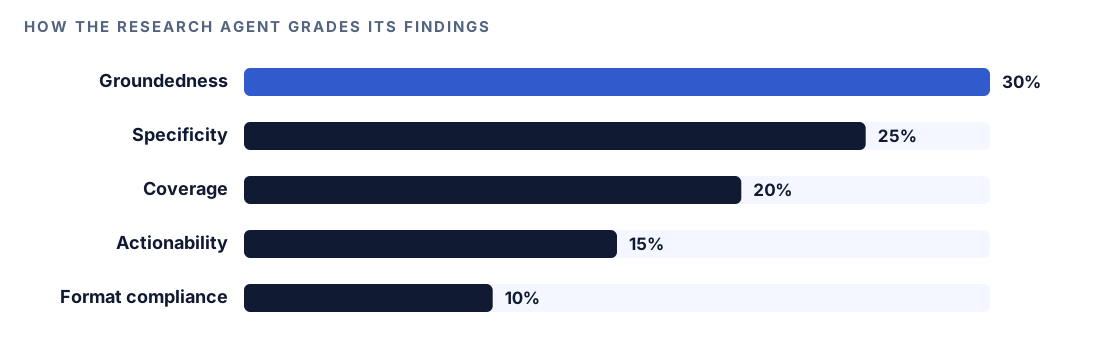
Research that scores below 70 goes back for more work, and below 50 starts over. The agent also treats every fetched page as data, never as instructions, so a page can't redirect what Codex does. Red flags that get a source rejected include round numbers with no methodology, figures found only on one low-authority site, and numbers that look suspiciously precise for a broad claim.
Then ask Codex to apply the fixes:
Use the fact-check report for content/blog/remote-work-trends.md. For each claim marked NOT FOUND or WEAK, find the original source of the number. If you find it, reword the sentence to match the source exactly and link that page. If you can't, rewrite the sentence without the number or remove it, and tell me which you chose. Leave VERIFIED claims alone. Show me the diff, run our build, then run $blog factcheck on the file again.Make it repeatable
Fact-checks pay off most right before a post merges. A short script can check every post changed on a branch with codex exec and save one report per post:
mkdir -p reports
for post in $(git diff --name-only --diff-filter=AM origin/main -- content/blog); do
  name=$(basename "$post" .md)
  codex exec "run \$blog factcheck $post and list every claim that scored below 0.7" -o "reports/factcheck-$name.md"
done
The -o flag writes Codex's final message to the file and still prints it, so the reports can be attached to a pull request or read in the job log. The dollar sign is escaped because the prompt sits in double quotes. Because each run fetches live pages, make sure your sandbox and permission setup allows the network access the task needs. Our guide to automating checks with codex exec covers CI setup in more detail.
Without the skill: a plain Codex prompt
Codex can run a basic check with no kit installed:
Read content/blog/remote-work-trends.md and list every sentence that contains a number, percentage, dollar amount or named source. For each one with a link, fetch the page and tell me whether the exact number appears there in the same context. Mark claims without links as unverified and suggest a search for each. Check the links one at a time and don't edit the file.The skill adds a fixed scoring scale with named statuses, claim patterns that catch vague "studies show" phrasing, set rules for paywalls, PDFs and dead links, and one report layout you can hand straight back to Codex for the fixes.
Pitfalls to avoid
- Trusting a citation because a link exists. A link to a homepage or an unrelated page is not support.
- Citing the article that quoted a study instead of the study itself.
- Fixing the number but leaving the old year in the sentence.
- Treating PARAPHRASE as a pass without reading what the source actually says.
- Keeping "studies show" or "research indicates" with no link.
- Forgetting SKIPPED claims. A post with more than 10 cited URLs needs a second pass.
Keep going
- Score a blog draft before you publish to check sourcing alongside structure, SEO and readability.
- Update old blog posts for freshness when a post has many failed claims and needs a full refresh.
- Source-grounded research with NotebookLM and Codex for finding replacement figures in your own documents.
- See every Codex Blog and Codex SEO command, including research and writing commands that pair with the fact-check.
FAQ
How do you fact-check a blog post?
List every claim that contains a number or a named source. Open each cited page, confirm the exact figure appears in the same context, and check that the year matches. Mark claims with no source as unverified, then find a primary source for each or remove it.
What is the difference between a primary and a secondary source?
A primary source is the organization that collected the data, such as a government agency or the research team behind a study. A secondary source is an article that reports on it. Cite the primary source whenever you can, because figures drift each time they're copied.
Can Codex fact-check blog posts reliably?
It handles the mechanical part well: checking whether a number appears on a cited page in a matching context, and scoring how strong that match is. It flags pages it can't read, and it can't judge whether the original study was well designed, so treat the report as a map of what to read, not a final verdict.
What happens when a cited source is behind a paywall?
The command can't see content behind a login, so a paywalled source scores 0.5 as WEAK, with a note explaining why. Check it yourself if you have access, or find a publicly available page that reports the same figure.
How many sources can Codex check in one run?
The factcheck command verifies up to 10 cited URLs per run and lists the rest as SKIPPED, so it doesn't overload source sites. For posts with more citations, fix the first batch and then have Codex check the remaining sources.