
Content Operations
Repurpose Blog Posts into Social and Email with Codex
Repurpose blog posts in Codex: turn one finished post into an X thread, LinkedIn article, YouTube script, Reddit post and email excerpt you can review.
To repurpose blog posts well, you don't paste the same paragraph into every channel; you rebuild the post's best ideas in the shape each platform expects. In Codex, RankCue's $blog repurpose <file> reads a finished post, pulls out its key insights and statistics, and writes a Twitter/X thread, a LinkedIn article, a YouTube script, a Reddit post and an email newsletter excerpt as separate files in your project. This guide covers what makes repurposing work, how the command runs, what each format contains, and how to review and publish the drafts with Codex.
Key takeaways
$blog repurposeturns one post into up to five drafts: an X thread, a LinkedIn article, a YouTube script, a Reddit post and an email excerpt.- It first extracts 5 to 7 key insights, every statistic with its source, quotes, the main argument and a short TL;DR, so all five formats draw on the same facts.
- Each format has its own rules, such as 7 to 9 tweets under 280 characters, 800 to 1,200 words for LinkedIn with the link moved to the first comment, and 150 to 200 words for email.
- Drafts land in a
repurposed/folder, one Markdown file per platform, named after the post's slug.- Nothing gets posted for you. Codex can check every figure against the original, tune the drafts to your voice, and show you the changes first.
The repurpose command at a glance
| Item | Details |
|---|---|
| Command | $blog repurpose <file> |
| What you give it | A finished blog post, plus the platforms you want, or all of them |
| What Codex reads | The post's title, key insights, sourced statistics, quotes, main argument, audience and topic |
| What you get back | Up to five Markdown drafts in repurposed/ and a summary with counts and next steps |
| Needs | No API keys or third-party accounts; the command writes drafts and doesn't post them |
| Best for | Getting more reach from each post without rewriting it five times by hand |
What does it take to repurpose a blog post well?
A good post took hours of research, and most of the people who would value it will never open your blog. Repurposing carries that research to where they already scroll, read and watch. The lazy version is one link plus a pasted excerpt in every feed. The useful version gives each audience something complete on its own terms, with a path back to the full post.
Every platform has its own shape
Each channel imposes its own limits. On X, you get 280 characters per tweet. On LinkedIn, a handful of lines decide whether anyone expands the post. On YouTube, the opening seconds decide whether anyone stays. On Reddit, anything that reads like marketing tends to get downvoted. In email, the subject line does all the work. One idea needs a different cut, order and tone for each, which is why the skill carries separate rules per platform.
Start from the post's core, not its paragraphs
Trimming paragraphs one by one produces weak social copy. A better method rebuilds from the post's strongest material, and that's how the skill works: it first lists the standalone insights, sourced figures, quotable lines, central argument and a brief TL;DR, then builds every format from that list. One shared core means the X thread and the newsletter can't quietly disagree about a number.
Keep the blog as the full answer
The post remains the complete version; everything else is an entry point. Where the topic is already being discussed in a community, on Reddit, in YouTube comments or in a LinkedIn thread, the skill recommends a two-way link. The community version names the blog as the long-form answer, and the blog mentions the discussion as social proof.
Value before promotion
Online communities accept the occasional plug from people who also contribute. For Reddit the skill applies the familiar 10% rule, keeping promotion to roughly one post in ten, and writes each draft so a reader who never clicks still learns something.
How $blog repurpose runs inside Codex
When you run the command on a post file, the skill works through six steps. The extraction step is the one that matters most, because every format inherits its facts.
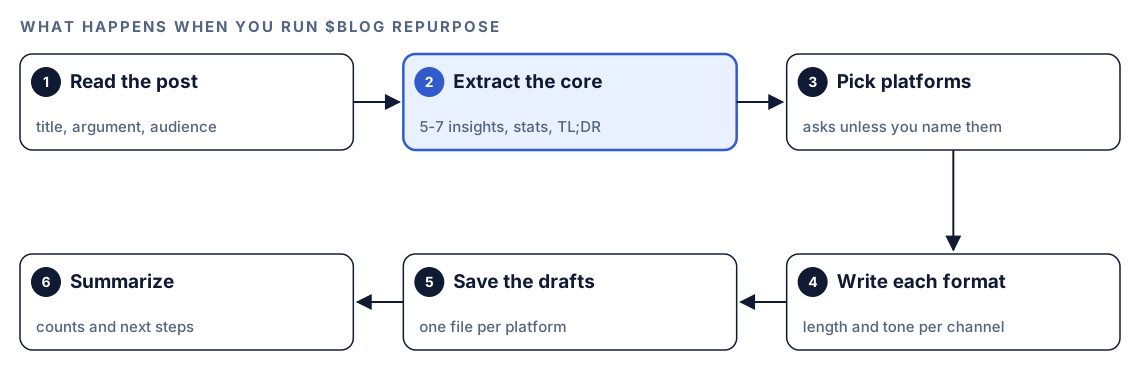
- Read the post. Codex opens the file and reads the title, the argument, the audience the post was written for and its topic category, which later guides hashtag and subreddit choices.
- Extract the core. It writes down 5 to 7 key insights, each as a standalone statement, plus every statistic with its attribution, notable quotes, the main argument and a 2 to 3 sentence TL;DR that delivers value on its own.
- Pick platforms. It asks which formats you want: the X thread, LinkedIn article, YouTube script, Reddit post, email excerpt, or all of them. If your request already names a platform, it skips the question.
- Write each format. Each draft follows its platform's rules for length, structure and tone, described in the next section.
- Save the drafts. Every format goes into its own file in a
repurposed/folder, which Codex creates if it doesn't exist yet. - Summarize. You get a list of the files with counts, such as tweets, words and estimated video minutes, plus suggested next steps.
What Codex writes for each platform
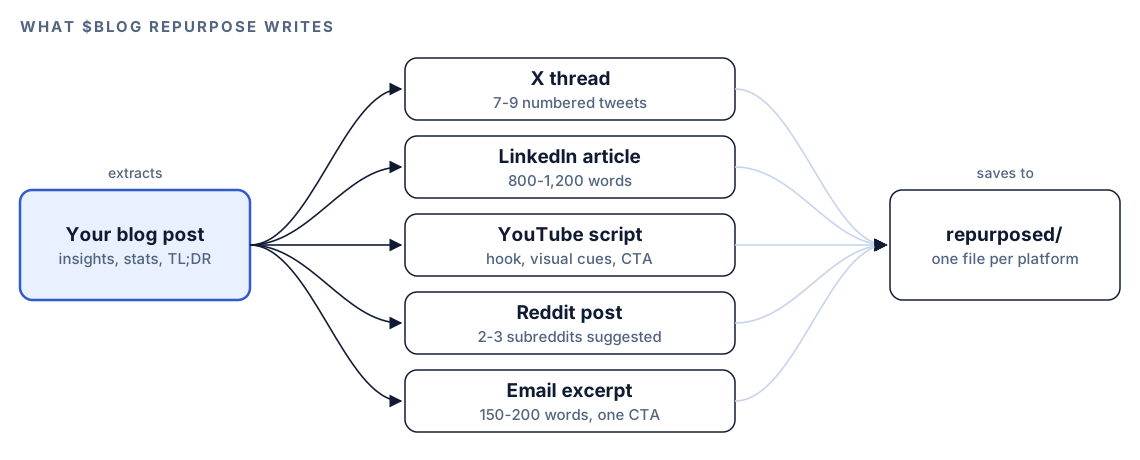
The five formats share one source but follow very different rules.
Twitter/X thread
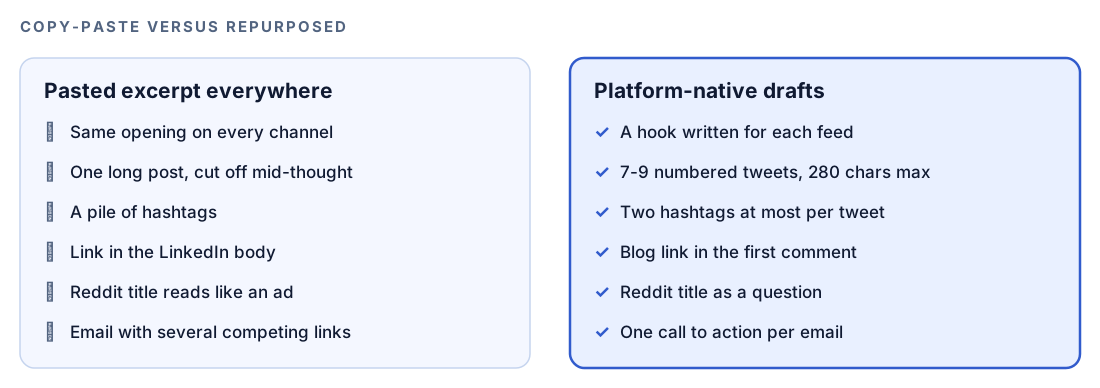
Expect 7 to 9 numbered tweets (1/, 2/ and so on), none longer than 280 characters. Tweet one has a single job, to stop the scroll, using an open question or a surprising figure from the post. The middle tweets give one insight apiece, each readable out of context and sourced where possible. The last tweet restates the core takeaway, links to the post and carries two hashtags at most. The tone is conversational and dense with ideas.
LinkedIn article
This draft is a first-person piece of 800 to 1,200 words, more opinionated than the original post. Because only the opening lines show before the post expands, those lines carry a personal story, an observation or a contrarian take, and stock openers like "I'm excited to share" are ruled out. Below that come one-to-three-sentence paragraphs, bold phrases, a numbered list of lessons and a couple of sourced figures, closing on a question for the comments. External links stay out of the body; the draft notes that the blog link goes in the first comment instead.
YouTube script
The script is timed. Seconds 0 to 15 open on the post's most striking point. The rest of the first minute previews three things the viewer will learn, says why they matter now, and cues a title card. Three to five segments follow, one per major section of the post, each pairing a point with evidence and a real example. Stage directions are written inline: [SHOW CHART: description], [CUT TO SCREENCAST], [B-ROLL: description] and [TEXT ON SCREEN: key stat]. The last 15 to 30 seconds ask for a subscription, point to the post in the description and tease a related video. Extras include a runtime estimate based on roughly 150 spoken words a minute, a title under 60 characters, a thumbnail concept and a timestamped description.
Reddit post
Two or three candidate subreddits come first, chosen with their size, posting rules and link policy in mind. The headline poses a question or shares an observation; it never announces a blog post. The body reads like a colleague reporting findings: an opening question, three to five sourced data points, Reddit-style Markdown, and an invitation for others to share what they've seen. Only at the end does the draft mention the full write-up, in one plain line. Nothing in it sounds like a sales pitch.
Email newsletter excerpt
Subject lines land between 40 and 60 characters and lean on curiosity, value or timeliness, never bait. The preview text, 40 to 90 characters, works as a second headline rather than an echo of the first. Inside: a TL;DR of two or three sentences, three sourced takeaways, and one button-style link to the post. The total budget is 150 to 200 words, so paragraphs stay at one or two sentences and key phrases are bolded for skimmers.
Run it in Codex, step by step
- Install the Codex Blog kit through the install section, restart Codex so it discovers the new skills, and open a task in the project that holds your posts.
- Run the command on a finished post:
$blog repurpose content/blog/remote-onboarding.md- Codex asks which platforms you want. To skip the question, name them in the same request:
$blog repurpose content/blog/remote-onboarding.md for LinkedIn and the email newsletter- Or describe the job in plain language, and Codex loads the skill because the request matches it:
Turn content/blog/remote-onboarding.md into an X thread and a Reddit post, and suggest which subreddits fit.- Open the
repurposed/folder. Since the files are written inside your project, Codex doesn't need to leave its workspace to save them.
The command works on a post file, so run it after the post is final. If you repurpose a draft and then edit the post, the drafts won't match.
Reading the output
After saving, Codex prints a summary. With placeholders, it looks like this:
## Repurposed Content: [Blog Title]

### Generated Outputs
- Twitter/X thread: repurposed/[slug]-twitter-thread.md ([N] tweets)
- LinkedIn article: repurposed/[slug]-linkedin-article.md (~[N] words)
- YouTube script: repurposed/[slug]-youtube-script.md (~[N] min estimated)
- Reddit post: repurposed/[slug]-reddit-post.md ([N] subreddits suggested)
- Email excerpt: repurposed/[slug]-email-newsletter.md (~[N] words)

### Quick Stats
- Key insights extracted: [N]
- Statistics reused: [N] across [N] platforms
- Total content pieces: [N]

### Next Steps
- Review and customize each piece for your brand voice
- Schedule posts using your preferred social media tool
- [Suggested posting windows for each platform]
The summary is a starting point, not a publishing schedule. Review the drafts in this order:
- Facts. Every statistic and quote must match the post and keep its source.
- Hooks. The first tweet, the LinkedIn opening lines, the video's first 15 seconds and the email subject decide whether anything else gets read.
- Platform rules. Tweet lengths, hashtag counts, the LinkedIn link note and the single email call to action.
- Voice. Make each piece sound like your brand, not like a template.
- Reddit, last and most carefully. Read each suggested subreddit's current rules before you post anything there.
Edit and publish with Codex
The drafts are files in your repository, so Codex can review and revise them the same way it edits code. That's the difference from a copy-and-paste tool: you can ask it to prove each figure against the source and show the changes as a diff.
A finished email excerpt follows a fixed shape, which makes it easy to check:
Subject: What to do in a remote hire's first 30 days
Preview: Three takeaways from this week's guide, with sources

**TL;DR:** [Two or three sentences that stand on their own]

- **[Takeaway one]** ([source])
- **[Takeaway two]** ([source])
- **[Takeaway three]** ([source])

[Read the full guide]
Then ask Codex to review the whole set:
Review the drafts in repurposed/ for remote-onboarding. Check every statistic and quote against content/blog/remote-onboarding.md and list anything that isn't in the post. Rewrite the hooks to match the voice in docs/voice.md. Confirm each tweet is under 280 characters with at most two hashtags, the LinkedIn body has no links, and the email has exactly one call to action. Show me the diff.Once a community post is live, close the loop the skill recommends by linking back from the blog:
Our Reddit discussion of this post is at [URL]. Add one sentence near the end of content/blog/remote-onboarding.md that points readers to the discussion. Show the diff and run the build.If your newsletter or social schedule lives in the repository, as a template folder or a queue file, Codex can copy the approved drafts there too, so the publishing step uses exactly what you reviewed.
Make it repeatable
Repurposing fits naturally after a post merges, which makes it a good job for codex exec, the non-interactive mode. One detail matters here: the skill normally stops to ask which platforms you want, and an unattended run can't answer. Name the platforms in the prompt so it never has to ask:
codex exec --sandbox workspace-write '$blog repurpose content/blog/remote-onboarding.md for all platforms. Save the files, then list any statistic you could not trace to a source in the post.' -o repurpose-summary.mdThe --sandbox workspace-write flag lets the run save files, since codex exec is read-only by default. The -o flag saves the final summary, including any untraceable figures, to a file a reviewer can read first. Because the run happens in your Git repository, the new drafts arrive as an ordinary change you can review before anything is scheduled. The non-interactive mode docs cover the options, and our guide to running checks with codex exec and CI shows how to trigger runs automatically.
Without the skill: a plain Codex prompt
You can get usable drafts from Codex without the kit:
Read content/blog/remote-onboarding.md. Pull out the 5 to 7 most useful insights and every statistic with its source. Then write a 7 to 9 tweet thread (each tweet under 280 characters, numbered 1/, 2/, at most two hashtags, link only in the last tweet) and a 150 to 200 word email excerpt with a 40 to 60 character subject line, a TL;DR, three sourced takeaways and one link. Use only facts from the post. Save each draft in repurposed/.What the skill adds is the full set of five formats with a tested structure for each, rules such as the LinkedIn link note and the Reddit self-promotion limit, YouTube production cues with a runtime estimate, predictable file names, and the same summary every time.
Pitfalls to avoid
- Publishing drafts unedited. They're a strong first pass, not your voice.
- Letting numbers drift. A rounded figure or a dropped source in one channel undermines the rest.
- Repurposing a post nobody has fact-checked. One error becomes five.
- Treating Reddit as a place to drop links. Read the subreddit's rules and lead with something useful.
- Moving the LinkedIn link back into the body after the skill took it out.
- Using the same hook everywhere. Each platform's opening has a different job.
- Running the command on a draft, then editing the post so the versions no longer match.
Keep going
- Plan a blog strategy and editorial calendar, which reserves a slot each month for repurposed content.
- Teach Codex your brand voice so the drafts need fewer edits.
- Fact-check blog statistics against sources before a post's numbers spread across five channels.
- See all Codex SEO and Codex Blog skills to find what pairs with this command.
FAQ
What does it mean to repurpose a blog post?
It means adapting a post you've already published into other formats, such as social posts, videos or newsletter sections, so the same research reaches new audiences. Good repurposing rewrites the ideas for each platform rather than pasting excerpts.
Which platforms are best for repurposing blog content?
It depends on where your audience spends time. The Codex Blog repurpose command covers five common channels: X, LinkedIn, YouTube, Reddit and email newsletters. Start with the one or two your readers actually use.
Is repurposing blog content bad for SEO?
Not when each version is a genuine adaptation. The skill writes shorter, rewritten pieces for each platform that point back to the post as the full answer, rather than copying the article elsewhere. The blog stays the complete version.
How long should a LinkedIn article based on a blog post be?
The repurpose skill aims for 800 to 1,200 words, shorter than a typical long-form post. The first two or three lines matter most, because they're all readers see before deciding to expand the post.
Can Codex repurpose blog posts automatically?
Codex can write all five drafts from one command, and with codex exec it can do so without the interactive UI, for example after a post merges. It doesn't post anything for you, so a person still reviews the drafts and publishes them.