
Content Operations
Editorial Calendar with Codex: Blog Strategy to Schedule
Plan a blog strategy and editorial calendar in Codex: pillars, clusters, stale-post refreshes, a 60/30/10 content mix and promotion slots in your repo.
An editorial calendar with Codex starts one step earlier than most calendars: first you decide which topics the blog should own, then you turn that plan into dated posts, refreshes and promotion slots. RankCue's Codex Blog kit handles both halves with $blog strategy <niche> for the plan and $blog calendar [period] for the schedule, and Codex keeps the results in your project where it can act on them. This guide covers how strategy and calendar fit together, how each command runs, how to read the output, and how to turn calendar rows into draft files.
Key takeaways
$blog strategydesigns 3 to 5 content pillars, each a hub-and-spoke cluster of 8 to 12 spoke topics, and ends with a 90-day roadmap.$blog calendarscans your posts, flags stale ones from their front matter dates, and schedules new posts, refreshes and repurposed pieces in a 60/30/10 split.- Every new post gets a cluster, a target keyword and one of 12 content templates, so each slot is ready to become a brief.
- The calendar finishes half-built clusters before opening new ones and never keeps more than three in active build-out.
- Codex can then create draft files for each slot, add pillar links as spokes go live, and update
lastUpdateddates after refreshes.
The strategy and calendar commands at a glance
| Item | Details |
|---|---|
| Command | $blog strategy <niche> for the plan, $blog calendar [period] for the schedule |
| What you give it | Your niche, your goals and rivals, how often you can publish, and a month or quarter |
| What Codex reads | Your blog files and their front matter dates, plus web search results on competitors and seasonal trends |
| What you get back | A strategy document with pillars and a 90-day roadmap; a saved calendar with a decay report, refresh queue and promotion schedule |
| Needs | Internet access for research; no third-party API keys |
| Best for | Launching a blog, restarting a stalled one, or planning the next month or quarter |
What is an editorial calendar, and why plan the strategy first?
An editorial calendar puts three kinds of work on dates: publishing new posts, updating old ones and promoting both. At its plainest, it's a table of days, titles and statuses. A bare table never says why each title is there, so teams that skip strategy end up with one-off posts that don't support each other, and no topic gets enough depth to compete.
A strategy answers the questions a calendar can't: who you're writing for, which subjects you want to own, how you'll differ from the blogs that already rank, and how you'll measure progress. The calendar turns those answers into a rhythm your team can keep.
Pillars and clusters
Search engines tend to favor sites that cover a subject thoroughly. The usual way to build that depth is a topic cluster: one long pillar page that covers a subject broadly, surrounded by shorter spoke posts that each target a narrower long-tail keyword. The pillar links to every spoke, every spoke links back, and related spokes link to each other.
The strategy skill plans on this model, with working sizes of 3,000 to 4,000 words for a pillar, 1,500 to 2,500 words for a spoke, and 8 to 12 spokes per pillar. These are planning targets, not Google rules.
Cadence, freshness and the content mix
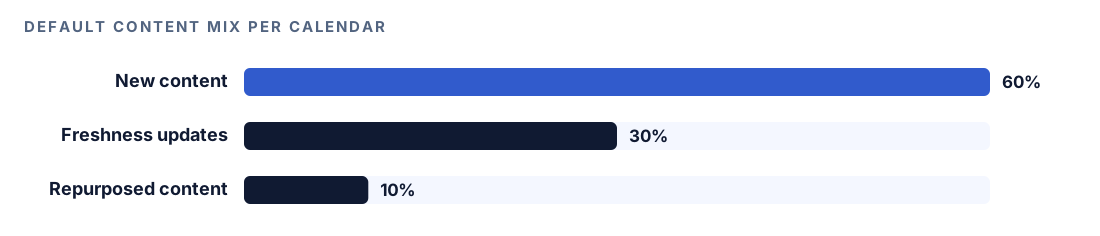
The calendar skill assumes two posts a week unless you say otherwise, and it reserves part of that capacity for old posts. Its formula is 60% new content, 30% freshness updates and 10% repurposed content. At two posts a week, that means eight slots a month: five new posts, two refreshes and one repurposed piece. Refreshes earn their place because posts age: statistics go stale, screenshots change, and competitors publish newer answers.
Promotion is part of the plan
The strategy skill also plans presence on YouTube, Reddit, review platforms, Wikipedia and Wikidata, industry publications and social networks, because AI assistants often cite pages other than yours. Its default budget split is 40% owned content and 60% earned media and distribution.
How $blog strategy builds the plan
When you run $blog strategy with your niche, Codex works through eight planning areas and combines them into one document.
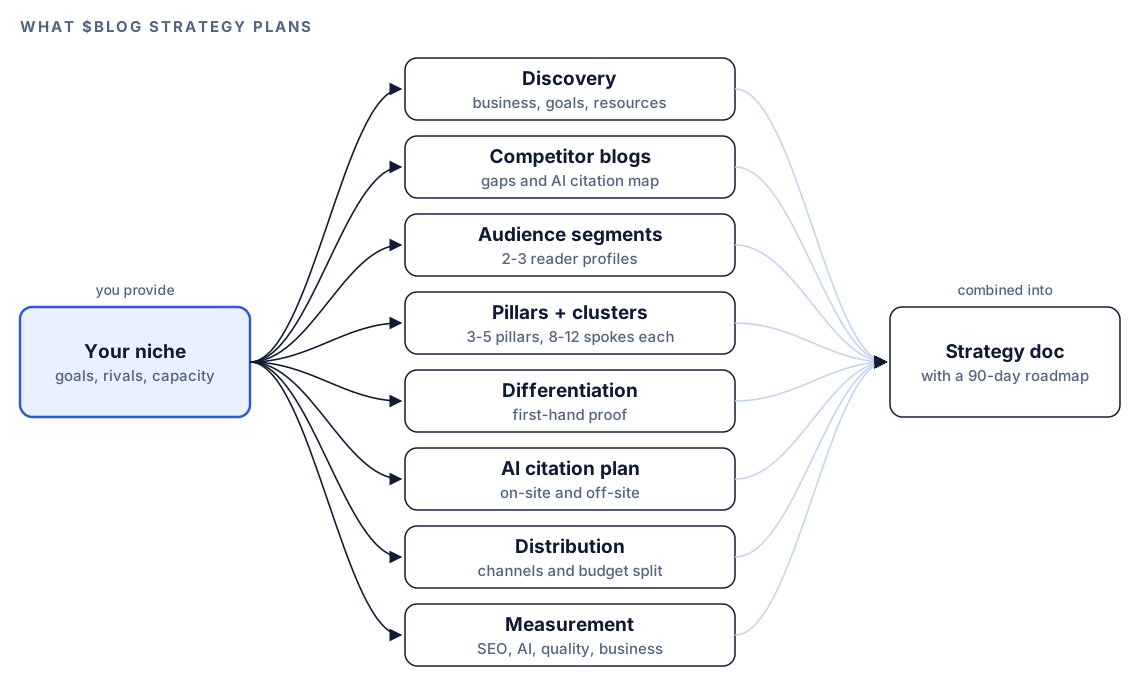
- Discovery. Codex asks about your business, the blog's goal (traffic, leads, authority or AI citations), your three to five main competitors, the expertise or data only you have, and your weekly writing capacity. It scans any blog already in the project.
- Competitor blogs. It searches the web for competitor blogs and reviews their publishing frequency, content types, visuals, schema and social reach. It also builds an AI citation map: which competitor ChatGPT, Perplexity and Google AI Overviews cite for each target query. Queries where nobody is cited become gaps, the openings the skill rates highest.
- Audience segments. Two or three reader profiles with role, pain points, what they search, what they ask AI assistants, and buying stage.
- Pillars and clusters. Each pillar gets a purpose, three to five primary keywords and a unique angle, plus a build plan listing every spoke with its template, keyword, word count and links.
- Differentiation. Ways to show first-hand experience: original data, case studies, building in public, expert interviews and hands-on tool reviews.
- AI citation plan. Answer-first openings, self-contained 40 to 60 word passages under each H2, question-style headings and FAQ sections, plus off-site channels.
- Distribution and measurement. Priority channels, and metrics for traditional SEO, AI citations, content quality and business impact.
- Strategy document. One document ending in a 90-day roadmap of foundation, expansion and optimization months.
The quality standards deserve a close read, because they become the bar every future post must clear: a quality score of 80 or more from $blog analyze, a named author with at least eight sources from the skill's top three quality tiers, two or more charts and three or more images, five or more internal links within the cluster, and at least 1,500 words for spokes and 3,000 for pillars. If you've already run $blog discourse on the topic, the strategy skill picks up those findings too.
How $blog calendar turns the plan into a schedule
The calendar command takes a period, a month or a quarter, and reads your actual blog files first, so the plan reflects what you've already published.
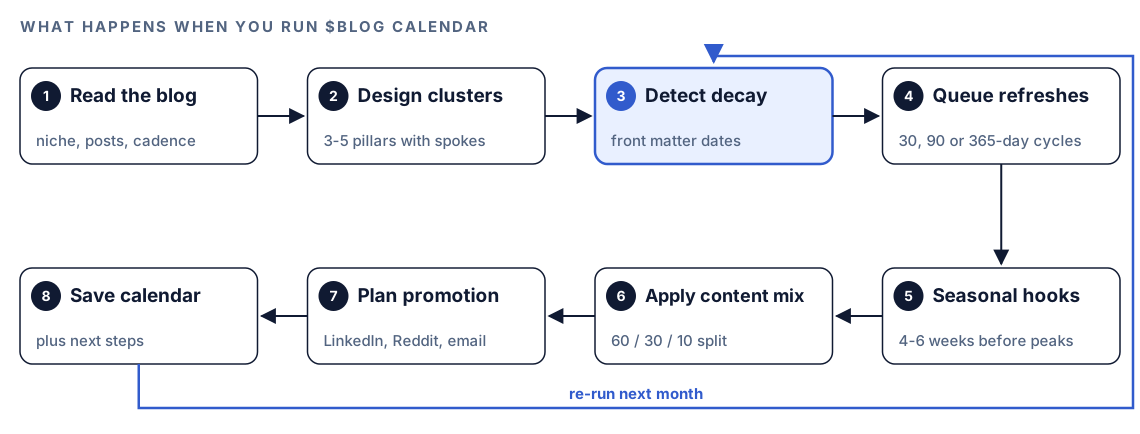
- Read the blog. Codex scans for Markdown, MDX and HTML posts and confirms your niche, cadence, timeframe and goals.
- Design clusters. Three to five, each with a pillar of 3,000+ words, supporting posts, a comparison and a FAQ post.
- Detect decay. It reads each post's
lastUpdatedordatefront matter and writes a content decay report with priorities. - Queue refreshes. Traffic drivers every 30 days, medium-priority posts every 90, low-priority posts yearly, evergreen posts when data changes.
- Seasonal hooks. It checks events, launches, algorithm updates and seasonal trends with web search, scheduling seasonal posts four to six weeks before the peak.
- Apply the content mix. The 60/30/10 split sets the slot types, and each new post gets a template.
- Plan promotion. LinkedIn and X on publish day, Reddit two to three days later, email in a weekly batch, and a YouTube video for pillar posts only.
- Save the calendar. Codex saves it and suggests
$blog brieffor the first topic,$blog writefor drafts and$blog rewritefor refreshes.
What goes into every calendar
Three sets of rules shape every calendar the skill produces. The first is the content mix.
Slots and templates
The split scales with cadence. Three posts a week gives twelve monthly slots: seven new, four refreshes, one repurposed. One post a week gives four: two or three new, one refresh, and a repurposed piece when there's room. Guides and how-tos take the biggest share of new posts, followed by comparisons, listicles, case studies and thought leadership, and each new post is matched to one of 12 templates, such as how-to-guide, comparison, pillar-page or faq-knowledge.
Decay thresholds
| How much traffic | Stale after | At risk after |
|---|---|---|
| Top traffic drivers | 30 days | 90 days |
| Middle of the pack | 90 days | 180 days |
| Little traffic | 180 days | 365 days |
A top post stale for over 30 days is Critical: refresh it now. Any post past its threshold is High priority this month, posts close to it are Medium this quarter, and the rest are Low. Since thresholds depend on traffic, tell Codex which posts bring in the most visits, or see our guide to spotting content decay in Search Console data.
Cluster progress rules
The calendar tracks each cluster's coverage and applies four rules. Clusters at 50% coverage or more come first. Clusters with a published pillar but few spokes come second. A new cluster starts only when existing ones reach 75%. No more than three clusters are in active build-out at once, which prevents five half-finished topics and no complete one.
Run it in Codex, step by step
- Set up the Codex Blog kit from the install section, restart Codex so it picks up the skills, and start a task from your blog's repository so it can see your posts.
- Check your permission mode. Both commands search the web for competitors and trends, and your mode decides whether Codex asks first. Allow it for this research.
- Run the strategy command with your niche, and save a round trip by including your answers:
$blog strategy bookkeeping software for freelance designers. We sell a bookkeeping app. Goal: trial sign-ups from organic search. Competitors: example-books.com, ledger.example and paytrack.example. We can publish two posts a week. Our edge is anonymized usage data from our own product.- Ask Codex to save the strategy in your repository, for example as
content/strategy.md, so later tasks can use it. - Run the calendar with the period you want:
$blog calendar quarterly- Or ask in plain language, and Codex picks the skill because the request matches it:
Build next month's editorial calendar for our blog. Use the pillars in content/strategy.md, assume two posts a week, and flag every post overdue for a refresh. Our top traffic posts are pricing-for-designers.md and invoice-templates.md.If you leave out the period or cadence, the skill asks before it plans.
Reading the calendar
The monthly calendar is a set of weekly tables followed by the refresh queue and promotion plan. With placeholders:
## Editorial Calendar: [Month Year]
Publishing cadence: 2 posts/week
Content mix: 5 new / 2 refreshes / 1 repurposed

### Week 1: [Date Range]
| Day | Type | Title | Template | Cluster | Target Keyword | Status |
|-----|------|-------|----------|---------|----------------|--------|
| Mon | New | [Title] | how-to-guide | [Cluster] | [keyword] | Draft |
| Thu | Update | [Existing post] | - | [Cluster] | [keyword] | Refresh |

### Freshness Update Queue
| Post | Last Updated | Priority | Scheduled |
|------|--------------|----------|-----------|
| [slug] | [date] | High | Week 2 |

### Distribution Schedule
| Post | Publish Date | LinkedIn | Reddit | Email | YouTube |
|------|--------------|----------|--------|-------|---------|
| [Title] | [Date] | Same day | +2-3 days | Next batch | If pillar |
The quarterly version groups rows by month, with a focus cluster per month and quarterly goals. Both include the decay report, a cluster progress table and a 30-day freshness schedule with an owner per post.
Work through it in this order:
- Critical decay items. A top post going stale costs the most.
- Half-built clusters. Finish clusters already past halfway.
- New posts. Turn each row into a brief, then a draft.
- Seasonal posts. Confirm each still has its lead time.
- Promotion. Book channel slots once dates are firm.
Apply the plan with Codex
A calendar in a Markdown file is still only a plan. In Codex, the same agent can turn each row into files that follow your site's conventions. Start with draft stubs that copy your existing front matter:
---
title: "[Working title from the calendar]"
description: ""
date: 2026-11-02
lastUpdated: 2026-11-02
draft: true
---Read the editorial calendar you saved for November. For each New row, create a draft file in content/blog/ that copies the front matter fields our existing posts use, with the working title and publish date filled in and draft set to true. Add the cluster, template and target keyword as a comment under the front matter. Don't write body text. Show me the diff, then run the site build so I know the drafts don't break anything.From there, each new slot goes through $blog brief and $blog write, and each refresh through $blog rewrite. Two follow-up requests keep the plan honest as posts ship:
The spoke "invoice reminders for freelancers" is published. Link to it from its pillar page with descriptive anchor text, and link the new post back to the pillar. Show the diff.I just refreshed pricing-for-designers.md. Set lastUpdated to today's date in its front matter.The second one matters more than it looks. The skill reads lastUpdated to judge staleness, so a refresh that never touches the field still looks overdue next month.
Make it repeatable
The skill tells you to re-run the calendar each period, which suits a scheduled codex exec run. Because it saves a file, the run needs write access to the workspace:
codex exec --sandbox workspace-write '$blog calendar monthly for next month. Two posts a week. Top traffic posts are listed in content/strategy.md. Save the calendar next to last month and put Critical decay items first in your summary.' -o calendar-summary.mdThe default codex exec sandbox is read-only, hence --sandbox workspace-write. The -o flag saves the final summary to a file for your team update. The run expects a Git repository, so the new calendar arrives as a normal change to review. Trend research needs the web, so confirm your sandbox settings give the run the network access it needs. Re-run $blog strategy less often, when goals change. Our guide to automating checks with codex exec covers scheduling.
Without the skill: a plain Codex prompt
You can get a reasonable first draft from Codex with no kit installed:
I run a blog about bookkeeping for freelance designers. Propose 3 to 5 content pillars. For each, give one pillar page and 8 to 12 spoke topics with a long-tail keyword each, and a linking plan where every spoke links to the pillar. Search the web for three competitor blogs and tell me which topics they cover poorly.Scan content/blog/ and list every post with its date or lastUpdated value. Then build a 4-week calendar at two posts a week: five new posts from content/strategy.md, two refreshes of the oldest important posts, and one repurposed piece, as a table with day, type, title, cluster, keyword and status.What the skills add is a fixed method: the same decay thresholds, the 60/30/10 mix, cluster progress rules, 12 named templates, promotion timing per channel and a consistent format on every run.
Pitfalls to avoid
- Opening more clusters than you can finish. One complete cluster beats three half-built ones.
- Planning a cadence your team can't sustain.
- Leaving refreshes out, so your best older pages decay.
- Missing front matter dates. Without
lastUpdatedordate, decay detection has nothing to measure. - Publishing seasonal posts at the peak instead of weeks before it.
- Treating the AI citation map as permanent. Re-check it when you revisit the strategy.
- Dropping bare links on Reddit. Share an insight, not a URL.
Keep going
- Build topic clusters from SERP overlap to test which keywords belong together.
- Write an SEO content brief with Codex, the next step for each calendar row.
- Turn one post into social posts and emails for your repurposed slots.
- See every Codex SEO and Codex Blog skill that plugs into this plan.
FAQ
What should an editorial calendar include?
Each entry needs a publish date, a title, a content type and a status. A calendar built for search also adds the cluster, target keyword and template for new posts, a queue of refreshes and a promotion plan.
How far ahead should you plan a blog calendar?
A practical approach is one month in detail and one quarter in outline, and the calendar skill supports both. Schedule seasonal content four to six weeks before the peak so it has time to be indexed.
What is the difference between a content strategy and an editorial calendar?
A content strategy decides who you write for, which topics you want to own and how you'll stand out. An editorial calendar schedules the posts, refreshes and promotion that carry it out. In the Codex Blog kit, $blog strategy handles the first and $blog calendar the second.
How often should you update old blog posts?
The calendar skill revisits top traffic drivers every 30 days and mid-priority posts every 90, looks at low-priority ones once a year, and leaves evergreen posts alone until their facts change.
Can Codex build an editorial calendar from my existing posts?
Yes. Run $blog calendar in a Codex task opened in your blog's project. Codex scans your posts, reads their front matter dates to find stale content, and schedules refreshes alongside new posts. It can then create draft files for each new slot.