
Keyword Research
Topic Clusters with Codex: Group Keywords by SERP Overlap
Build topic clusters with Codex from real SERP overlap: plan a pillar and spokes, map every internal link, then write the posts with links in place.
Topic clusters with Codex start from one test: if two keywords return many of the same top-ten Google results, they belong together, and if they don't, they need separate pages. RankCue's $seo cluster command expands a seed keyword, compares live results pair by pair, and designs a pillar page, spokes and an internal link matrix, and $blog cluster can then write every post with the links already in place. This guide explains how clusters work, how both commands run inside Codex, how to read the plan, and how to keep the cluster healthy after launch.
Key takeaways
- Both commands group keywords by shared top-ten organic URLs, not by how similar the words look.
$seo clustermerges keywords into one page at 7 to 10 shared results, clusters them at 4 to 6 and cross-links them at 2 to 3.$blog clustermerges at 5 or more.- A plan has one pillar of 2,500 to 4,000 words and 2 to 5 clusters of 2 to 4 spokes of 1,200 to 1,800 words, and every post gets at least 3 incoming links.
- You review the plan as files:
cluster-plan.json, a summary and an interactivecluster-map.html.- Execution writes the pillar first, then each spoke, swaps link placeholders for real links, and ends with a scorecard.
The cluster commands at a glance
| Item | Details |
|---|---|
| Command | $seo cluster <seed> to plan, and $blog cluster with plan or execute to plan and write the posts |
| What you give it | A seed keyword, or an existing strategy from $seo plan or $blog strategy |
| What Codex reads | Live search results for every keyword variant, through web search or DataForSEO when connected, and later your plan file |
| What you get back | cluster-plan.json, a summary, cluster-map.html, then written posts or briefs and cluster-scorecard.md |
| Needs | Internet access for searches; DataForSEO is optional, needs your own account, and its own pricing applies |
| Best for | Planning a content hub, preventing cannibalization before you write, and building a new blog section |
What is a topic cluster?
A topic cluster is a set of pages that cover one subject together. A broad pillar page targets the main keyword and links down to narrower spokes, and each spoke answers one question, links back up and links across to its neighbors. Readers move from overview to detail, and search engines see which page answers which query.
Pillar, clusters and spokes
- The pillar targets the broadest keyword: the one with the widest intent, the highest relative volume, and the most result overlap with the other keywords.
- Clusters are subtopic groups under the pillar. The skills plan 2 to 5 of them.
- Spokes are the individual posts in a cluster, 2 to 4 per cluster, each with a primary keyword no other post uses.
Why result overlap beats word similarity
Two phrases can look different and still describe one need. If "improve email deliverability" and "email deliverability tips" return mostly the same pages, Google treats them as one intent, and two posts would compete. Two near-identical phrases can also need different pages, for example when one returns guides and the other returns product pages.
So both skills compare search engine results pages (SERPs), not words. For each keyword pair, Codex searches both and counts the URLs their top-ten organic lists share, ignoring ads, featured snippets and People Also Ask boxes.
Intent decides the template
Each keyword gets one of four intents: informational (how, what, why, guide), commercial (best, review, vs, alternative), transactional (buy, price, discount, sign up) or navigational (brand names, login pages). Navigational keywords are dropped, because a topic page won't satisfy them. Mixed keywords take their dominant intent, and borderline cases are flagged for you.
Intent then picks each post's template: an ultimate guide, how-to, listicle or explainer for informational topics, a comparison, review or best-of page for commercial ones, and a landing page for transactional ones.
How the plan phase runs inside Codex
Planning runs in seven stages, all visible in the task log.
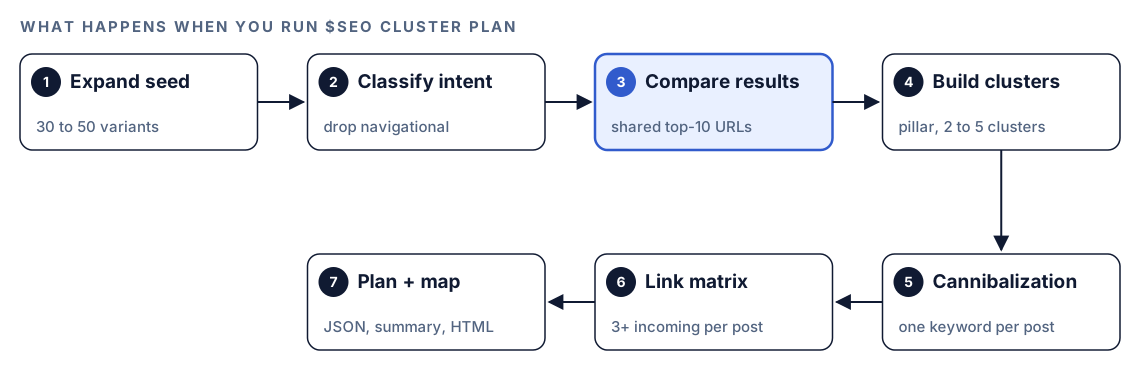
- Expand the seed. Codex gathers 30 to 50 variants from related searches, People Also Ask questions, modifiers such as "how to", "tools" and "checklist", question forms, and commercial terms such as "pricing". If fewer than 30 survive deduplication, a second pass uses the top questions as seeds.
- Classify intent and drop navigational keywords.
- Compare results. Pairs are compared within each intent group first, and only boundary keywords are cross-checked. In the skill's own example, 40 keywords make 780 possible pairs, while four groups of about ten need roughly 180 comparisons.
- Build clusters. Pick the pillar, form 2 to 5 clusters of 2 to 4 spokes, and set a template and word count for each post.
- Check cannibalization. No two posts share a primary keyword, and keywords sharing 7 or more results merge into one post.
- Design the link matrix before any post exists.
- Write the plan and map: JSON, a readable summary, and a self-contained HTML map.
How Codex decides what goes together
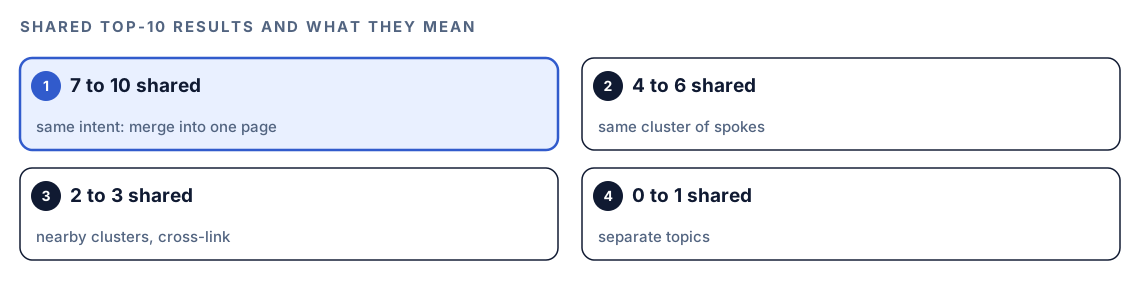
The overlap count drives almost every decision in the plan, and the SEO command sorts it into four bands.
The overlap bands
Seven to ten shared results means one page, four to six the same cluster, two or three neighboring clusters with cross-links, and zero or one separate topics. Before delivery, the SEO command also checks that no spoke shares fewer than 4 results with its cluster peers.
The blog command uses a simpler rule: 5 or more shared results means one post. It also maps the people, products and frameworks Google ties to the topic. Run both on one seed and pairs sharing 5 or 6 results can land differently, so decide those by hand.
The internal link matrix
| Link | Direction | Requirement |
|---|---|---|
| Spoke to pillar | Up | Every spoke, anchored on the pillar keyword |
| Pillar to spoke | Down | Every spoke, anchored on that spoke's keyword |
| Spoke to spoke | Within a cluster | 2 to 3 links per post |
| Cross-cluster | Between clusters | 0 to 1 links per post, only when relevant |
On top of the table: every post needs at least 3 incoming internal links, no page may be an orphan, every post must sit within two clicks of the pillar, anchors use the target keyword or a close variant, and links go in the body copy, not only in navigation.
When search data isn't available
If web search and DataForSEO both fail, the SEO command retries, then falls back to intent-only clustering with a warning. The blog command groups without live results and notes the reduced accuracy in the scorecard. Treat either plan as a draft until you can rerun it with real results.
Run it in Codex, step by step
- Install the kit using the setup steps in the install section, restart Codex, and open a new task in your site or blog project.
- Check your permission mode. Planning runs many web searches, so depending on your mode, Codex may ask before it uses the internet. Approve it for the run.
- Plan a cluster from a seed keyword:
$seo cluster plan email deliverability- Or start from an existing strategy. The SEO command imports the latest
$seo planoutput and skips expansion. The blog command reads the Cluster Build Plan table from$blog strategy, checks it against live results, and flags conflicts rather than overriding your choices.
$seo cluster plan --from strategy
$blog cluster plan --from strategy- Plan with the blog command if it will write the posts. Typed alone,
$blog clusterasks whether to plan or execute. After planning, it summarizes clusters, posts, links and estimated words, then waits for your explicit approval.
$blog cluster plan email deliverability- Or ask in plain language. Codex picks the skill when the request matches:
Group keywords around "email deliverability" by how much their Google results overlap, then plan a pillar page with spokes and an internal link plan.With DataForSEO connected, the SEO command uses its live result data instead of web search. A cost check runs before each batch, Codex asks when a batch needs approval, and it falls back to web search if the budget check blocks the call. You need your own DataForSEO account, and its pricing applies. Our guide to DataForSEO in Codex covers the setup.
Reading the cluster plan
The summary lists overlap scores for keyword pairs, each cluster with its rationale, every post's template and intent, the full link list and the cannibalization check. The JSON file holds the same plan for Codex to execute. A spoke entry in the blog command's plan looks like this:
{
  "id": "A1",
  "title": "[Post title]",
  "primary_keyword": "[long-tail keyword]",
  "secondary_keywords": ["[variant]", "[variant]"],
  "search_volume_estimate": "medium",
  "template": "how-to-guide",
  "word_count_target": 1500,
  "links_to": ["P", "A2"],
  "links_from": ["P", "A2"]
}
Volume is a relative label (high, medium or low) from result signals, not a search count. For exact numbers, pull Ahrefs or DataForSEO data before you set priorities.
Open cluster-map.html in a browser to see the pillar in the center, clusters in color around it, and lines for the links.
Before approving, check what the skill's own pre-delivery list checks: no duplicate primary keywords, 3 or more incoming links per spoke, pillar and spoke links both ways, no orphans, templates that match intent, word counts in range, and 2 to 5 clusters of 2 to 4 posts.
From plan to published posts
Execution works one post at a time, in a fixed order, so links can point at pages that already exist.

With the Codex Blog kit installed, $seo cluster execute writes the pillar and then the spokes, highest volume first, through the blog writing skill. Without it, you get one brief per post in a cluster-briefs/ folder: title, meta description, keywords, template and H2/H3 outline, word count, links with anchors, key points and competing pages to beat. The Complete Bundle includes both kits.
$blog cluster execute runs the same idea in more detail:
- Load the plan from the path you give, or the latest cluster folder.
- Write the pillar first, so spokes can link to a known file.
- Write spokes in priority order, alternating between clusters when there are more than two. Each post gets a context block with its role, keywords, template, word count, the posts already written, and placeholders for posts to come. It also carries an evidence rule: every statistic needs a year, a named source and a dated link, or it is dropped.
- Inject backward links. Earlier posts are scanned for placeholders that point at the new post, and those become real links.
- Keep going on failure. A failed post is logged and skipped, and a cancelled run resumes from the next unwritten post.
- Score the cluster.
cluster-scorecard.mdlists each post's status and word count, a quality score from$blog analyze, a 0 to 100 cohesion score, a link audit, any post pairs with more than 70% keyword overlap, and next steps such as$blog schema.
You approve once, at the plan. Posts are then written without pausing for outline approval, which is why the plan review matters.
Apply the cluster to your site with Codex
Execution writes posts into a cluster folder. While a target post doesn't exist yet, the link is a placeholder:
Before you raise sending volume, read [INTERNAL-LINK: email warmup schedule -> email-warmup-schedule.md].Once that post is written, the marker becomes a normal link:
Before you raise sending volume, read [email warmup schedule](email-warmup-schedule.md).Your site likely uses other paths, front matter and routes, and Codex can convert them in your codebase:
Move the posts from cluster-email-deliverability/ into content/blog/. Rewrite every link to a .md file in that folder as our /blog/<slug> route, keep the cluster, cluster_role and cluster_group front matter, and match our existing front matter fields. Fail if any [INTERNAL-LINK marker is left. Show me the diff, run the build, then list each post with its incoming link count.Read the diff, and spot-check that each spoke links to the pillar inside the body text. Then run $blog schema on the pillar and a few spokes to add structured data such as BreadcrumbList.
Make it repeatable
Clusters decay when new posts ignore the plan. A short AGENTS.md rule keeps Codex honoring it on every future writing task:
## Topic clusters
- cluster-plan.json in each cluster folder is the source of truth for primary keywords and planned links.
- Before writing a new post, check every cluster plan. If the new post's primary keyword is already taken, stop and ask.
- Every spoke links to its pillar with the pillar's primary keyword, and to 2-3 spokes in its cluster, in body text.
- After adding or removing a post in a cluster, run $seo cluster map and report posts written vs planned.
Codex reads AGENTS.md before it starts work, so the rule applies without repeating it. The map command updates each post's status and reports written versus planned posts and the share of planned links in place. Our guide to AGENTS.md rules for SEO covers how to keep these files short and specific.
Without the skill: a plain Codex prompt
Without the kit, you can still ask Codex for an overlap-based plan:
Expand "email deliverability" into 30 to 50 related searches and questions. Drop brand and login queries. For each pair with the same intent, search both and count how many top 10 organic URLs they share, ignoring ads and answer boxes. Merge pairs sharing 7 or more into one page, group pairs sharing 4 to 6, and propose a pillar, 2 to 5 clusters and a link plan where every post gets at least 3 incoming links. Save it as JSON.What the skills add is a repeatable method: the same thresholds and checks every time, cost-checked DataForSEO data, a JSON plan and map you can open, an execution engine that writes posts in order and fills in links, and a scorecard that shows what's missing.
Pitfalls to avoid
- Grouping keywords by how similar the words look instead of by shared results.
- Letting two posts target the same primary keyword.
- Keeping brand and login queries in a topic cluster.
- Linking spokes only from navigation or a sidebar instead of the body copy.
- Reading the high, medium and low volume labels as real search counts.
- Approving the plan without reading it, since execution won't stop for each post.
- Publishing posts that still contain
[INTERNAL-LINKmarkers.
Keep going
- Keyword research with Codex covers building the keyword set behind a cluster.
- Find keyword cannibalization with Codex checks existing posts for overlap first.
- Build an SEO strategy plan with Codex produces a strategy the plan command can import.
- The full list of Codex SEO and Codex Blog skills shows every command in both kits.
FAQ
What is a topic cluster in SEO?
A topic cluster is a group of pages on one subject: a broad pillar page plus narrower spoke pages that link to it and to each other. The links show readers and search engines which page covers which question.
How many articles should a topic cluster have?
The skills plan one pillar plus 2 to 5 clusters of 2 to 4 spokes, which the blog command frames as 5 to 15 spokes in total. A seed that yields more than 50 variants is usually too broad and worth narrowing.
What is SERP overlap?
SERP overlap is the number of URLs two keywords share in their top ten organic results. High overlap means Google sees the keywords as one intent, so one page should target both. Low overlap means they need separate pages.
What is the difference between a pillar page and a spoke?
A pillar page covers the broad topic and targets the main keyword, usually at 2,500 to 4,000 words in these plans. A spoke covers one narrower question at 1,200 to 1,800 words, links up to the pillar, and receives a link back from it.
Can Codex write all the posts in a topic cluster?
Yes. After you approve the plan, $blog cluster execute writes the pillar and every spoke in order, fills in the links and produces a scorecard. Still review each post and run your build before anything goes live.