
Content Operations
Keyword Cannibalization: Find Competing Posts with Codex
Find keyword cannibalization across your blog with Codex: spot posts competing for one query, score severity, then merge, redirect or refocus them.
Keyword cannibalization is what you get when several posts on one site go after the same search query and end up splitting the attention a single page would have earned. In Codex, RankCue's $blog cannibalization command scans a folder of posts, works out the primary keyword of each one, groups the posts that aim at the same intent, and tells you whether to merge, differentiate, canonicalize or leave each pair alone. Below you'll learn how to spot the problem, how the command decides what competes, how to read its severity levels, and how to have Codex make the fix in your repository.
Key takeaways
$blog cannibalization [dir]reads the title, H1, H2 headings, opening paragraph and meta description of every post, then picks a two or three word primary keyword for each.- Posts are grouped by exact, stem, semantic and subset matches, and every competing pair gets a severity from Critical to Low.
- Local mode needs no API keys. Adding
--apipulls real ranking overlap from DataForSEO, which needs your own DataForSEO account.- Every conflict ends in one of four actions: MERGE, DIFFERENTIATE, CANONICAL or NO ACTION, each with its reasoning.
- Codex can carry out the fix as well: combine the posts, add the redirect, rewrite titles and repoint internal links, then hand you one diff to review.
The cannibalization command at a glance
| Item | Details |
|---|---|
| Command | $blog cannibalization [dir], with --api for ranking data |
| What you give it | The folder that holds your posts, such as content/blog |
| What Codex reads | Markdown, MDX and HTML files: titles, headings, opening paragraphs, front matter descriptions |
| What you get back | A table of competing pairs with shared keywords, severity and a recommendation, plus detail per cluster |
| Needs | Nothing extra in local mode; a DataForSEO account and internet access in API mode |
| Best for | Blogs with many posts on overlapping topics, before a content refresh or a new topic cluster |
What is keyword cannibalization?
A searcher who types a query wants one good answer. When your site offers two pages that both look like that answer, a search engine has to choose. Sometimes it picks the page you'd pick. Often it picks the older, thinner one, or swaps between the two over time.
The real cost is splitting. Backlinks, internal links, clicks and topical signals that could have built one strong page get divided across two average ones, and neither earns the spot a single complete page could hold.
Overlap alone isn't the problem. A post on "meal prep containers" and one on "how to start meal prepping" share a phrase, yet the people searching for each want different things. Intent decides whether two pages compete, not vocabulary, and that idea runs through the whole skill.
Signs your posts are competing
You rarely see cannibalization head-on. You see its side effects:
- Rankings for one query hop between two of your URLs.
- The wrong page ranks, such as a short news item beating your full guide.
- Two posts carry almost the same title and H1.
- Internal links about the topic are split between both URLs.
- A solid post stalls on page two while a weaker sibling sits nearby.
Search Console gives you a fast manual test. Add a query filter to the Performance report, then switch to the Pages tab underneath the chart. When two or more of your URLs pick up impressions for that one query, it deserves a closer look.
Why blogs drift into it
It's usually an accident of time, as different writers cover the same ground. "Meal prep tips" goes live in year one and "a guide to meal prep" in year three. A yearly roundup gets a new URL every January while the old ones stay live.
Duplicate content is a related but separate issue. It means the same text at several URLs. Cannibalization means different text chasing one query. Both can end in a redirect or a canonical tag, but only a comparison of what each page targets reveals cannibalization.
How the cannibalization command runs inside Codex
Type $blog cannibalization content/blog in a Codex task and the skill works through a fixed sequence. Findings arrive as a report at the end.
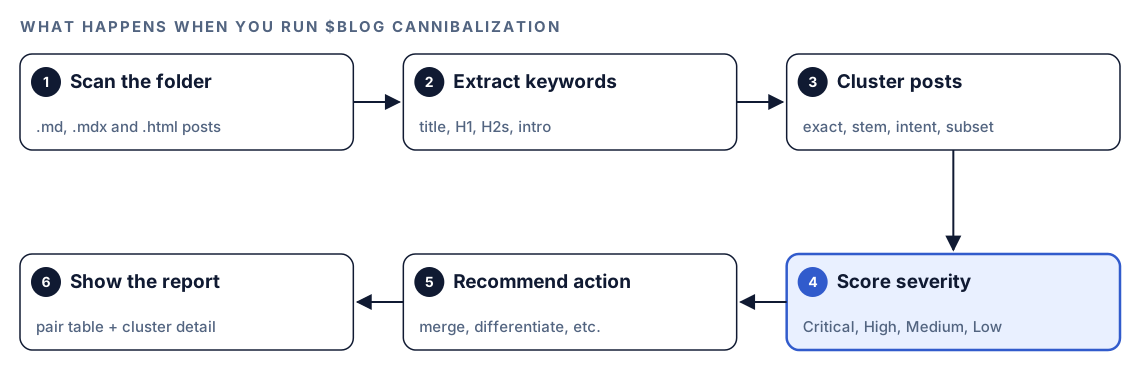
- Scan the folder. Codex collects every
.md,.mdxand.htmlfile under the folder you name, skippingnode_modules,.gitand anydraftsfolder so unpublished work can't raise false alarms. An empty folder gets a message asking you to check the path; a folder with a single post stops early, since a comparison needs two. - Extract keywords. Each post's title or H1, H2 headings, opening paragraph and front matter description feed one primary keyword, plus secondary keywords taken from the H2s.
- Cluster the posts. Matching or overlapping primary keywords are grouped using four rules, applied in a fixed order.
- Score severity. Any cluster holding two or more posts gets a level from Critical to Low.
- Recommend an action. Each cluster is assigned one of four actions, with a note on which post is the stronger one.
- Show the report. A summary table and per-cluster detail appear in the task.
Local mode and API mode
Local mode is the default and reads only your files, so it needs no keys and no network. It shows what your posts *target*, which is where cannibalization starts.
API mode, switched on with --api, adds what your posts actually *rank for*. It gathers your published URLs from you or from your sitemap, asks DataForSEO's Ranked Keywords endpoint what each URL ranks for, then runs the Page Intersection endpoint on pairs inside a cluster to find keywords where both appear. Shared keywords then come with search volume and position.
If credentials are missing, the skill drops back to local mode and says so. A rate limit error gets one retry, after which the remaining URLs go through local mode. Unreachable URLs are skipped and marked as unverified.
What Codex checks to find competing posts
How the primary keyword is chosen
The title and H1 weigh the most, because that's where a writer declares the topic. H2 headings count for less, and the opening paragraph is a supporting signal. The skill splits the title and H1 into one, two and three word phrases, counts how often each phrase recurs across the title, H2s and opening paragraph, and keeps the best-scoring phrase of two or three words.
An editor would judge the same way: a phrase in the title, two headings and the first paragraph is what the page competes for, whatever the writer intended.
The four match rules
Keywords are then compared in this order:
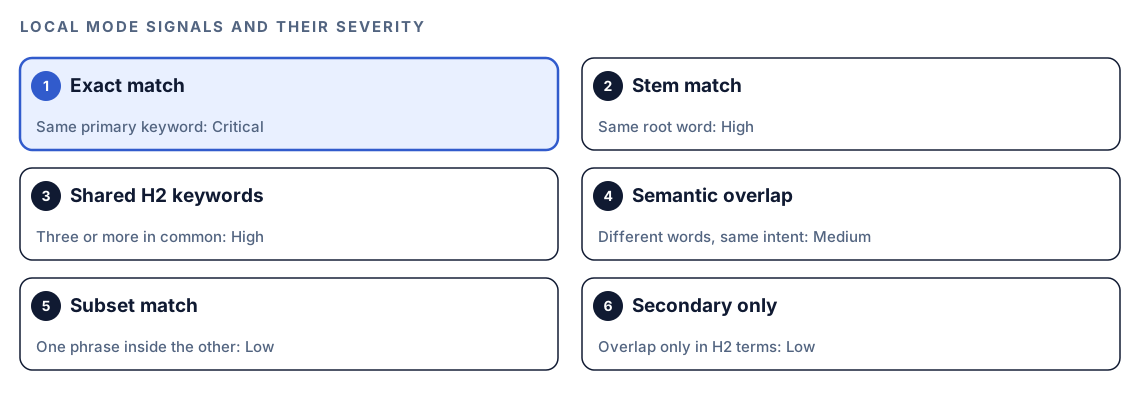
- Exact match. Two or more posts share an identical primary keyword.
- Stem match. The keywords share a root, such as "budget" and "budgeting".
- Semantic overlap. Different words, same intent, such as "best running shoes for beginners" and "top starter running shoes". Codex makes this one as a judgment call rather than a string comparison.
- Subset match. One keyword sits inside the other, such as "meal prep" and "meal prep for athletes".
Severity levels
| Level | Meaning | Act |
|---|---|---|
| Critical | Identical keyword; in API mode, both pages also rank in the top 20 | Now |
| High | Same cluster, with one page ranking above the other | This week |
| Medium | Related keywords that partly overlap in results | This month |
| Low | Similar wording, but different confirmed intents | Monitor |
Without ranking data, local mode follows a simpler ladder. Identical primary keywords are Critical. A stem match, or three or more shared H2 keywords, is High. Semantic overlap is Medium. A subset match alone, or overlap limited to secondary keywords, is Low.
API mode also computes a score so clusters can be ranked against each other:
severity_score = overlap_count x avg_search_volume x (1 / position_gap)overlap_count is how many keywords both pages rank for, avg_search_volume is their mean monthly volume, and position_gap is the distance between the two pages' average positions, never less than 1. The final term does the clever work. Pages sitting right next to each other are trading places, the most harmful form of the problem, so a small gap lifts the score.
Run a cannibalization check in Codex
- Set up the Codex Blog kit from the install section, restart Codex, and start a fresh task inside your blog's repository. If this is your first kit, read how to install SEO skills in Codex first.
- Point the command at your posts:
$blog cannibalization content/blog- A plain request works too, because Codex matches it to the skill's description on its own:
Look through content/blog for posts that compete for the same search intent. Group them and tell me what to do with each pair.- For ranking data, the skill expects your DataForSEO login and password as environment variables. Each call it makes is billed under DataForSEO's own pricing:
export DATAFORSEO_LOGIN="your-dataforseo-login"
export DATAFORSEO_PASSWORD="your-dataforseo-password"- Then add the flag, and share your published URLs or your sitemap location when Codex asks:
$blog cannibalization content/blog --apiAPI mode talks to DataForSEO over the network, so your permission mode may make Codex ask first. Approve it for that service. Our walkthrough of DataForSEO in Codex covers the account side.
Reading the report
The summary table lists one competing pair per row:
| Post A | Post B | Shared Keywords | Severity | Recommendation |
|--------|--------|-----------------|----------|----------------|
| /[post-a] | /[post-b] | [keyword], [keyword] | Critical | MERGE |
| /[post-c] | /[post-d] | [keyword] | High | DIFFERENTIATE |
| /[post-e] | /[post-f] | [keyword], [keyword] | Critical | CANONICAL |
| /[post-g] | /[post-h] | [keyword] | Low | NO ACTION |
Under it, every flagged cluster gets a block with both titles and URLs, all overlapping keywords (with volume in API mode), which post is stronger because it's more complete or better organized, and the reasoning behind the action.
| Action | Suggested when | The work |
|---|---|---|
| MERGE | Both posts are thin, or cover one intent at similar depth | Combine the best parts, 301 redirect the weaker URL, preserve links to either URL |
| DIFFERENTIATE | Intents differ but targeting overlaps | Move the weaker post to a long-tail keyword, rewrite its title, H1 and description, cross-link the two |
| CANONICAL | One post is the authority, the other a lesser copy | Canonical tag on the weaker page, optional noindex, a link to the authority |
| NO ACTION | Similar words, genuinely different intent | Note the reasoning, check rankings quarterly, revisit if either drops |
Work top-down by severity, and read both posts before merging, since semantic overlap is a judgment call. After a local run, confirm big pairs with the Search Console check above.
Apply the fixes with Codex
A merge isn't a single edit. It touches two content files, a redirect rule and every post linking to the old URL. Codex can handle all of it in one task and give you one diff.
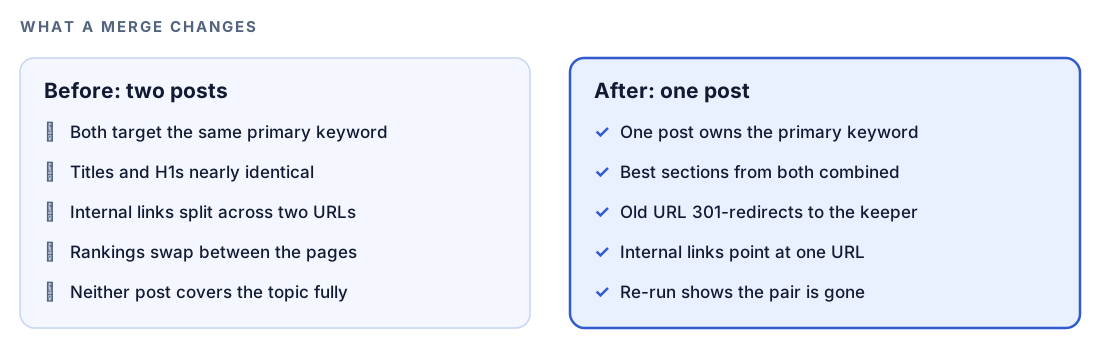
A merge request might read:
The cannibalization report says MERGE content/blog/meal-prep-ideas.md into content/blog/meal-prep-guide.md. Keep the meal-prep-guide URL. Carry over any section the guide lacks, without repeating material. Add a 301 redirect from /blog/meal-prep-ideas to /blog/meal-prep-guide using our existing redirect setup, update every internal link to the old URL, and delete the old file. Show the diff, then run the build.The redirect line depends on your host. With a Netlify-style _redirects file it looks like this:
/blog/meal-prep-ideas /blog/meal-prep-guide 301Repoint internal links too. Links through a redirect still work, but direct links avoid chains when you merge again later. Google's page on redirects and Google Search explains why a permanent redirect suits a page that has moved for good.
DIFFERENTIATE changes the weaker post's front matter. Before:
title: "Meal Prep Tips"
description: "Tips to make meal prep easier."
After:
title: "Meal Prep for Night-Shift Workers: A Weekly Plan"
description: "A weekly meal prep plan built around night shifts, with batch recipes that hold up for five days."
Ask Codex to carry the new angle into the H1 and H2s too, and to link each post to the other. For CANONICAL, the weaker page gets one tag in its head:
<link rel="canonical" href="https://example.com/blog/meal-prep-guide/">Google treats canonical tags as a strong hint, not an order. Whatever the fix, check the diff before accepting it, then rerun $blog cannibalization; the pair should drop off the table.
Stop new cannibalization before it starts
Prevention is cheaper than cleanup, and the risky moment is when someone drafts a post on a topic the blog already covers. A few lines in your project's AGENTS.md turn that moment into a checkpoint:
## New blog posts
- Before drafting in content/blog, list existing posts whose title or H1 shares the new post's main keyword. If any exist, propose updating one instead and wait for my answer.
- Yearly topics keep one URL. Update the existing post and its date.
- After adding a post, run $blog cannibalization content/blog and report any Critical or High pair involving the new post.
Because Codex loads AGENTS.md ahead of every task, each new writing job in that repository passes through the check without a reminder from you. Keep the rules brief, as the combined file has a size limit. For a broader rule set, see AGENTS.md rules for SEO.
No kit? Try a plain Codex prompt
Codex can make a decent first pass with nothing installed:
List every Markdown and MDX post in content/blog with its title, H1 and meta description. Name the main search query each post targets in two or three words. Group posts that target the same query or intent, and for each group say which post is strongest and whether to merge, redirect or differentiate the rest, with one sentence of reasoning.For one suspicious pair:
Read content/blog/meal-prep-tips.md and content/blog/meal-prep-guide.md. Would someone searching for one be satisfied by the other? If yes, plan a merge. If not, suggest a distinct primary keyword, title and H1 for the weaker post.The skill's advantage is repeatability: weighted keyword extraction, four ordered match rules, severity levels with deadlines, a DataForSEO mode that falls back cleanly, and a report shape that stays the same, so one quarter's results line up with the next.
Pitfalls to avoid
- Merging posts that only share words. Different intents call for differentiation.
- Deleting the weaker post without a redirect, which discards its links and strands visitors on a 404.
- Leaving internal links aimed at the old URL after a merge.
- Reading local results as ranking data. They show targeting, not positions.
- Publishing each yearly roundup at a fresh URL instead of updating the last one.
Keep going
- Run a blog audit with Codex for a lighter cannibalization pass alongside orphan pages, stale posts and per-post scores.
- Build topic clusters with Codex so every new post starts with its own keyword.
- Update old blog posts with Codex to refresh the post you keep after a merge.
- Browse every Codex SEO and Codex Blog command on the skills page.
FAQ
What is keyword cannibalization in SEO?
It's when several pages on one site aim at the same query and the same intent. Because a search engine has to pick one of them, clicks and links get divided, and each page tends to sit lower than one combined page would.
How do I know if my posts are cannibalizing each other?
Common clues are lookalike titles, a query whose ranking URL keeps changing, and a Search Console Pages tab that lists more than one of your URLs for a single query. $blog cannibalization surfaces likely pairs across a whole folder so you know where to look.
Should I merge or redirect cannibalizing pages?
Usually you do both, in that order: fold whatever is worth keeping into the stronger post, then point the weaker URL at it with a 301. When the two posts answer different questions, skip the merge and give the weaker one a new focus.
Is keyword cannibalization always bad?
Not always. Two pages that use similar words while answering different questions can rank side by side without harm. The skill's NO ACTION verdict covers that case and asks you to note the reasoning so future audits have context.
Can Codex find keyword cannibalization without an API key?
Yes. The default local mode works from the files in your repository alone, with no keys and no network calls. Adding --api brings in ranking overlap from DataForSEO, which requires your own DataForSEO account.