
Content Operations
Content Decay Analysis with Codex and Search Console
Run content decay analysis in Codex: compare two quarters of Search Console data, flag posts that lost traffic, and schedule refreshes that stick.

Content decay analysis means comparing how your posts did in search this quarter against last quarter, so you catch the ones quietly losing traffic before they fade out. In Codex, RankCue's Codex Blog kit covers both halves of the job: $blog decay sets two Search Console exports against each other and marks every post that lost 20% or more since the previous quarter, while $blog calendar slots the slipping and stale posts into your publishing plan as refreshes. This guide explains why posts decay, how to tell decay from seasonality, how both commands work, and how to have Codex refresh the posts in your repository.
Key takeaways
- Content decay is a slow, steady loss of search traffic on a post that used to perform. It's normal, and it's usually fixable.
$blog decay <current-gsc> <previous-gsc>reads a current and a previous Search Console export, picks out posts with a fall of 20% or more between them, and ranks them so you know which to refresh first.$blog calendaradds an age check: it readslastUpdatedordatein each post's front matter and marks posts stale after 30, 90 or 180 days, depending on how much traffic they carry.- The calendar then makes room for refreshes, using a mix of 60% new posts, 30% updates and 10% repurposed content.
- Codex can carry out the refresh in your repository, update the post's dates, and show you the diff before anything ships.
The decay and calendar commands at a glance
| Item | Details |
|---|---|
| Commands | $blog decay <current-gsc> <previous-gsc>, then $blog calendar [period] to schedule the work |
| What you give it | Two Search Console exports, current and previous quarter; for the calendar, a monthly or quarterly period |
| What Codex reads | The two exports, plus the front matter dates of the posts in your project |
| What you get back | Posts that declined, in refresh order; a content decay report, a freshness queue and an editorial calendar |
| Needs | Access to your Search Console property to export data; internet access for the calendar's seasonal research |
| Best for | Quarterly content reviews and deciding which old posts deserve your next hour of work |
What is content decay?
Decay describes a post whose search clicks and impressions shrink a little at a time, month after month. Picture a guide that pulled steady visits for a year and now gives up a few more each month, with no single event to blame. Nothing breaks. The post just matters a bit less to searchers, and to search engines, than it used to.
A cliff is a different story. When a post loses most of its visits within days, look for a technical cause: the page dropped out of the index, a canonical tag now points elsewhere, or a redesign changed the URL. Rule those out first. Decay is the slow leak, not the burst pipe.
Why posts decay
Several forces wear a post down, usually in combination:
- The facts age. Figures, screenshots, prices, product names and that year in the title quietly expire.
- Rivals catch up. Another site ships a sharper, more current page on your topic, and it wins the comparison.
- The results page fills up. Videos, forum threads and AI answers can sit above your listing, so holding a position earns fewer visits.
- Intent moves. People typing the same phrase begin to expect a different kind of answer than the one you wrote.
- Your own posts compete. A newer article on a similar topic pulls queries away from the older one. That's keyword cannibalization, and refreshing won't fix it.
Read the pattern before you refresh
Each page in Search Console carries four numbers: clicks, impressions, CTR (the share of impressions that became clicks) and average position. The way those four move together hints at the cause, and the cause decides the fix.
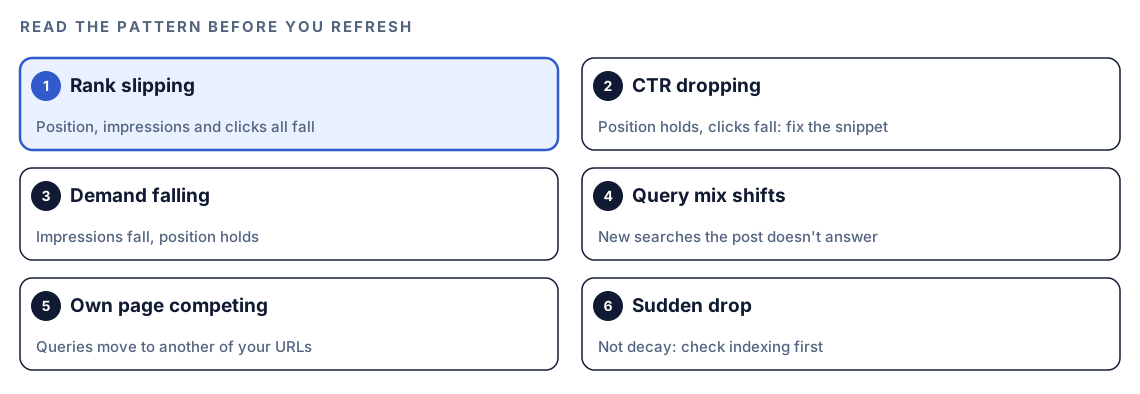
A post losing position, impressions and clicks together is usually being outranked, so the content needs work. A post holding its position while clicks fall has a snippet problem or new features above it, so start with the title and description. If impressions fall while position holds, fewer people are searching, and no rewrite will bring them back.
Decay or seasonality?
Comparing one quarter with the previous one spots trouble early, but it can't tell a dip from a decline when the topic has a season. A post about filing deadlines or summer camping gear rises and falls on a calendar. For topics like that, also set this quarter against the same months a year back. Search Console keeps 16 months of performance data, which is enough for that check.
How content decay analysis runs inside Codex
The two commands split the work. $blog decay looks at what search traffic did. $blog calendar looks at how old each post is and turns both signals into a plan.
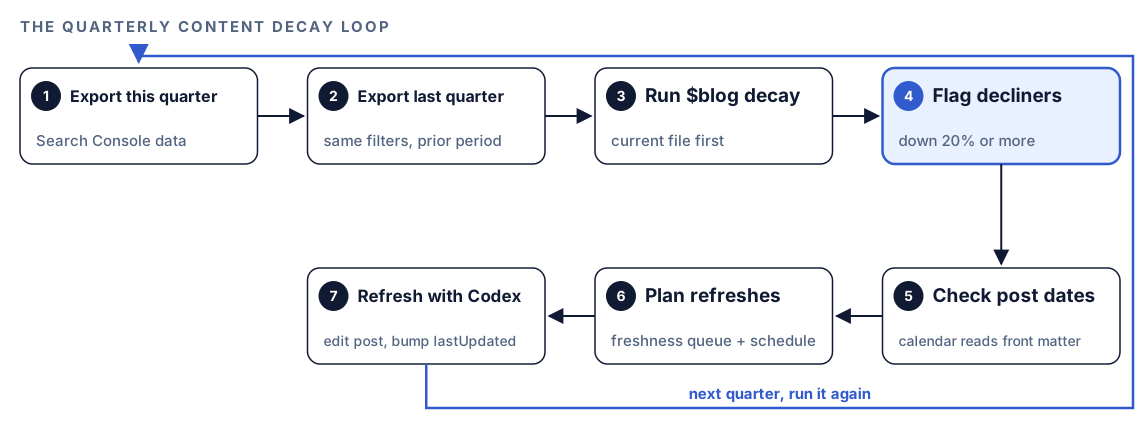
- Export this quarter. Download the current quarter's performance data from Search Console.
- Export last quarter. Download the quarter before, with the same filters, so the comparison is fair.
- Run `$blog decay`. Give it the current export first and the previous export second.
- Flag the decliners. Any post that fell by a fifth or more against the earlier quarter is marked, and the list is ranked so the most urgent refresh sits on top.
- Check post dates.
$blog calendarreadslastUpdatedordatefrom each post's front matter and sorts posts by how stale they are for their traffic level. - Plan the refreshes. The calendar builds a freshness queue and slots refreshes into the publishing schedule next to new posts.
- Refresh with Codex. Each scheduled refresh becomes a task in which Codex updates the post and its dates.
Then the loop starts again next quarter, with fresh exports.
What Codex checks when it plans refreshes
The decay command gives you the traffic signal. The calendar adds structure: thresholds, priorities, cadences and a content mix.
Stale thresholds by traffic level
Not every post ages at the same speed. A page carrying a big share of your visits needs attention within weeks, while a niche post can wait months:
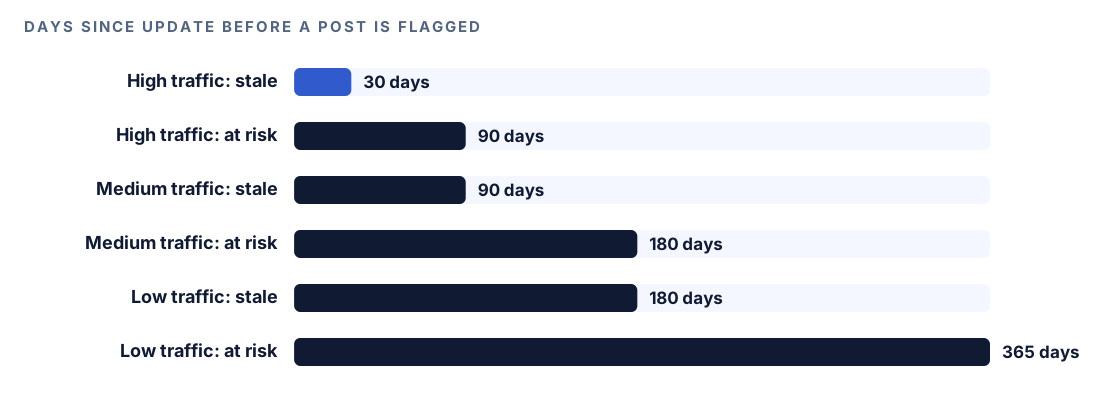
| Traffic level | Stale after | At risk after |
|---|---|---|
| High-traffic posts | 30 days | 90 days |
| Medium-traffic posts | 90 days | 180 days |
| Low-traffic posts | 180 days | 365 days |
Tell Codex which posts drive your traffic, or share the Search Console numbers, so each post lands in the right tier.
Priority levels
Each post then gets a priority:
- Critical: one of your big traffic earners has gone more than 30 days without an update. Do it now.
- High: a post of any tier has crossed its own line. Book it in this month.
- Medium: a post is nearing its line. Fit it in this quarter.
- Low: still inside its window. Leave it.
Refresh cadence and content mix
How often a post comes back up depends on what it's worth to you. Your biggest traffic earners return to the queue on a 30-day cycle, mid-tier posts on a 90-day cycle and minor ones once a year, while evergreen explainers wait until the facts beneath them change.
Refreshes shouldn't swallow the whole plan, so the calendar works to a 60/30/10 split between fresh articles, updates and repurposed pieces. Unless you say otherwise it assumes two posts a week, which gives eight monthly slots: five go to new articles, two to refreshes and one to a repurposed piece. Bump the pace to three a week and the split becomes seven, four and one.
The $blog audit command runs a similar age check across the whole blog, flagging posts not updated in 90 days and estimating how much work each refresh needs. Our blog audit guide covers it.
Run a decay check in Codex, step by step
- Install the Codex Blog kit with the steps in the install section, restart Codex so it finds the new skills, and start a task in the repository that holds your blog.
- In Search Console, open the Performance report, set the date range to the last three months, and export it. The table of pages is the part that maps to your posts. Repeat for the three months before that, with the same search type and filters.
- Save both exports in your project, for example in a
datafolder, and run the command with the current file first:
$blog decay data/gsc-pages-current.csv data/gsc-pages-previous.csv- You can also ask in your own words, and Codex will pick up the skill from the request:
Compare data/gsc-pages-current.csv with data/gsc-pages-previous.csv. Which blog posts lost the most search traffic between the two quarters, and which should I refresh first?- Build the plan with the calendar. It asks about your niche, how often you can publish, the timeframe and your goals, and scans your existing posts:
$blog calendar quarterlyThe calendar also researches seasonal opportunities using web search. Your permission mode may make Codex check with you before it goes online; say yes if you want that part of the plan.
Reading the decay report
The calendar's decay report lists each post with its last update and what to do about it:
## Content Decay Report
| Post | Last Updated | Days Stale | Priority | Action |
|------|-------------|-----------|----------|--------|
| [slug] | [date] | [N] | Critical | Refresh immediately |
| [slug] | [date] | [N] | High | Schedule this month |
| [slug] | [date] | [N] | Medium | Schedule this quarter |
Further down, a freshness queue assigns each refresh to a week, and a freshness schedule lists the next refresh date for each post, most urgent first, with an owner column you fill in.
The value comes from reading the two signals together:
- Declining and stale. Flagged by
$blog decayand old by date. Refresh these first; outdated content is the likely cause. - Declining but recently updated. Age isn't the problem. Look at the results page, competing pages, or your own overlapping posts.
- Stale but steady. Traffic is holding. A light refresh of facts and links is enough. Don't rewrite a post that works.
- Fresh and steady. Nothing to do this quarter.
Apply the fixes with Codex
A refresh inside Codex touches more than the words. The post, its front matter and its structured data all need to agree. The kit's $blog update <file> command is a freshness-focused rewrite, an alias for $blog rewrite, that updates statistics, adds new developments and refreshes images:
$blog update content/blog/remote-work-tools.mdOr give Codex a precise brief:
Refresh content/blog/remote-work-tools.md. It lost search traffic this quarter. Check every statistic, price and year reference and replace anything outdated with a current figure from a named source. Add a short section on the questions people now search for on this topic. Keep the URL and slug unchanged. Set lastUpdated in the front matter to today and make sure dateModified in the post's JSON-LD matches. Show me the diff, then run the build.The front matter change is small but important, because the calendar reads it next time:
title: "Remote Work Tools for Small Teams"
date: 2025-02-11
lastUpdated: 2026-10-18
Only move lastUpdated when the content has really changed. Google's guidance on creating helpful content specifically warns against changing dates to make pages seem fresh when nothing meaningful changed. Review the diff to check that the new figures have sources and that nothing useful was cut.
Make it repeatable with codex exec
Decay is a quarterly job, which makes it a good fit for a non-interactive run. Once the new exports are in data, one line produces a saved report:
codex exec '$blog decay data/gsc-pages-current.csv data/gsc-pages-previous.csv' -o decay-report.mdcodex exec runs without the interactive interface and -o writes Codex's final message to the file you name. The single quotes stop your shell from treating $blog as a variable. The default sandbox is read-only, which suits a report that only reads two files. If you chain the calendar into the same job, make sure your sandbox and permission setup allows the network access its seasonal research needs; the Codex sandboxing docs explain the options. Scheduling and CI setups are covered in codex exec for SEO automation.
No kit? A plain Codex prompt
You can run a basic decay check with no skills installed:
Load data/gsc-pages-current.csv and data/gsc-pages-previous.csv. Join them on the page URL. For each URL, show clicks, impressions and average position in both periods and the percentage change in clicks. List pages whose clicks fell by 20% or more, sorted by clicks lost. Then find the matching post in content/blog for each one and show its lastUpdated date.And an age check that needs no data at all:
Read the front matter of every post in content/blog. List posts whose lastUpdated, or date if lastUpdated is missing, is more than 180 days ago, oldest first, with their titles.What the kit adds is the system around the numbers: traffic-tier thresholds, fixed priority levels, refresh cadences, a content mix that protects new work, and a calendar that turns the findings into dated tasks in the same format every quarter.
Pitfalls to avoid
- Calling a seasonal dip decay. Compare the same quarter last year before rewriting.
- Changing the date without changing the content.
- Rewriting a post that is old but still performing.
- Changing the URL during a refresh. Keep the address and the history that comes with it.
- Comparing exports with different date lengths, search types or filters.
- Refreshing a post whose traffic moved to another of your own posts. Fix the overlap instead.
- Spending every slot on refreshes. The 30% share keeps new content flowing.
Keep going
- Refreshing old posts with Codex goes deeper on the rewrite itself.
- Plan an editorial calendar in Codex covers topic clusters, templates and distribution.
- Use Search Console data in Codex shows how to pull performance data through Google's APIs.
- The skills page lists every command in the Codex SEO and Codex Blog kits.
FAQ
What is content decay in SEO?
It's a slow, months-long slide in the clicks and impressions a page earns from search. The usual causes are outdated facts, better pages from other sites, a busier results page, or one of your newer posts taking over its queries.
How do you find decaying content?
Put two periods of equal length side by side, URL by URL, and look for pages whose clicks and impressions keep sliding. Run on two exports, $blog decay does the matching for you and surfaces every post that fell 20% or more.
How often should old blog posts be updated?
Match the cycle to the post's value. The Codex Blog calendar brings top traffic earners back every 30 days, mid-tier posts every 90 days and minor posts yearly, and leaves evergreen pieces alone until their facts change.
Is every drop in traffic a sign of content decay?
No. A cliff-edge loss usually has a technical cause, and a dip that repeats every year is a season. Decay is what's left once you've ruled out both.
Can Codex analyze Search Console data for content decay?
Yes. Export two quarters from Search Console, save them in your project, and run $blog decay with the current file first. Codex flags the declining posts, and $blog calendar schedules the refreshes.
Will a new published date alone help a post rank?
A new date alone does nothing useful, and Google's guidance cautions against it. Make real changes to the post, then move lastUpdated and dateModified to match.