
Content Operations
Blog Audit with Codex: Health-Check Every Post
Run a blog audit with Codex: score every post, find orphan pages, competing posts and stale content, then fix them in your repo with a reviewable diff.
A blog audit with Codex reviews every post in your project in one pass: writing quality, on-page SEO, structured data, internal links, freshness, and how easy each post is for AI answers to quote. RankCue's $blog audit command splits that work across six parallel agents, then adds site-wide checks for orphan pages, competing posts and stale content, and saves a single report with a score for every post and a queue of what to fix first. Read on for what a good blog audit covers, how the command works inside Codex, how to read the report, and how to have Codex work through the fixes in your repository.
Key takeaways
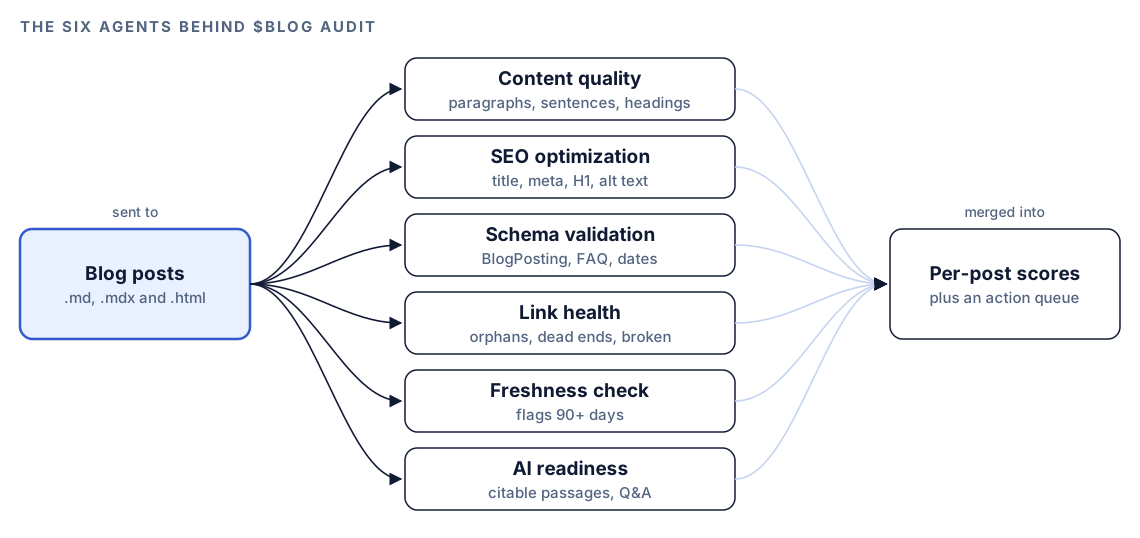
$blog audit [directory]finds the blog files in your project, looking in common folders such ascontent/,posts/,blog/and_posts/, and leaves out READMEs, changelogs and config files.- Six agents review the posts in parallel: content quality, SEO, schema, link health, freshness and AI readiness.
- Beyond per-post scores, it maps your internal links to find orphan and dead-end pages, flags posts that target the same keyword, and sorts stale posts by age.
- The results are saved to
blog-audit-report.mdin the project root, with an action queue that starts at the lowest-scoring post.- Codex can then work down that queue in your repository, adding links to orphans, fixing front matter and schema, and refreshing old posts, with a diff for every change.
The audit command at a glance
| Item | Details |
|---|---|
| Command | $blog audit [directory] |
| What you give it | A blog folder, or nothing, in which case it searches the usual blog locations in your project |
| What Codex reads | Markdown, MDX and HTML posts: front matter, headings, body text, internal links and structured data |
| What you get back | blog-audit-report.md with a summary dashboard, per-post scores, an action queue, and tables for cannibalization, orphan pages and stale content |
| Needs | Your project files; no third-party API keys |
| Best for | A quarterly health check, taking over an inherited blog, or choosing what to fix before a content push |
What should a blog audit check?
A blog gets worse one post at a time. One article ships without a meta description. Another links to a page that was renamed last spring. A third quotes a figure from three years ago. None of these breaks the site, and none shows up when you check a single page. Together they drag the whole blog down.
A site-wide audit catches two kinds of problem. Some live inside a post: weak structure, missing tags, broken markup. Others only show when posts are compared: a post nothing links to, two posts chasing one keyword, a category untouched for a year. Single-page checkers can't see the second kind.
Quality and on-page basics
Readers and search engines both reward posts that are easy to scan. That means short paragraphs, clear headings, one H1, a descriptive title and a meta description that gives a reason to click. These are cheap to fix and easy to forget, which is why they show up in almost every audit.
Internal links, orphans and dead ends
Links between posts are the corridors of your blog. An orphan page is a room with no corridor leading to it: visitors arrive only through the sitemap, a search result or a bookmark, and it never collects the context that links from related posts would give it. A dead-end page is a room with no exit, so someone who reaches the last paragraph has no next step on your site. Google's guidance on making links crawlable explains why plain, descriptive links matter for discovery.
Freshness and AI readiness
Posts age. Statistics expire, tools change, and screenshots stop matching the product. A good audit shows how long it has been since each post was updated, so you can plan refreshes instead of finding out from a reader.
AI answer engines add a newer check. They tend to quote passages that make sense on their own, answer a question directly, and name things clearly. A post built from tidy, self-contained sections is easier to cite than one long unbroken argument.
How the audit runs inside Codex
Start $blog audit in a Codex task and the skill works in seven stages, saving the report as the last one.
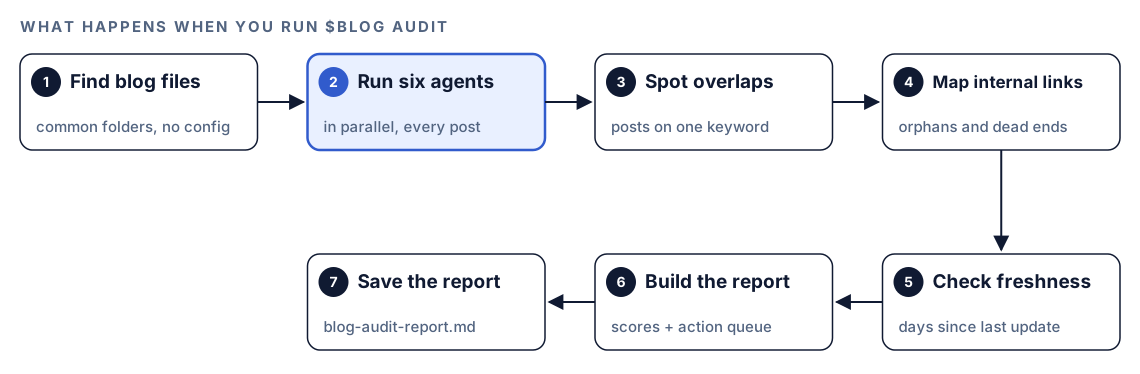
- Find blog files. Codex looks for
.md,.mdxand.htmlfiles wherever blogs usually live, fromcontent/andarticles/tosrc/pages/blog/, ignores housekeeping files like READMEs, licenses and package manifests, and reports the post count and folders. If those spots are empty, it falls back to any Markdown file in the project whose front matter looks like a post, with a title, date and description. - Run six agents in parallel. Each agent reviews every post for one area, so the six areas are checked side by side rather than one after another.
- Spot overlaps. To catch cannibalization, it takes each post's main topic from the title, H1, meta description and opening paragraph, normalizes it, and flags posts that target the same keyword.
- Map internal links. It builds a map of which post links where, plus the reverse map of which posts link in, to find orphans and dead ends.
- Check freshness. It reads the
lastUpdated,dateModified,dateorupdatedfield from front matter and works out how many days have passed. - Build the report. All findings roll up into a dashboard, per-post scores and tables.
- Save the report. The file goes to
blog-audit-report.mdin the project root, and Codex gives you the headline numbers in the task.
What Codex checks on every post
Each agent owns one area and runs the same checks on every post.
Content quality
This agent rates writing on a 30-point scale. Its targets: paragraphs of 40 to 80 words that never pass 150, sentences averaging 15 to 20 words, a sound heading outline that uses questions where they fit, and a Flesch Reading Ease result between 60 and 70, the range of plain, everyday English.
SEO optimization
Here the checks are the familiar on-page set. Titles should run 50 to 60 characters. Meta descriptions should run 150 to 160 characters and carry a statistic. Every post needs exactly one H1, images need alt text, and the agent also counts links in and out and judges whether the slug is clean.
Schema validation
It detects the structured data on each post, checks that BlogPosting markup is complete, and checks the presence and format of FAQ markup. It also confirms that dateModified matches the lastUpdated value in front matter, a mismatch that is easy to miss when a template hardcodes the date. Missing or malformed markup is flagged.
Link health
Every internal link becomes an arrow in a graph of your blog. Reading that graph, the agent finds posts with no arrows in, posts with no arrows out, and arrows aimed at files that aren't there, then proposes pairs of posts that would benefit from linking both ways. Each orphan comes with two or three topically related posts that should point to it.
Freshness
Any post not updated in 90 days or more is flagged. The stale content table then gives each post a refresh priority: High after more than 180 days, when the post is likely outdated; Medium between 90 and 180 days, when it needs a review for accuracy; and Low under 90 days, when no action is needed yet. Each post also gets an effort estimate, separate from its priority:
| Refresh effort | What it involves | Time estimate |
|---|---|---|
| Light | Update statistics, check links | 1 to 2 hours |
| Moderate | Rewrite sections, add new data | 3 to 4 hours |
| Heavy | Full rewrite | 5 hours or more |
AI readiness
The final agent rates how quotable each post is for AI answers. It wants self-contained passages of 120 to 180 words, questions answered directly, people and products named clearly, a TL;DR box and citation capsules, and content that AI crawlers are able to reach.
Run a blog audit in Codex
- Set up the Codex Blog kit with the steps in the install section, restart Codex so the new skills are picked up, and open a task in your blog's repository. Our guide to installing SEO skills in Codex has the details.
- Run the audit across the project:
$blog audit- Or point it at one folder, which helps in a monorepo or when docs and blog posts share a content directory:
$blog audit src/content/blog- Or describe what you want and let Codex pick the skill:
Give my blog a full health check. Score every post, find pages with no internal links pointing to them, and list the posts that haven't been updated in months.The audit works from the files in your repository and doesn't need any API keys. When it finishes, Codex tells you where the report was saved, how many posts it reviewed, the average score, and how many critical issues it found.
Reading the audit report
The report opens with a dashboard:
## Blog Audit Report

**Audit Date:** [date]
**Total Posts:** N
**Average Score:** XX/100

### Health Overview
| Metric | Count |
|--------|-------|
| Posts Scoring 90+ (Excellent) | N |
| Posts Scoring 70-89 (Good) | N |
| Posts Scoring 50-69 (Needs Work) | N |
| Posts Scoring <50 (Poor) | N |
| Orphan Pages | N |
| Dead-End Pages | N |
| Cannibalization Issues | N |
| Stale Content (90+ days) | N |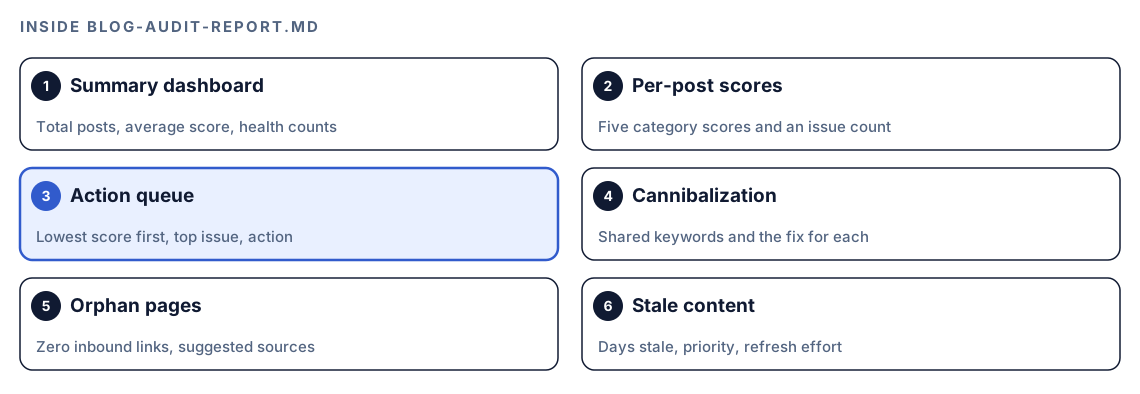
Below the dashboard, a per-post table breaks each score into content, SEO, E-E-A-T, technical and AI citation, with an issue count. The action queue comes next, sorted with the lowest score first:
### Prioritized Action Queue (Lowest Score First)
| Priority | Post | Score | Top Issue | Recommended Action |
|----------|------|-------|-----------|--------------------|
| 1 | [file] | XX | [issue] | [action] |
| 2 | [file] | XX | [issue] | [action] |
The last three tables cover topic cannibalization (each shared keyword, the competing posts, and whether to merge, redirect or differentiate), orphan pages (with the posts that should link to each one), and stale content (last update, days stale, priority and refresh effort).
A sensible order of work:
- Site-wide link problems first. Broken internal links and orphan pages affect discovery across the blog, and each fix is small.
- Cannibalization next. There's no point polishing two posts if one of them should be merged away.
- The action queue. Work from the top. The skill suggests running
$blog analyze <file>on the lowest-scoring post first for a detailed breakdown. - Stale content. Schedule refreshes, starting with posts that matter most to your traffic.
- AI readiness. For your most important posts,
$blog geo <file>goes deeper on citation readiness.
Apply the fixes with Codex
Since the posts, templates and front matter share one repository, Codex can make the changes too.
Orphan pages are the easiest win. The report already names two or three posts that should link to each orphan, so the request is short:
Open blog-audit-report.md. For each page in the Orphan Pages table, add one natural, in-context link to it from each recommended source post, using descriptive anchor text that fits the sentence. Don't add link lists or footers. Show me the diff for each post, then run the build.Schema mismatches usually trace back to one template. If the audit reports that dateModified doesn't match lastUpdated, a common cause is a template that prints the publish date in both fields:
{
  "@type": "BlogPosting",
  "datePublished": "2025-04-02",
  "dateModified": "2025-04-02"
}
Ask Codex to find the template that renders the JSON-LD and read dateModified from the post's lastUpdated field, so every post is fixed at once:
{
  "@type": "BlogPosting",
  "datePublished": "2025-04-02",
  "dateModified": "2026-09-14"
}
For on-page issues, a batch request keeps the diff reviewable:
From the action queue in blog-audit-report.md, take the five lowest-scoring posts. Fix only the SEO items listed for them: title length, meta description length, missing alt text and duplicate H1s. Keep each post's meaning and voice. Show one diff per post and run the build when you're done.Read each diff before accepting it. A meta description of the right length can still be dull, and a new link can still sit in the wrong paragraph. Then run $blog audit again and compare the dashboard with the last one.
Make it repeatable with codex exec
A blog audit pays off most as a routine. Because the skill writes blog-audit-report.md into the project, an unattended run needs permission to write files. The default codex exec sandbox is read-only, so allow workspace edits:
codex exec --sandbox workspace-write '$blog audit src/content/blog' -o audit-summary.mdThe full report lands in blog-audit-report.md, and -o saves Codex's closing message, which carries the headline numbers, to audit-summary.md. Commit both after each run and your Git history becomes a record of the blog's health over time. To act on the results, open the report in an interactive task, or continue the unattended run with codex exec resume --last and a follow-up request, then check the changes with git diff before you commit. Our guide to automating SEO checks with codex exec covers scheduling and CI.
No kit? A plain Codex prompt
Without the kit, Codex can still give you a useful first audit:
Find every blog post in this repo (Markdown, MDX or HTML with a title and date in front matter). Build a table with one row per post: title length, meta description length, number of H1s, internal links out, internal links in, and days since lastUpdated or date. Then list orphan pages (no inbound internal links), dead-end pages (no outbound internal links), and posts not updated in over 180 days.And for a link check alone:
Map every internal link between posts in src/content/blog. List links whose target file doesn't exist, and for each post with no inbound links, suggest two related posts that should link to it.The skill adds structure that a one-off prompt won't keep: six specialist agents with fixed thresholds, scores you can compare between runs, cannibalization and freshness checks in the same pass, and a report saved in the same format every time.
Pitfalls to avoid
- Chasing the score instead of the reader. A post can hit every threshold and still be unhelpful.
- Treating every post older than 90 days as broken. Check whether it still performs before rewriting it.
- Fixing orphans with link dumps. One relevant, in-context link beats a list of ten in a footer.
- Auditing the wrong files. If drafts or docs share a folder with posts, point the command at the blog folder.
- Accepting a huge multi-post diff in one go. Work in batches you can actually review.
- Running the audit once. Without a second run, you can't tell whether the fixes worked.
Keep going
- Find keyword cannibalization with Codex for severity levels, DataForSEO data and merge decisions beyond the audit's quick check.
- Spot content decay with Codex to add Search Console traffic trends to the audit's age-based freshness check.
- Score a blog draft with Codex for the detailed
$blog analyzebreakdown on your lowest-scoring posts. - Browse the full list of Codex SEO and Codex Blog skills to see what else the kits do.
FAQ
What is a blog audit?
A blog audit is a review of every post on a blog for quality, on-page SEO, structured data, internal links and freshness. It also looks for problems that only show across posts, such as orphan pages and several posts competing for one keyword.
How often should you audit your blog?
A quarterly audit is a sensible default for an active blog, plus a run before a redesign, a migration or a big content push. Running the same audit each time is what makes the results comparable.
What is an orphan page and why does it matter?
An orphan page is a post that no other page on your site links to. Readers can't reach it by browsing, crawlers can only find it through your sitemap or outside links, and it gets none of the relevance that internal links pass. The audit lists every orphan with two or three posts that should link to it.
Can Codex audit an entire blog automatically?
Yes. Run $blog audit in your blog's repository and Codex reviews every post it finds, then saves the full report to blog-audit-report.md. With codex exec, you can run the same audit on a schedule.
Does the blog audit change my posts?
No. The audit reads your posts and writes one report file. Changes happen only when you ask Codex to apply fixes, and you review the diff before accepting them.