
Content Operations
Blog Post Quality Score: Grade Drafts with Codex
Get a blog post quality score in Codex: 100 points across five categories, an AI writing check, and ranked fixes Codex can apply to your draft.
A blog post quality score turns the vague question "is this draft ready?" into a number, plus a ranked list of what is holding the post back. In Codex, RankCue's $blog analyze <file-or-url> command scores any post out of 100 across five categories, checks for flat or formulaic writing, and sorts every fix from Critical to Low. This guide explains what the score measures, how the command runs, how to read the report, and how to let Codex fix the issues in your project before you hit publish.
Key takeaways
$blog analyzegrades a post out of 100. Content quality is worth up to 30 points and SEO up to 25, while trust signals, technical setup and quotability for AI answers get 15 apiece.- Point it at one draft in your repo, a published page, or a folder of posts, and choose a Markdown report, JSON for tools, or a one-line table per post.
- An AI content check measures sentence-length variety, stock phrases and vocabulary diversity, and quotes the passages that set it off.
- Five rating bands tell you what to do next, from shipping as is to starting over. The kit's write and rewrite workflows use the same scale and hold back any draft that lands under 90.
- The score is an editorial tool, not a Google metric. Use it to decide what to fix, let Codex make the fixes, then score again.
The analyze command at a glance
| Item | Details |
|---|---|
| Command | $blog analyze <file-or-url> |
| What you give it | A post file in your project, a published URL, or a folder of posts |
| What Codex reads | Front matter, headings, paragraphs, statistics, images, charts, links, FAQ, schema and meta tags |
| What you get back | A quality report with score, rating, category breakdown, AI content risk, prioritized issues and quick stats, or the same data as JSON or a table |
| Needs | Internet access only when you analyze a URL; no third-party API keys |
| Best for | A last check before publishing, ranking old posts for a refresh, and a quality gate in CI |
What is a blog post quality score?
Google doesn't publish a quality score for blog posts, and no tool can read its internal judgment. A quality score is an editorial checklist expressed as points, each tied to something a reader or crawler can notice. Its value is consistency: one rubric on every post lets you compare drafts and see where an hour of editing pays off.
What Google says it rewards
Google's guidance on helpful, people-first content describes the target: content made to help people, by someone who knows the subject, that leaves readers satisfied. It frames quality through E-E-A-T: experience, expertise, authoritativeness and trust. None is a single measurable factor, but each has visible proxies, such as a named author, inline sources and signs the writer did the work.
Readability
Readability formulas guess how hard text is from the length of its sentences and words. On the Flesch Reading Ease scale, a bigger number is easier going. Grade-level formulas such as Flesch-Kincaid and the Gunning Fog index express the same idea as a school year. By default the skill wants Flesch 60 to 70 at grade 7 to 8, and a writing persona can move that target:
| Writing for | Target Flesch score | Target school grade |
|---|---|---|
| General consumers | between 60 and 80 | grades 6 through 8 |
| Professionals | between 50 and 60 | grades 8 through 10 |
| Technical readers | between 30 and 50 | grades 10 through 12 |
| No persona set | between 60 and 70 | grades 7 through 8 |
Flat, machine-sounding prose
Google's guidance on generative AI content focuses on whether content adds value, not on which tool produced it. So the skill's AI content check isn't about dodging a detector. It catches prose that reads flat: every sentence the same length, the same stock transitions, a narrow vocabulary. Readers notice that, and it often signals a thin post.
Citation readiness
AI answer engines quote passages, not pages. A section that answers up front, sticks to one topic and names its source is easy to lift and credit, so one category rewards exactly that. Our generative engine optimization guide covers the wider topic.
How $blog analyze runs inside Codex
Give the command a file, URL or folder and the skill runs the same six steps every time.
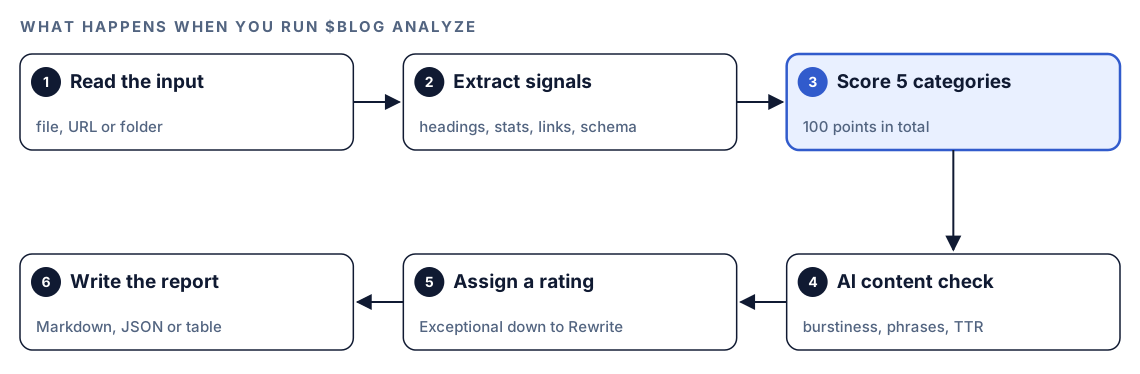
- Read the input. Codex opens a file from your repo as is, downloads a URL and pulls the article text out of it, or treats a folder as a batch job and scores every post inside.
- Extract signals. It collects what the checks need: title, author, tags, description and both dates from the front matter; the heading tree; paragraph sizes; each number in the text and whether a source backs it; images, alt text and file formats; charts; links in and out, including broken ones; the FAQ; schema types; and the social and meta tags.
- Score five categories. Each checklist item earns all, some or none of its points, and the report says why.
- Run the AI content check. Sentence-length spread, called burstiness, gets a 0 to 10 score. A list of 17 stock phrases is counted, along with em dashes, and the type-token ratio divides distinct words by total words. When the signals combine to an AI probability over 50 percent, the post is flagged and the offending passages are quoted.
- Assign a rating. The total lands in one of five bands.
- Write the report. Markdown is the default; JSON and a single-row table are options.
What the quality score checks
The categories aren't equal. Content quality weighs most, because no markup rescues a post that doesn't answer the question.
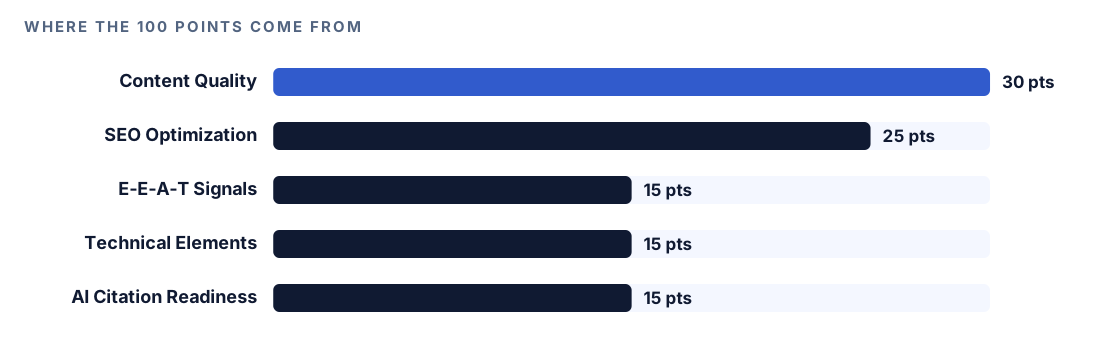
Content Quality (30 points)
Depth and readability are worth 7 points each, and originality, such as your own data, case studies or first-hand experience, is worth 5. Structure earns 4 when sentences average 15 to 20 words with no more than 25 percent over 20, paragraphs run 40 to 80 words, and an H2 appears every 200 to 300 words. Engagement elements earn 4; a summary box labeled "Key Takeaways", "TL;DR", "At a Glance" or similar counts. The last 3 points go to clean prose: passive voice at or under 10 percent, no more than 5 trigger words per 1,000, and transition words between 20 and 30 percent.
SEO Optimization (25 points)
Heading hierarchy with the keyword in two or three headings is worth 5. The title tag earns 4 at 40 to 60 characters with the keyword up front. Keyword placement earns 4 when the keyword appears in the first 100 words without stuffing, and 3 to 10 contextual internal links with descriptive anchors earn another 4. A short, lowercase, keyword-rich URL is worth 3, a 150 to 160 character meta description with a statistic is worth 3, and 3 to 8 outbound links to strong sources are worth 2.
E-E-A-T Signals (15 points)
A real, named author with a bio is worth 4. Citations are worth 4 when at least eight distinct numbers have strong sources and none are invented; full marks need a year in the sentence, a citation naming publisher and title, and a link with its retrieval date. Trust pages such as about, contact and an editorial policy earn 4, and signs of hands-on testing earn 3.
Technical Elements (15 points)
Schema earns 4 with BlogPosting, FAQ and Person markup at minimum, with a bonus for three or more types. Images earn 3 for AVIF or WebP, descriptive alt text, and lazy loading on everything except the LCP image. Tables and lists earn 2, page speed signals earn 2 (LCP under 2.5 seconds, no render-blocking JavaScript), mobile-friendliness with tap targets of 48 pixels or more earns 2, and Open Graph plus Twitter card tags earn 2.
AI Citation Readiness (15 points)
Standalone passages of 120 to 180 words with a sourced statistic earn 4. Question headings on 60 to 70 percent of H2s plus an FAQ earn 3, a clearly named topic earns 3, and answer-first sections with headed tables earn 3. The last 2 points need server-rendered or static content.
Run it in Codex, step by step
- Set up the Codex Blog kit from the install section, restart Codex so it discovers the skills, and start a task in the repository that holds your posts.
- Score a draft in your repository:
$blog analyze content/blog/standing-desk-guide.md- Score a published page instead. Depending on your permission mode, Codex may ask before it uses the internet, so approve it for your own site:
$blog analyze https://example.com/blog/standing-desk-guide- Plain language works too. A request like this matches the skill's description, so Codex loads it on its own:
Rate this blog post before I publish it and tell me what to fix first: content/blog/standing-desk-guide.md- Score a whole folder and sort it so the weakest posts come first:
$blog analyze content/blog --batch --sort score- Pick an output format with
--format jsonfor tools and dashboards, or--format tablefor a one-line summary per post. - Add
--rubricto get 10 editorial heuristics scored 0 to 4, each tagged P0 to P3 by severity, or--cognitive-loadfor a per-section map of concept density. Both sit alongside the normal score rather than replacing it.
Reading the report
The default report follows a fixed layout, so two reports are easy to compare:
## Blog Quality Report: [Post title]

**Score: XX/100** - [Rating]

| Category | Score | Max | Notes |
|----------|-------|-----|-------|
| Content Quality | XX | 30 | [one-line summary] |
| SEO Optimization | XX | 25 | [one-line summary] |
| E-E-A-T Signals | XX | 15 | [one-line summary] |
| Technical Elements | XX | 15 | [one-line summary] |
| AI Citation Readiness | XX | 15 | [one-line summary] |

### AI Content Risk
- Burstiness score: X/10
- AI phrases detected: N ([phrases])
- Vocabulary diversity (TTR): X.XX
- Flagged passages: [quoted sentences]

### Issues Found
Critical (Must Fix)
- [ ] [Issue, location and fix]

### Quick Stats
- Statistics: N sourced / N unsourced
- Internal links: N
Each band comes with a clear next move:
| Band | Total | What to do |
|---|---|---|
| Exceptional | 90 or more | Ship it |
| Strong | 80s | Tidy a few details and ship |
| Acceptable | 70s | Fix the flagged areas first |
| Below Standard | 60s | Plan a substantial revision |
| Rewrite | under 60 | Rebuild it from a fresh outline |
Work Critical items first, then High. Before trusting a good score, check Quick Stats for unsourced statistics; one wrong number hurts more than a missing heading. Batch mode adds a queue that starts with the lowest score.
When a score blocks a draft
The kit's reviewer agent applies the same five categories whenever $blog write or $blog rewrite hands over a draft. Its instructions say to score strictly and to mark anything it can't measure, like page speed, as not applicable instead of guessing.
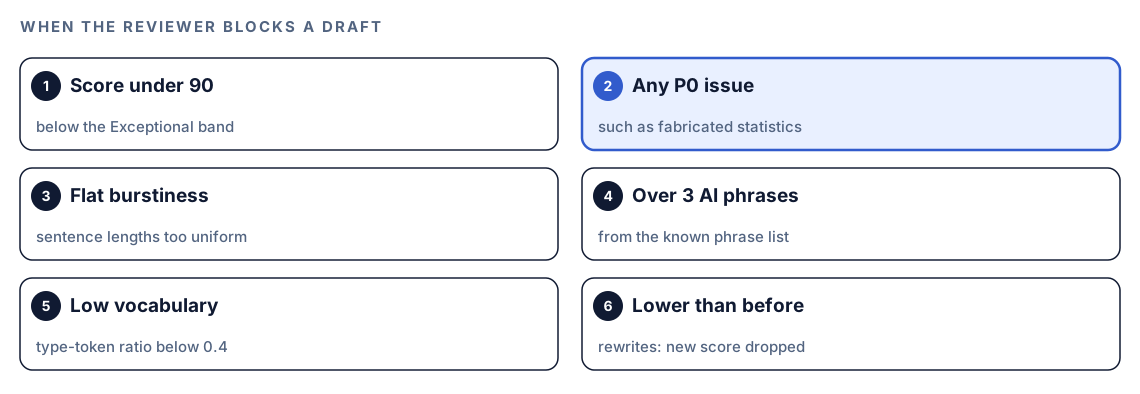
Any one of these sends a draft back: a total under 90, a P0 issue such as invented statistics, uniform sentence lengths, more than three stock phrases, or vocabulary diversity under 0.4. A rewrite that scores below the original is blocked too. Running $blog analyze yourself shows how far a post sits from that bar.
Apply the fixes with Codex
Because Codex works inside your repository, it can edit the post, show the diff and check the build in one task.
A typical High-priority fix is a vague H2 with a weak opener. Before:
## Choosing the right desk height

When it comes to desks, there are many factors to consider. Furthermore, every person is different.
After:
## What desk height should you choose?

[Direct answer in the first sentence, with the recommended range and its source linked inline.] [One sentence on how to adjust it for your own height.]
Then hand Codex the report:
Use the quality report for content/blog/standing-desk-guide.md. Fix every Critical and High issue in the file. Don't invent statistics: if a claim needs a source you can't find, list it for me instead. Keep the author's examples and voice. Show me the diff, run our build, then run $blog analyze on the file again and compare the two scores.If the list is long, $blog rewrite applies the whole set of optimizations in one pass, with an approval step first. Our guide to updating old blog posts walks through it.
Make it repeatable
Scoring a local file only reads the project, so the default read-only sandbox of codex exec is enough. That makes the analyze command a natural pre-publish gate. Save a small JSON Schema as quality-schema.json:
{
  "type": "object",
  "properties": {
    "score": { "type": "integer" },
    "rating": { "type": "string" },
    "critical_issues": { "type": "array", "items": { "type": "string" } }
  },
  "required": ["score", "rating", "critical_issues"],
  "additionalProperties": false
}
Then run the check and fail the job when a draft scores under your bar:
codex exec --output-schema quality-schema.json -o quality.json '$blog analyze content/blog/standing-desk-guide.md'
score=$(jq '.score' quality.json)
if [ "$score" -lt 80 ]; then
  echo "Quality score $score is below 80. Fix the issues in quality.json first."
  exit 1
fi
--output-schema asks Codex for a final answer in that shape, and -o saves it. The 80 matches the start of the Strong band, but the bar is yours to set. In CI that runs repository code, keep the API key out of job-level environment variables. Our codex exec automation guide covers CI setup in more depth.
Without the skill: a plain Codex prompt
Codex can produce a rough score on its own if you spell out the rubric:
Score content/blog/standing-desk-guide.md out of 100 with these weights: content quality 30, SEO 25, E-E-A-T 15, technical 15, AI citation readiness 15. For each category, list what loses points and quote the heading or line. Count statistics with and without a source link, report the average sentence length, and flag paragraphs over 150 words. Rank the fixes as Critical, High, Medium or Low. Don't edit the file.What the skill adds is a fixed, point-by-point checklist, the same phrase list and lexical measures on every run, readability bands per audience, batch sorting and export formats. That consistency is what makes this month's score comparable with last month's.
Pitfalls to avoid
- Treating the score as a Google metric. It's a checklist, not a ranking forecast.
- Chasing points instead of readers. Forcing every heading into a question can make a post worse.
- Trusting a high total that hides unsourced numbers. Read the Quick Stats line.
- Comparing scores across audiences with different readability targets.
- Scoring a draft before its front matter exists, which sinks the title, description and author checks.
- Scoring once. Re-run the command after fixes to confirm they landed.
Keep going
- Fact-check blog statistics against their sources to verify the numbers the score counts.
- Run an E-E-A-T audit with Codex for a deeper look at experience and trust signals.
- Check every post against a blog SEO checklist for title, meta and heading validation.
- Browse all Codex Blog and Codex SEO commands to see what else runs on a draft.
FAQ
What is a good quality score for a blog post?
On this scale, 80 to 89 is Strong and 90 or more is Exceptional. The kit's write and rewrite workflows hold a draft back until it reaches 90 with no blocking issues. Under 70 needs real work before it goes live.
How is a blog post quality score calculated?
The analyze command adds up five category scores, each built from small checks worth a few points, such as title length or paragraph size. Writing quality and on-page SEO carry the most weight, and the report explains every point the post lost.
Can a quality score predict Google rankings?
No. Rankings depend on signals a single-post score can't see, including the competition for each query. A good score means the post covers the basics Google's guidance describes. That gives it a fair chance, nothing more.
Does Google penalize AI-written blog posts?
Google's guidance looks at whether content is helpful and original, not at how it was made, though mass-producing pages that add no value can break its spam policies. The AI content check flags flat, formulaic writing so you can fix it first.
Can Codex score every post on my blog at once?
Yes. Point $blog analyze at a folder with --batch and add --sort score to list the weakest posts first. Then fix them one at a time from the top of the queue.