
Content Operations
Update Old Blog Posts for Freshness with Codex
Update old blog posts with Codex: audit first, approve a plan, replace stale statistics with sourced data, and keep publish dates honest in your repo.
To update old blog posts well, you have to change more than the date: swap out numbers that have aged, repair weak structure, and add what has happened since the post went live. In Codex, RankCue's Codex Blog kit handles that with two commands, $blog rewrite <file> for a full optimization pass and $blog update <file> for a lighter freshness pass, and both edit the post inside your own project so every change shows up as a diff you can review. This guide covers when a refresh is worth the effort, how both commands work inside Codex, what they change in a post, and how to keep a refresh honest.
Key takeaways
$blog rewrite <file>opens with a read-only audit and a section-by-section plan, and it changes nothing until you approve that plan.- The rewrite swaps unsupported numbers for cited ones, opens each section with a direct answer, splits long paragraphs, adds an FAQ, and records a
lastUpdatedfield next to the untoucheddate.$blog update <file>keeps the existing structure and concentrates on freshness: newer data, new developments, refreshed images and an updatedlastUpdatedfield.- A reviewer agent scores the new version before you see it. It needs 90 out of 100 with no blocking issues, and scoring below the original version counts as blocking.
- Google advises against making pages look fresh without real changes, so the value of a refresh comes from what you change, not from the new date.
The rewrite and update commands at a glance
| Item | Details |
|---|---|
| Command | $blog rewrite <file> for a full pass, $blog update <file> for a freshness pass |
| What you give it | The path to a published post in your project, in Markdown, MDX or HTML |
| What Codex reads | The post's front matter and body, plus the other posts in your blog folder for a keyword overlap check |
| What you get back | An audit summary and a plan first; after you approve, the edited post file and a before-and-after score summary |
| Needs | Internet access for source research, stock images and video lookups; no third-party API key for the core workflow |
| Best for | Posts with aging statistics, thin sections or a stale date that still deserve a place on your blog |
Why update old blog posts at all?
Posts decay quietly. A figure from years ago keeps being quoted as current. A tool redesigns its interface, so the steps stop matching the screen. A competitor publishes a clearer answer. None of this throws an error, so most blogs carry a long tail of posts that were right when written and are slightly wrong today. Fixing them helps readers first, and search engines want to rank the page that answers the query best now, not the one that answered it best three years ago.
What freshness means to Google
Google's guide to its ranking systems describes freshness systems, which aim to show more recent content for queries where people expect it. A search about a software release or this year's rules needs current information. A search about how to tie a bowline doesn't. So ask first whether a post's topic is time-sensitive. If it is, stale details cost you clicks and trust. If not, refresh for accuracy and clarity rather than to look new.
Published dates, modified dates and honest signals
Two dates matter: when the post first appeared, and when it last changed in a meaningful way. Most sites expose both in front matter, in the byline, and in structured data as datePublished and dateModified. Google's guidance on byline dates asks for a clear visible date that agrees with the markup.
Its guidance on helpful, people-first content goes further. One of its self-check questions asks whether you change page dates to look fresh when the content hasn't substantially changed. That's the trap. It's also why the rewrite writes a separate lastUpdated field and never touches the first date.
Rewrite, update, merge or leave alone
Not every old post needs the same treatment:
| Situation | Best move |
|---|---|
| Accurate, evergreen and still useful | Leave it alone |
| Sound structure, but numbers and examples have aged | Run $blog update |
| Weak structure, unsourced claims, thin sections | Run $blog rewrite |
| Two posts chase the same keyword | Merge them or shift one to a different angle |
The last row matters. Refreshing a post that competes with a sibling just gives you two stronger rivals, so the rewrite checks for overlap before it edits anything.
How $blog rewrite runs inside Codex
The skill moves through fixed phases, and you can follow each one in the task log.
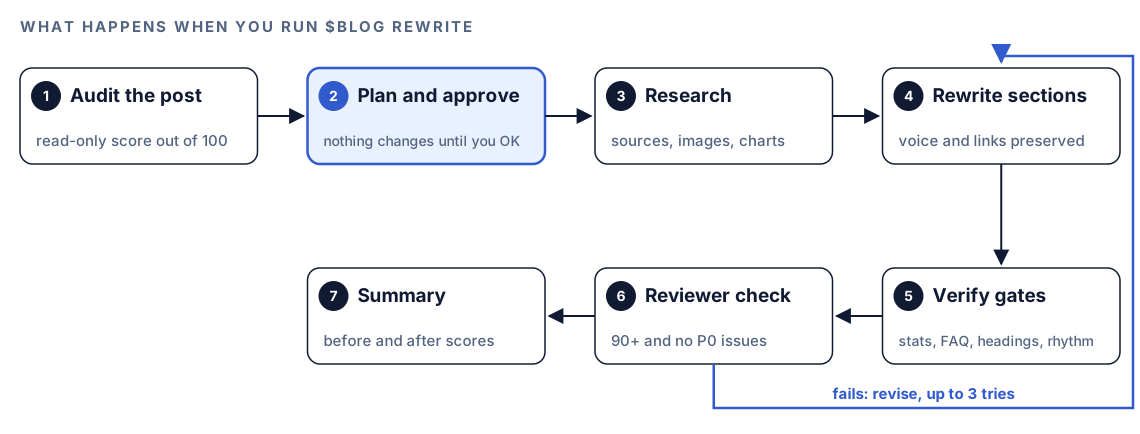
- Audit, read-only. Codex detects the format, then counts cited and uncited numbers, images and charts, and paragraphs over 150 words. It checks heading order, direct-answer openers, FAQ markup, freshness fields, self-promotion and source quality, scans for repetitive writing, and searches your blog folder for posts chasing the same keyword. The post gets a score out of 100.
- Plan and wait. You get the findings and a section-by-section plan, and nothing is edited until you approve it.
- Research. Each doubtful number gets a replacement from tier 1 to 3 sources: official bodies and established research or trade outlets, not content farms. Posts with fewer than three images get stock photos from Pixabay or Unsplash, each URL checked for an HTTP 200 response. Posts with fewer than two charts get some planned.
- Rewrite. Edits follow a fixed order that starts by protecting what works: your voice, first-hand insight, good images and internal links.
- Verify. The result is checked against the skill's gates. For MDX, Codex builds the project to catch compile errors.
- Reviewer check. A separate reviewer agent needs 90 out of 100 and zero P0 (blocking) issues. A failing draft is revised, up to three attempts, and then Codex stops and shows the diagnostic rather than a weak draft.
- Summary. You see the score change per category and every edit made.
What the rewrite changes in a post
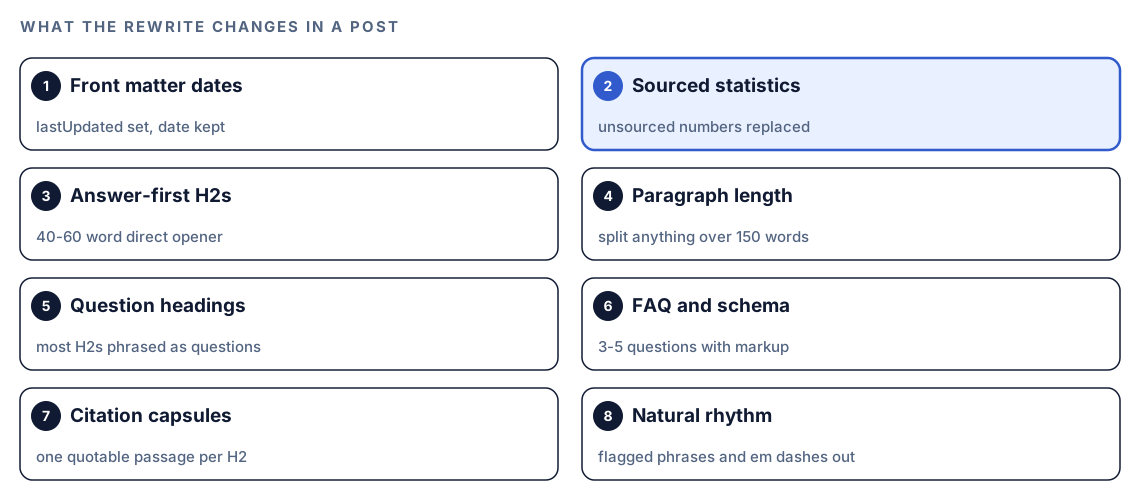
The rewrite isn't a free-form polish. Each edit maps to the skill's 100-point score, which gives content quality 30 points, SEO 25, and E-E-A-T, technical elements and AI citation readiness 15 apiece.
Front matter and dates
lastUpdated gets today's date; date stays as published. The meta description is rewritten to 150 to 160 characters containing one statistic. A missing cover image, cover alt text or social image is added, and tags are checked for fit.
Statistics and sources
The skill hunts for patterns such as "X% of" and "X out of Y", plus confident claims with no source. Each is replaced with data from a tier 1 to 3 source, credited inline with the source name, a link and the year. Zero fabricated statistics is one of the gates.
Answer-first sections, headings and paragraphs
Every H2 opens with a 40 to 60 word paragraph that answers the heading directly and carries a sourced statistic. Headings turn into questions where natural, aiming for 60 to 70 percent questions, and the keyword appears in two or three of them. Paragraphs over 150 words are split toward 40 to 80 words.
FAQ, citation capsules and the summary box
A post without an FAQ gets three to five questions with FAQ schema. Each H2 gets a citation capsule, a standalone 40 to 60 word passage with one claim, one data point and its source, so an AI answer engine can quote it whole. A key takeaways box follows the introduction.
Writing patterns
Burstiness, the spread of sentence lengths, should show a standard deviation above 6 words. Vocabulary diversity, unique words divided by total words, should beat 0.50, and under 0.40 reads as repetitive. Stock phrases such as "it's important to note" get replaced, em dashes go, and contractions come in. A second pass catches structural habits, like three or more paragraphs opening with "Here".
Media, promotion and original value
Images and charts are spaced through the post, never repeating a chart type, and a post with no video gets two or three lazy-loaded embeds. Brand mentions drop to one. Original value is tagged as [ORIGINAL DATA], [PERSONAL EXPERIENCE] or [UNIQUE INSIGHT], and if there is none, Codex asks you for first-hand material.
What does $blog update do differently?
The update command is the lighter tool. It keeps the structure and focuses on newer statistics, developments since the last update, images older than a year and the lastUpdated field, with a target of at least 30 percent changed content.
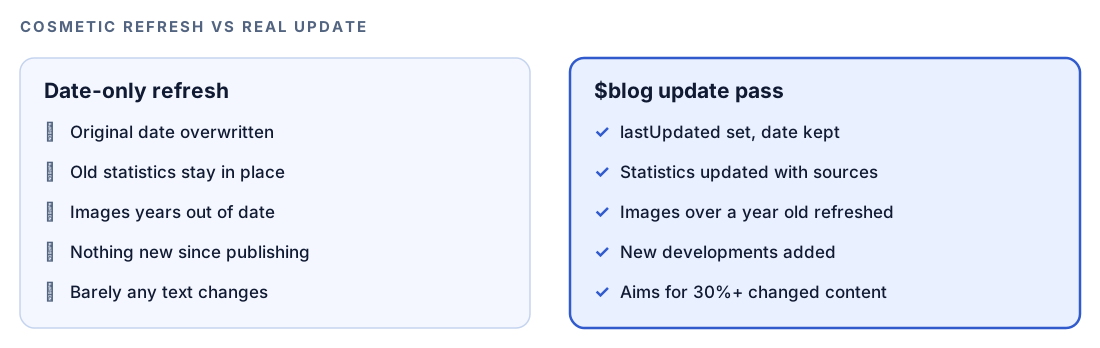
That target keeps an update from shrinking into the date-only change Google warns about. Use $blog update when a post is well built but dated, and $blog rewrite when the structure is weak or the claims can't be sourced.
Run it in Codex, step by step
- Install the Codex Blog kit with the setup steps in the install section, restart Codex so it finds the new skills, and open a new task in your blog's project folder.
- Check your permission mode. Research, image checks and video lookups fetch live pages, so depending on your mode, Codex may ask before it uses the internet. Approve it for this task.
- Run the full rewrite on one post:
$blog rewrite content/blog/choosing-a-standing-desk.md- Or describe the job in plain language. Codex picks the skill when your request matches it:
This post is from 2023 and the numbers are stale. Audit it, show me a plan, and once I approve, rewrite it with sourced statistics while keeping my voice.- For a lighter freshness pass that keeps the structure, use the update command:
$blog update content/blog/choosing-a-standing-desk.md- Answer the plan. Reply with changes before you approve, such as "keep the introduction as it is", "skip video embeds" or "the third section is my own test, don't touch it".
If you've set up $blog image, which has its own setup step and uses Gemini, the rewrite can offer generated images for sections where stock photos don't fit.
Reading the report
You get two reports. The first comes with the plan: current score, findings, writing-pattern results and keyword overlap status. The second comes at the end:
## Blog Optimization Complete: [Post title]

### Score Change
- Before: XX/100 ([Rating])
- After: XX/100 ([Rating])
- Content Quality: XX/30
- SEO Optimization: XX/25
- E-E-A-T Signals: XX/15
- Technical Elements: XX/15
- AI Citation Readiness: XX/15

### Cannibalization
- [none found / flagged N posts / resolved]

### Changes Made
- XX statistics replaced with sourced data
- Answer-first formatting applied to XX H2 sections
- FAQ schema added with XX questions
- lastUpdated set to [date]
Read it in this order:
- Overlap status. If another post targets the same keyword, settle merge or differentiate first.
- Replaced statistics. Open each new source and confirm the number is there and means what the sentence says.
- Voice. Skim the sections you care about most. You're the judge of whether it still sounds like you.
- Score change. The per-category numbers show where the post was weak and whether the pass fixed it.
Apply the fixes with Codex
The rewrite already edits the file, so this step is checking and shipping. Because Codex works in your repository, the refresh is one reviewable diff.
Here's the front matter change in a typical post. Before:
---
title: "How to Choose a Standing Desk"
date: "2023-04-12"
description: "Everything you need to know about standing desks."
---
After:
---
title: "How to Choose a Standing Desk"
date: "2023-04-12"
lastUpdated: "2026-10-18"
description: "[150 to 160 characters that answer the question and include one sourced statistic]"
coverImageAlt: "[One sentence describing the cover image]"
---
In the body, an uncited line such as "office workers sit for X hours a day" becomes a sentence that names its source and links to the page holding the number. Then ask Codex to check its own work:
Show me the full diff for content/blog/choosing-a-standing-desk.md. List every statistic that changed, with its source URL, so I can check each one. Confirm that the original date is unchanged and that every internal link from the old version is still there. Then run our build and tell me if anything fails.Two follow-ups close the loop. Run $blog factcheck on the file to confirm each new number appears on its cited page, as covered in our guide to fact-checking blog statistics. Then run $blog analyze on it for an independent score, explained in scoring a draft before you publish.
Make it repeatable
Refreshes go wrong in familiar ways: an overwritten publish date, or a lastUpdated bump with no real change. A short rule in your project's AGENTS.md keeps Codex consistent whenever it touches a published post:
## Refreshing published posts
- Never change `date` on a published post. Set `lastUpdated` only when the content changed in substance.
- Use $blog update for freshness passes. Use $blog rewrite only when the audit score is below 70 or I ask for it.
- Every new or changed statistic links to the page where that number appears.
- Keep first-person stories, test results and examples unless I approve removing them.
- After any refresh, run $blog factcheck on the file and report every claim below 0.7.
Codex reads AGENTS.md before it starts work, so these rules carry into future tasks. Keep it short, since combined instructions have a size cap. Our guide to AGENTS.md rules for SEO shows a fuller file.
Without the skill: a plain Codex prompt
You can get a reasonable refresh from Codex with no kit installed:
Read content/blog/choosing-a-standing-desk.md. List every statistic and say whether it links to a source. Flag paragraphs over 150 words, skipped heading levels, and anything that looks out of date as of today. Propose a section-by-section refresh plan and don't edit the file until I approve it. When I do, keep the original date, add a lastUpdated field, and show me the diff.The skill adds what you'd otherwise rebuild each time: a 100-point audit before and after, the overlap check, a fixed edit order, a source standard for new numbers, and a reviewer gate.
Pitfalls to avoid
- Bumping the date without real changes. It's the exact pattern Google's guidance warns about.
- Overwriting the original publish date. Keep
dateand addlastUpdated. - Accepting replacement statistics unread. A number that misstates its source is worse than none.
- Keeping experience phrases that aren't true. The rewrite adds hedges such as "in our experience", so cut any you can't back up.
- Refreshing a post that should be merged with a sibling targeting the same keyword.
- Changing the URL during a refresh. If you must, add a redirect from the old address.
Keep going
- Spot content decay in Search Console data to find which posts lost clicks and deserve a refresh first.
- Find keyword cannibalization across posts before you refresh posts that compete with each other.
- Score a blog draft before you publish to get an independent quality score after the refresh.
- See every Codex Blog and Codex SEO command, including the research and image commands the rewrite can call on.
FAQ
How often should you update old blog posts?
No single schedule suits every blog. Time-sensitive posts need a check whenever their facts change, while evergreen posts can go much longer if they stay accurate. A drop in clicks in your search data is a better trigger than the calendar.
Does changing the date on a blog post help SEO?
A new date alone isn't an update, and Google's people-first content guidance treats it as a warning sign. Change the modified date when the content changed in substance, and keep the original publish date in your markup.
Should I rewrite an old post or just update it?
Update it when the structure works but the details have aged. Rewrite it when sections are thin, claims are unsourced or the quality score is low. In Codex, $blog update handles the first case and $blog rewrite handles the second.
Will Codex change my post without asking?
No. The rewrite shows an audit and a plan first and waits for your approval. After that, its edits land as a normal diff you can review or reject before you commit.
Can Codex update old blog posts in bulk?
The rewrite and update commands work on one file at a time, which keeps each diff reviewable. To decide the order, score your whole blog first with $blog analyze in batch mode or run $blog audit, then refresh the lowest-scoring posts one by one.