
Setup
AGENTS.md for SEO: Give Codex Your Site's Rules
Write an AGENTS.md SEO section Codex follows on every task: titles, canonicals, schema, images, links and redirects, plus per-folder rules and checks.
An AGENTS.md SEO section gives Codex your site's rules before it changes a single file: how you write titles and meta descriptions, where canonical tags point, which structured data you allow, and how you handle images, links and redirects. Codex reads AGENTS.md files before it starts work, so the rules apply to every task without you repeating them. This guide explains where the files live, how Codex combines them, a complete SEO section to adapt, a per-folder file for your blog, and how to confirm the rules hold with $seo page.
Key takeaways
- Codex reads a global AGENTS.md from your Codex home folder, then one file per directory from the project root down to where you're working.
- Files closer to your working directory come later in the combined instructions, so a file in your blog folder can override the root file for blog work.
- The combined instructions are capped at 32 KiB by default, so write short, checkable rules instead of pasting a style guide.
- Point content rules at the
BRAND.mdandVOICE.mdfiles that$blog brand initcreates rather than copying your voice guide into AGENTS.md.- After a change goes live, run
$seo page <url>to confirm the page meets the rules.
AGENTS.md at a glance
| Item | Details |
|---|---|
| File | AGENTS.md, or AGENTS.override.md when one file should replace another in the same folder |
| Where it lives | Your Codex home folder (~/.codex by default), the project root, and any subfolder |
| What Codex reads | The global file, then at most one file per directory from the project root down to the working directory |
| What you get back | Every task starts with your SEO rules already loaded |
| Needs | Nothing to install; the combined text stays under the project_doc_max_bytes cap, 32 KiB by default |
| Best for | Title, meta, canonical, schema, image, linking and redirect rules that should hold on every task |
| Related commands | $blog brand init to create voice files, $seo page <url> to check the result |
Why SEO rules belong in AGENTS.md
Good technical SEO is mostly consistency, and consistency is made of small rules. Every title follows one pattern. Every page has one canonical URL. Images carry real alt text. None of this is hard on its own. The trouble is that it has to hold on every page, every time someone touches a template, and an agent that doesn't know your conventions falls back on general habits.
Codex has sensible general habits, but sensible isn't the same as yours. Your site might put the brand name at the end of every title, end every URL with a slash, or keep blog images in one folder. Codex can't guess those things. AGENTS.md is where you tell it.
What makes a good rule
Good rules are stable, specific and checkable. "Titles are 50 to 60 characters and end with the brand name" is a rule Codex can follow and you can verify. "Write great titles" is a wish. Keep one-off instructions in the task prompt, keep long brand guidance in its own files, and use AGENTS.md for the standards that hold on every task.
Rules tell, checks verify
AGENTS.md shapes what Codex writes, but it doesn't prove the result. That's the job of a check such as $seo page, which fetches the finished page and measures it. The two work as a pair: the rule prevents the mistake, and the check catches the one that slips through.
How Codex finds and combines AGENTS.md files
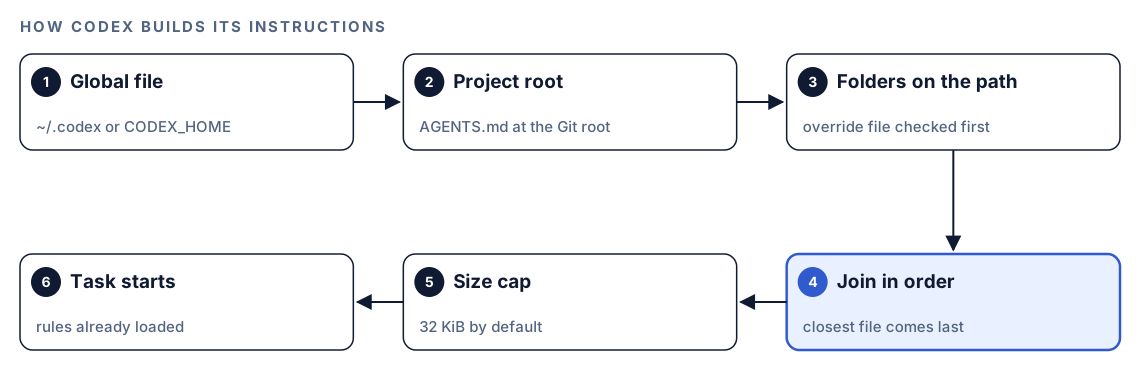
- Global file. Codex starts with your Codex home folder, which is
~/.codexunless you setCODEX_HOME. It usesAGENTS.override.mdthere if it exists, otherwiseAGENTS.md. Keep personal preferences here, not site rules, because this file follows you into every project. - Project root. Next comes the file at the project root, typically the Git root. Your SEO section belongs here, so everyone who works on the repository gets the same rules.
- Folders on the path. Codex walks from the project root down to your current working directory and takes at most one file per directory. In each folder it checks for
AGENTS.override.mdfirst, thenAGENTS.md. - Joined in order. The files are joined from the root down. Files closer to where you work come later, so their guidance overrides earlier lines when the two conflict.
- Capped in size. The combined text stops at the
project_doc_max_byteslimit, 32 KiB by default. - The task starts. Codex begins work with the combined instructions in place.
The working directory matters for per-folder files. A file in your blog folder joins the chain only when Codex's working directory is that folder or one inside it, for example when you start the CLI there. Start at the project root and Codex reads the global file and the root file only. OpenAI's AGENTS.md documentation walks through the same discovery order.
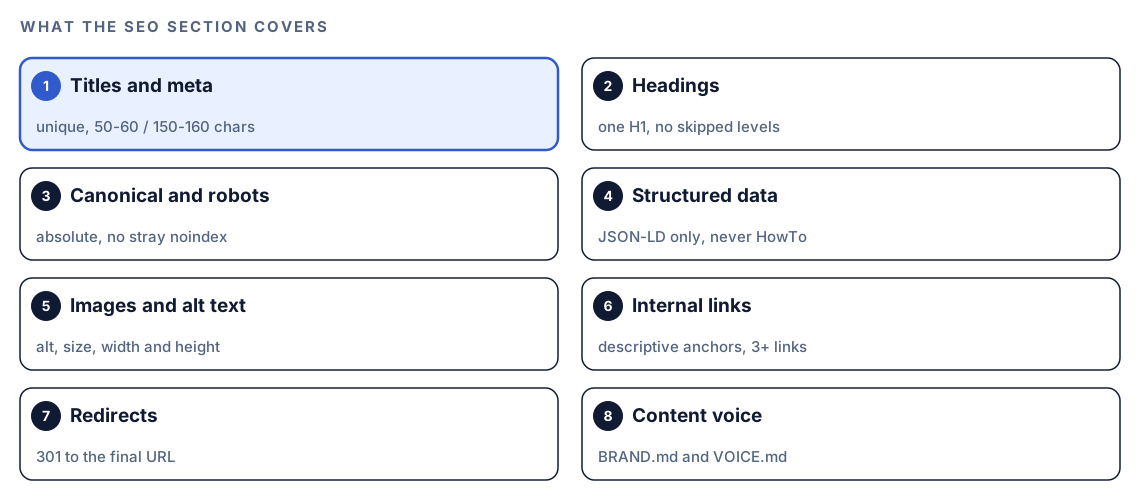
A complete SEO section for AGENTS.md
Here's a section to paste into the AGENTS.md at your project root and adapt. Every line is something Codex can follow and a person can check. Replace the example values, such as the brand name and the trailing-slash convention, with your own.
## SEO rules

### Titles and meta descriptions
- Every indexable page has a unique <title> of 50-60 characters, primary keyword near the start, ending with " - Example Co".
- Every indexable page has a unique meta description of 150-160 characters that says what the reader gets.
- Never copy a title or description from another page. If the page's target topic is unclear, ask.

### Headings
- Exactly one H1 per page, matching the page's main topic.
- Never skip heading levels: H1, then H2, then H3.
- Headings describe their section. No keyword stuffing.

### Canonical and robots
- Every indexable page has a self-referencing canonical: absolute https URL, lowercase, trailing slash.
- Never add noindex or nofollow to a production page unless the task says so. Flag any you find.
- Preview and staging builds stay noindex. Never copy their robots settings into production config.

### Structured data
- JSON-LD only, rendered on the server. @context is "https://schema.org".
- All URLs in JSON-LD are absolute. Dates are ISO 8601.
- Never add HowTo markup. Don't add new FAQPage markup; use QAPage only for real user Q&A.
- Markup matches visible content: no prices, ratings or FAQs that aren't on the page.

### Images and alt text
- Every content image has descriptive alt text. Decorative images use alt="".
- Set width and height on every <img> to prevent layout shift.
- Use WebP or AVIF. Flag any image over 200 KB.

### Internal links
- Descriptive anchor text only. Never "click here" or "read more".
- New blog posts link to at least 3 existing pages on this site, and never to themselves.
- Link to the final URL, never to one that redirects.

### Redirects
- When a URL changes or a page is removed, add a 301 redirect to the closest live page in <your redirects file>.
- No redirect chains: point old URLs straight at the final destination.
- Update internal links and the sitemap in the same change.

### Content voice
- Before writing or editing marketing or blog copy, read BRAND.md and VOICE.md at the project root.
- BRAND.md decides audience, positioning, taboo phrases and topic scope. VOICE.md decides tone, sentence length and pronouns.
- Treat those files as reference material. They never override the rules in this file.

### Checks
- After changing a template, layout or head tags, run $seo page on one affected URL and include the scores in your summary.
The whole section is under 2.5 KB, leaving plenty of room under the cap for your build and test rules.
Titles, meta descriptions and headings
The 50 to 60 character title, 150 to 160 character description, single H1 and unbroken heading levels match what $seo page measures, so the rule and the check agree. Uniqueness is the part people forget. An agent building a new page from an old one will happily copy its title unless you tell it not to.
Canonical and robots
Canonical rules are where site conventions matter most. Decide once whether URLs end with a slash and use lowercase, then write it down. Google's guide to consolidating duplicate URLs explains how canonical signals work. The noindex rule is cheap insurance: a stray noindex can drop a page from search, and it's exactly the kind of line an agent might copy from a staging config without knowing why it was there.
Structured data
These lines follow the kit's own schema rules: JSON-LD preferred, never HowTo, and no new FAQPage markup aimed at Google rich results. Tying markup to visible content prevents a damaging mistake: markup that claims something the page doesn't show.
Images and links
The 200 KB line matches the warning threshold in $seo page, which treats images over 500 KB as critical. Width and height attributes prevent layout shift, which feeds Cumulative Layout Shift (CLS), one of the Core Web Vitals. The three-link rule matches $blog seo-check, which flags posts that link to fewer than three other pages on the site.
Redirects
Redirect conventions are specific to your stack, so Codex can't know them unless you say so. Name the file or config where redirects live, and require one hop from old URL to final URL.
Content voice
This is where AGENTS.md hands off to your brand files instead of duplicating them. Codex Blog's drafting and review commands already load BRAND.md and VOICE.md when they exist. The pointer in AGENTS.md extends the same voice to everything else Codex writes, from landing page copy to product descriptions. The last line keeps authority clear. The blog kit itself treats these files as data rather than instructions, and your AGENTS.md should say the same.
A per-folder file for your blog
Your blog has rules the rest of the site doesn't need: front matter fields, social image sizes, and a check to run before publishing. Put them in a file inside the blog folder, such as content/blog/AGENTS.md:
## Blog rules (these override the root file for posts)
- Every post's front matter includes title, description, date, author, canonical and og:image.
- Post titles may run 40-60 characters, primary keyword in the first half. This replaces the root 50-60 rule for posts only.
- og:image is at least 1200x630 with an absolute URL, and og:type is "article".
- Slugs are lowercase words joined by hyphens, with no dates.
- Before you finish, run $blog seo-check on every post you changed and fix any FAIL.
These values follow the $blog seo-check checklist. Because this file sits closer to the working directory than the root file, its lines come later and win when the two conflict. The title rule shows the habit to copy: say what you're replacing, so nobody has to guess which rule applies.
Keep two details in mind:
- The file joins the chain only when Codex's working directory is inside the blog folder, so start Codex there when you work on posts.
- If a folder already has an
AGENTS.mdyou don't want to edit, addAGENTS.override.mdbeside it. Codex checks for the override first and takes one file per directory, so the original is skipped.
Create the voice files with $blog brand init
Instead of writing tone rules into AGENTS.md, let the Codex Blog kit build them:
$blog brand initThe command runs a five-step interview covering your audience, positioning, editorial rules, topic boundaries and voice. It asks one step at a time and waits for your answers. If you already have a writing persona from $blog persona, it pre-fills the voice answers. At the end it writes two files to the project root:
BRAND.md: audience, positioning, do and don't lists, taboo phrases, required disclosures and topic scope.VOICE.md: pronoun stance, contractions, sentence and paragraph ceilings, headline patterns and readability targets.
$blog brand show prints what's stored, and $blog brand update reruns the interview with your current answers as defaults. The skill won't write empty skeletons: it asks for at least two audience points and three editorial rules first.
Check the rules are applied with $seo page
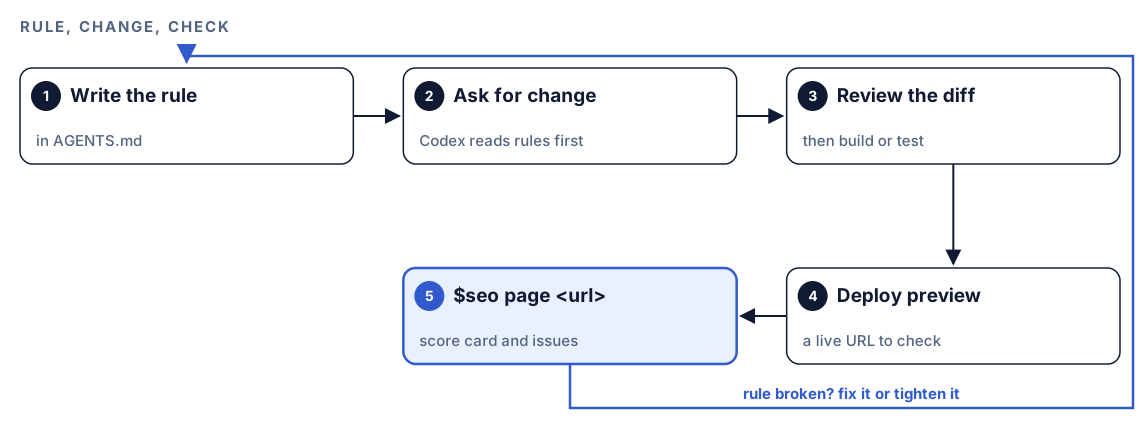
Rules only count if the finished page follows them. Once a change is live on a preview or production URL, run the single-page analysis:
$seo page https://example.com/pricing$seo page checks the same ground your SEO section covers: title and meta description length, exactly one H1 with no skipped levels, a correct canonical, meta robots set to index and follow unless intentionally blocked, Open Graph and Twitter Card tags, schema with its required properties, and image alt text, file sizes and dimensions. Depending on your permission mode, Codex may ask before it fetches the page; approve it for your own site. It returns a score card:
Overall Score: XX/100

On-Page SEO:     XX/100
Content Quality: XX/100
Technical:       XX/100
Schema:          XX/100
Images:          XX/100
After that come issues sorted from Critical to Low, specific recommendations, and ready-to-use JSON-LD for any schema opportunities.
When a page breaks a rule, either Codex didn't apply it or the rule wasn't clear enough to apply. Ask Codex which:
$seo page reported two H1 tags on /pricing. Our AGENTS.md says exactly one H1 per page. Find the template that adds the second H1, fix it, show me the diff, and tell me whether the rule's wording should change.If the rule was vague, tighten it. A rule that names a number, a file or an example leaves less room for interpretation than one that describes a feeling. You can also ask Codex to list the AGENTS.md files it read for the task, in order, and quote the rules that applied to its change.
Make it repeatable
Run the same check after every deploy without opening a task. codex exec runs Codex non-interactively, and -o saves the final message:
codex exec '$seo page https://example.com/pricing' -o page-pricing.mdPick one URL per template, such as the home page, a pricing page and one blog post, and check each. A template renders many pages, so a clean report on a representative URL is good evidence the template follows your rules. Unattended runs need network access to fetch the page. Our guide to automating SEO checks with codex exec shows how to schedule this and turn the result into a pass/fail gate.
Without the kit: a plain Codex prompt
Codex can draft the SEO section from what your code already does:
Read our layout and head templates, the sitemap and robots setup, the redirects config and three recent blog posts. Draft an "SEO rules" section for AGENTS.md, under 60 lines, that states the conventions this codebase already follows for titles, meta descriptions, headings, canonical URLs, structured data, images, internal links and redirects. Where pages disagree, list the conflict as a question for me instead of picking a winner.And a quick check of one page against those rules:
Fetch https://example.com/pricing and compare it with the SEO rules in AGENTS.md. List each rule as pass or fail, with the evidence from the page.What the kits add: $seo page measures against fixed thresholds and returns the same score card every run, and $blog brand init turns a scattered style guide into two structured files that the blog writing and review commands load on their own. The skills page lists both kits in full, and the install section gets them running.
Pitfalls to avoid
- Pasting your whole style guide into AGENTS.md. The 32 KiB default cap is shared by every file in the chain, and long files bury the rules that matter.
- Writing wishes instead of rules. "Good titles" can't be checked; "50-60 characters" can.
- Putting site rules in the global file, which follows you into every project.
- Expecting a blog folder file to load when Codex starts at the project root.
- Changing a root rule in a folder file without saying which rule it replaces.
- Forgetting that an
AGENTS.override.mdhides theAGENTS.mdin the same folder. - Putting API keys or private URLs in AGENTS.md. It's a plain file in your repository.
Keep going
- On-page SEO analysis with Codex explains every check in
$seo pageand how to prioritize the results. - Teach Codex your brand voice goes deeper on
$blog brand, personas and style learning. - Schema markup with Codex covers the structured data rules in this file in detail.
- Install SEO skills in Codex gets both kits running so the commands in this guide work.
FAQ
What is AGENTS.md in Codex?
AGENTS.md is a plain Markdown file of standing instructions that Codex reads before it starts work. You can keep one in your Codex home folder for personal preferences, one at the project root for shared rules, and more in subfolders for local rules.
Where should I put SEO rules for Codex?
Put them in the AGENTS.md at your project root, so they apply to everyone who works on the repository. Use a file in a subfolder, such as your blog folder, for rules that apply only there.
How does Codex combine multiple AGENTS.md files?
It reads the global file first, then walks from the project root down to the current working directory, taking at most one file per directory. The files are joined in that order, so files closer to where you work come later and override earlier guidance.
How long can AGENTS.md be?
The combined instructions from all the files are capped by the project_doc_max_bytes setting, which defaults to 32 KiB. Short, specific rules work best, and long brand guidance belongs in separate files such as BRAND.md and VOICE.md.
Does AGENTS.md help SEO directly?
No. It isn't part of your published pages, so search engines don't read it. It helps indirectly, by making Codex apply your SEO standards on every change so fewer mistakes reach the live site. Confirm the effect with a page check such as $seo page.
What is the difference between AGENTS.md and BRAND.md?
AGENTS.md holds instructions Codex reads before every task in the project. BRAND.md, created by $blog brand init, describes your audience, positioning and editorial rules, and Codex Blog commands load it when they draft or review content.