
Setup
Install Skills in Codex: Set Up the SEO and Blog Kits
Install skills in Codex step by step: run setup, restart, check the runtime with $seo doctor, pick a permission mode and run your first SEO audit.
To install skills in Codex from RankCue, you buy a kit, run the setup command from our install section, restart Codex, and open a new task in your project. After that, typing $seo or $blog with a command runs a skill, and so does describing the job in plain language. This guide covers each step, the $seo setup and $seo doctor checks, permission modes, and common fixes.
Key takeaways
- A Codex skill is a folder with a
SKILL.mdfile, loaded in full only when a task uses it.- Installing a RankCue kit takes four moves: buy, run the setup command, restart Codex, open a new task.
$seo setupbuilds the Python runtime and Playwright Chromium;$seo doctorconfirms they're ready without changing your system.- You can call a skill explicitly with
$seoor$blog, let Codex pick it from a plain request, or browse installed skills with/skillsin the CLI.- Commands that check live pages need internet access, so pick a permission mode that asks before Codex goes online.
Setup at a glance
| Item | Details |
|---|---|
| Commands | $seo setup and $seo doctor to prepare the runtime, then any $seo or $blog command |
| What you give it | A RankCue kit, Codex (app, CLI or IDE extension), and the project folder you want to work in |
| What Codex reads | The name and description of each installed skill, then the full SKILL.md of the skill a task uses |
| What you get back | A Python runtime with Playwright Chromium, a readiness report, and output saved in your project |
| Needs | Internet for setup and for live-page checks; your own accounts only for optional integrations |
| Best for | First-time setup, a new computer, or a health check before a big audit |
What is a Codex skill?
OpenAI Codex is a coding agent. It works inside your project: it reads files, runs commands, edits code, and shows you the changes before you keep them. It knows a fair amount about SEO, but it has no fixed method, so the same request can come back in a different shape each time. A skill gives Codex that method: the instructions, scripts and reference material for one kind of job, followed the same way on every run.
What's inside a skill folder
A skill is a folder with a SKILL.md file. The file opens with a name and a description, followed by instructions written for the agent. A skill can also carry scripts and reference files. RankCue's kits use this format: a top-level skill per kit that routes your command, plus a skill for each job.
How Codex decides to use a skill
With explicit invocation, you mention the skill with a dollar sign, such as $seo audit https://example.com. With implicit invocation, you describe the job and Codex picks the skill whose description matches your request. Explicit calls are predictable; implicit calls are convenient once you trust the match.
Why installed skills don't slow every task
Codex knows each skill's name and description, but it loads the full SKILL.md only when it uses that skill. Installing both kits, with dozens of commands between them, doesn't bloat a task where you only want to fix a CSS bug.
Codex looks for skills in a few places, including a repository's .agents/skills folder and the user folder $HOME/.agents/skills. You don't manage those folders yourself, because the setup command installs the skills. OpenAI's guide to building skills explains the format.
What the Codex SEO and Codex Blog kits contain
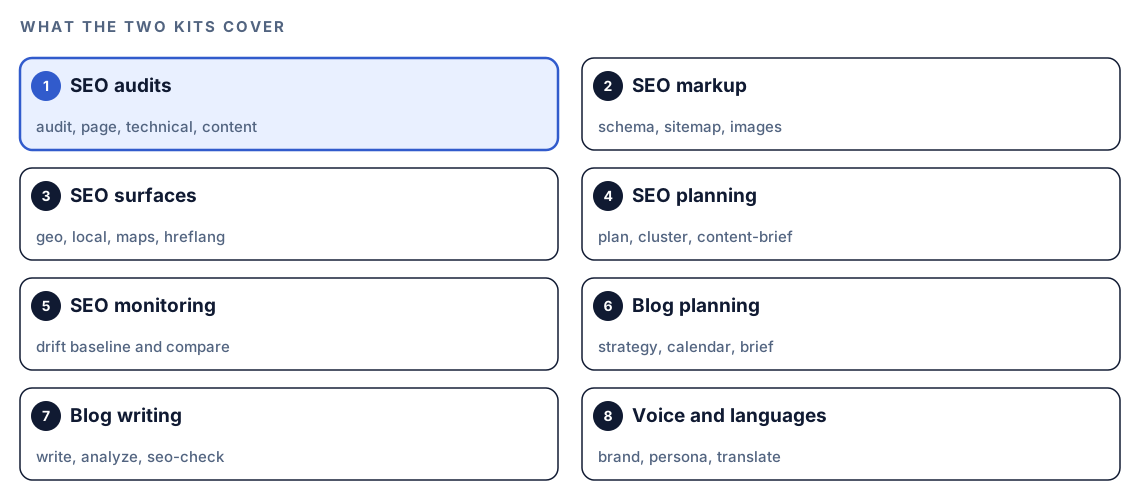
RankCue sells two kits. Codex SEO audits and analyzes websites through $seo commands. Codex Blog plans, writes and checks content through $blog commands. The Complete Bundle includes both. Our skills page lists 31 Codex SEO skills and 30 Codex Blog skills, with a short description of each.
Codex SEO
The $seo skill works as a router: you give it a command and a URL or topic, and it hands the job to the matching skill.
- Audits:
$seo auditfor a whole site,$seo pagefor one URL, plus$seo technicaland$seo content. - Markup and assets:
$seo schema,$seo sitemapand$seo images. - Search surfaces:
$seo geofor AI search,$seo localand$seo mapsfor local search,$seo hreflangfor multilingual sites. - Planning and monitoring:
$seo plan,$seo clusterand$seo content-brief, plus$seo driftto compare a page against a saved baseline.
The full audit crawls up to 500 pages, hands the work to specialist agents running in parallel, and returns an SEO Health Score from 0 to 100 with a prioritized action plan.
Codex Blog
The $blog skill routes the same way across the life of a post:
- Plan and write:
$blog strategy,$blog brief,$blog outline,$blog writeand$blog rewrite. - Check:
$blog analyzescores a post out of 100,$blog seo-checkruns a pass/fail checklist, and$blog auditreviews a whole folder. - Voice and languages:
$blog brandand$blog personarecord your audience and tone, and$blog translatehandles other languages.
A few commands use outside services with your own credentials, such as $seo google (Google APIs), $seo dataforseo (DataForSEO) and $blog image (Gemini). The provider's own pricing applies, and the core of both kits works without them.
How to install skills in Codex, step by step
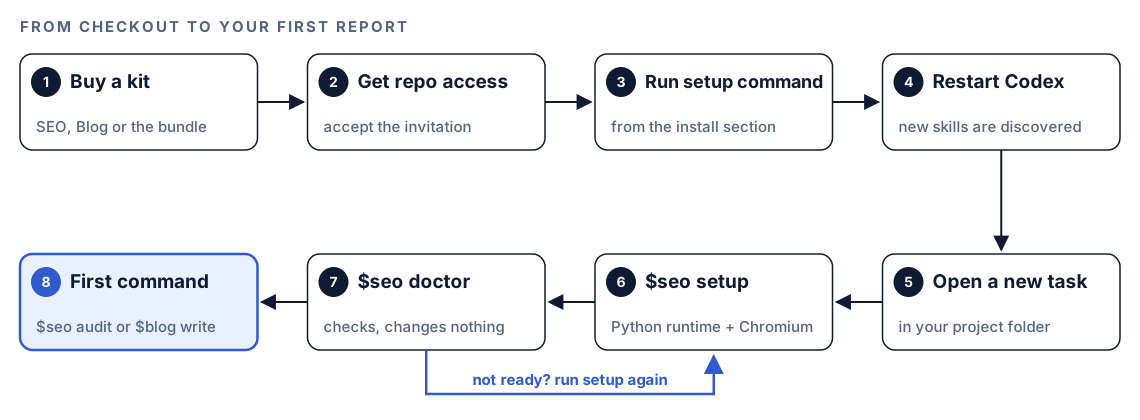
- Buy a kit. Choose Codex SEO, Codex Blog or the Complete Bundle in the pricing section. After checkout you get access to the kit's private repository; accept the invitation. There's no license key.
- Run the setup command. Each kit has its own setup command in the install section. Run it in your terminal, or run both for the bundle. It installs the skills and agents.
- Restart Codex. Close Codex and open it again so it discovers the new skills and agents.
- Open a new task in your project. Use your website's project folder, not a task you opened before the install.
- Run `$seo setup`. It creates an isolated Python runtime and installs Playwright Chromium, the headless browser the kit uses to render JavaScript pages and capture screenshots. The runtime sits apart from any Python you already use.
- Run `$seo doctor`. It checks that the runtime, its dependencies and Chromium are ready, and it changes nothing on your system. If it reports a gap, run
$seo setupagain and check once more. - Run your first command. Try
$seo auditon your own site or$blog writeon a topic you know well. The output lands in your project.
Because doctor only reads, it's safe to run whenever something feels off:
$seo doctorThree ways to run a skill in Codex
All three routes end in the same place: Codex loads the skill's full instructions and follows them.
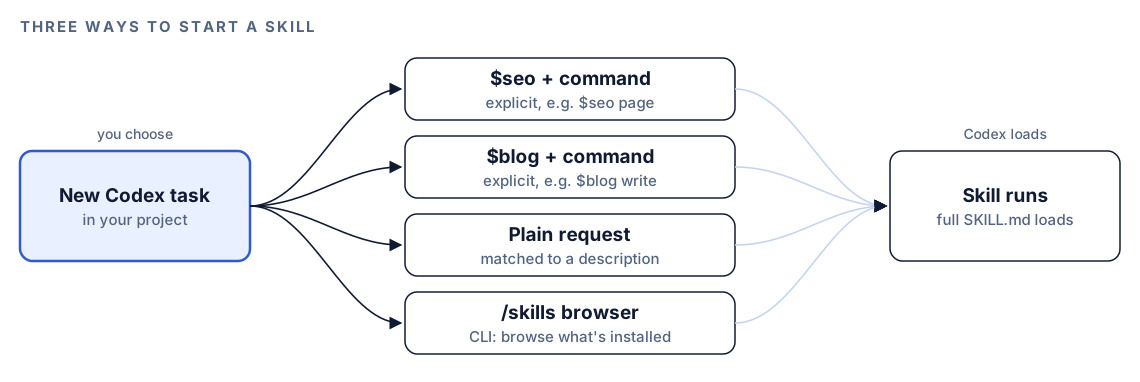
Mention the skill with a dollar sign
Type the kit name with a dollar sign, then the command and its argument:
$seo page https://example.com/pricing$blog write how to choose a standing desk for a small officeExplicit calls are the most predictable, so use them in scripts.
Describe the job in plain language
Codex compares your request with each skill's description and picks the one that fits:
Check https://example.com/pricing for on-page SEO problems: the title, meta description, headings, canonical tag and images. Save the findings as a report in this project.If Codex picks a different skill than you expected, repeat the request in the explicit form.
Browse with /skills in the CLI
In the Codex CLI, type /skills to browse the skills Codex can see. It's the quickest way to confirm a fresh install worked.
Choose a permission mode before your first audit
Codex works inside a permission boundary, and many $seo commands need to reach past it to fetch live pages. In the Codex app and IDE extension, you pick one of these modes, described in OpenAI's permission modes documentation:
- Ask for approval: Codex works inside the current workspace and asks before it edits files outside it or uses the internet. The docs recommend it as the starting point.
- Approve for me: the same workspace sandbox, but approval requests go to automatic review, and Codex only asks you about actions detected as potentially unsafe.
- Full access: unrestricted access to the internet and to any file on your computer.
- Custom (config.toml): uses the permissions defined in your
config.tomlfile.
In the CLI, type /permissions to change the mode.
For your first runs, Ask for approval is a good fit. Depending on your mode, Codex may ask before it uses the internet during an audit. Approve it for the site you're checking, and you'll learn what each command reaches for. Setup needs an internet connection too.
Your first commands, and where the output goes
Start with a site you can judge. Your own is ideal, because you already know its weak spots.
$seo audit https://example.comThe audit writes a folder named after your domain. Inside are a full report (FULL-AUDIT-REPORT.md), an action plan (ACTION-PLAN.md) sorted from Critical to Low, a JSON data file, a findings file for each category, and desktop and mobile screenshots when the browser is available. In the kit's terms, Critical issues block indexing or cause penalties, and Low issues belong in the backlog.
For content, try the blog side:
$blog write how to choose a standing desk for a small office$blog write detects your blog platform, picks one of 12 content templates, researches the topic, outlines, drafts, checks on-page SEO and scores the result. A draft that fails the kit's quality gates goes back for another pass, up to three times.
Either way, the results are ordinary files in your project, so you can hand them straight back to Codex:
Fix the Critical items in ACTION-PLAN.md that live in this repo. Show me the diff for each one, then run the build.Make it repeatable
The same commands run from scripts with codex exec, Codex's non-interactive mode. A good first script is the readiness check. $seo doctor changes nothing, so it fits the default read-only sandbox:
codex exec '$seo doctor' -o doctor-report.mdThe single quotes stop your shell from treating $seo as a variable. -o saves Codex's final message to the file you name and still prints it. codex exec expects to run inside a Git repository, so start it from your project folder. Put it at the top of any scheduled job, and a broken runtime shows up as a short report instead of a failure halfway through an audit. Our guide to automating SEO checks with codex exec builds on this with drift checks, saved audits and CI gates.
Without the kit: a plain Codex prompt
With no skills installed, this prompt still gets a solid single-page check:
Fetch https://example.com/pricing. Report the title tag and its length, the meta description and its length, every H1 to H3 in order, the canonical URL, the robots meta tag, and any images without alt text. Then find the template in this repo that renders the page and suggest fixes.You can also write a small skill of your own. Create a folder named title-check inside your repository's .agents/skills folder, and put this SKILL.md in it:
---
name: title-check
description: Check page titles and meta descriptions against our length rules. Use when asked to review titles or meta descriptions.
---

Fetch the page. Report the title and meta description with their character counts.
Flag titles outside 50-60 characters and descriptions outside 150-160 characters.
Suggest one rewrite for each problem.
What the kits add is depth and consistency: tested checklists for each job, scripts that render JavaScript pages and capture screenshots, specialist agents that split a full audit between them, scoring rules, and the same report format on every run.
Troubleshooting common setup problems
The skills don't show up
Restart Codex, then open a new task. The restart lets Codex discover what the setup command installed, and a new task starts clean. In the CLI, check /skills. If you bought the bundle, make sure you ran both setup commands.
A command stops at a URL
Commands that check live pages need internet access. If you decline Codex's request to go online, it can't fetch the page, so approve access for the site you're checking. If the site is down or the URL is wrong, the skill reports that the URL is unreachable instead of guessing at the content.
The browser or runtime is missing
Run $seo doctor to see what's not ready. If something is missing, run $seo setup again, then doctor once more.
A command asks for an API key
Integrations such as $seo google need your own account with the provider. Set one up only when you need that data. During a full audit, optional agents run only when their credentials are detected, so a missing key narrows the report instead of breaking it.
Pitfalls to avoid
- Skipping the restart. New skills may not appear until Codex restarts.
- Reusing an old task. Open a new task in your project after you install.
- Working in the wrong folder. Open the task in the project you want changed, so reports and fixes land there.
- Declining every internet request, then wondering why an audit came back empty.
- Choosing Full access just to avoid prompts. Start with Ask for approval and widen it only when a task needs more.
- Treating optional integrations as required. Add an API key when you need that data, not before.
Keep going
- Run a full SEO audit with Codex to get the most out of your first
$seo auditreport. - Write a blog post with Codex, step by step follows
$blog writefrom topic to finished draft. - AGENTS.md rules for SEO shows how to give Codex your site's standards once, for every future task.
- The full list of Codex SEO and Codex Blog skills describes every command in both kits.
FAQ
How do I install skills in Codex?
A skill is a folder with a SKILL.md file, and Codex finds skills in places such as a repository's .agents/skills folder or $HOME/.agents/skills. For RankCue's kits you don't copy folders by hand. Run the setup command from the install section, restart Codex, and open a new task in your project.
Do I need to restart Codex after installing a skill?
Yes. Restart Codex after you run the setup command so it discovers the new skills and agents, then open a new task in your project. If a skill still doesn't appear, check /skills in the CLI.
What is the difference between explicit and implicit skill invocation?
Explicit invocation means you name the skill with a dollar sign, like $seo audit https://example.com. Implicit invocation means you describe the job in plain language and Codex picks the skill whose description matches. Explicit is more predictable, and implicit is quicker when you don't remember the command name.
Does the Codex SEO kit need internet access?
Setup needs an internet connection, and so do the commands that check live pages, such as audits and page analysis. Depending on your permission mode, Codex asks before it goes online, so approve it for the site you're checking.
Do I need API keys to use the kits?
Not for the core commands. A few integrations need your own account with a provider, such as Google APIs, DataForSEO, Firecrawl or Gemini, and that provider's pricing applies. You can add them later if you want that data.