
Local SEO
Local SEO Audit with Codex: GBP, Citations and Reviews
Run a local SEO audit with Codex: check Google Business Profile signals, NAP, citations, reviews and local schema, then fix the pages in your own repo.
A local SEO audit with Codex checks the signals that decide whether nearby customers find a business: Google Business Profile clues on the website, name, address and phone consistency, citations, reviews, local schema and location page quality. With RankCue's Codex SEO kit, the audit is one command, $seo local <url>, and because Codex works inside your project, it can then fix the templates that print your address, hours and markup. This guide explains how local search works, what the command checks, and how to turn the report into reviewed code changes.
Key takeaways
$seo local <url>reads a page, decides whether the business is a storefront, a service-area business or a hybrid, detects the industry, and scores six dimensions out of 100.- Profile signals carry the most weight (25 points), then reviews (20) and local on-page SEO (20). NAP and citations, local schema and local authority share the rest.
- The skill compares name, address and phone across the page, the LocalBusiness JSON-LD and visible profile data, and flags every mismatch.
- The report ends with ten prioritized actions and a list of what the audit couldn't measure, such as live map positions.
- Codex can apply the fixes in your codebase and show you the diff before anything ships.
The local command at a glance
| Item | Details |
|---|---|
| Command | $seo local <url> |
| What you give it | A homepage, contact page, service page or location page URL |
| What Codex reads | The page HTML (rendered when maps or review widgets load with JavaScript), its LocalBusiness JSON-LD, and directory lookups |
| What you get back | A LOCAL-SEO-ANALYSIS-<domain>.md report with a score out of 100, NAP audit, schema status with a ready-to-use fix, and ten prioritized actions |
| Needs | Internet access, no API keys. DataForSEO is optional and adds live profile and local pack data at its own pricing |
| Best for | Storefronts, service-area businesses and multi-location brands |
Why local SEO matters for search
Search for "dentist near me" and Google usually shows a map with a short list of businesses, the local pack. Those listings come from Google Business Profile (GBP), the listing a business manages in Google's dashboard. Below the map, organic results rank websites, with location added to the mix. Your website feeds both: the profile links to it, and it's what ranks in the organic list.
Google says local results depend mainly on relevance (how well a listing matches the search), distance (how far the business is from the searcher) and prominence (how well known it is, judged from reviews, links and mentions). You can't move your building, so the report treats distance as outside your control. Relevance and prominence are where the work is.
Storefront, service-area business or hybrid
The skill sorts the business into one of three types first:
- Brick-and-mortar: a visible street address, a Maps embed with directions, and a structured address in schema.
- Service-area business (SAB): no public address, phrases like "we come to you", and
areaServedin schema. - Hybrid: both, such as a showroom that also serves nearby towns.
The type changes the checklist. A plumber who works from home shouldn't be told to embed a map pin, so service-area businesses skip the map and street address checks.
NAP, citations and reviews
NAP means name, address and phone number. A citation is any site that lists them, such as Yelp, BBB, Bing Places or an industry directory. When a business appears with two phone numbers, search engines and customers have to guess which is right. Reviews feed prominence too, and the skill looks past the star average at count, recency, owner replies and presence on more than one platform.
Location pages and the swap test
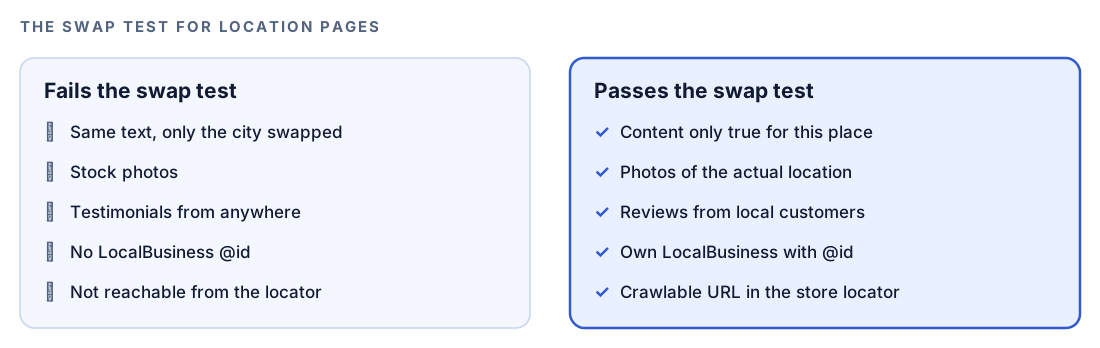
Multi-location brands risk near-identical city pages, which Google's spam policies treat as doorways. The skill's swap test is simple: if you could replace one city name with another and the page would still make sense, the page isn't really about that place.
How the local audit runs inside Codex
Run $seo local https://example.com/ in a Codex task and the skill follows a fixed sequence, visible in the task log.
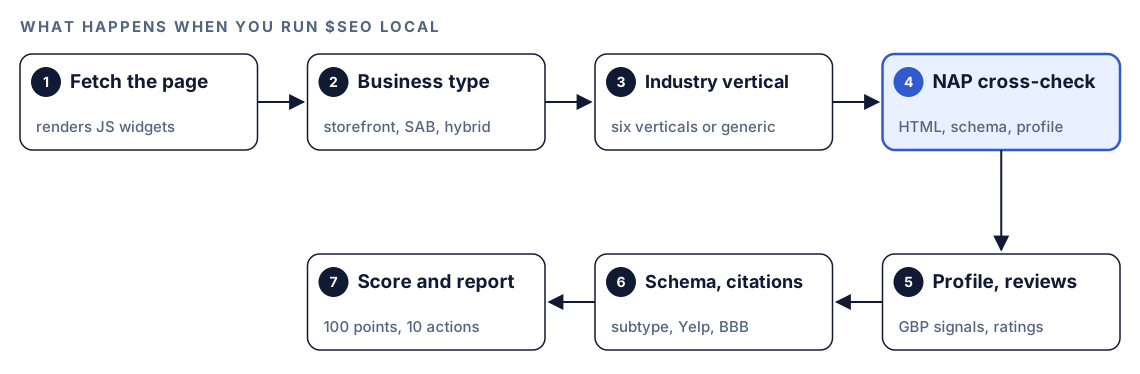
- Fetch the page. Map embeds and review widgets are often injected by JavaScript, so the skill renders script-heavy pages in a headless browser first.
- Detect the business type. Storefront, service-area or hybrid. This decides which checks apply.
- Detect the industry. Restaurants, healthcare, legal, home services, real estate and automotive each have their own signals. If two look equally likely, Codex shows both and asks you to confirm. If none fits, it uses the generic LocalBusiness path.
- Cross-check NAP. It pulls name, address and phone from the visible HTML, the JSON-LD and any visible profile data, and flags every difference.
- Check profile signals and reviews. Maps embed, place references, review widgets, photos, opening hours and
aggregateRating. - Check schema and citations. It validates the LocalBusiness markup and looks for your Yelp, BBB and Facebook listings with
site:searches or direct fetches. - Score and report. Six weighted dimensions add up to 100, followed by ten actions and a limitations section.
An unreachable URL is reported, never guessed at. If the page shows no local signals, Codex asks you to confirm it's a local business and share the profile link.
What Codex checks, and how the score is weighted
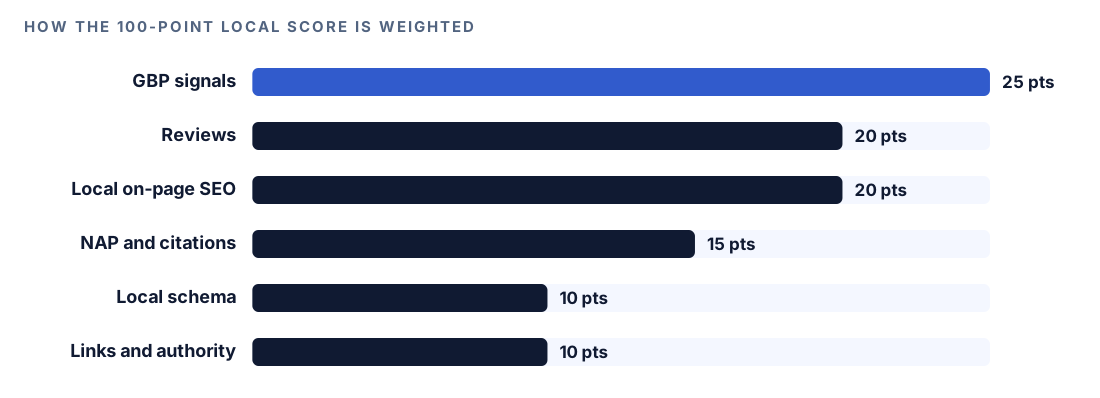
Each dimension is graded full, partial or low against a scoring guide.
Google Business Profile signals (25 points)
The profile lives on Google, so the skill looks for what a page can show: a Maps embed or place ID, a reviews widget, photos and visible opening hours. It also compares your content with the categories your profile appears to use. Practitioners widely treat the primary category as the most important profile setting, so a mismatch is worth fixing early. For question-and-answer content, the skill recommends an FAQ section on your own site.
Reviews and reputation (20 points)
Full marks need at least 10 reviews, a 4.5 rating or higher, recent activity, owner responses and more than one platform. The skill flags review gating, which means asking customers if they're happy before sending only the happy ones to a review site. Google's policies forbid it, and it can break US Federal Trade Commission rules. A US clinic also must not confirm in a reply that a reviewer is a patient.
Local on-page SEO (20 points)
The skill wants the city and service named in the title tag and H1, NAP written into the HTML, a page for each main service, a tappable tel: link and a contact form visible without scrolling, and a lazy-loaded map. Key pages should sit within three clicks of the homepage, with two to five in-text links per 1,000 words. Multi-location sites need a store locator with crawlable URLs, a pattern such as /locations/city-name/, and a unique LocalBusiness @id on each location page.
NAP consistency and citations (15 points)
Besides the three-way NAP comparison, the skill checks whether you're listed on the big four (Google, Yelp, BBB, Facebook). It tells you to claim Apple Business Connect and Bing Places, names directories for your industry, and suggests submitting to Data Axle, Foursquare and Neustar/TransUnion, aggregators that feed business data to many other sites.
Local schema markup (10 points)
Schema isn't a direct ranking factor, but it helps machines read your details. The skill requires name and a PostalAddress address, and recommends geo with at least five decimal places, openingHoursSpecification, telephone, url, priceRange under 100 characters, image and aggregateRating. It wants the most specific type: Restaurant rather than plain LocalBusiness, LegalService rather than the deprecated Attorney, Dentist rather than generic MedicalBusiness. Service-area businesses should name cities in areaServed, and branches should point to the parent with branchOf. Google's LocalBusiness structured data guide lists the properties Google reads.
Local links and authority (10 points)
Backlinks aren't visible from one page, so the skill hunts for on-page proof of local standing: a chamber of commerce badge, BBB accreditation, local news coverage, sponsorships and spots on "best of" lists. For AI search it points you to $seo geo <url>, covered in our generative engine optimization guide.
Run it in Codex, step by step
- Install the kit from the install section, restart Codex, and open a new task in your website's project folder. How to install SEO skills in Codex walks through it.
- Check your permission mode. The command fetches live pages, so depending on your mode, Codex may ask before it uses the internet. Approve it for the site you're checking.
- Run the command on the page that matters most, usually the homepage, the contact page or one location page:
$seo local https://example.com/locations/springfield/- Or ask in plain language; Codex picks the skill when the request matches it:
Run a local SEO audit on https://example.com. Check our Google Business Profile signals, NAP consistency, citations, reviews and LocalBusiness schema.- Answer any questions. Large location sets hit quality gates: at 30 or more location pages the skill warns and holds each page to at least 60% unique content, and at 50 or more it stops until you justify the page set.
- Optionally, connect DataForSEO for live profile data, real-time local pack positions and automated citation checks. It needs its own account and its own pricing applies; see our DataForSEO in Codex guide.
For guided follow-up work, $seo flow local <url> runs the FLOW framework's local-stage prompts.
Reading the report
The report keeps the same order on every run. A trimmed outline:
## Local SEO Analysis: example.com

Local SEO Score: XX/100
Business type: [Brick-and-mortar / SAB / Hybrid]
Industry vertical: [detected vertical]

| Dimension | Weight | Score |
|---|---|---|
| GBP Signals | 25 | XX |
| Reviews & Reputation | 20 | XX |
| Local On-Page SEO | 20 | XX |
| NAP Consistency & Citations | 15 | XX |
| Local Schema Markup | 10 | XX |
| Local Link & Authority Signals | 10 | XX |

## NAP Consistency Audit
| Source | Name | Address | Phone |
|---|---|---|---|
| Page HTML | [name] | [address] | [phone] |
| LocalBusiness schema | [name] | [address] | [phone] |
| Visible GBP data | [name] | [address] | [phone] |

## Top 10 Actions
1. [Critical] [action]
2. [High] [action]

## Limitations
[what this audit could not assess]
The full report also holds the GBP checklist, a review snapshot, citation status, a schema fix and, for chains, location page quality. Work through it in this order:
- NAP problems. NAP missing from the HTML is marked Critical. Page and schema mismatches come next.
- Wrong type or category signals. A generic or deprecated schema type, or content that doesn't support your primary category.
- Review risks. Remove any review gating at once, then work on recency and replies.
- Location pages. Rewrite pages that fail the swap test before you add new ones.
- Citations and authority. These take weeks of outreach, so schedule them.
Don't skip the limitations. The audit is blind to map-grid rankings, Domain Authority, your complete link profile, GBP Insights numbers and today's local pack position, and the report names the kinds of paid tools that cover them. For map rankings, see Google Maps rank tracking with Codex.
Apply the fixes with Codex
Most local problems on a website come from the same details typed in several places. Codex can give those details one home and make every template read from it.
Before, a footer and a JSON-LD block that disagree:
<footer>
  <p>Example Family Dental, 123 Main Street, Springfield. Call (555) 010-0199</p>
</footer>
<script type="application/ld+json">
{ "@context": "https://schema.org", "@type": "LocalBusiness",
  "name": "Example Dental", "telephone": "555-010-0100" }
</script>
After, the specific type, a full address, five-decimal coordinates, hours and one phone number:
{
  "@context": "https://schema.org",
  "@type": "Dentist",
  "@id": "https://example.com/#springfield",
  "name": "Example Family Dental",
  "url": "https://example.com/",
  "telephone": "+1-555-010-0199",
  "image": "https://example.com/images/clinic.jpg",
  "address": {
    "@type": "PostalAddress",
    "streetAddress": "123 Main Street",
    "addressLocality": "Springfield",
    "addressRegion": "IL",
    "postalCode": "62701",
    "addressCountry": "US"
  },
  "geo": { "@type": "GeoCoordinates", "latitude": 39.78172, "longitude": -89.65015 },
  "openingHoursSpecification": [{
    "@type": "OpeningHoursSpecification",
    "dayOfWeek": ["Monday", "Tuesday", "Wednesday", "Thursday", "Friday"],
    "opens": "08:00",
    "closes": "17:00"
  }]
}
Plus a phone link visitors can tap:
<a href="tel:+15550100199">(555) 010-0199</a>Then hand Codex the job:
Use the findings in the LOCAL-SEO-ANALYSIS report. Create one business details file with our name, address, phone, hours and coordinates, and make the footer, the contact page and the LocalBusiness JSON-LD read from it. Use the Dentist type, render the JSON-LD on the server, and wrap the phone number in a tel: link. Don't invent values; ask me for anything missing. Show me the diff, then run the build.Read the diff with your real details beside you. Only you know which number is current.
Location pages need local proof only you have: photos of the site, the team there, testimonials from local customers. Ask Codex to build templates with slots for those details and to list pages that still fail the swap test, rather than filling gaps with generic text.
Some fixes live outside your codebase, such as the primary category, Bing Places and data aggregators. Codex can't log into those accounts, but it can write a checklist with the exact NAP string to paste into each. After you deploy, run $seo local on the same URL again to confirm the fixes landed.
Make it repeatable
For a chain, check every location page, not only the one you remember. codex exec runs a task without the interactive UI and -o saves the final message, so a loop gives you one summary per location:
for city in springfield shelbyville riverton; do
  codex exec --sandbox workspace-write "run \$seo local https://example.com/locations/$city/ and summarize the Critical and High actions" -o "local-$city.md"
done
codex exec starts read-only, so --sandbox workspace-write lets the skill save its full report too. It expects a Git repository, and unattended runs need network access, so make sure your sandbox and permission setup allows it (see the Codex sandboxing docs). Our codex exec automation guide shows how to run it in CI.
Without the skill: a plain Codex prompt
You can get a useful first pass from Codex with no kit installed:
Fetch https://example.com/contact. Extract the business name, address and phone number from the visible page, from any LocalBusiness JSON-LD, and from any embedded map or review widget. Put them side by side in a table and flag every difference, including formatting. Then tell me whether the JSON-LD uses the most specific LocalBusiness subtype and includes geo, openingHoursSpecification, telephone and url.For location pages in your repository:
Read every page in content/locations/. For each one, apply a swap test: if the city name were replaced with another city, would the page still make sense? List the pages that fail and quote the generic sections.What the skill adds is structure: business type and industry detection, six weighted dimensions, quality gates for large location sets, and a report that states what it couldn't measure.
Pitfalls to avoid
- Formatting your NAP differently in the footer, the schema and your listings.
- Using plain
LocalBusiness, or a deprecated type likeAttorney, when a specific type exists. - Publishing location pages that differ only by the city name.
- Asking customers if they were satisfied before sending them to leave a review.
- Showing your phone number only in an image or a script-loaded widget.
- Reading the score as a ranking forecast. Distance to the searcher still matters.
Keep going
- Google Maps rank tracking with Codex measures your rank across a grid of map points, which this audit can't see.
- Schema markup with Codex goes deeper on validating and fixing JSON-LD of any type.
- DataForSEO in Codex explains the optional connection that adds live local pack positions.
- The full list of Codex SEO and Codex Blog skills shows every command in both kits.
FAQ
What does a local SEO audit include?
It checks what shapes how a business appears in map and local organic results: profile signals, NAP consistency, citations, reviews, local schema, location pages and local links. The $seo local command covers these from your website and scores six weighted dimensions.
How do I check NAP consistency?
Compare the name, address and phone number on your website, in your schema and on every listing, and fix any difference, including formatting. The local command handles the website side by comparing the visible page, the JSON-LD and any profile data it can see.
Do Google reviews affect local rankings?
Google lists review count and rating among the things that shape a business's prominence in local results. Customers also weigh recency and owner replies, which is why the skill looks at review activity and responses, not just the average.
Can Codex update my Google Business Profile?
No. Codex works in your project: it reads files, runs commands and edits code. It can fix your website and prepare a checklist for your profile and listings, but you make those changes yourself.
Does the local audit show where I rank in Google Maps?
No, live map positions are listed in its limitations. For that, connect DataForSEO and run $seo maps grid, which checks your rank at many points around your business.