
Content Operations
SEO Content Brief with Codex: Intent, Gaps and Outline
Build an SEO content brief with Codex: score competitors, rank content gaps, set keyword and meta rules, and turn the brief into a page in your repo.
An SEO content brief with Codex is a research plan that Codex builds inside your project before anyone writes: it studies the pages that already rank, works out what the searcher wants, finds the gaps, and hands the writer a section-by-section plan. RankCue's kits offer three routes: $seo content-brief <topic> for a competitive brief with scored rivals, $blog brief <topic> for a full blog plan, and $blog outline <topic> for the skeleton alone. This guide covers what a strong brief contains, how each command runs, and how to turn the result into a page in your repository.
Key takeaways
$seo content-briefreviews the top five results, sets aside sites you can't realistically displace, such as Wikipedia or Amazon, and scores each real rival out of 40.- Pass a keyword for a new page, or the URL of an existing page to get a targeted improvement plan instead of a rewrite.
- Every heading, keyword and FAQ must fit what your business actually offers, so Codex reads your homepage and sitemap first.
$blog briefadds a template pick, 8-12 sourced statistics and a distribution plan;$blog outlinereturns only the structure.- A brief is a plan, not a promise of rankings. Its value is that the writer, the editor and Codex all work from one file.
The brief commands at a glance
| Item | Details |
|---|---|
| Command | $seo content-brief <topic>, $blog brief <topic> or $blog outline <topic> |
| What you give it | A keyword or topic, or for $seo content-brief the URL of a page to improve |
| What Codex reads | Your homepage and sitemap, the current top results, and the competitor pages |
| What you get back | A brief or outline in a fixed Markdown structure; the blog commands save theirs into briefs/ or outlines/ |
| Needs | Internet access; optional DataForSEO or Ahrefs connections for volume and difficulty data |
| Best for | Planning new posts and service pages, and improving pages that rank but underperform |
What is an SEO content brief?
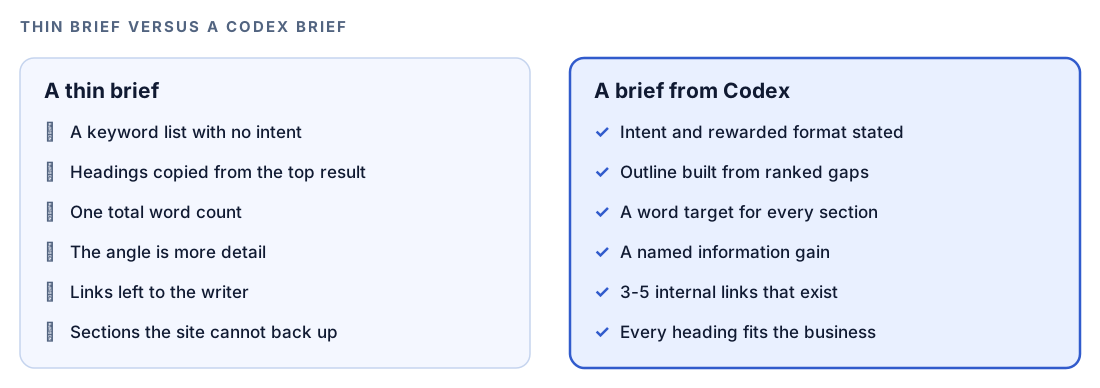
A content brief is the handoff between research and writing. It settles the questions that are expensive to argue about mid-draft: who is searching, what kind of page they expect, which subtopics are required, which angle this page owns, and where it links. Without one, writers tend to mirror the first result they open.
Search intent comes first
Intent is the reason behind a query. The skill files each keyword under one of four types: informational (learn something), commercial (compare before buying), transactional (buy, book or sign up now) and navigational (reach one specific site). It also notes which page format is winning, whether that's a local pack, a video, a comparison table, a listicle, an FAQ, a landing page or a long guide. If every top result is a table, you want to know before drafting an essay. Our guide to search intent and SXO analysis with Codex covers reading the results page in depth.
Competitors, not just results
Not every page in the top five is a competitor. You won't outrank an encyclopedia or a marketplace listing by writing the same thing, so the skill sets aside forums, video and social platforms, Pinterest, Wikipedia, Amazon, job boards, directories, news aggregators, government pages and SEO tool pages. Each remaining rival is scored from 1 to 10 on depth, formatting, SEO and user experience, for a total out of 40. The split tells the writer more than the total: a deep but cluttered rival is beaten on layout, a polished but shallow one on substance.
Gaps and information gain
Gaps come in three kinds. Topic gaps are subtopics nobody covers. Depth gaps are subtopics covered only briefly. Quality gaps are stale facts, missing expert views or hard-to-scan pages. The skill weighs each gap's impact and your advantage against the effort it takes, so the gaps your business can fill well rise to the top.
The skill also insists on information gain: one specific thing the page adds that no ranking page offers. That could be first-hand testing, quotes from an expert, a case study with real outcomes, your own data, or an original framework. "More detail" and "better formatting" don't qualify.
Keyword placement without stuffing
The skill treats keyword use as a band. Its setting for the primary keyword is 0.5% to 2.0% of total words; above 2% gets a second look, and above 3% is a stuffing risk. The phrase must sit in six spots: the URL slug, the H1, the title tag, the meta description, the opening 100 words and at least one image's alt text, but not every subheading. The brief instead spreads 5-8 close supporting terms and 10-15 looser related terms through the body, and assigns a keyword to each heading.
Which brief command should you use?
| Command | What it produces | Best when |
|---|---|---|
$seo content-brief <topic> | Scored competitors, ranked gaps, keyword and meta rules | Service pages, landing pages, and improving an existing page |
$blog brief <topic> | Template pick, statistics, visuals, citation capsules, distribution plan | A blog post you want fully planned before drafting |
$blog outline <topic> | Headings, word targets, FAQ slots and gaps only | You know the subject and just need structure |
$blog brief asks about the audience, intent and call to action, and infers whatever you leave out. It recommends one of 12 templates, such as how-to guide, comparison, pillar page or tutorial, then gathers 8-12 statistics with the source, URL and date for each. It also plans a citation capsule per section: a standalone passage of 40-60 words an AI answer engine could quote.
$blog outline is lighter. It studies the top five results and returns three title options, 6-8 H2 sections with word targets, FAQ slots, linking zones and shared gaps. It aims for 60-70% of H2s phrased as questions, each opening with a direct answer.
How the content brief command runs inside Codex
When you run $seo content-brief in a Codex task, the skill follows the same fixed sequence every time.
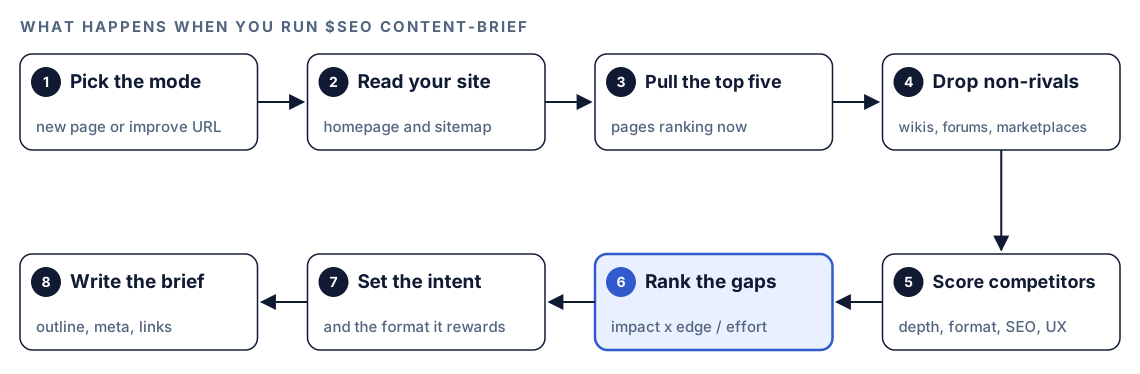
- Pick the mode. A URL triggers improve mode; a keyword triggers a new page brief.
- Read your site. The homepage and sitemap show what you sell and which pages can take links.
- Pull the top five. Codex finds the pages ranking for the keyword.
- Drop non-competitors. Sites on the excluded list are set aside.
- Score the rivals. Each real competitor gets its four scores.
- Rank the gaps. Topic, depth and quality gaps are sorted by payoff against effort.
- Set the intent. The query gets its type and winning format.
- Write the brief. A page-type template is adapted to the gaps and returned in the same structure every time.
In improve mode, Codex reads your page, notes what already works, and splits the outline into "keep and strengthen" and "add new" sections. The skill avoids recommending a full rewrite when targeted changes will win.
Two rules shape every brief. The website relevance rule keeps out any heading, keyword or FAQ your site can't credibly deliver, even if a competitor covers it. The site structure coverage rule applies to hubs and category pages: the outline must name every relevant category that exists on your site, none invented and none skipped, each with an internal link suggestion.
What you get back
The winning outline
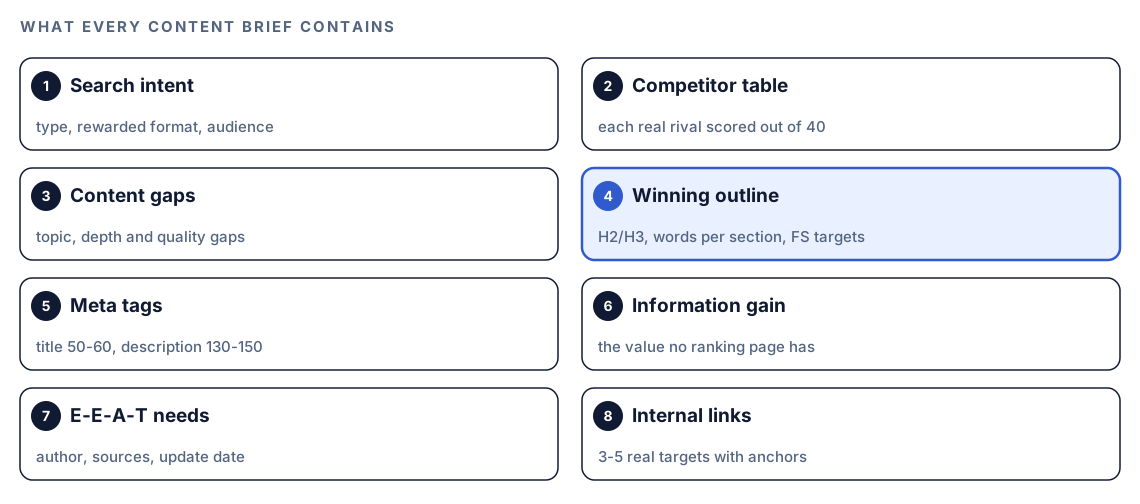
Writers live in this section. It sets the H1, the slug, and a target length next to the competitor average, then lists every H2 and H3 with a word count, a format note, keyword guidance, and "FS target" markers on sections built to win a featured snippet, the answer box Google sometimes shows above regular results.
Meta tags
The proposed title runs 50-60 characters, opens with the keyword, and ends with the brand after a pipe or dash, matching your site's pattern. The description runs 130-150 characters in active voice, closes with a call to action, and skips both the brand and quotation marks. Google can still pick its own title link, as its title link documentation explains, but a strong draft gives it a good default.
Trust signals and internal links
The E-E-A-T section lists what the page needs to earn trust: a last updated date, dated statistics, citations to strong sources, and an author bio that fits the subject. That list matters most on YMYL ("your money or your life") topics like medicine, money or law. The brief ends with three to five internal links with anchor text, and labels the page as a hub that links out or a spoke that links up to a pillar.
Ask for "just an outline" and the skill drops the research sections and adds a short writing note to each heading instead.
Run it in Codex, step by step
- Install the kits from the install section, restart Codex, and open a new task in your site's project folder. Our walkthrough on installing SEO skills in Codex covers each step.
- Check your permission mode. These commands search the web and fetch competitor pages, so depending on your mode, Codex may ask before it uses the internet. Approve it for the research.
- Run a brief for a new page, or pass a URL to improve an existing one:
$seo content-brief commercial roof inspection checklist$seo content-brief https://example.com/services/roof-inspection- Or ask in plain language. Codex picks the matching skill when your request fits its description:
Write a content brief for a service page targeting "commercial roof inspection". Our site is example.com. Tell me what the top results miss and give me a word count for every section.- For a blog post, use the blog commands:
$blog brief how often to inspect a commercial roof$blog outline how often to inspect a commercial roof$blog brief saves to a briefs/ folder and $blog outline to an outlines/ folder, ready for $blog write. If you ran $blog discourse on the topic first, $blog brief also loads the summary it saved at your project root and uses its themes and contrarian takes to sharpen the gaps.
- Add live data if you have it. When DataForSEO or Ahrefs tools are connected in your Codex setup,
$seo content-briefuses them for SERP data, volume, difficulty and intent. Both need your own account and API access, and each provider's pricing applies.
Reading the brief
A $seo content-brief result has this shape, with placeholders where your data goes:
## Content Brief: [primary keyword]

### Search Intent
Commercial. Results reward [format]. Audience: [who], [knowledge level].

### Competitor Analysis
| # | URL | Key H2 Sections | Est. Words | Score | Main Gap |
|---|-----|-----------------|------------|-------|----------|
| 1 | rival-one.example/[page] | [H2 list] | ~XXXX | XX/40 | [gap] |

### Winning Outline
**H1:** [H1 with primary keyword]
**URL Slug:** /[slug]
**Target Word Count:** ~XXXX words (competitor avg: ~XXXX words)

H2: [section title] (~XXX words) FS target
- Format: [table, list or definition box]
- Keywords: secondary keyword in H2, primary keyword once in body
Review it in this order:
- Intent and format. Check them against your own look at the results, since everything else depends on them.
- Information gain. A vague line here means a vague page. Push until it names something only you can provide.
- Relevance. Cut any section your business can't support.
- Word targets. Read them as coverage guides; without your own target, the skill uses the competitor average.
- Links. Confirm each target exists. If no sitemap was found, the brief warns that link ideas may be incomplete.
The skill is open about its limits: it reports an unreachable URL rather than guessing, and widens to partial-match rivals when filtering leaves none.
Turn the brief into a page with Codex
The brief sits in your repository, so Codex can act on it directly. New posts go to $blog write, covered in our guide to writing a blog post with Codex. For an existing page, apply only what the brief marks as new or to strengthen:
Use the content brief you just wrote for /services/roof-inspection. Find the file in this repo that renders that page. Add the "add new" sections in the brief's order and expand the "strengthen" sections, without touching sections marked "keep". Update the title and meta description to the brief's versions. Mark any statistic you can't source as [NEEDS SOURCE]. Show me the diff, then run the build.The meta change is often the quickest win. Before:
<title>Roof Inspections | Example Roofing</title>
<meta name="description" content="We do roof inspections.">
After, following the brief's rules on length, keyword position and a closing call to action:
<title>Commercial Roof Inspection Checklist | Example Roofing</title>
<meta name="description" content="Use our commercial roof inspection checklist to catch leaks, drainage faults and flashing damage early. Book a site visit with our team.">
Read the diff before you accept it, and check that each new claim is true for your business.
Make it repeatable
A few lines in your project's AGENTS.md file make the brief the source of truth for every content task:
## Content briefs
- No new post or landing page without a brief in briefs/. Use $seo content-brief for service pages and $blog brief for posts.
- Drafts follow the brief's H2 order and section word targets. If you cut a section, say which and why.
- Only write headings for things we actually offer. Never copy competitor sections for services we don't sell.
- Title tags 50-60 characters, keyword first, brand last. Meta descriptions 130-150 characters, no quotation marks.
- End every draft summary by naming the information gain item from the brief that the page delivers.
Codex reads AGENTS.md before it starts work, so a teammate who asks for "a post about roof drainage" next month gets a brief-first workflow automatically. Keep the file short; combined instructions have a size cap. Our guide to AGENTS.md rules for SEO shows a fuller rule set.
Without the skill: a plain Codex prompt
You can get a reasonable first brief from Codex with no kit installed:
Search for "commercial roof inspection checklist" and open the top five results. Ignore Wikipedia, forums, marketplaces and directories. For each remaining page, list its H2s, estimate its length and name its weakest area. Then read the homepage and sitemap at https://example.com and write a brief: search intent, gaps the competitors share, an H2/H3 outline with a word target per section, a 50-60 character title, a 130-150 character meta description, and three internal links to pages that exist on our site.What the skills add is consistency: the full excluded-domain list, the 40-point score, the gap weighting, the relevance and coverage rules, page-type templates, and one output format, so briefs from different people look alike.
Pitfalls to avoid
- Briefing from the keyword alone. Without your sitemap, the outline drifts toward services you don't sell.
- Accepting a vague information gain line. "More comprehensive" is not an angle.
- Copying the top result's H2s. Match the intent, not the structure.
- Treating the word target as a quota. Padding to hit a number makes the page worse.
- Forcing the primary keyword into every heading. Follow the brief's placement list.
- Publishing statistics from a
$blog briefwithout opening the source. The brief records each URL and date so you can check.
Keep going
- Keyword research with Codex helps you choose the keyword before you brief it.
- Write a blog post with Codex turns a saved brief into a full draft.
- E-E-A-T audit with Codex checks that the finished page shows the trust signals the brief asked for.
- Every Codex SEO and Codex Blog command lists the rest of both kits.
FAQ
What goes into a good SEO content brief?
The keyword and its intent, the page format that currently wins, an outline with word targets, a title and meta description, internal link targets, and one clear thing the page adds that rivals lack. The Codex SEO brief also scores competitors.
Is a content outline the same as a content brief?
No. An outline is the skeleton of headings, word targets and FAQ slots. A brief wraps that skeleton in research: competitors, gaps, information gain and meta tags. In the kits, $blog outline gives you the skeleton, while $blog brief and $seo content-brief give you the full brief.
How do I create a content brief in Codex?
Install the kit, open a task in your project, and run $seo content-brief with your keyword, or $blog brief for a blog post. A plain-language request works too. Approve internet access when asked, since the brief depends on live results.
Do content briefs help a page rank?
Not by themselves. A brief improves the page that gets written, so it matches intent and adds something new. Search engines reward those qualities, but no brief can promise a position.
Can I brief a page that already exists?
Yes. Pass its URL to $seo content-brief and it switches to improve mode, marking what to keep, strengthen and add without pushing a full rewrite.