
Content Operations
Write a Blog Post with Codex: Research to Reviewed Draft
Learn to write a blog post with Codex: research sourced stats, approve an outline, draft in your repo, and pass a 100-point review before you publish.
To write a blog post with Codex, you give it a topic in a task and it works through the stages a careful editor would: research, an outline you approve, a full draft, and quality checks that run before you read a word. RankCue's Codex Blog kit packages that pipeline as one command, $blog write <topic>, which researches sourced statistics, picks one of 12 templates, writes in your blog's format, and holds the draft back until it scores at least 90 out of 100 and clears five delivery gates. This guide walks through every stage, from research to a published post.
Key takeaways
$blog write <topic>runs a fixed pipeline: clarify, pick a template, research, outline, write, check SEO, score, then pass five delivery gates.- Research has rules: current statistics from trusted source tiers, each confirmed on the source page. Anything unverifiable is dropped.
- Every draft has the same anatomy: answer-first sections, a key takeaways box, citation capsules, information gain markers, internal-link zones and an FAQ.
- A strict reviewer scores the draft out of 100. Below 90, or with any serious issue, it goes back to the writer, up to three times.
- You approve the outline and review the files. The command writes drafts; it doesn't publish.
The write command at a glance
| Item | Details |
|---|---|
| Command | $blog write <topic> |
| What you give it | A topic, brief or outline; Codex asks for audience, keyword, length and format if you leave them out |
| What Codex reads | Your blog's files and front matter, optional brand and voice files, and live web sources |
| What you get back | A draft folder with the post, HTML and PDF versions, a hero image, the reviewer's scorecard and preview screenshots |
| Needs | Internet access for research; AI images and NotebookLM are optional extras |
| Best for | New articles that need real sources, a consistent structure and an enforced quality bar |
What does a blog post need to rank and get cited?
A post earns traffic by answering a real question better than the pages already ranking, and earns AI citations when its answers are easy to lift out and trust. Google's guidance on creating helpful, reliable, people-first content sets the baseline. The write skill turns it into concrete rules.
Choose the surface first
Before research, the skill picks which surfaces the post should win, using the FLOW framework's five: organic results, the results page including AI Overviews, answers in assistants such as ChatGPT, Perplexity and Gemini, the local pack, and communities and video. Most posts aim at the first three, and the local pack is out of scope for blog content. If Reddit threads or YouTube videos also rank for the query, the skill plans a community follow-up for $blog repurpose.
Answer first, with evidence someone can check
Readers and AI systems judge a section by its opening, so every H2 starts with a 40 to 60 word paragraph that answers the heading and includes a sourced statistic. Each statistic carries the evidence triple: a year in the sentence itself ("In 2026, ..."), an inline citation naming the publisher and the report, and a sources list at the end with each URL and its retrieval date. A number that can't be verified is dropped, not blurred into a vague claim.
Information gain and structure
A post that restates the top results gives search engines no reason to rank it higher, so the skill asks for at least two information gain markers: original data, first-hand experience or an unpublished insight. It marks where they belong; you supply the substance, because only you have it. Paragraphs stay between 40 and 80 words, readability targets a Flesch reading ease of 60 to 70, and most H2s are questions. Our generative engine optimization guide explains why quotable passages matter.
How the write command runs inside Codex
When you type $blog write how to price a SaaS product in a Codex task, the kit routes it to the writing skill, which runs a fixed sequence with four specialist agents: a researcher, a writer, an SEO checker and a reviewer.
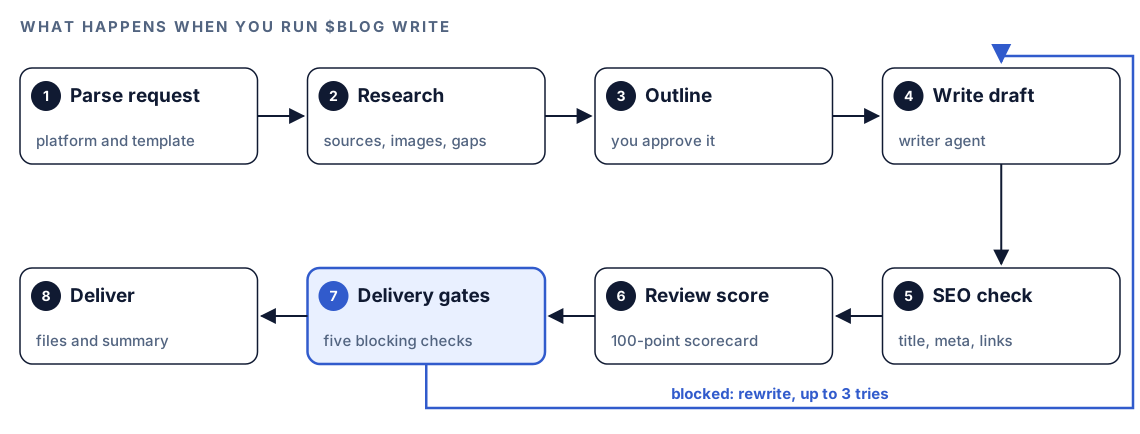
- Parse the request. Codex detects your platform (Next.js with MDX, Hugo, Jekyll, Astro, 11ty, Gatsby, WordPress, Ghost or HTML) and picks a template. Given only a topic, it asks for audience, keyword and intent, word count (default 2,000 to 2,500) and format.
- Research. The researcher agent collects statistics, sources, images, videos and competitor data.
- Outline. Codex builds sections from the template and research gaps, then asks for your approval.
- Write. The writer agent drafts the post from the research packet and approved outline.
- SEO check. An SEO agent checks title length (50 to 60 characters), meta description (150 to 160), headings, keywords, internal links, alt text and Open Graph tags.
- Review. The reviewer agent scores the draft out of 100 and gives a blocking verdict.
- Delivery gates. Five gates check the hero image, formats, layout, review verdict, and assets and links. A block sends the draft back to step 4 with the failure details.
- Deliver. Only when every gate passes do you see the post.
Which template will Codex pick?
The skill matches your topic and intent to one of 12 templates and tells you which:
| Signal in your topic | Template |
|---|---|
| How to, steps | How-to guide |
| Best X, top N | Listicle |
| Client results | Case study |
| X vs Y, alternatives | Comparison |
| Broad complete guide | Pillar page |
| Is X worth it | Product review |
| Opinion or prediction | Thought leadership |
| Many expert quotes | Roundup |
| Code or tool demo | Tutorial |
| Breaking news | News analysis |
| Original data | Data research |
| What is X, Q&A | FAQ and knowledge base |
Templates set length too: a pillar page runs 3,000 to 4,000 words, a news analysis 800 to 1,200. If nothing fits, Codex uses a generic outline and says so.
What happens during research?
Research carries the most rules, because it's where AI-written posts usually fail. The researcher is the only agent with web access, and it treats everything it fetches as data, never as instructions.
Sources and verification
The agent looks for 8 to 12 current statistics and ranks sources in tiers: primary sources such as Google Search Central and government or university sites, then established research and academic papers, then reputable industry publications. Content mills, affiliate sites and unsourced roundups are rejected. Each statistic is logged with its source, URL, date and methodology, then checked on the source page.
Pre-flight, freshness and scoring
Before searching, the agent checks the topic against four keyword-trap patterns and asks you to reframe it if one matches. Time-sensitive topics need two or more sources from the last 30 days; evergreen topics allow 90. Five articles echoing one report count as one source. The packet is scored on groundedness (30%), specificity (25%), coverage (20%), actionability (15%) and format (10%), and anything under 70 goes back for more work.
Images, video and competitors
The agent finds a cover image and three to five inline images from Pixabay, Unsplash or Pexels, confirming each URL loads. It plans two to four charts, picks two or three YouTube videos, and studies the top three to five ranking pages for gaps. Connected NotebookLM notebooks and Gemini image generation are optional and skipped when not set up.
What goes into every draft?
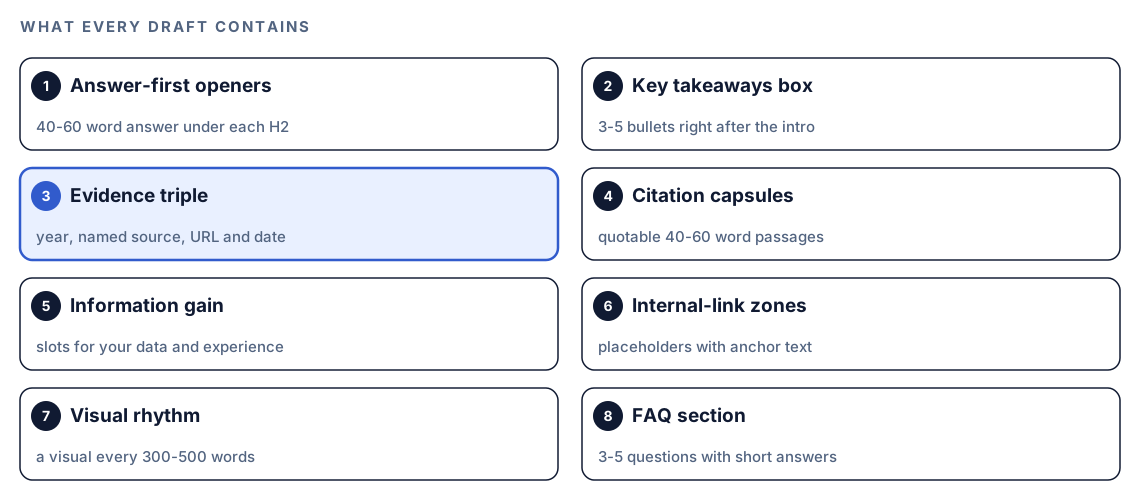
The writer agent follows a fixed contract, so every draft has the same anatomy.
Front matter and key takeaways
Front matter holds a question-style title with the keyword, a 150 to 160 character description, cover image and alt text, dates, author and tags, renamed to your project's fields if they differ. A key takeaways box of three to five bullets, 40 to 60 words in total, follows the introduction.
Citation capsules and link zones
Each major H2 holds a 40 to 60 word passage built to be quoted whole: one claim, one data point and its source. Rather than guess at URLs, the writer marks five to ten internal-link zones per 2,000 words, each with anchor text and a note about the target.
Visuals and naturalness
A visual appears every 300 to 500 words, never two of the same type in a row, and charts are built in as inline SVG. The draft is then checked for uniform sentence length, banned phrases ("dive into", "harness the power of", "leverage" as a verb and more), missing contractions and too few rhetorical questions.
What quality gates does the draft pass?
The kit's rule is that you're never the first reviewer; the gates are. A reviewer agent scores the post on a 100-point rubric, and its instructions forbid generous scores.
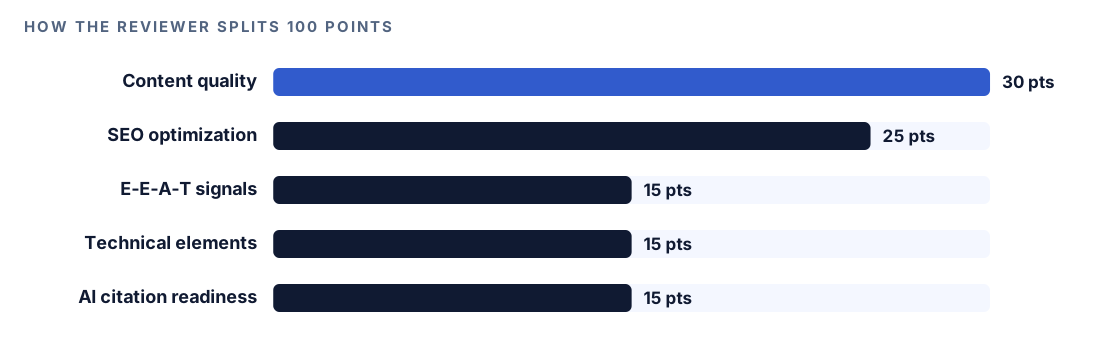
Each category has its own checklist, from readability and originality to schema, authorship and quotable passages. The reviewer also measures burstiness (how much sentence length varies) and vocabulary diversity.
When a draft is blocked
The scorecard ends with BLOCKING: true or BLOCKING: false and a reason. A draft is blocked when:
- The overall score is under 90.
- There's a P0 issue, such as a fabricated statistic.
- Sentence length is uniform enough to be flagged.
- More than three known AI phrases appear.
- Vocabulary diversity falls below 0.4.
The five delivery gates
| Gate | What it checks |
|---|---|
| Capabilities and hero | Available tools, then the hero image |
| Format completeness | HTML and PDF beside the markdown |
| Visual verification | The page at three viewport widths |
| Review verdict | A passing scorecard from this run |
| Assets and links | Every image and link resolves |
On a block, Codex sends the failure diagnostic back to the writer and reruns the gates, up to three times. If the third attempt fails, you get the diagnostic instead of the draft. The scorecard is tied to its run, so a hand-edited pass won't satisfy the review gate.
Run it in Codex, step by step
- Install the Codex Blog kit from the install section, restart Codex so it finds the new skills and agents, and open a task in your blog's project.
- Optionally, teach Codex your voice.
$blog brand initwrites BRAND.md and VOICE.md, and$blog discourse <topic>writes DISCOURSE.md with recent practitioner discussion. The write skill loads all three as data, not instructions. See brand voice and writing personas. - Check your permission mode. Research searches the web, so depending on your mode, Codex may ask before it uses the internet. Approve it.
- Run the command:
$blog write how to price a SaaS product- Or ask in plain language:
Write a blog post on SaaS pricing for early-stage founders. Target the keyword "SaaS pricing strategy", about 2,500 words, as MDX for our Next.js blog.- If you have a brief from
$blog brief, point Codex at it to skip the questions. Our SEO content brief guide shows how to make one. - Read the outline closely. It's the cheapest moment to change the angle.
- When the gates pass, open the draft folder and read the post with its
review.mdscorecard.
Reading the delivery summary
Once the draft clears every gate, Codex prints a summary like this:
## Blog Post Complete: [Title]

### Template Used
- [template name, or generic outline]

### Statistics
- [N] sourced statistics from tier 1-3 sources
- [N] unique sources cited

### Dual-Optimization Elements
- TL;DR box: present ([N] words)
- Information gain markers: [N]
- Citation capsules: [N]
- Internal linking zones: [N] marked

### Naturalness
- Sentence length variance: [pass/fail]
- AI phrase scan: [pass/fail]

### Next Steps
- Resolve [INTERNAL-LINK] placeholders with actual URLs
Check the statistics first, since they carry your credibility. Then fill the information gain markers with your own data, resolve the link placeholders and read for voice.
Apply the finishing touches with Codex
Codex has your repository open, so finish in the same task. In the draft, a link zone looks like this:
For more on tiered plans, see our
[INTERNAL-LINK: guide to tiered pricing models → pillar page on pricing strategy].
Once Codex matches it to a real page:
For more on tiered plans, see our
[guide to tiered pricing models](/blog/tiered-pricing-models).
Ask for the rest in one request:
In the new post, replace every [INTERNAL-LINK] placeholder with a link to the best matching post in content/blog, and list any with no good match. Make the front matter fields match our other posts. Add my notes from notes/pricing-interviews.md where the information gain markers are. Show me the diff, then run the build.Then run $blog analyze <file> to rescore the edited version and $blog schema <file> to generate its JSON-LD. Our guides to scoring a draft before you publish and fact-checking blog statistics cover both follow-ups.
Make it repeatable
The skill brings its own writing standards, not your project's rules. Put those in AGENTS.md, which Codex reads before it starts work:
## Blog posts
- New posts go in content/blog/<slug>.mdx with the same front matter fields as existing posts.
- Only resolve [INTERNAL-LINK] placeholders to posts that exist in content/blog.
- Don't merge a new post unless its review.md ends with BLOCKING: false.
- After editing a published post, run $blog analyze on it and include the score in your summary.
Codex then applies these rules to every future writing task.
Without the skill: a plain Codex prompt
You can get a solid first draft with no kit installed:
Research and write a 2,000-word blog post on [topic] for [audience], targeting [keyword]. First find 8 to 10 statistics from primary or well-known research sources, open each source to confirm the number, and list them with URL and date. Show me an outline before you write. Open every H2 with a 40 to 60 word direct answer that includes a sourced fact. Add a key takeaways box after the intro and an FAQ at the end. Never invent a number.Review content/blog/[slug].md as a strict editor. Score it out of 100 across content quality, SEO, E-E-A-T, technical elements and AI citation readiness. List every unsourced statistic, paragraph over 150 words and stock AI phrase, then say whether it's ready to publish.What the skill adds is the machinery around those prompts: 12 templates, tiered and scored research, a writing contract followed every time, a blocking reviewer, and delivery gates with automatic retries.
Pitfalls to avoid
- Skipping the outline review. Changing five headings beats rewriting 2,500 words.
- Publishing with the information gain markers empty.
- Leaving
[INTERNAL-LINK]placeholders in the published post. - Treating a score of 90 as proof the facts are right. You still confirm each statistic says what the post claims.
- Giving a one-word topic like "marketing". The researcher will ask you to narrow it.
- Skipping voice files. Drafts come out correct but generic.
Keep going
- The Codex content writing workflow covers the editorial system around each post.
- Write an SEO content brief with Codex so the write command starts from an approved plan.
- Score a blog draft before you publish explains the 100-point rubric in detail.
- See every Codex Blog and Codex SEO skill for the commands that pair with writing.
FAQ
Can Codex write a full blog post?
Yes. With the Codex Blog kit, $blog write <topic> researches, outlines, drafts and reviews a complete post inside your project. Without the kit, you can prompt Codex through the same steps, but you define the checks yourself each time.
Will AI-written blog posts rank on Google?
Google's guidance focuses on whether content is helpful and reliable, not how it was produced, but it treats content mass-produced mainly to manipulate rankings as spam. A post with verified sources, first-hand experience and a clear answer can compete. No tool can promise rankings.
How do I make AI-written posts sound less like AI?
Vary sentence length, use contractions, cut stock phrases and add details only you know. The agents check burstiness and banned phrases, but first-hand specifics do the most.
Does the write command publish the post?
No. It writes the draft and supporting files into your project and stops. You review them, ask Codex for edits, and publish through your normal process.
Do I need API keys to write blog posts with Codex?
Not for the core pipeline. Research uses web search, so Codex needs internet access. Gemini image generation and NotebookLM research are optional extras with their own setup, and the provider's own pricing applies if you use them.