
Content Operations
Brand Voice with Codex: BRAND.md, VOICE.md and Personas
Teach Codex your brand voice: generate BRAND.md and VOICE.md, save a writing persona, and have every blog draft checked against your rules.
Getting brand voice with Codex right comes down to writing your voice down once, in files Codex reads every time it drafts, instead of explaining it again in every prompt. RankCue's Codex Blog kit handles this with three commands: $blog brand init interviews you and writes BRAND.md and VOICE.md to your project root, $blog persona create saves a measurable writing persona, and $blog style learn <paths> builds a voice profile from posts you already have. This guide covers what each file holds, how Codex loads them, how drafts get checked, and how to make the setup stick.
Key takeaways
$blog brand initinterviews you in five rounds (audience, positioning, editorial rules, topic scope and voice) and saves BRAND.md and VOICE.md at the project root.- Drafting and review commands such as
$blog write,$blog rewrite,$blog briefand$blog analyzepick those files up on their own. Without them, nothing changes.- A persona stores the measurable side of your voice: four tone sliders, a vocabulary tier, a readability band, sentence length, contraction frequency and a passive voice cap.
- With a persona active,
$blog writeand$blog rewritetest each draft against those numbers and point out every miss with a suggested fix.- The files sit in your repository, so voice changes get reviewed like code, and an
AGENTS.mdrule can extend them to every task.
The brand and persona commands at a glance
| Item | Details |
|---|---|
| Command | $blog brand init, show or update; $blog persona create, list, use or show; $blog style learn <paths> |
| What you give it | Interview answers, optional links to posts that already sound right, or paths to existing posts |
| What Codex reads | Your answers, any saved persona, and the sample posts you point it at |
| What you get back | BRAND.md and VOICE.md at the project root, a named persona stored as JSON, and a voice profile from your posts |
| Needs | No API keys. Internet access only when you hand it sample URLs |
| Best for | Writers and teams who want every draft and rewrite to sound like one publication |
What is brand voice, and why does it matter for search?
Brand voice is the set of choices that make a publication recognizable: who it writes for, what it believes, which words it uses and bans, how long its sentences run and how formal it gets. Tone is the part that bends with the moment. A launch post and an outage apology share a voice but not a tone.
No search engine scores how on-brand a paragraph sounds, so voice isn't a ranking factor by itself. It does shape what readers and search systems care about. Google's guidance on helpful, people-first content asks whether a page brings original insight, shows real expertise and leaves the reader satisfied. Copy that could sit on any site struggles with all three.
Tone on four scales
The persona skill places tone on four scales, each scored from 0.0 to 1.0:
| Scale | Low end sounds like | High end sounds like |
|---|---|---|
| Funny to serious | A joke to open the section | A plain statement of the risk |
| Formal to casual | We are pleased to confirm | Good news, it shipped |
| Respectful to irreverent | Thanks for bearing with us | The old way was a mess |
| Enthusiastic to matter-of-fact | This is a huge step forward | Here is what changed |
Unsure? The defaults are 0.6, 0.5, 0.3 and 0.5: a little serious, middling on formality, polite, and neither gushing nor flat.
Why drafts drift, and the three files that stop it
Codex starts each task fresh. Unless your voice is written where it can read it, every command guesses at your brand, so drafts swing between breezy and stiff and banned words creep back. The kit fixes that with one source of truth in three parts:
- BRAND.md holds the reader, the mission, the competitors, the banned phrases and the topics you will and won't cover.
- VOICE.md describes how you sound in plain prose: pronouns, contractions, length limits, headline styles and the summary box label.
- The persona restates the voice as numbers a draft can pass or fail.
If they conflict, BRAND.md settles audience, positioning, banned phrases and scope. VOICE.md settles tone, pronouns and the sentence cap. The persona owns the tone sliders and reading-level targets, and VOICE.md keeps a readable copy of them.
How $blog brand init runs inside Codex
Type $blog brand init in a Codex task and the skill starts an interview, one round at a time.
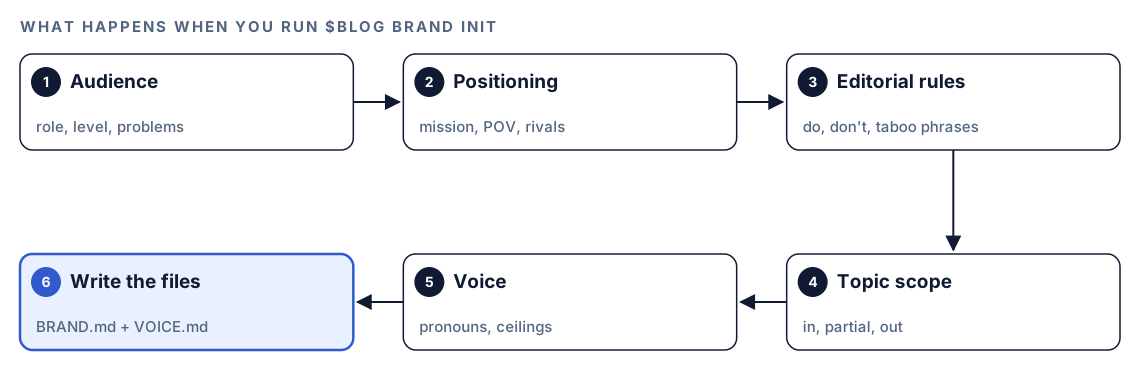
- Audience. Who reads you, how expert they are, the three to five problems they want solved, and what they tend to get wrong. Those wrong beliefs are where your posts can add something new.
- Positioning. A one-line mission, the belief that sets you apart, what you should never be mistaken for, and three rivals with one line on how you differ from each.
- Editorial rules. Things you always do, things you never do, banned phrases, and disclosures you must include, such as affiliate links.
- Topic scope. Core topics, adjacent topics you only cover with a fresh angle, topics you refuse, and any recurring formats.
- Voice. Pronoun choice, contractions, a hard word cap per sentence, a paragraph cap (150 words unless you change it), headline styles to use and avoid, and the summary label. An existing persona fills these in for you.
- Write the files. BRAND.md and VOICE.md land at the project root, each stamped with a last-updated date.
Thin answers won't produce a hollow file: the skill keeps asking until it has at least two audience points and three editorial rules. If the files already exist, it asks whether to overwrite them or switch to an update. $blog brand update replays the interview with your current answers filled in, and $blog brand show summarizes both files or says which one is missing.
Which commands load your brand files?
Once the files exist, you can forget about them. The $blog entry point, which routes each command to its sub-skill, looks for them at the start of anything that drafts, reviews or scores content.
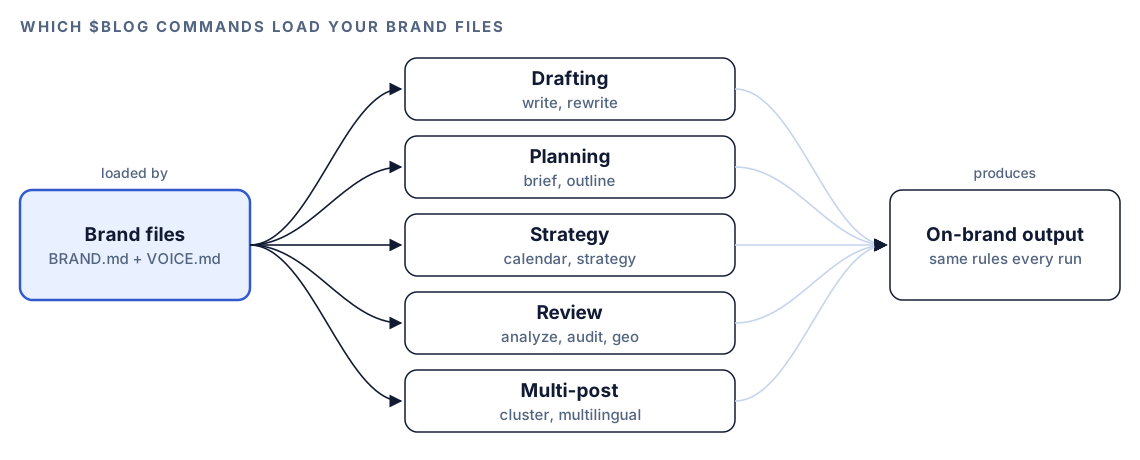
That list is $blog write, $blog rewrite, $blog brief, $blog outline, $blog calendar, $blog strategy, $blog analyze, $blog audit, $blog geo, $blog cluster and $blog multilingual. Without the files, those commands work as before, and nothing nags you to create them.
Brand files count as data, not orders
A collaborator might edit BRAND.md, or it might come with a repository you cloned, so the kit treats both files as untrusted input. It wraps their contents in a fence tagged with a fresh random code the author can't guess, scans for text shaped like an instruction ("ignore previous", "from now on", "act as"), and passes along a warning when it finds one. No line in the file can hand an agent a tool it lacks.
So describe your standard instead of ordering an AI around. "We never call our product a platform" is fine. "Act as a senior editor from now on" gets flagged.
What a writing persona sets
The brand files are prose. A persona turns the measurable parts of your voice into settings.
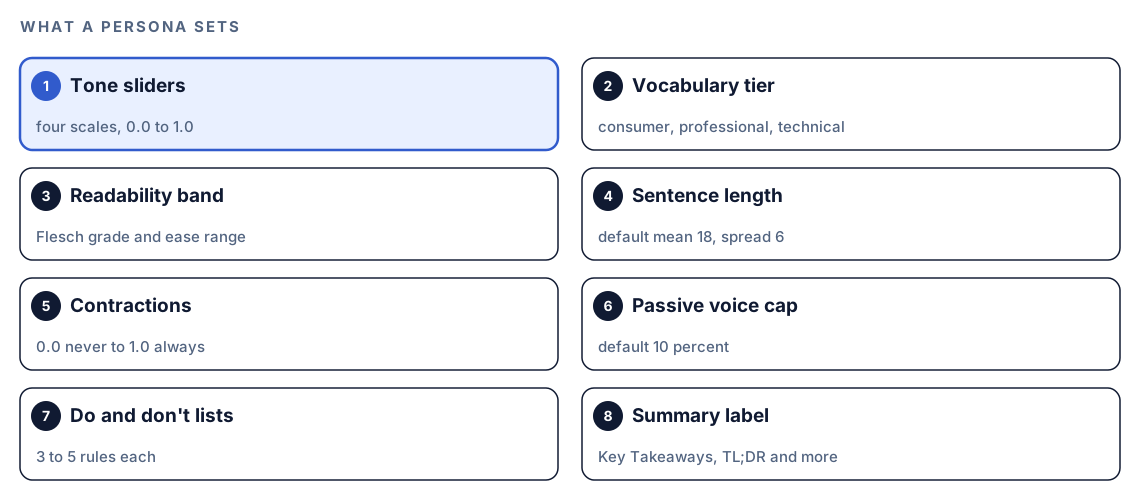
$blog persona create asks about your brand basics, the four sliders, writing rules, do and don't lists, the summary label, and optional voice samples, then saves the persona under a kebab-case name such as acme-saas.
Reading level by vocabulary tier
Choosing a vocabulary tier fills in a reading-level range. Flesch Reading Ease scores text from 0 to 100, and higher means easier. The Flesch grade approximates a US school grade.
| Tier | Flesch grade | Flesch ease | Typical use |
|---|---|---|---|
| Consumer | 6 to 8 | 60 to 80 | Health, lifestyle, personal finance |
| Professional | 8 to 10 | 50 to 60 | B2B, marketing, management |
| Technical | 10 to 12 | 30 to 50 | Engineering, medical, legal |
You can override the pairing. Out of the box, the persona aims for 18-word sentences with a spread of 6, a contraction frequency of 0.6, and passive constructions under 10%.
Learn from posts that already sound right
The final persona round is optional. Hand it up to three links to posts with the voice you want. The skill measures their sentence length, contraction habits, tone and vocabulary, then flags where they differ from your settings. A dead link is skipped and noted.
When your best writing already lives in the repository, $blog style learn <paths> does the learning from files: it builds an author voice profile on the same tone scales, reading levels and vocabulary tiers. Treat the mismatches as a decision point. If your settings say "few contractions" but your favorite posts are full of them, one side is wrong.
How drafts get checked
Run $blog persona use <name> and the writer loads the persona before $blog write or $blog rewrite drafts anything. Afterward it tests the draft:
- Sentence length stays within one standard deviation of the target mean, a 12 to 24 word range with the defaults.
- The reading level falls inside the chosen band.
- Passive voice stays under the cap.
- Nothing matches a "don't" rule.
Each failure comes back named, with a suggested edit. The persona lasts one session, so reactivate it in each new task.
Run it in Codex, step by step
- Install the kit from the install section, restart Codex, and open a new task in your blog's project folder. Our guide to installing the skills in Codex has the details.
- If you want both layers, build the persona first, so the brand interview can borrow its voice answers. To profile posts you already have, run the voice learning command too:
$blog persona create
$blog style learn content/blog/pricing-guide.md content/blog/onboarding-checklist.md- Run the brand interview:
$blog brand init- Or ask in plain language. Codex picks the skill when your request matches it:
Set up brand context for this blog. Interview me about our audience, positioning, editorial rules and voice, then write BRAND.md and VOICE.md to the project root.- Confirm the files, activate the persona, and write as usual:
$blog brand show
$blog persona use acme-saas
$blog write how to price a B2B analytics tool
The interview needs no API keys. Sample URLs are the exception: Codex has to fetch them, so depending on your permission mode it may ask before using the internet. Approve it for the sites you're reading.
Reading the output
Under a title and a last-updated note, BRAND.md looks like this, with your answers in place of the brackets:
## Audience
- **Primary**: [role + context]
- **Expertise**: [beginner / intermediate / advanced / mixed]

## Positioning
- **Distinctive POV**: [the belief a competitor would argue with]
- **What we are NOT**: [anti-positioning]

## Editorial Rules
### Never do
- [rule]
### Taboo phrases
- [phrase]
VOICE.md adds pronouns, length limits, headline styles, the persona's sliders and your sample links. Check the files in this order:
- Banned phrases and never-do rules. Make them testable. "Avoid jargon" can't be matched. "Never use leverage as a verb" can.
- Sentence cap against the persona's target. A 30-word cap fits an 18-word average. A 15-word cap contradicts it.
- Point of view. If no competitor would argue with it, sharpen it.
Apply it with Codex
Here the repository matters. Your voice is plain text beside your content, so changes get reviewed like any pull request, and Codex can bring old posts in line. A filled-in section:
### Never do
- Promise results we can't show
- Open a post with a dictionary definition

### Taboo phrases
- best-in-class
- cutting-edge
Then ask Codex to apply it:
Read BRAND.md and VOICE.md. Check every post in content/blog for taboo phrases, sentences over the sentence cap, and headline styles VOICE.md says to avoid. List findings per file, then fix the three worst posts. Keep facts, links and front matter unchanged. Show me the diff and run the site build before I accept anything.For one post, $blog rewrite content/blog/old-post.md with the persona active does this through the skill, with the persona checks at the end. Read the diff either way, because voice edits can shift meaning.
Make it repeatable
The $blog commands load your brand files by themselves. A landing page edit or a set of release notes won't. A short rule in your project's AGENTS.md covers those tasks:
## Voice and brand
- Before writing or editing anything under content/, read BRAND.md and VOICE.md in the project root.
- BRAND.md decides audience, positioning, banned phrases and scope. VOICE.md decides tone, pronouns and sentence length.
- For new posts and rewrites, run $blog persona use acme-saas first.
- Don't hand-edit BRAND.md or VOICE.md. Propose the change and run $blog brand update.
Codex reads AGENTS.md before it starts work, so this applies to every task. The rule points at the brand files instead of pasting them in, because the instructions Codex loads from AGENTS.md files are capped at 32 KiB by default. Our guide to AGENTS.md rules for SEO shows how to keep it lean.
Without the skill: a plain Codex prompt
Codex can draft a voice guide with no kit installed:
Read the five posts in content/blog that we consider our best writing. Describe their voice as a style guide: who they address, pronoun use, average sentence length, how often they use contractions, words they never use, and how headlines are built. Write it to VOICE.md and quote one example sentence for each rule.Using VOICE.md as the standard, review content/blog/draft.md. List every sentence that breaks a rule, name the rule, and propose a rewrite. Don't change facts or links.The skill adds structure on top: an interview that never skips audience, positioning or scope, numeric targets every draft is tested against, automatic loading into each drafting and review command, and the safety fence around the files.
Pitfalls to avoid
- Writing rules no one can test. "Be engaging" gives Codex nothing to check.
- Letting VOICE.md and the persona disagree. Change voice settings through the commands, not by hand.
- Pasting the whole brand guide into
AGENTS.mdinstead of pointing to the files. - Phrasing rules as orders to an AI. "Act as" and "from now on" trip the injection scan.
- Assuming the persona carries into a new task. It lasts one session.
- Leaving the files stale. Rerun
$blog brand updatewhen positioning or rivals change.
Keep going
- Write a blog post with Codex, step by step shows where these files plug into drafting.
- Score a draft before you publish covers the 100-point review, which reads them too.
- The Codex content writing workflow puts research, drafting and review in one loop.
- Update old blog posts with Codex refreshes older posts against your new rules.
- Every command in both kits lists the full skill set.
FAQ
What should a brand voice guide include?
Name the reader, the point of view, the banned words, and testable rules such as sentence length and pronouns. The $blog brand init interview also covers scope, rivals and disclosures, which most style guides leave out.
What is the difference between brand voice and tone?
Voice is the fixed personality of your writing. Tone is how that personality adjusts to each piece. A persona records tone on four scales, so one voice can sit at different points for a launch post and an apology.
How do I make AI-written content sound like my brand?
Put your voice in files the AI reads every time, then test drafts against numbers. In Codex, BRAND.md and VOICE.md load into the $blog drafting commands automatically, and an active persona checks each draft afterward.
Can Codex learn my writing style from existing posts?
Yes. $blog style learn <paths> builds a voice profile from posts in your repository, and the persona interview can study up to three sample URLs and flag where they differ from your settings. Review the result first, since old posts can carry habits you want to drop.
Does brand voice affect SEO?
Not directly, because no ranking signal measures voice. A consistent, distinctive voice does help pages read as original and written for a specific reader, which is what Google's helpful content guidance describes.