
Content Operations
Blog Audio Narration with Codex and Gemini TTS
Turn blog posts into audio with $blog audio in Codex: summary, full or two-voice dialogue narration, MP3 output and a player embedded in your site.
Blog audio narration turns a written post into something people can listen to, and with Codex you can produce it in the same project where the post lives. RankCue's Codex Blog kit does it with $blog audio generate <file>: Codex reads the post, rewrites it as speech, sends it to Google's Gemini text-to-speech, and returns an MP3 with embed code you can paste into the page. Below we cover why audio versions are worth having, the three narration modes, voice choice, setup, and getting the player onto your pages with Codex.
Key takeaways
$blog audio generate <file>creates narration in one of three modes: a 200 to 300 word spoken summary, a full read-aloud, or a two-speaker dialogue.- Codex writes the speech text and the script only handles text to speech, so headings, links, code and lists are rewritten for the ear before any audio is made.
- You need a Google AI API key. Google's own pricing applies, and the skill reports an estimated cost with each file.
- The output is an MP3 (or WAV when FFmpeg is missing) plus an HTML5 audio embed, and Codex can add the player to your post or layout and run your build.
- When
$blog writecalls the skill and no key is set, audio is skipped quietly and the post still gets written.
The audio command at a glance
| Item | Details |
|---|---|
| Command | $blog audio generate <file>, plus $blog audio voices and $blog audio setup |
| What you give it | The path to a blog post in your project, and optionally a mode and a voice |
| What Codex reads | The post's title, markdown body and approximate word count |
| What you get back | An audio file, its duration, the voice used, HTML5 embed code, an estimated API cost and a placement suggestion |
| Needs | Internet access, a Google AI API key (Google's pricing applies), Python 3.11 or newer, and FFmpeg for MP3 output |
| Best for | Listen-to-this-article players, short audio summaries and podcast-style episodes made from posts |
Why add blog audio narration?
Some readers would rather listen than read. They're walking, driving, cooking or resting their eyes after a day at a screen. A narrated version gives them a way into the post, and it needs no new writing because the post already exists.
Be clear about what audio doesn't do. Search engines read the text on your page, and an audio player doesn't replace it. Screen reader users already have tools that read pages aloud, so treat narration as an extra format, not a substitute for accessible HTML.
What text to speech is
Text to speech (TTS) turns written text into synthetic speech. Modern systems, Gemini's included, offer natural-sounding voices with distinct styles, but the result depends heavily on the input. Prose written for the eye, full of headings, links, bullets and code, sounds strange when a voice reads it literally. So the skill has Codex rework the post for listening before any audio exists.
Three ways to narrate a post
The skill offers three modes. The lengths come from the skill's own guidance:
| Mode | Typical length | What you get |
|---|---|---|
| Summary | 1 to 2 minutes | A fresh script of 200 to 300 words covering the essentials |
| Full | 5 to 15 minutes | Every section of the post, rewritten so it sounds spoken |
| Dialogue | 3 to 8 minutes | Two voices, a host and an expert, discussing the post |
Summaries suit long guides. Full mode suits essays where the writing itself matters. Dialogue mode produces something close to a short podcast episode.
The player and page speed
The embed code the skill writes sets preload="metadata". That attribute asks the browser to fetch only basic details, such as the duration, until someone presses play, so a large audio file doesn't download in full while the rest of the page is loading.
How the audio command runs inside Codex
Point $blog audio generate at a post and the skill follows a fixed sequence you can watch in the task log.
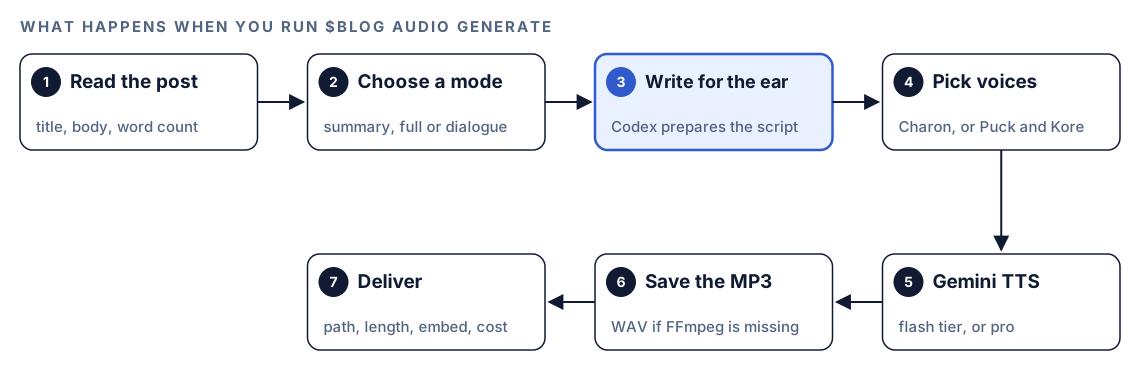
- Read the post. Codex takes the title from the H1 or front matter, the markdown body, and an approximate word count.
- Choose a mode. If you named a mode, Codex uses it. Otherwise it asks whether you want a summary, the full article or a dialogue.
- Write for the ear. Codex prepares the speech text itself. The script that calls Gemini only converts text to audio; it doesn't edit anything.
- Pick voices. Your choice wins. Without one, the skill defaults to Charon for summary and full mode, and pairs Puck as host with Kore as expert for dialogue.
- Generate with Gemini. The skill uses Gemini's faster flash tier by default, which suits summaries and standard narration. It switches to the higher-quality pro tier for dialogue or premium content.
- Save the file. FFmpeg converts the result to MP3. If FFmpeg isn't installed, you get a WAV file instead.
- Deliver. Codex reports the file path, the duration in a form like 3:42, ready-to-paste embed code, the estimated API cost and where to put the player.
The split between steps 3 and 5 is what matters: Codex shapes the words, and Gemini only voices them. Prepared text beyond the skill's 32k-token limit for one request gets split into sections, each generated on its own.
What Codex changes before narration
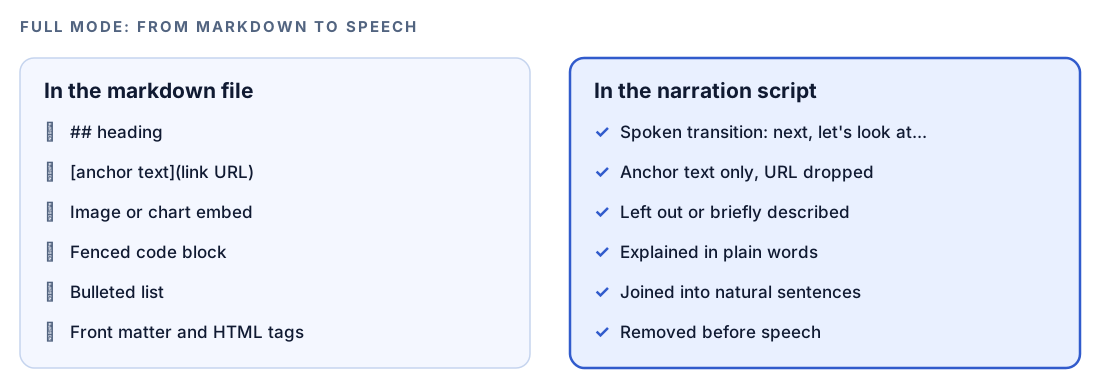
Each mode has its own scripting rules. Full mode shows the idea best, because it keeps your words and changes only their form.
Summary mode
Codex drafts a new script of 200 to 300 words, written to be heard. The first sentence gives the listener the post's main answer. Three to five takeaways follow, and the script ends on something the listener can act on. Markdown, "In this article" openers and talk about the text itself are not allowed, and casual spoken transitions link the points.
Full mode
The whole post is kept, but its form changes:
- Headings become spoken transitions, such as "Next, let's look at pricing."
- Links become plain text. The anchor stays and the URL goes.
- Images and charts are skipped or summed up in a phrase.
- Code is explained in words instead of read symbol by symbol.
- Bullet points merge into flowing sentences.
- Front matter, schema and HTML tags disappear.
- A one-line opener names the post and when it was published.
Dialogue mode
Codex scripts a conversation between two people: a curious host who drives the questions and an expert who gives clear answers. The script runs 15 to 25 exchanges and favors relaxed phrasing over formal lines. Each line carries a speaker tag:
[Speaker1] So what should someone take away from this post?
[Speaker2] [The article's main answer, said the way you'd explain it to a friend.]
[Speaker1] And where do most people go wrong?
Choosing a voice
$blog audio voices lists the skill's 30-voice catalog with a note on each voice's character. If you'd rather not browse, the skill suggests voices by content type.
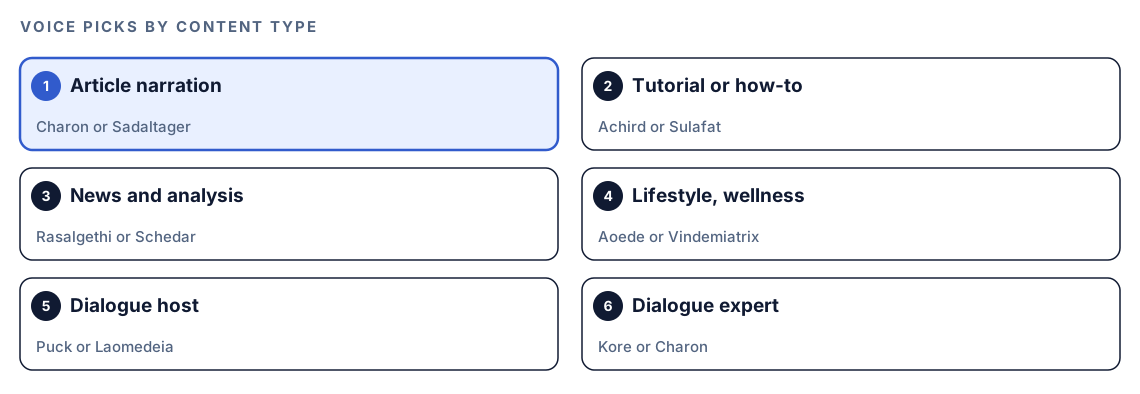
For a standard article, the informative Charon is the default, with Sadaltager as the alternative. A how-to reads well in a friendly or warm voice, which is where Achird and Sulafat come in. The diagram shows the remaining pairings for news, lifestyle and the two dialogue roles. Whichever you pick, keep one house voice across the blog so returning listeners recognize it.
Run it in Codex, step by step
- Install the Codex Blog kit with the steps in the install section, restart Codex, and open a new task in your blog's project folder. Our guide to installing skills in Codex covers the details.
- Create an API key in Google AI Studio and set it as an environment variable where Codex runs. It's the key
$blog imageuses, so if image generation already works, audio is covered. Google's own pricing applies.
export GOOGLE_AI_API_KEY=your-key- Confirm the setup. The skill checks for the key and runs a quick dry-run test:
$blog audio setup- Install FFmpeg if you want MP3 files. Without it, the skill still works and saves WAV.
- Check your permission mode. The skill calls the Gemini API over the internet, so depending on your mode, Codex may ask before it uses the internet. Approve it for this task.
- Generate narration for a post:
$blog audio generate content/blog/pricing-guide.md- Or ask in plain language, including the mode and voice if you know them. Codex picks the skill when your request matches it:
Make a short audio summary of content/blog/pricing-guide.md with the Charon voice, save it under public/audio, and give me the embed code.The skill also accepts a --mode option. When you leave the mode out, Codex asks before it writes the script.
Reading the result
When $blog write calls the skill during drafting, the result comes back as a compact block:
### Audio Narration
- **Path:** [project path]/audio/[post-slug].mp3
- **Duration:** [m:ss]
- **Voice:** Charon
- **Embed:** <audio controls preload="metadata"><source src="audio/[post-slug].mp3" type="audio/mpeg"></audio>
A standalone run also reports the estimated API cost and a suggested spot for the player. Before you publish, check four things:
- Listen to the whole file. Names, numbers, acronyms and product terms are where synthetic voices stumble.
- Compare the duration with the mode. A summary that runs much longer than two minutes probably needs a tighter script.
- Read the error, if there is one. An unknown voice name means running
$blog audio voices. A rate limit means waiting and retrying. Other API errors usually come down to an invalid key or a preview model that isn't available.
Add the player with Codex
The skill hands you embed code for three common setups. For plain HTML sites built with tools such as Hugo or Jekyll:
<p><strong>Listen to this article</strong></p>
<audio controls preload="metadata">
  <source src="/audio/pricing-guide.mp3" type="audio/mpeg">
  Your browser does not support the audio element.
</audio>
MDX sites such as Next.js or Gatsby use the same element with a self-closing source tag. WordPress uses its audio shortcode:
[audio src="audio/pricing-guide.mp3"]On placement, the skill gives two options. Put the player just under the opening section, where the first H2 begins, or put it above everything else with a short label so readers know what it is.
Pasting a player into one post is easy. The bigger win from Codex is changing the template once. Add an optional front matter field to each post that has audio:
audio: /audio/pricing-guide.mp3Then ask Codex to render the player from it:
Add optional audio support to our blog post layout. When a post's front matter has an audio field, render a labeled "Listen to this article" player with preload set to metadata, placed after the introduction. Use the MP3 from this task for content/blog/pricing-guide.md and add the field to that post. Show me the diff, then run the build.Review the diff, play the file on a staging build, and confirm posts without the field are unchanged.
Make it repeatable
Audio stays consistent when the same command runs the same way for every new post. codex exec runs Codex without the interactive interface, so a script or CI job can narrate each post after it merges:
codex exec --sandbox workspace-write '$blog audio generate content/blog/pricing-guide.md in summary mode with the Charon voice. Save the MP3 to public/audio/ and add the audio front matter field.' -o audio-report.mdSingle quotes stop the shell from treating $blog as a variable. --sandbox workspace-write lets Codex save the file and edit the post, since the default sandbox is read-only. -o writes Codex's final message, with the path, duration and estimated cost, to a file you can keep with the job's logs. The run needs your Google AI key in its environment and internet access, so make sure your sandbox and permission setup allows the network access the task needs. Store the key as a secret rather than in the repository. Our guide to automating checks with codex exec covers scheduling and CI patterns.
Without the skill: a plain Codex prompt
Codex can write a good narration script with no kit installed. You then paste it into whichever TTS tool you use:
Read content/blog/pricing-guide.md and write a 250-word spoken summary for text to speech. Open with the main answer, cover three to five key points, and end with one practical tip. No markdown, no URLs, no "in this article". Write numbers and abbreviations the way a narrator would say them.For a full read-aloud script:
Convert content/blog/pricing-guide.md into a narration script. Turn headings into spoken transitions, keep link text but drop URLs, describe each code block in one sentence, turn lists into sentences, and remove front matter. Save it as audio/pricing-guide.txt.The skill adds everything after the script: the Gemini call, voice recommendations, two-voice dialogue, MP3 conversion, embed code, a cost estimate, and a quiet fallback so $blog write never stalls on a missing key.
Pitfalls to avoid
- Publishing audio you haven't listened to. Mispronounced names and numbers undo the trust the post builds.
- Letting narration go stale. When you update a post, regenerate its audio, or listeners hear old advice.
- Switching voices from post to post. One house voice sounds deliberate; five sound random.
- Narrating very long posts in one pass. Text over the skill's token limit has to be split into sections.
- Burying the player at the bottom of the page, where listeners never find it.
- Running batch jobs without a key in the environment. Inside
$blog writethe step is skipped silently, so check that files were actually created.
Keep going
- Write a blog post with Codex to see how audio fits into the full drafting workflow.
- Repurpose blog posts with Codex for turning the same post into social posts and emails alongside your audio version.
- Generate blog images with Codex, which uses the same Google AI key as audio.
- The full list of Codex Blog and Codex SEO skills shows every command in both kits.
FAQ
Does adding audio to a blog post help SEO?
Don't count on it for rankings. Search engines read the text of the page, and narration doesn't replace that text. It serves readers who prefer listening, and a dialogue version can double as a podcast episode, so treat it as a reader feature rather than a ranking tactic.
How long is an AI narration of a blog post?
It depends on the mode. In the skill's guidance, a summary runs about one to two minutes from a 200 to 300 word script, a full read-aloud runs about 5 to 15 minutes, and a dialogue runs about 3 to 8 minutes over 15 to 25 exchanges.
Do I need an API key for blog audio in Codex?
Yes. The skill uses Gemini text-to-speech, which needs a Google AI API key set as an environment variable. Google's own pricing applies, and the skill reports an estimated cost with each file. $blog audio setup checks the key and runs a dry-run test.
Which voice is best for narrating a blog post?
The skill defaults to Charon, which its catalog describes as informative, for summaries and full narration. Sadaltager is the other pick for articles, Achird or Sulafat suit tutorials, and Puck with Kore is the default pair for dialogue. Run $blog audio voices to see all 30.
Can Codex turn a blog post into a podcast?
Close to it. In dialogue mode Codex scripts a host and an expert talking through the post, and Gemini gives each one a separate voice. You get a short, podcast-style file to embed on the post or publish elsewhere.
What file format does the narration use?
The skill saves MP3 when FFmpeg is installed and falls back to WAV when it isn't. It also hands you an HTML5 audio embed with preload set to metadata, and its embedding guide covers MDX and WordPress too.