
Content Operations
Blog Taxonomy SEO: Clean Up Tags and Categories in Codex
Audit thin, orphan and duplicate blog tags with Codex, get ranked tag ideas for new posts, and sync a clean taxonomy to WordPress or Shopify.
Blog taxonomy SEO means keeping your tags and categories useful to readers and crawlers, instead of letting them pile up into hundreds of near-empty archive pages. RankCue's Codex Blog kit gives Codex one command for the job, $blog taxonomy, which audits every tag and category across your posts, suggests tags for a new post from its own text, and syncs the result to WordPress, Shopify, Ghost, Strapi or Sanity. This guide covers how taxonomy affects search, what the audit flags, how to read its report, and how to let Codex do the cleanup in your repository.
Key takeaways
$blog taxonomy auditmaps every tag and category to the posts that use it and flags thin tags, orphan tags, tag bloat, deep category trees, uncategorized posts and duplicate slugs.- A tag with fewer than five posts counts as thin. The skill recommends merging it or adding noindex, and ranks orphan tags with zero posts as the most urgent fix.
$blog taxonomy suggestscores tag ideas from a post's headings, repeated phrases and emphasized text, then returns five to ten candidates and a primary category.$blog taxonomy syncpushes tags to your CMS through its API, using credentials you keep in environment variables, never in files.- Because Codex works in your project, the cleanup itself (front matter edits, noindex tags, redirects) arrives as a diff you can review before it ships.
The taxonomy command at a glance
| Item | Details |
|---|---|
| Command | $blog taxonomy audit [directory], $blog taxonomy suggest <file> and $blog taxonomy sync <cms> |
| What you give it | A folder of posts, a single post file, or the name of your CMS |
| What Codex reads | Front matter tags and categories, headings, bold and italic text and body copy, or your CMS through its API |
| What you get back | An audit report with prioritized fixes, a ranked tag table with suggested categories, or tags created and assigned in the CMS |
| Needs | Nothing extra for local files. Sync needs CMS credentials and internet access |
| Best for | Blogs with years of ad hoc tags, platform migrations, and keeping new posts consistent |
What is blog taxonomy, and why does it matter for SEO?
Taxonomy is the system you use to group posts. Most blogs run two systems side by side. Categories are the few broad sections of the blog, sometimes nested. Tags are the many narrow labels that cut across sections. On most platforms, each category and each tag gets its own archive page at its own URL, such as example.com/tag/email-marketing/. That's why taxonomy is an SEO question: every tag you create is a page that search engines can find, crawl and index.
Categories versus tags
Think of categories as the table of contents and tags as the index. The skill's guidelines put numbers on that:
- Aim for 5 to 10 main categories across the whole site.
- Give every post exactly one primary category.
- Keep category trees to three levels or fewer.
- Use 3 to 8 tags per post, and never more than 15.
- Write every slug in lowercase with hyphens, such as
email-deliverability. - Don't publish a tag archive until at least five posts use that tag.
How tag sprawl hurts a site
Tags are cheap to create, so they multiply. A writer adds "Email Marketing", another adds "email-marketing", a third adds "Email Tips". Over a few years you end up with hundreds of tags, most attached to one or two posts. Each one produces an archive page that is little more than a short list of links, often repeating what a category page already shows.
Those pages cost you in three ways. Crawlers spend time on URLs with almost no unique content, which matters more as a site grows. Searchers who land on a two-post tag page get a weak experience. And near-duplicate tags split one topic across several URLs, so none of them becomes the clear hub for it. Tags with zero posts are the worst case: empty archives that can still be linked and crawled.
What good taxonomy does for you
A tidy taxonomy works the other way. A strong category page becomes a hub that links every post on a topic, which helps readers browse and helps search engines discover and understand related pages through internal links. When a thin tag archive is still useful for visitors, a noindex rule keeps it out of Google's index while people can still use it.
How $blog taxonomy runs inside Codex
The three subcommands cover different moments: audit for the archive you already have, suggest for each new post, and sync for pushing the result to your CMS. Used together, they form a loop.
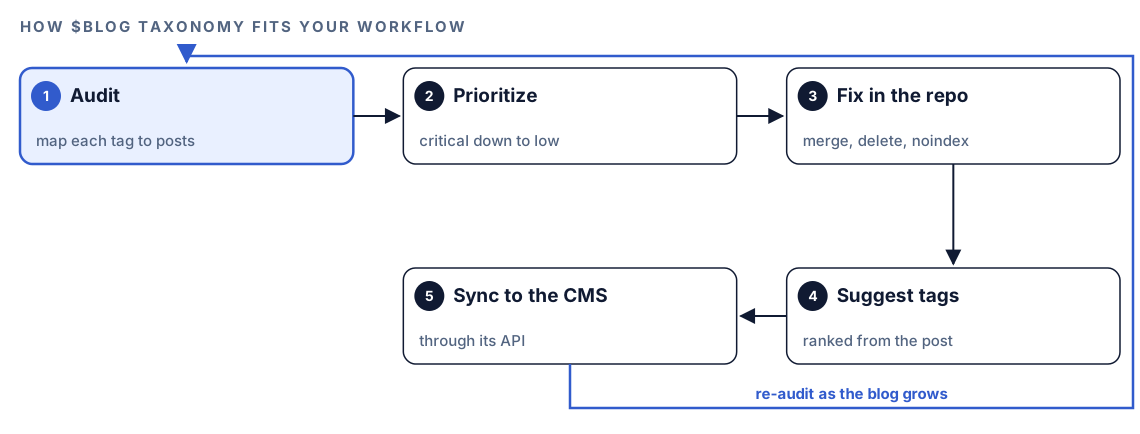
- Audit. Codex scans every post in the folder you name, or fetches the list from your CMS, and builds a map from each tag and category to the posts that use it.
- Prioritize. It runs six health checks on that map and sorts the findings into critical, high, medium and low.
- Fix in the repo. You decide what to merge, delete or noindex, and Codex makes the edits as a diff.
- Suggest tags. For each new post,
suggestranks tag ideas from the post's own content, so new tags don't add fresh sprawl. - Sync to the CMS.
synccreates the tags and assigns them through the CMS's API. Tags that already exist are skipped and noted.
How tag ideas are ranked
The suggestion step is more careful than picking words that sound right. It reads the post's H2 and H3 headings, its bold and italic phrases, and any tags already in the front matter. Then it counts repeated phrases in the body. A single word needs at least four uses (ignoring stop words such as "the" or "with"), a two-word phrase at least three, and a three-word phrase at least two.
Next it tidies the list. Singular and plural forms merge under the more common one, hyphenated and spaced versions merge, and synonyms group under the most frequent term. Slugs that are nearly identical, within two character edits of each other (as with seo-audit and seo-audits), count as the same tag. Finally each candidate gets a score.
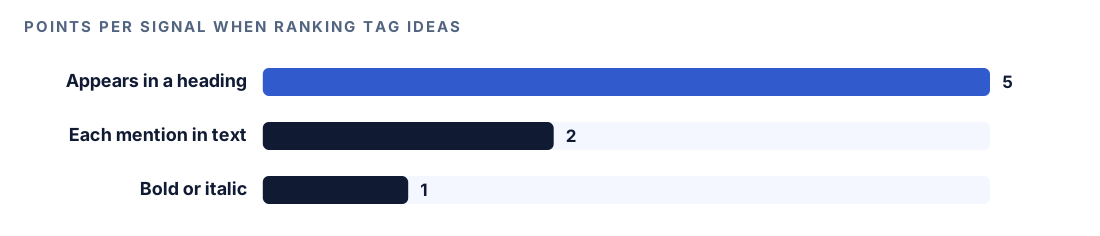
A phrase that appears in a heading earns 5 points, each mention in the text earns 2, and emphasis earns 1. The top five to ten candidates come back with a primary category and an optional secondary one. The weighting makes sense: headings show what a post is really about, while a word repeated in passing may not.
What the taxonomy audit checks
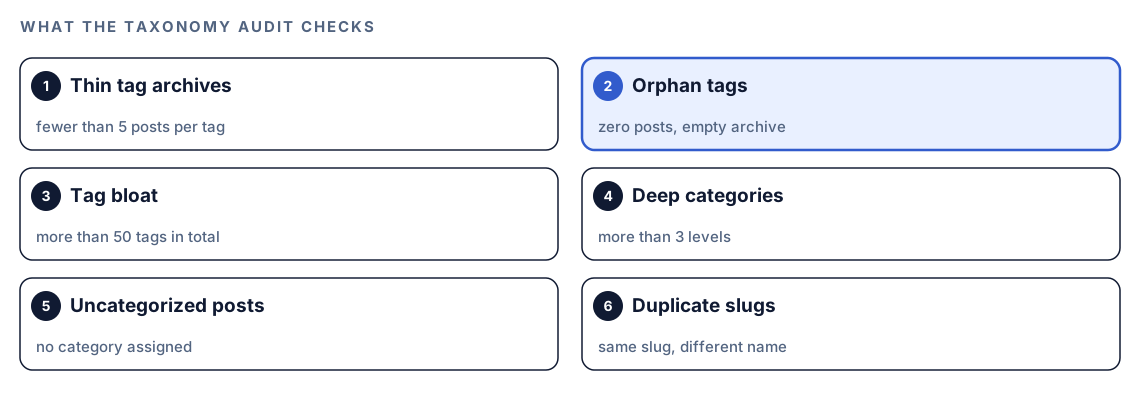
The audit applies the same six checks to every tag and category, whether the tags came from a migration, a plugin or years of different writers.
Thin and orphan tags
Any tag with fewer than five posts is thin, and the skill recommends merging it into a related tag or adding noindex to its archive. Tags with fewer than three posts are rated high priority. Orphan tags, with no posts at all, are the only critical finding, because they create empty archive pages that waste crawl attention. The recommended fix for orphans is deletion.
Tag bloat and deep categories
Past 50 tags in total, the audit flags bloat and recommends consolidation, because a long tag list is harder for readers to navigate and spreads your topics thin. Category trees deeper than three levels get a recommendation to flatten them. Deep trees usually mean long URLs and category pages with few posts.
Uncategorized posts and duplicate slugs
Every post without a category gets flagged, with a suggestion to assign one. Duplicate slugs, where two terms share a slug but have different names, get merged into one canonical version. Naming problems such as mixed case or a space in one tag and a hyphen in another are rated low priority, but they're also the easiest to fix.
Run it in Codex, step by step
- Install the kit using the steps in the install section, restart Codex, and open a new task in your blog's project folder. Our guide to installing the skills in Codex covers setup in detail.
- Audit the folder that holds your posts:
$blog taxonomy audit content/blog- Or ask in plain language. Codex picks the skill when your request matches it:
Audit the tags and categories across content/blog. Find thin tags, orphan tags and duplicate slugs, and tell me what to merge or delete.- For a new post, get ranked tag ideas before you publish:
$blog taxonomy suggest content/blog/email-deliverability-guide.md- To sync with a CMS, set three environment variables in your shell, not in a file, and never commit them:
export CMS_TYPE=wordpress
export CMS_URL=https://example.com
export CMS_API_KEY=your-application-password- Then run the sync:
$blog taxonomy sync wordpressCMS_TYPE accepts wordpress, shopify, ghost, strapi or sanity. The key depends on the platform: an application password for WordPress, an Admin API access token for Shopify, an Admin API key for Ghost, and an API or project token for Strapi and Sanity. Sync uses your own CMS account, so that platform's API access rules apply.
Sync talks to your CMS over the internet, so depending on your permission mode, Codex may ask before it connects. Approve it for your CMS domain. If a variable is missing, the skill says which one. If the CMS rejects the credentials, it reports the failure and doesn't retry. If it hits a rate limit, it waits and retries once.
Reading the report
The audit report opens with totals, then lists issues by priority:
## Taxonomy Audit: content/blog

**Total tags**: XX | **Total categories**: XX
**Healthy**: XX | **Thin**: XX | **Orphan**: XX

### Critical Issues
- [orphan tags]

### Recommendations
1. Merge [tag-a] and [tag-b] (same topic, XX combined posts)
2. Delete orphan tags: [list]
3. Add noindex to tag archives with < 5 posts
The suggestion report is a ranked table with a score and the signals behind it, such as "H2 + X mentions", followed by a primary and secondary category.
Work through the audit in this order:
- Orphan tags. Delete them first. Nothing depends on an empty archive.
- Duplicates and near-duplicates. Merge each group into one canonical slug.
- Thin tags. For each one, decide: merge it into a broader tag, noindex it until it reaches five posts, or remove it.
- Bloat and depth. Consolidate the tag list and flatten deep categories.
- Naming. Normalize case and separators last, since merges may already have fixed some.
A simple rule for thin tags: if you'll write more on the topic soon, noindex it and keep it. If it was a one-off label, merge or remove it.
Apply the fixes with Codex
For blogs built from Markdown or MDX files, tags and categories live in each post's front matter, so Codex can fix them directly. A typical post before cleanup:
title: "Email deliverability checklist"
categories: [Marketing, Email, Guides]
tags: [Email Marketing, email-marketing, newsletters, Newsletter Tips, misc]
After:
title: "Email deliverability checklist"
categories: [email-marketing]
tags: [email-deliverability, newsletters, sender-authentication]
One primary category, a handful of specific tags, and consistent lowercase slugs. For thin archives you want to keep, the tag template needs a robots meta tag:
<meta name="robots" content="noindex, follow">One step the skill doesn't cover but you shouldn't skip: when you delete or merge a tag archive that has inbound links or search traffic, add a 301 redirect from the old URL to the tag or category it merged into. Then ask Codex to carry out the whole plan:
Use the taxonomy audit report. In content/blog, merge each group of duplicate tags into its canonical slug, remove orphan tags, and make sure every post has exactly one category and no more than eight tags. In the tag archive template, add noindex for tags with fewer than five posts. Add 301 redirects from every removed tag URL to the tag it merged into. Show me the diff, run the build, and list the tag pages that no longer exist.Review the diff, then run $blog taxonomy audit content/blog again. A shorter report with no critical issues tells you the cleanup landed.
Make it repeatable
Taxonomy decays one post at a time, so a scheduled audit beats an annual cleanup. The audit only reads files, which makes it a good fit for codex exec, whose default sandbox is read-only. This saves a monthly report:
codex exec '$blog taxonomy audit content/blog' -o reports/taxonomy-audit.mdFor a CI check, ask for a structured answer instead. Save this as taxonomy-schema.json:
{
  "type": "object",
  "properties": {
    "orphan_tags": { "type": "array", "items": { "type": "string" } },
    "thin_tags": { "type": "array", "items": { "type": "string" } },
    "duplicate_slugs": { "type": "array", "items": { "type": "string" } }
  },
  "required": ["orphan_tags", "thin_tags", "duplicate_slugs"],
  "additionalProperties": false
}
Then run:
codex exec --output-schema taxonomy-schema.json '$blog taxonomy audit content/blog' -o taxonomy.jsonYour pipeline can read taxonomy.json and fail the job when orphan_tags isn't empty. codex exec expects to run inside a Git repository, which a blog project usually is. Our guide to automating checks with codex exec covers scheduling and CI setup.
Without the skill: a plain Codex prompt
Codex can produce a useful first inventory with no kit installed:
Read the front matter of every file in content/blog. Build a table of each tag and category with the number of posts that use it. Flag tags used by fewer than five posts, tags that differ only by case, spacing or plural form, and posts with no category. Suggest merges, but don't change any files yet.What the skill adds is a fixed rulebook: the same thresholds and priority levels on every run, a scoring method for new tags, adapters for five CMS platforms, and a report format you can compare month to month.
Pitfalls to avoid
- Deleting or merging tag archives that earn links or traffic without adding redirects.
- Creating a new tag for every keyword a post targets.
- Adding noindex to category pages that act as real topic hubs.
- Mixing case and separators, so one topic ends up with three slugs.
- Storing CMS credentials in a file or committing them to the repository.
- Running
syncbefore you've reviewed the audit and the suggestions.
Keep going
- Run a blog audit with Codex to check every post's health, not only its tags.
- Build topic clusters with Codex to turn your categories into deliberate topic hubs.
- Find keyword cannibalization with Codex when posts, not tags, compete for the same query.
- See every command in both kits for the rest of the Codex Blog and Codex SEO skills.
FAQ
Should tag pages be indexed?
Only when they're worth landing on. A tag archive with enough posts on a clear topic can be a useful page. The skill recommends noindex or a merge for tags with fewer than five posts, which covers most tags on a typical blog.
How many tags should a blog post have?
The skill's guideline is 3 to 8 tags per post and never more than 15. Fewer, more specific tags make each archive more useful than a long list of loose labels.
What is the difference between categories and tags for SEO?
Categories are the broad sections of a blog, and every post should have exactly one primary category. Tags are narrower labels that connect posts across categories. Both usually create archive pages, so both affect how many URLs search engines see.
Should I delete unused tags?
Yes. Tags with no posts create empty archive pages, and the audit rates them as the most urgent fix. If an unused tag's URL still has inbound links, redirect it to the closest live tag or category instead of letting it return an error.
Can Codex update tags in WordPress or Shopify?
Yes. $blog taxonomy sync works with WordPress, Shopify, Ghost, Strapi and Sanity through each platform's API. You supply the CMS type, URL and an API credential as environment variables, and Codex creates and assigns the tags, skipping any that already exist.