
On-Page SEO
Search Intent Analysis with Codex: SXO and Page-Type Fit
Use Codex to read the results page backwards, catch page-type mismatches, score your page from real searcher personas, and fix it in your repo.
Search intent analysis with Codex starts where Google starts: with the results page. Codex reads what ranks for your keyword, works out which type of page searchers are being shown, and tells you whether your page is that type before you spend another week polishing copy the results don't want. RankCue's Codex SEO kit runs the whole analysis with one command, $seo sxo <url>, and this guide covers what search intent and SXO are, how the command runs inside Codex, how to read its scores, and how to let Codex reshape the page in your own project.
Key takeaways
$seo sxo <url>reads the top organic results for your keyword backwards, classifies each one's page type, and checks whether your page matches what Google is rewarding.- A page-type mismatch is the lead finding. A well-built blog post can stall on a keyword where the first page is mostly product or comparison pages.
- You get an SXO Gap Score out of 100 across seven dimensions, kept apart from technical SEO health, plus 4 to 7 persona cards scored on relevance, clarity, trust and action.
$seo sxo wireframe <url>turns the findings into a current-versus-target page outline that Codex can build into your templates.- The command needs internet access. DataForSEO is optional, and the skill asks you to confirm the cost before any paid call.
The SXO command at a glance
| Item | Details |
|---|---|
| Command | $seo sxo <url>, optionally followed by the keyword you want the page to rank for |
| What you give it | A live URL, plus a target keyword when the title and H1 don't make it obvious |
| What Codex reads | The rendered page and the top 10 organic results for the keyword, with their SERP features |
| What you get back | An SXO analysis: SERP landscape, page-type verdict, user stories, Gap Score, persona scores, priority actions and limitations |
| Needs | Internet access; an optional DataForSEO connection for more precise SERP data |
| Best for | Pages that are technically sound but stuck, and deciding what kind of page to build for a keyword |
What is search intent, and what does SXO add?
Search intent is the job a searcher wants done. "What is a CRM" wants an explanation, "CRM pricing" wants numbers, and "Gmail sign in" wants one specific page. The usual labels are informational, navigational, commercial investigation (comparing before buying) and transactional (ready to act). They're a start, but too coarse to act on: two pages can both serve commercial intent and still be different kinds of page.
Intent shows up as page type, format and angle
The results page is the better guide, because it shows what Google has decided the searcher wants. Three things stand out when you scan the first page:
- Page type: product pages, category pages, blog posts, comparisons, tools, local results. This is the strongest signal.
- Format: long-form guides, listicles, how-tos, comparison tables, videos.
- Angle: the hook most results share, such as "for beginners" or "for small teams".
If most of the results are category pages, Google thinks the searcher wants to shop, and an article on the topic answers a question nobody asked.
Why a good page can still be the wrong page
Most audits check health: speed, indexability, titles, schema. A page can pass all of that and still sit on page three because it's the wrong type for the keyword. If the first page is mostly product pages, a how-to post is chasing a slot Google gave to something else, and more links won't change that.
SXO: where SEO meets user experience
Search experience optimization (SXO) joins two questions that usually live in different teams. SEO asks what Google rewards for the query. UX asks whether visitors can do what they came to do. SXO asks both: does this page deserve to rank here, and will the people who click be satisfied? Google's guidance on creating helpful, people-first content argues the same thing from its side.
That's why the skill reports an SXO Gap Score and never calls it an SEO score. A page can be technically excellent and strategically misaligned at once, so when a technical health score exists too, the two sit side by side instead of being blended.
Reading the results page backwards
Working backwards means you study the results before your own page. Every SERP feature adds a clue: People Also Ask exposes worries, ad copy shows which triggers sell, related searches sketch the journey, and the featured snippet's format shows the answer shape Google expects.
How the SXO command runs inside Codex
When you run $seo sxo https://example.com/guides/crm-setup in a Codex task, the skill follows a fixed pipeline and saves the finished analysis in your project.
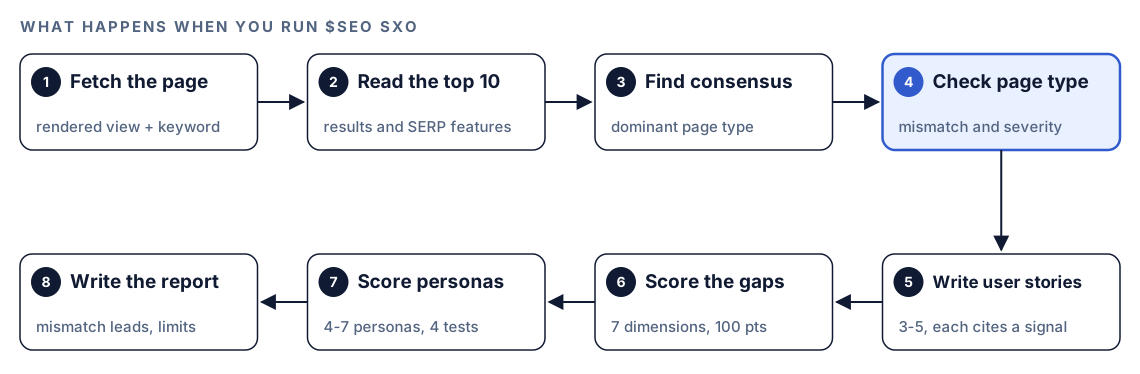
- Fetch the page. Codex prefers the rendered page, since visitors judge what JavaScript puts on screen. It pulls the title, H1, meta description, headings, word count, schema, calls to action and media. With no keyword given, it uses the overlap between the title tag and the H1, and asks you if that's empty.
- Read the top 10. For each organic result it records the authority tier (brand, niche authority or unknown), page type, format, rough depth, schema and media, and it logs SERP features from ads to AI Overviews.
- Find the consensus. The skill rates agreement on the dominant page type: over 60% of results is a strong consensus, 40 to 60% is mixed, under 40% is fragmented.
- Check the page type. Your page is classified with the same taxonomy. If it differs from the dominant type, the mismatch gets a severity and leads the report.
- Write user stories. It derives 3 to 5 stories, each citing the signal it came from and covering at least two journey stages.
- Score the gaps. Seven dimensions add up to the Gap Score.
- Score personas. It builds 4 to 7 personas and scores the page from each one's seat.
- Write the report. Priority actions come ranked, and a limitations section says what couldn't be assessed.
Results come from web search by default. With DataForSEO connected, the skill gets exact positions, features and snippets, plus keyword volume and competition. It estimates the cost and asks before any call, and falls back to web search, noting the lower precision, if the cost is too high.
What the SXO report scores
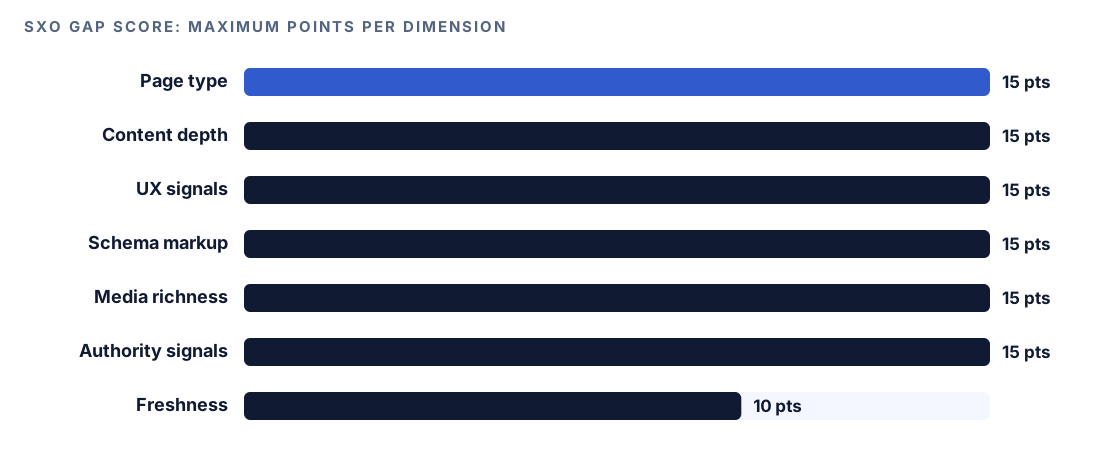
The Gap Score splits 100 points across seven dimensions. Six are worth up to 15 points and freshness up to 10. Higher means closer to what the results reward, and every score comes with the evidence behind it.
Page-type alignment
Each kind of mismatch maps to a response:
| Your page | What ranks instead | Severity | Recommended response |
|---|---|---|---|
| Blog post | Product pages | Critical | Build a separate product page and link to it |
| Blog post | Comparisons | High | Rework it into a comparison with a feature matrix |
| Product page | Informational pages | High | Add a layer of explanatory content |
| Landing page | Tools or calculators | High | Put a working tool on the page |
| Service page | Local results | Medium | Add location details and local business schema |
| Matches the results | Same type | Aligned | Improve depth and UX |
A fragmented results page isn't flagged. The skill reads it as an opening for a page with a clearer format.
Depth, UX, schema, media, authority and freshness
The other six compare your page with the ranking norm: depth (word count, headings, topic coverage), UX (call-to-action clarity, above-the-fold content, mobile layout), schema types, media (images, video, interactive elements), authority (E-E-A-T markers such as credentials and social proof) and freshness (update dates and recency).
Personas and user stories
Personas come from the results, not a brainstorm: the skill clusters People Also Ask questions, splits ad copy by audience and maps related searches to journey stages. Each persona scores the page out of 25 on four tests: relevance, clarity (can they find the answer within 10 seconds?), trust and action (is there an obvious next step?). The weakest persona's fixes come first.
User stories follow one template, so each traces back to a signal:
As a [persona derived from a SERP signal],
I want to [goal derived from the query intent],
because [emotional driver from ad copy or PAA tone],
but I'm blocked by [barrier from PAA questions or related searches].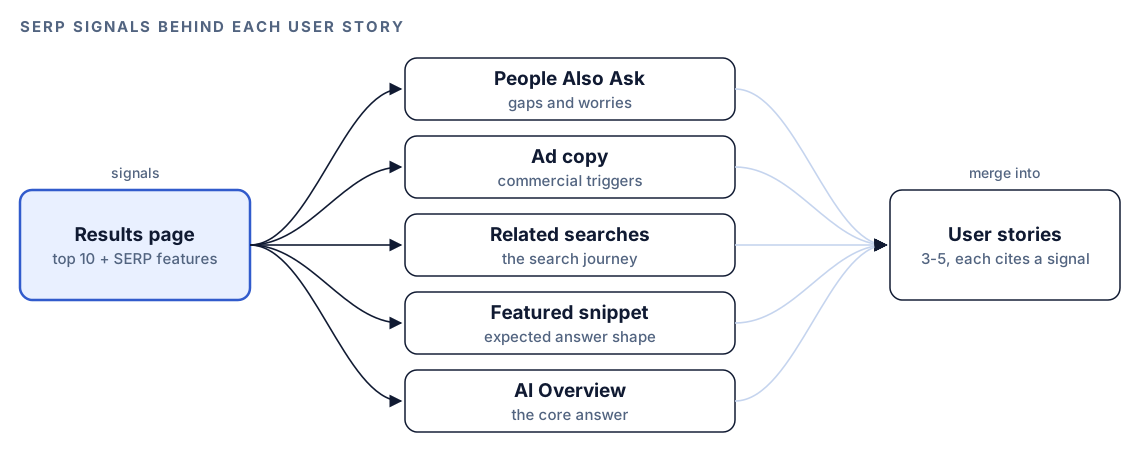
Run it in Codex, step by step
- Install the kit with the steps in the install section, restart Codex, and open a new task in your website's project folder. The guide to installing SEO skills in Codex walks through it.
- Check your permission mode. The command fetches a live page and runs a web search, so depending on your mode, Codex may ask before it uses the internet. Approve it for the site you're checking.
- Run the command, adding the keyword after the URL if the title and H1 don't name it:
$seo sxo https://example.com/guides/crm-setup crm setup for small teams- Or ask in plain language, and Codex picks the skill because the request matches it:
Why isn't https://example.com/guides/crm-setup ranking for "crm setup for small teams"? Check whether it's the page type Google shows, and score it from the searchers' point of view.- Use a subcommand when you need only part of the job:
$seo sxo wireframe https://example.com/guides/crm-setup
$seo sxo personas https://example.com/guides/crm-setup
wireframe adds the current and target page outlines. personas skips the SERP analysis and scores the page from persona perspectives only. For DataForSEO's SERP data, connect your account first; the guide to live SERP data with DataForSEO in Codex covers the setup, and DataForSEO's own pricing applies.
Reading the report
The analysis always has the same seven sections, so reports for different pages line up:
## SXO Analysis: https://example.com/guides/crm-setup
### Target Keyword: [keyword]
### 1. SERP Landscape
- Dominant page type: [type] ([XX]% consensus)
- SERP features: [list]
### 2. Page-Type Alignment
- Your page type: [type] / SERP expects: [type]
- Verdict: [ALIGNED or MISMATCH (severity)]
### 3. User Stories
### 4. Gap Analysis (SXO Score: XX/100)
### 5. Persona Scores
### 6. Priority Actions
### 7. Limitations
Read the verdict first: a critical or high mismatch outranks everything, because polishing the wrong page type wastes effort. Then the weakest persona, whose lowest test usually names a concrete change, such as a buried answer or a missing price. Then the largest gaps. Finally the limitations, which flag a sample under five results, an all-ads page, or JavaScript that hid content.
Some findings point to a deeper check:
| Finding | Next command |
|---|---|
| E-E-A-T gaps in persona scores | $seo content |
| Missing schema types | $seo schema |
| Local intent in the results | $seo local |
| Thin content | $seo page |
| Technical problems during the fetch | $seo technical |
| Image and media gaps | $seo images |
Apply the fixes with Codex
A critical mismatch usually calls for a new page: if the results want a product page, build one and link to it from the guide. Smaller gaps are edits, and Codex makes them in the template rather than in one copy of the HTML.
The wireframe bridges the report and the code. It describes the target layout as an annotated HTML outline, with placeholders that say exactly what goes where rather than "add a CTA here". An excerpt looks like this:
<!-- SOLL (target) for "crm setup for small teams": comparison layout -->
<header>
  <h1>[Option A] vs [Option B] for small teams: [one-line verdict]</h1>
  <p>[Two-sentence answer for readers who only want the verdict]</p>
  <a href="/pricing#teams">[Pricing CTA with team-plan badge, below the hero]</a>
</header>
<section id="comparison-matrix">
  <!-- Rows: criteria raised in People Also Ask. Columns: the options. -->
</section>
Then hand it to Codex:
Use the SOLL wireframe from the SXO report for /guides/crm-setup. Restructure the page template to match it, keep the URL and any content that's still accurate, and build the comparison matrix as a reusable component. Fill placeholders from data in this repo and ask me when a value isn't there. Show me the diff, then run the build and the tests.Review the diff with the persona cards open. Each change should answer a low score: clarity moves the answer up, trust adds real credentials or reviews, action gives each persona a next step. Once the page is live, run $seo sxo on the same URL and compare the verdict and score.
Make it repeatable
Results drift: a keyword that showed guides last quarter can tilt toward tools. A short codex exec loop re-checks your key pages and saves one report each:
mkdir -p reports/sxo
while read -r name url; do
  codex exec "run \$seo sxo $url and lead with the page-type verdict" -o "reports/sxo/$name.md"
done < sxo-pages.txt
Each line of sxo-pages.txt holds a name and a URL. codex exec runs without the interactive UI and -o saves the final message, so you can commit the reports and diff them next quarter. Watch the dominant page type first; a shift there matters more than a few points of score. Run it inside your Git repository, with a sandbox and permission setup that allows the network access the search needs. The guide to automating SEO checks with codex exec covers scheduling and CI.
Without the skill: a plain Codex prompt
You can get a first pass from Codex with no kit installed:
Search Google for "crm setup for small teams" and list the top 10 organic results. Classify each one's page type (product, category, blog post, comparison, tool, local) and format. Tell me the dominant type and how many results share it. Then fetch https://example.com/guides/crm-setup, classify it the same way, and say whether it matches.What the skill adds is structure: the same taxonomy and severity scale every run, a 100-point Gap Score with evidence, SERP-derived personas, the wireframe, and an honest limitations section.
Pitfalls to avoid
- Treating a keyword match as an intent match. A page can use the exact phrase and still be the wrong type.
- Rewriting a blog post when the results want a product page or a tool. Build the page they reward instead.
- Inventing personas. Ones from a brainstorm drift toward the customers you wish you had.
- Blending the Gap Score into a technical health score, which hides the mismatch.
- Skipping the limitations. A thin sample or an all-ads page weakens the verdict.
- Checking intent once. Re-run it on key pages every few months.
Keep going
- On-page SEO analysis with Codex checks one page in depth once the type is right.
- Comparison and alternatives pages with Codex helps when the verdict says the results want a comparison.
- E-E-A-T audit with Codex picks up where the trust and authority scores stop.
- Every Codex SEO and Codex Blog command is on the skills page.
FAQ
What are the four types of search intent?
Informational (learning something), navigational (reaching a specific site), commercial investigation (comparing options) and transactional (ready to act). The page types in the results tell you more than the label does.
What is SXO in SEO?
SXO means search experience optimization. It pairs SEO's question, what does Google reward for this keyword, with UX's question, can visitors do what they came for. A page can be technically healthy and still fail on SXO if it's the wrong type for the query.
Why is my page not ranking even though it's well optimized?
Often it's a page-type mismatch: your page is a guide but the results are mostly product or comparison pages, or the reverse. Better on-page SEO won't fix that. Check the dominant type for the keyword, then reshape the page or build a new one that matches.
Can Codex analyze search intent for my pages?
Yes. With the Codex SEO kit installed, $seo sxo <url> reads the results for the page's keyword, checks the page type and scores the page from several personas. Codex can then restructure the template in your project and run your build.
Does the SXO analysis need a paid API?
No. It uses web search for the results by default. DataForSEO is an optional upgrade for more precise SERP data; if you connect it, the skill estimates the cost and asks before each call, and DataForSEO's own pricing applies.