
On-Page SEO
On-Page SEO Analysis with Codex: Score and Fix Any URL
Run an on-page SEO analysis with Codex: score titles, headings, meta tags, schema and images on any URL, then fix issues in your templates with a diff.
On-page SEO analysis with Codex means pointing Codex at one URL and getting back a scored review of everything on that page that search engines read: the title, meta description, headings, content, technical tags, schema and images. RankCue's Codex SEO kit does it with a single command, $seo page <url>, and because Codex works inside your repository, it can then fix the issues in the templates that produce them. This guide covers what the command checks, how it runs, how to read the score card, and how to turn the findings into reviewed changes.
Key takeaways
$seo pagescores one URL out of 100 across five areas: on-page SEO, content quality, technical tags, schema and images.- It checks concrete settings, such as a 50-60 character title, a 150-160 character description, exactly one H1, and no skipped heading levels.
- Images over 200 KB get a warning and over 500 KB a critical flag, and JavaScript lazy-loaders are recognized rather than misreported.
- Core Web Vitals are flagged as risks from the HTML, not measured, so confirm them with field or lab data.
- Codex can fix most findings in the shared layout or component, show you the diff, and run your build before you accept it.
The page command at a glance
| Item | Details |
|---|---|
| Command | $seo page <url> |
| What you give it | One live, publicly reachable URL |
| What Codex reads | The page's HTML: head tags, headings, body text, links, structured data and image markup |
| What you get back | A page score card, issues sorted Critical to Low, recommendations, and ready-to-use JSON-LD suggestions |
| Needs | Internet access for the fetch; an optional DataForSEO account for live rankings and backlink data |
| Best for | Landing pages before launch, pages that slipped in rankings, and checking a template change |
What is on-page SEO, and why does it matter?
On-page SEO covers everything you control on the page itself, as opposed to off-page signals like links from other sites. It decides two things: whether search engines understand what the page is about, and whether searchers choose it when it appears. A page can be crawlable and fast and still underperform because its title is vague, its headings are a jumble, or its canonical tag points somewhere else.
Titles, descriptions and headings
The title tag is one of the strongest on-page hints about a page's topic and often the source of the clickable headline in results. The meta description doesn't affect ranking directly, but it often becomes the snippet that persuades someone to click. Google may rewrite either one when it judges that other text on the page fits a query better, so a clear, accurate draft matters.
Headings give the page its outline. One H1 should state the topic, and H2 to H6 should step down in order so both readers and crawlers can follow the structure. The URL matters too: short, readable, hyphenated paths without tracking parameters are easier to understand and share.
Tags readers never see
Several tags only machines read. The canonical tag names the preferred URL when similar pages exist. The meta robots tag tells crawlers whether to index the page and follow its links. Open Graph and Twitter Card tags control how the page looks when shared on social platforms. Hreflang tags, on multilingual sites, point each language version at the others. A single wrong value in any of them can undo good content.
Content, images and speed
Beyond tags, the page has to answer the query well, show who wrote it, and load without delay. Heavy images are a frequent cause of slow pages, and images without width and height cause layout shift as they load.
How the page command runs inside Codex
When you run $seo page in a Codex task, the skill fetches the URL and reviews it in six groups, then rolls the results into one score card.
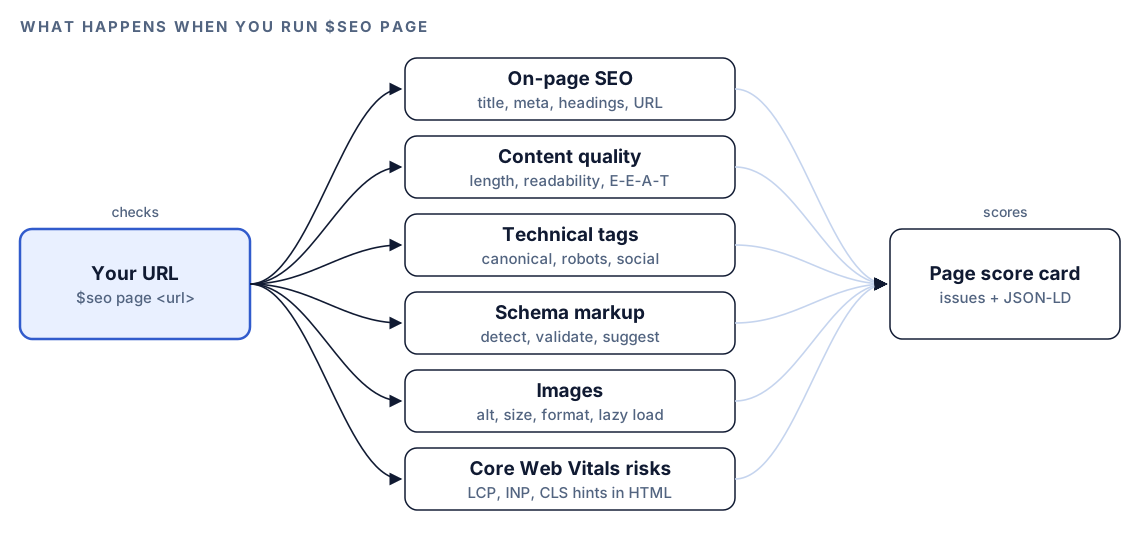
- On-page SEO. Title, meta description, H1, heading hierarchy, URL, internal links and external links.
- Content quality. Word count against page-type minimums, readability (Flesch Reading Ease and grade level), keyword density, E-E-A-T signals, and publication and updated dates.
- Technical tags. Canonical, meta robots, Open Graph, Twitter Card and, on multilingual pages, hreflang.
- Schema markup. Every structured data type on the page, with JSON-LD preferred, required properties validated, and missing types listed.
- Images. Alt text, file size, format, width and height, and how each image is lazy-loaded.
- Core Web Vitals risks. Patterns in the HTML that tend to hurt loading, responsiveness or visual stability.
The result is an overall score out of 100 plus a score for each of the first five areas. The Core Web Vitals group adds flags, not a score, because real performance can't be measured from HTML alone.
What Codex checks on the page
Title and meta description
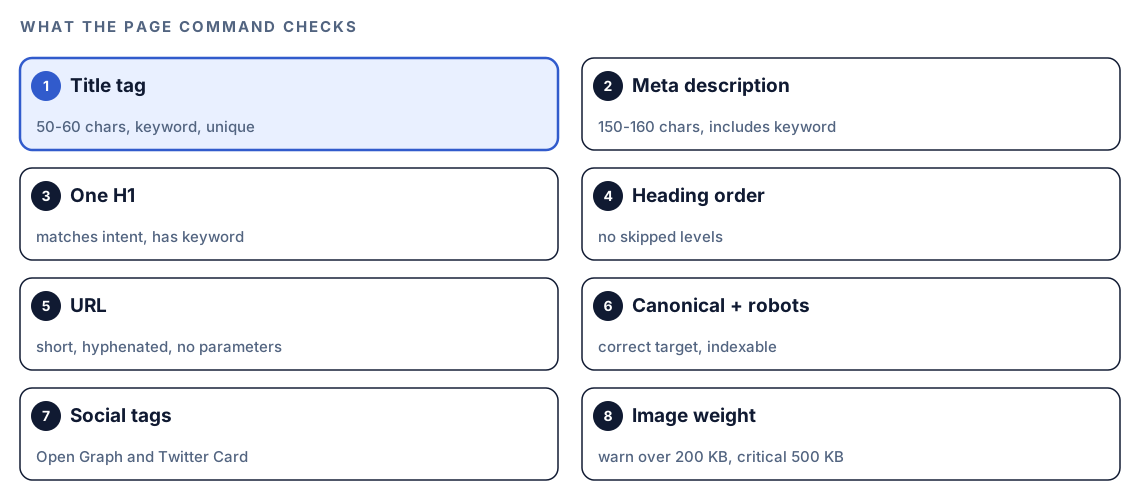
The skill wants a title of 50-60 characters that includes the primary keyword and is unique to the page. The meta description should run 150-160 characters, include the keyword, and give a reason to click. Uniqueness matters because duplicate titles force search engines to guess which page answers which query.
Headings, URL and links
There must be exactly one H1, matching the page's intent and containing the keyword. Subheadings must not skip levels, so an H2 followed directly by an H4 is flagged. The URL should be short, descriptive and hyphenated, with no parameters. Internal links need relevant anchor text, the page shouldn't be an orphan with no links pointing to it, and external links should go to authoritative sources in reasonable numbers.
Schema rules
The skill validates the markup it finds and suggests what's missing, with ready-to-use JSON-LD. It follows two firm rules: it never recommends HowTo markup, and it doesn't recommend FAQPage for rich results. Existing FAQPage markup stays, since it can still help AI systems parse a page, and QAPage is suggested for pages where real users ask and answer questions. Our guide to schema markup with Codex goes deeper.
Images and lazy loading
Every image needs descriptive alt text, with keywords only where they fit naturally. The skill flags files over 200 KB as a warning and over 500 KB as critical, recommends WebP or AVIF over JPEG and PNG, and checks that width and height are set. It also reports how each image is lazy-loaded: native, a JavaScript library, a performance plugin, or not at all. When a script-based lazy-loader is present, it doesn't flag images for lacking the native loading="lazy" attribute, because those tools remove it on purpose. For a whole-site view, see image SEO with Codex.
Core Web Vitals risks
The skill flags likely causes rather than measuring: oversized hero images and render-blocking resources for Largest Contentful Paint (LCP), heavy JavaScript without async or defer for Interaction to Next Paint (INP), and missing image dimensions or injected content for Cumulative Layout Shift (CLS). The "good" thresholds in Google's Core Web Vitals guidance are LCP within 2.5 seconds, INP within 200 milliseconds and CLS below 0.1. Confirm the real numbers in PageSpeed Insights.
Run it in Codex, step by step
- Install the kit from the install section, restart Codex, and open a new task in your site's project folder. Our guide to installing SEO skills in Codex has the details.
- Check your permission mode. The command fetches a live page, so depending on your mode, Codex may ask before it uses the internet. Approve it for the site you're checking.
- Run the analysis:
$seo page https://example.com/pricing- Or ask in plain language. Codex picks the skill when your request matches its description:
Check the SEO of https://example.com/pricing. I want the title, headings, meta tags, images and schema reviewed, with the worst problems first.- If DataForSEO tools are connected in your Codex setup, the skill can add live search positions and a backlink summary with spam scores. That needs your own DataForSEO account, and its pricing applies.
The skill is honest about pages it can't fully see. An unreachable URL is reported instead of guessed at. A page behind a login gets a note, with a suggestion to supply the rendered HTML or a public URL. If the HTML body is empty because the page builds itself in JavaScript, the skill analyzes what's there, says the results may be incomplete, and suggests a browser-rendered snapshot.
Reading the score card
The report opens with the score card:
Overall Score: XX/100

On-Page SEO:     XX/100  ████████░░
Content Quality: XX/100  ██████████
Technical:       XX/100  ███████░░░
Schema:          XX/100  █████░░░░░
Images:          XX/100  ████████░░
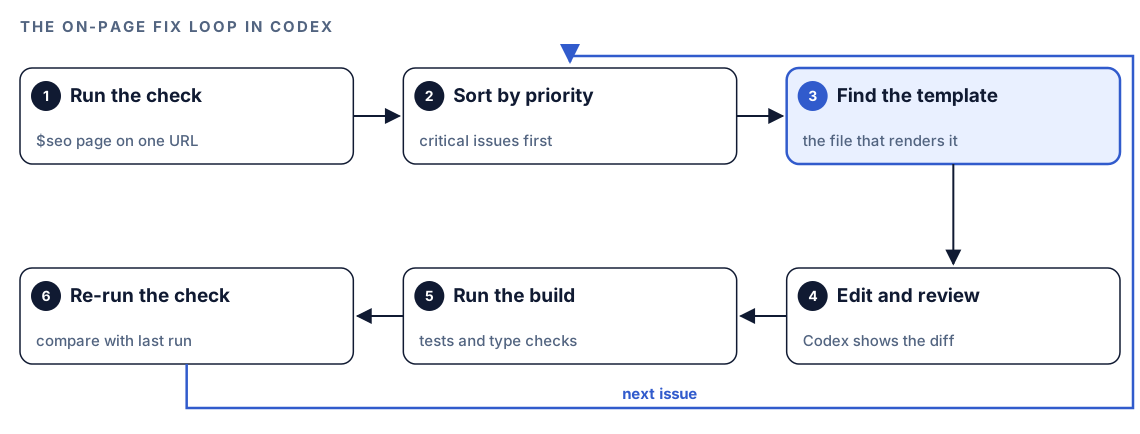
Below it come three sections: Issues Found, sorted Critical, High, Medium, then Low; Recommendations, each with its expected impact; and Schema Suggestions with JSON-LD you can paste. Work top-down. A wrong canonical or a stray noindex outranks everything else, because it can remove the page from results entirely. Then fix titles, the H1 and heavy images, which are quick and visible. Leave polish such as extra schema types for last. The lowest area score shows where most of the remaining work sits.
Apply the fixes with Codex
Most on-page issues live in shared code. A missing canonical or a generic title on one page usually means the layout or head component is wrong for every page that uses it, so fixing the source beats patching output.
A typical head fix. Before:
<head>
  <title>Pricing</title>
  <meta name="description" content="Pricing">
</head>
After:
<head>
  <title>Pricing Plans for Small Teams and Startups | Example App</title>
  <meta name="description" content="Compare Example App pricing for small teams and startups, with monthly and annual plans, seat limits and every feature listed side by side. Start a trial.">
  <link rel="canonical" href="https://example.com/pricing">
  <meta property="og:title" content="Pricing Plans for Small Teams and Startups | Example App">
  <meta property="og:description" content="Compare plans side by side and pick the one that fits your team.">
  <meta property="og:image" content="https://example.com/og/pricing.png">
  <meta property="og:url" content="https://example.com/pricing">
  <meta name="twitter:card" content="summary_large_image">
</head>
And an image below the fold:
<img src="/img/usage-chart.avif" alt="Bar chart of monthly usage by plan" width="1200" height="675" loading="lazy">Then give Codex the job:
Use the $seo page report for https://example.com/pricing. Fix the Critical and High issues only. Find the layout or component that renders the head tags and images, and change it there rather than in built output. Keep titles at 50-60 characters and descriptions at 150-160. Show me the diff and run the build. List anything you couldn't fix and why.Review the diff with care. A canonical change on a shared layout affects every page that uses it, so check that each page gets its own URL, not the pricing page's. After deploy, run $seo page again on the same URL and compare.
Make it repeatable
A full report is for people; a CI job needs a yes or no. codex exec can ask for a final answer that matches a JSON Schema, which turns the page check into a gate for a staging deploy. Save this as page-gate.schema.json:
{
  "type": "object",
  "properties": {
    "url": { "type": "string" },
    "overall_score": { "type": "integer" },
    "critical_issues": { "type": "array", "items": { "type": "string" } }
  },
  "required": ["url", "overall_score", "critical_issues"],
  "additionalProperties": false
}
Then run the check and fail the job if any critical issue comes back:
codex exec '$seo page https://staging.example.com/pricing' --output-schema page-gate.schema.json -o page-gate.json
jq -e '.critical_issues | length == 0' page-gate.json
-o saves the final message to a file, and jq -e exits with an error when the list isn't empty. Make sure your sandbox and permission setup allows the network access the check needs. In CI, keep any API key out of job-wide environment variables. Our guide to automating SEO checks with codex exec covers CI setup in more depth.
Without the skill: a plain Codex prompt
You can get a solid first pass with no kit installed:
Fetch https://example.com/pricing. Report the title and meta description with character counts, every heading in order, the canonical and meta robots values, Open Graph and Twitter tags, and each image's alt text, format, size and width and height. Flag a missing or duplicate H1, skipped heading levels, images over 200 KB, and any noindex. Then find the template in this repo that renders this page.What the skill adds is a fixed standard: the same thresholds, the schema rules, lazy-loader detection, the five-area score card and priority order, so this week's report is comparable with last month's.
Pitfalls to avoid
- Fixing the built HTML instead of the template, so the next deploy undoes the change.
- Copying one canonical URL into a shared layout, which points every page at the same address.
- Writing titles for character counts alone. The count is a guide; the title still has to describe the page.
- Treating Core Web Vitals flags as measurements. Check field or lab data before rebuilding anything.
- Adding HowTo markup because an old checklist says to.
- Stuffing keywords into alt text. Describe the image.
- Checking one page and assuming the rest are fine. Run it on each template type.
Keep going
- Run a full SEO audit with Codex when you need the whole site, not one URL.
- E-E-A-T audit with Codex goes deeper on the content quality part of the score.
- Image SEO with Codex checks alt text, formats and file sizes across every page.
- The full list of Codex SEO and Codex Blog skills shows every command in both kits.
FAQ
What does an on-page SEO analysis check?
It reviews the elements on the page itself: the title tag, meta description, headings, URL, content quality, internal and external links, canonical and robots tags, social tags, structured data and images. A good analysis also flags likely performance problems and sorts issues by priority.
How long should a title tag and meta description be?
The page command uses 50-60 characters for titles and 150-160 for meta descriptions. Search engines truncate by pixel width, not a fixed character count, so treat these as guides and put the important words first.
Is on-page SEO different from technical SEO?
Yes, though they overlap. On-page SEO covers one page's content and tags, while technical SEO covers site-wide crawling, indexing, rendering and performance. The page command checks the technical tags on a single page; a site-wide crawl needs a technical audit.
Can Codex fix on-page SEO issues for me?
Yes. After $seo page runs, Codex can find the template or component that produces each issue, edit it, show you the diff and run your build. You review and accept the change, then re-run the check to confirm.
Does the page command measure page speed?
No. It flags patterns in the HTML that often hurt Core Web Vitals, such as heavy images or render-blocking scripts. Measure real performance with PageSpeed Insights or your own field data.