
Integrations
DataForSEO Codex Guide: Live SERP and Keyword Data
Use the DataForSEO Codex extension for live SERPs, keyword volume, difficulty, backlinks and AI visibility, with cost checks before every call.
Connecting DataForSEO to Codex gives you live search data instead of guesses, in the same task where you plan and edit content. RankCue's DataForSEO Codex extension adds $seo dataforseo [cmd], a set of 23 commands for live Google results, keyword volume and difficulty, backlinks, competitors, on-page audits, business listings and AI visibility, all billed through your own DataForSEO account. This guide covers what the data is good for, how the command works and keeps costs in check, how to read the output, and how Codex turns it into changes in your project.
Key takeaways
$seo dataforseohas 23 commands in six groups: SERP data, keyword research, domains and competitors, technical and on-page, content and listings, and AI visibility.- It needs the optional DataForSEO extension and your DataForSEO API login. DataForSEO charges per API call at its own prices.
- A cost check runs before every call. Approved calls go ahead, calls that need approval wait for your OK, and calls that would pass your daily budget are blocked.
- Defaults are the United States and English, with desktop results for SERP checks. Name another market and the skill uses it.
- Results are labeled "DataForSEO (live)" with timestamps, and commands such as
$seo auditand$seo contentuse the same live data when the extension is installed.
The DataForSEO command at a glance
| Item | Details |
|---|---|
| Command | $seo dataforseo [cmd], for example serp, keywords, volume, backlinks, onpage or ai-mentions |
| What you give it | A keyword, a keyword list, a domain, a URL, a YouTube video ID or a query, depending on the command |
| What Codex reads | Live results from DataForSEO's APIs, through the DataForSEO MCP server that the extension sets up |
| What you get back | Tables of SERP results, keyword metrics, link and competitor data or audit scores, labeled "DataForSEO (live)" with timestamps, plus a running cost log |
| Needs | The optional DataForSEO extension, a DataForSEO API login and password, and internet access. DataForSEO's own pricing applies to every call |
| Best for | Keyword research with real volumes, live SERP checks, competitor research and AI visibility tracking |
Why live SERP and keyword data matters
A coding agent knows a lot about SEO, but it can't know today's search volume for your keyword or who ranks third for it this morning. Without a data source, any number it gives you is a guess. The skill is strict about this: when DataForSEO returns nothing, it reports "no data found" instead of filling the gap.
A results page is more than ten links
Search results now mix organic listings with featured snippets, People Also Ask boxes, AI Overviews, image packs and videos. Which features appear changes what a page needs to win. A query answered by a featured snippet rewards a tight definition near the top of the page. A query full of video results may need a video. You only learn this by looking at the live page for the market you care about.
Volume, difficulty and intent
Three numbers decide most keyword choices. Search volume is the average number of monthly searches. Keyword difficulty is a 0 to 100 estimate of how hard it is to reach the top results, and the skill adds a plain label: Easy, Medium, Hard or Very Hard. Search intent is the reason behind the search, sorted into informational, navigational, commercial and transactional. A high-volume keyword with the wrong intent for your page is a trap. A modest keyword with clear buying intent can be worth more to a business than a bigger informational one.
Location and language change everything
Results for the same keyword differ between countries, languages and devices. DataForSEO identifies markets with location codes, and the skill defaults to code 2840 (the United States) and English, with desktop results for SERP checks. If you sell in Germany, say so, or you will plan your content around the wrong results.
How $seo dataforseo runs inside Codex
Every command follows the same pattern, built to avoid surprise bills as much as to fetch data.
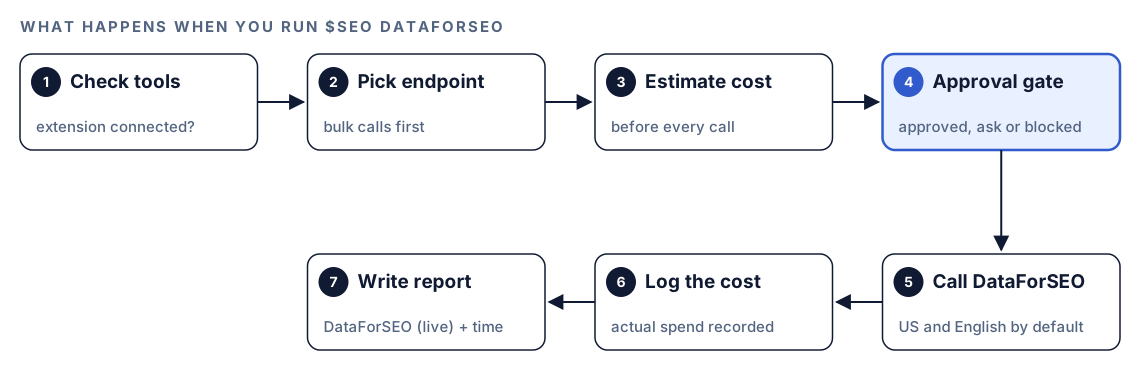
- Check the tools. The skill confirms that the DataForSEO tools are available in the session. If they aren't, it tells you the extension isn't installed and how to install it.
- Pick the endpoint. One bulk request beats a string of small ones, so the skill batches where it can. It sticks to defaults unless you ask otherwise and reuses data it already fetched in the session.
- Estimate the cost. Before every call, it checks the estimated cost against your settings.
- Pass the approval gate. The check returns one of three answers. Approved calls go ahead. Calls that need approval show you the estimate and wait for your confirmation. Calls that would exceed your daily budget are blocked and don't run.
- Call DataForSEO. The data comes back live. Before a heavy job, like crawling a whole backlink profile or sizing a long keyword list, you get a heads-up.
- Log the cost. After each call, the actual cost is recorded.
- Write the report. Results are formatted as tables, labeled "DataForSEO (live)", and time-sensitive data such as positions and backlink counts carries a timestamp.
You can check spending at any time:
$seo dataforseo costs today
$seo dataforseo costs summary
$seo dataforseo costs config --mode threshold --threshold <amount>
costs today breaks down today's spend, costs summary shows the last seven days, and costs config changes the approval mode, for example to a threshold mode where you choose the amount above which calls need your OK.
What you can pull: the 23 commands
The commands fall into six groups. Most take a keyword or a domain and return a table.
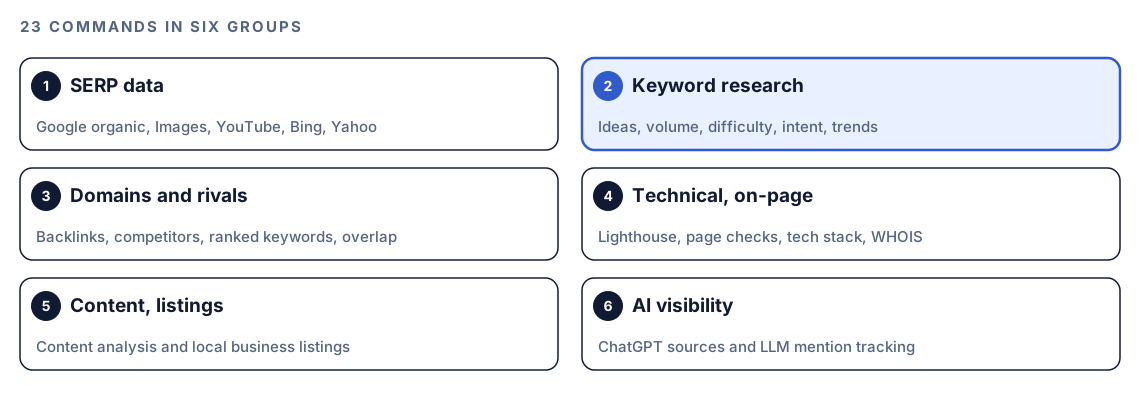
SERP data
serp <keyword>shows the current Google page: each listing's position, page title, snippet and URL, plus any featured snippet, the People Also Ask questions, and the sites an AI Overview cites. Ask for Bing or Yahoo to switch engines.serp-images <keyword>looks at Google Images: which sites hold the most spots, how winning images word their alt text, which file formats they use, and where you rank in web results without a single image showing.serp-youtube <keyword>lists the videos YouTube shows for a search, andyoutube <video_id>digs into one video, including its comments and subtitle text.
Image queries filtered with site: or filetype: cost more, and the skill warns you before it runs one.
Keyword research
keywords <seed>expands one seed into related ideas, 50 by default, each with its volume, difficulty, cost per click, competition level and trend.volume <keywords>checks a list you already have and adds monthly searches, a month-by-month trend, cost per click and competition.difficulty <keywords>scores how hard each term is to rank for, from 0 to 100, with a plain label.intent <keywords>tags every term with one of the four intents and says how sure it is.trends <keyword>uses Google Trends to show whether interest is rising or falling and whether it peaks in certain months.
Domains and competitors
backlinks <domain>profiles a site's links: how many there are, how many sites send them, the most used anchors, how much is dofollow, a spam score, and links gained or lost over time.competitors <domain>names the sites you actually compete with in search and how many keywords you share.ranked <domain>shows what a site ranks for, which page ranks, where it sits and how much each term is searched.intersection <domains>lines up between 2 and 20 sites to find the keywords and linking sites they have in common.traffic,subdomainsandtop-searchesestimate search traffic, break a site down by subdomain, and find the biggest queries where a domain appears.
Technical, content, listings and AI visibility
onpage <url>combines a quick page check for broken links, missing tags and slow loading with content parsing and a full Lighthouse run that includes Core Web Vitals.tech <domain>identifies the CMS, analytics and other software a site runs, andwhois <domain>shows the registrar, creation and expiry dates, and owner details when they are public.content <keyword/url>rates content for quality, tone and readability and tracks how often a phrase appears over time.listings <keyword>finds local businesses for a search, with their ratings, review counts and whether each listing is claimed.ai-scrape <query>shows what ChatGPT web search returns for a query and which sources it cites.ai-mentions <keyword>tracks how often AI models mention brands and domains, which pages they cite, and how mentions change over time.
Which other commands use DataForSEO?
Installing the extension also upgrades other commands in the kit. When the DataForSEO tools are available, these skills use live data instead of static analysis alone.
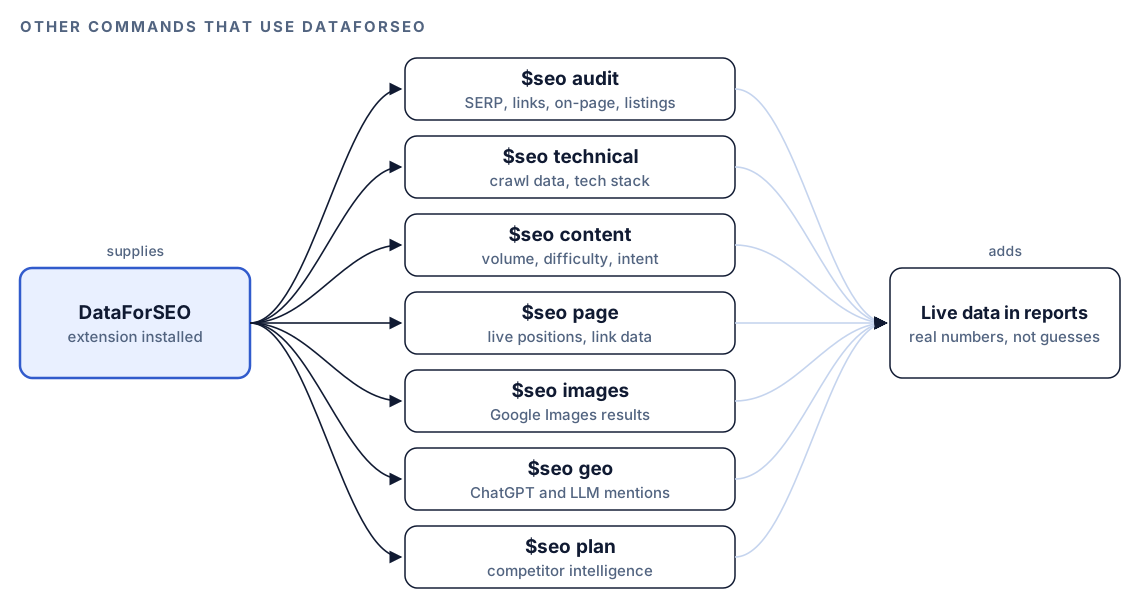
$seo audit can hand SERP, backlink, on-page and listings work to a DataForSEO agent. $seo content gets real volume, difficulty and intent, and $seo geo gets ChatGPT and LLM mention data. The backlinks skill also treats DataForSEO as its highest-confidence source, which is what unlocks new and lost link tracking, as our guide to backlink analysis with Codex explains.
Run it in Codex, step by step
- Install the Codex SEO kit from the install section, restart Codex, and open a new task in your project.
- Install the DataForSEO extension that ships with the kit and enter your DataForSEO API login and password, then restart Codex. If the login is wrong, the skill reports an authentication error and suggests running the installer again.
- Check your permission mode. Every command calls DataForSEO over the internet, so depending on your mode, Codex may ask before it goes online. Approve it for this task.
- Set your approval mode before the first big job, using
costs configas shown above. - Run a command:
$seo dataforseo serp "project management software"
$seo dataforseo volume "crm for startups, crm for small business, crm pricing"
$seo dataforseo intent "crm for startups, best crm, simple crm"
$seo dataforseo onpage https://example.com/pricing- Or ask in plain language. Codex picks the skill when your request matches it:
Get live Google results for "crm for startups" in the UK in English. Show who ranks in the top 10, which SERP features appear, and the People Also Ask questions.- If a location code is wrong, the skill says so and looks up the right one instead of guessing.
Reading the report
The layout depends on the command, but every report uses tables, labels the source as "DataForSEO (live)", and timestamps data that changes. A SERP report looks something like this:
## SERP: "crm for startups" (Google, United Kingdom, English, desktop)
Source: DataForSEO (live), pulled [date, time]

| Rank | Domain | Title | Notes |
|---|---|---|---|
| 1 | [domain] | [page title] | featured snippet |
| 2 | [domain] | [page title] | |
| 3 | [domain] | [page title] | cited in AI Overview |

People Also Ask: [question], [question], [question]

## Recommendations
- High: [action tied to a SERP feature]
- Medium: [action]
Read keyword reports in this order: intent first, because a mismatch can't be fixed with effort. Then difficulty against your site's strength, then volume. Recommendations come ranked Critical, High, Medium and Low. Treat "no data found" as missing data, not proof of zero demand, and try a broader query or check the location and language.
Apply the fixes with Codex
Live data is only useful if something changes. Because Codex works in your repository, it can act on the report in the same task.
The onpage command often turns up problems that live in your templates, such as a missing meta description. Before:
<head>
  <title>Pricing</title>
</head>
After:
<head>
  <title>Pricing Plans for Small Teams | Example</title>
  <meta name="description" content="Compare Example's plans for small teams, with monthly and annual billing and a feature table for each tier.">
</head>
Ask Codex to fix the source, not the symptom:
Run $seo dataforseo onpage https://example.com/pricing. For each issue that comes from our code, such as missing meta tags or broken links, find the template or content file responsible and fix it there. List issues caused by third-party scripts separately for me. Show the diff, then run the build.Keyword data works the same way. Feed Codex a SERP report and ask it to add the People Also Ask questions your page doesn't answer as a short FAQ section, or to map a volume and intent report onto existing posts and flag gaps. Review the diff before you accept it, and check that every new claim is true.
Make it repeatable
Rankings move every week, and a saved snapshot is the only way to see how. codex exec runs a command without the interactive UI, and --output-schema asks for a final answer that matches a JSON Schema, so each snapshot has the same shape and diffs cleanly in Git. A schema file such as serp-schema.json:
{
  "type": "object",
  "additionalProperties": false,
  "required": ["keyword", "pulled_at", "results"],
  "properties": {
    "keyword": { "type": "string" },
    "pulled_at": { "type": "string" },
    "results": {
      "type": "array",
      "items": {
        "type": "object",
        "additionalProperties": false,
        "required": ["rank", "url"],
        "properties": { "rank": { "type": "integer" }, "url": { "type": "string" } }
      }
    }
  }
}
Then a weekly run:
codex exec --output-schema serp-schema.json '$seo dataforseo serp "crm for startups"' -o reports/serp/crm-for-startups.jsonCommit the file each week, and git diff shows who moved. An unattended run has nobody to approve a call that needs it, so keep scheduled jobs small and inside your approval threshold, and review spend with costs summary. The run also needs network access, so make sure your sandbox and permission setup allows it. Our guide to automating SEO checks with codex exec covers scheduling.
Without the skill: a plain Codex prompt
If you already have keyword data from another tool, Codex can still do the analysis:
Read keywords.csv (columns: keyword, volume, difficulty). Classify each keyword as informational, navigational, commercial or transactional. Group keywords that share intent and topic, then map each group to the page in content/ that best covers it. List groups with no matching page as content gaps, highest volume first.What the skill adds is the live data itself, fetched on demand for any market, plus cost checks before every call, spend tracking, and the same labeled report format across 23 commands.
Pitfalls to avoid
- Running big jobs before you set an approval mode and a budget.
- Forgetting the market. Without a location, you get United States results in English.
- Paying twice for the same data across sessions. Save reports you will need again.
- Running
site:orfiletype:image queries without expecting the higher cost. - Comparing SERP snapshots taken for different devices or locations.
- Treating "no data found" as zero demand.
Keep going
- Keyword research with Codex shows how to turn volume and intent into a content plan.
- Backlink analysis with Codex uses DataForSEO as its top source.
- The generative engine optimization guide explains what to do with AI visibility data.
- Browse every skill in both kits to see the other extensions.
FAQ
What is DataForSEO?
DataForSEO is a provider of SEO data through APIs: live search results, keyword metrics, backlinks, on-page audits, business listings and more. Tools call its APIs and pay per request, which is how the Codex SEO extension uses it.
How much does it cost to use DataForSEO in Codex?
You pay DataForSEO directly at its own per-call prices. The skill estimates the cost before every call, asks for approval when your settings require it, blocks calls that would pass your daily budget, and shows your spend for today or the last seven days.
Can Codex get live Google search results?
Yes, with the DataForSEO extension. $seo dataforseo serp <keyword> fetches the current Google results for the market you choose, including featured snippets, People Also Ask questions and AI Overview references.
What location does the DataForSEO skill use by default?
It uses the United States and English, with desktop results for SERP checks. Name a different country or language in your request, and the skill uses the matching location code, or looks it up if the code you gave is invalid.
Can I track AI search visibility with DataForSEO?
Yes. ai-scrape shows which sources ChatGPT web search cites for a query, and ai-mentions tracks how often AI models mention a brand or domain and which pages they cite over time.