
Integrations
Ahrefs with Codex: Pull Backlink and Keyword Data
Use Ahrefs with Codex: pull Domain Rating, referring domains, organic keywords and Content Explorer data, then apply the fixes in your own code.
Using Ahrefs with Codex puts live Domain Rating, referring domains, organic keywords and Content Explorer results into the same task where you edit your site. RankCue's Codex SEO kit includes an optional Ahrefs extension, run as $seo ahrefs [cmd] <url>, that reads your Ahrefs API data through the official Ahrefs MCP server and labels every number with its source. This guide explains what the Ahrefs metrics mean, how the four subcommands work, where Ahrefs fits next to the kit's other data sources, and how to turn the numbers into changes in your codebase.
Key takeaways
$seo ahrefshas four subcommands:metricsfor ratings and referring domains,backlinksfor link details,organicfor keywords, andcontentfor Content Explorer.- It needs the optional Ahrefs extension, an Ahrefs API token and Node.js 18 or newer. Ahrefs' own pricing applies, and API usage is metered in units.
- Every metric is labeled "Ahrefs (live, confidence 1.00)". When Ahrefs and Moz disagree, the skill trusts Ahrefs and records the difference.
- Before any batch of 50 or more URLs, the skill estimates the cost and shows it to you first.
- Codex can turn the data into edits in your repository, such as retitling a page to match the queries it already ranks for.
The Ahrefs command at a glance
| Item | Details |
|---|---|
| Command | $seo ahrefs metrics <url>, $seo ahrefs backlinks <url>, $seo ahrefs organic <url>, $seo ahrefs content <topic> |
| What you give it | A domain or page URL, or a topic for Content Explorer |
| What Codex reads | Live data from your Ahrefs account, through the official Ahrefs MCP server |
| What you get back | Ratings, referring domains, anchors, organic keywords, traffic by country or top content for a topic, with a source label on every number |
| Needs | The optional Ahrefs extension, an Ahrefs API token, Node.js 18 or newer, and internet access. Ahrefs' own pricing and unit metering apply |
| Best for | Teams that already use Ahrefs and want its data next to the code and content they are changing |
What Ahrefs data tells you, and what it doesn't
Ahrefs runs its own crawler and keeps its own index of links and rankings. Its metrics are models built on that index. They are useful for comparing sites and spotting change, but they are not numbers Google publishes or uses. Knowing what each one measures keeps you from chasing the wrong thing.
Domain Rating and URL Rating
Domain Rating (DR) is Ahrefs' 0 to 100 score for the strength of a site's backlink profile compared with other sites in its index. Ahrefs describes the scale as logarithmic, so moving from 70 to 80 takes far more than moving from 20 to 30. URL Rating (UR) applies the same idea to a single page.
Use them to compare. If your pricing page has a much lower UR than the competitor pages ranking above it, links are probably part of the gap. Treat DR as a target in its own right, and you end up chasing links that move a number instead of links that bring readers.
Referring domains and anchors
Referring domains count the unique sites that link to you, which tells you more than a raw backlink count, since one site can link hundreds of times from a footer. Anchor text, the clickable words in each link, shows how other sites describe you. A healthy profile is mostly brand names and URLs, not exact keywords.
Organic keywords and traffic estimates
Ahrefs estimates which keywords a page ranks for and how much traffic that should bring, based on its ranking data and estimated search volumes. The estimate is directional. It can't see your real clicks, so use it to compare pages and competitors, and use Search Console for your own numbers. Our guide to Search Console data in Codex covers that side.
Content Explorer
Content Explorer is Ahrefs' searchable index of pages by topic. For a topic, it shows the top pages with their referring domains and social shares. That is a quick way to see which formats and angles attract links before you write.
How $seo ahrefs runs inside Codex
The Ahrefs skill is short and strict. It checks that it can reach Ahrefs, guards your budget, and labels everything it reports.
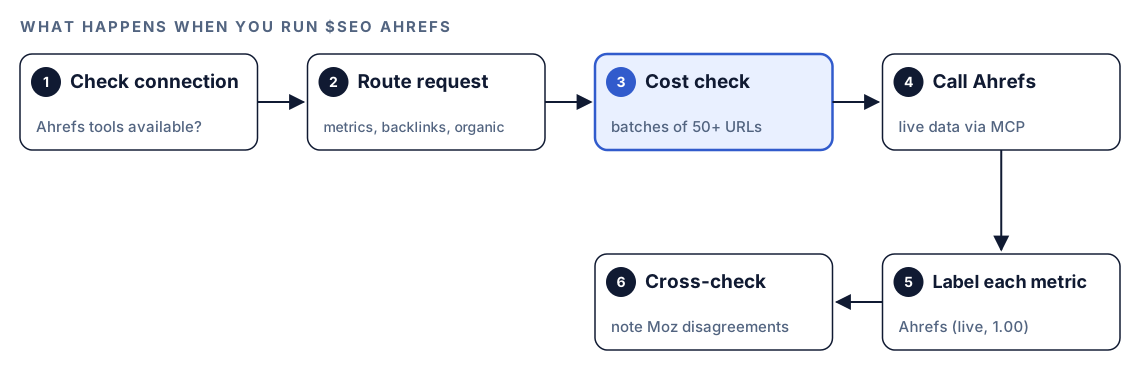
- Check the connection. Before any call, the skill confirms that the Ahrefs tools are available in the session. If they aren't, it tells you the extension isn't installed and shows the install step, instead of guessing at numbers.
- Route the request. Your subcommand decides which Ahrefs data to fetch.
- Check the cost. For a batch of 50 or more URLs, the skill estimates the API cost first and shows you the estimate.
- Call Ahrefs. The data comes live from your Ahrefs account, so it reflects Ahrefs' index at the time of the call.
- Label each metric. Every number carries the label "Ahrefs (live, confidence 1.00)", so you always know where it came from.
- Cross-check. If the same metric also comes from Moz and the two disagree, the skill trusts Ahrefs and notes the gap in the report. After each batched call, it logs the actual cost.
What each subcommand returns
Each subcommand answers one question, and you can run them one after another in the same task.
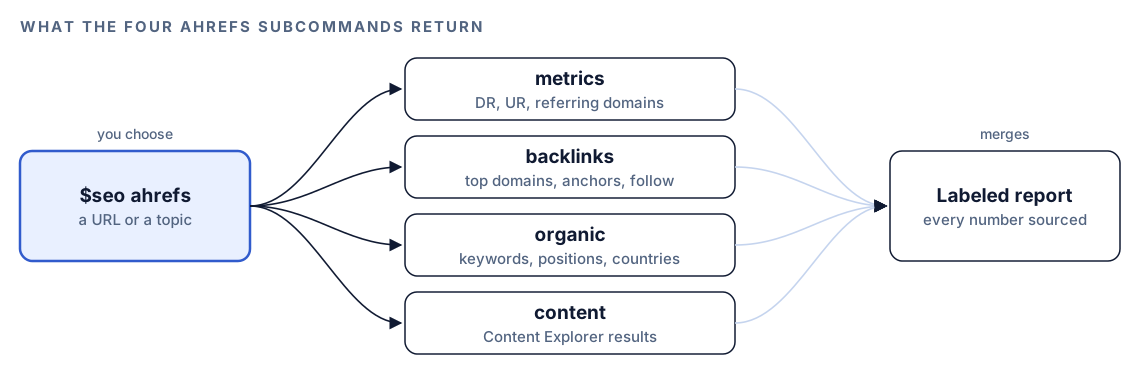
metrics: how strong is this site or page?
$seo ahrefs metrics <url> returns Domain Rating or URL Rating, the referring domain count, and the organic traffic estimate. It is the quickest snapshot, and the natural first call when you size up a competitor.
backlinks: who links here, and how?
$seo ahrefs backlinks <url> lists the top referring domains, the anchor text distribution, and the ratio of follow to nofollow links. For toxic link assessment, the skill combines Ahrefs data with the Common Crawl and verification crawler signals from the backlinks skill rather than judging on one source.
organic: what does this page rank for?
$seo ahrefs organic <url> returns organic keywords, the ranking distribution (how many keywords sit in each position band), and traffic by country. This is the subcommand that feeds the most practical fixes, because it shows the queries a page already earns impressions for.
content: what earns links on this topic?
$seo ahrefs content <topic> searches Content Explorer and returns the top results with their social shares and referring domains. Use it to see what has already worked before you plan a new post.
How Ahrefs fits with the rest of the kit
The Ahrefs skill knows its limits and hands work to other skills when they fit better.
| Job | Best command | Why |
|---|---|---|
| A single source of Ahrefs numbers | $seo ahrefs | Live data from your account with clear labels |
| A link profile weighed across several sources | $seo backlinks | The Ahrefs skill hands multi-source confidence weighting back to it |
| Live SERP features and positions | $seo dataforseo | Where the two overlap on SERP data, the skill prefers DataForSEO |
| Your own clicks and impressions | $seo google | Search Console reports real clicks, not estimates |
If you want the full link audit, read our guide to backlink analysis with Codex. For live search results, see DataForSEO in Codex.
Run it in Codex, step by step
- Install the Codex SEO kit from the install section, restart Codex, and open a new task in your website's project.
- Install the Ahrefs extension that ships with the kit. There is an installer for Linux and macOS and one for Windows. Have your Ahrefs API token ready, and make sure Node.js 18 or newer is installed, because the Ahrefs MCP server runs on it. Then restart Codex before your next task.
- Check your permission mode. The skill calls the Ahrefs API over the internet, so depending on your mode, Codex may ask before it goes online. Approve it for this task.
- Run a subcommand:
$seo ahrefs metrics https://example.com
$seo ahrefs backlinks https://example.com
$seo ahrefs organic https://example.com/pricing
$seo ahrefs content "technical seo checklist"- Or ask in plain language. Codex picks the skill when your request matches its description:
Use Ahrefs to compare the Domain Rating and referring domains of example.com and competitor.com, and tell me which pages on each site rank for the most keywords.- For large jobs, expect a cost check. If your request covers 50 or more URLs, Codex shows you the estimate before the batch runs.
Reading the report
The exact layout depends on the subcommand, but every number carries its source, and any disagreement with Moz is spelled out. A metrics comparison looks something like this:
## Ahrefs metrics: example.com vs competitor.com

| Metric | example.com | competitor.com | Source |
|---|---|---|---|
| Domain Rating | XX | XX | Ahrefs (live, confidence 1.00) |
| Referring domains | X,XXX | X,XXX | Ahrefs (live, confidence 1.00) |
| Organic traffic estimate | XX,XXX | XX,XXX | Ahrefs (live, confidence 1.00) |

### Discrepancies
- Referring domains for example.com: Ahrefs XXX, Moz XXX. Using Ahrefs.
Read it in this order:
- Gaps against competitors, not absolute values. A DR of XX means little alone and a lot next to the sites you compete with.
- Organic keywords for pages you can change. Pages that rank just off page one are the cheapest wins.
- Anchor and follow ratios for anything unusual, then the full link audit if something looks off.
- Discrepancy notes. Different tools crawl different parts of the web, so a gap between Ahrefs and Moz is normal. Record which one you use and stay consistent.
Apply the fixes with Codex
Ahrefs tells you what is happening. Codex can then change the files that cause it. The most common fix comes from organic: a page ranks for a query that its title and headings barely mention.

Say the services page ranks just off page one for "technical seo audit for saas" but its front matter is vague. Before:
title: "Our Services"
description: "Learn more about what we do and how we can help."
After:
title: "Technical SEO Audits for SaaS Websites"
description: "A technical SEO audit for SaaS sites: crawl issues, Core Web Vitals and indexing, with a prioritized fix list."
Then ask Codex to do it properly across the page:
Run $seo ahrefs organic https://example.com/services/audit. Find the queries where this page ranks just off page one. Update the title, meta description, H1 and one H2 in the source file so they match the main query naturally, without keyword stuffing. Add one internal link to this page from our page with the highest URL Rating. Show me the diff, then run the build.Read the diff before you accept it. Check that the new title is true to the page, not just keyword-shaped. Then give rankings a few weeks, pull organic again, and compare.
For new content, $seo ahrefs content gives you the angles that already earn links. If you also have the Codex Blog kit, $blog brief <topic> turns those angles into a brief you can write from.
Make it repeatable
Ahrefs units cost money, and a token in the wrong file is a leak. A short block in your project's AGENTS.md keeps Codex careful on every future task:
## Ahrefs data
- Label every Ahrefs number with its source and the date it was pulled.
- Show the cost estimate and ask before any Ahrefs batch of 50 or more URLs.
- Never write the Ahrefs API token into the repo, reports or logs.
- Use $seo dataforseo for live SERP features and $seo backlinks for multi-source link scores.
- Save snapshots to reports/ahrefs/ with the date in the file name.
Codex reads AGENTS.md before it starts work, so these rules apply without you repeating them. Keep the file short, because the combined instructions have a size cap. The AGENTS.md documentation explains how files at different folder levels combine, and our guide to AGENTS.md rules for SEO shows a fuller example.
Without the skill: a plain Codex prompt
If you export data from Ahrefs by hand, Codex can still do useful work with the file:
Read organic-keywords.csv, an Ahrefs export for example.com. Group keywords by URL. For each URL, list queries ranking between positions 8 and 20, the current title from our source files, and whether the title mentions the main query. Suggest a better title for the five weakest matches and say which file each one lives in.What the skill adds is live data without manual exports, a consistent source label on every number, discrepancy notes against Moz, and a cost check before big batches.
Pitfalls to avoid
- Treating Domain Rating as a Google ranking factor. It is Ahrefs' model, useful for comparison only.
- Reading traffic estimates as analytics. Use Search Console for your real clicks.
- Running a big batch without looking at the cost estimate first.
- Mixing numbers from Ahrefs and other tools in one table without saying which is which.
- Committing the API token to the repository or pasting it into a report.
- Chasing high-DR links from sites your readers never visit.
Keep going
- Backlink analysis with Codex combines several link sources into one confidence-weighted health score.
- Live SERP and keyword data with DataForSEO covers the other major data extension in the kit.
- Search Console, GA4 and PageSpeed data in Codex gives you first-party numbers to check estimates against.
- See every skill in both kits, or compare the kits on the pricing section.
FAQ
What is Domain Rating in Ahrefs?
Domain Rating is Ahrefs' 0 to 100 score for the strength of a website's backlink profile compared with other sites in its index. The scale is logarithmic, so each step up gets harder. It is best used to compare sites, not as a goal.
Does Google use Ahrefs Domain Rating?
No. Domain Rating is a third-party metric built on Ahrefs' own crawl. Google has its own systems and doesn't use DR, so treat it as a rough proxy for link strength when comparing sites.
Can Codex pull data from Ahrefs?
Yes, with the Ahrefs extension in RankCue's Codex SEO kit. After you install it and add your Ahrefs API token, $seo ahrefs fetches live metrics, backlinks, organic keywords and Content Explorer results inside your Codex task.
Do I need an Ahrefs account to use $seo ahrefs?
Yes. The skill uses your own Ahrefs API token, and Ahrefs' own pricing and unit metering apply. If you don't have Ahrefs, $seo backlinks works with other sources, including some that need no keys.
How accurate are Ahrefs traffic estimates?
They are modeled from Ahrefs' ranking data and estimated search volumes, so they show direction and scale rather than exact visits. Compare them between pages and competitors, and check your own site's real numbers in Search Console.