
Link Building
Backlink Analysis with Codex: Link Gaps and Risky Links
Run backlink analysis with Codex: score your link profile, flag toxic links, find competitor link gaps, and fix linked 404s in your own codebase.
Backlink analysis with Codex comes down to one command: $seo backlinks <url> gathers your link profile from every data source you have connected, scores it, and flags risky links and competitor gaps inside your Codex task. Because Codex also works in your project files, it can turn the findings into changes, such as redirects for dead pages that still attract links. This guide covers how backlinks affect search, how the command works, how to read the report, and how to act on it safely.
Key takeaways
$seo backlinks <url>builds a seven-section report, from profile overview and anchor text to toxic links, competitor gaps and new and lost links.- Common Crawl and a verification crawler need no keys, while Moz, Bing Webmaster Tools and the DataForSEO extension add richer data.
- Every metric carries a source and confidence label, and the skill won't print a numeric score when fewer than 4 of its 7 factors have data.
- Codex can act on the report in your repository, for example with permanent redirects for linked 404 pages and a disavow draft you upload yourself.
The backlinks command at a glance
| Item | Details |
|---|---|
| Command | $seo backlinks <url>, with gap, toxic, new, verify and setup subcommands |
| What you give it | Your domain, a competitor URL for gap analysis, or a file of known links to verify |
| What Codex reads | Link data from DataForSEO, Moz, Bing Webmaster Tools and Common Crawl, plus pages that should link to you |
| What you get back | A Backlink Health Score out of 100 (or an INSUFFICIENT DATA notice), seven report sections with a source on every metric, and a prioritized fix list |
| Needs | Internet access. Moz and Bing need your own accounts and API keys, and DataForSEO needs the optional extension and an account; each provider's own pricing applies |
| Best for | Link audits, risky link reviews, link building research, and checking that earned links are still live |
Why backlinks still matter for search
A backlink is a link from another website to yours. Search engines follow links to discover pages and treat them as a sign that people found a page worth pointing to. One link from a respected, relevant site says more than a hundred from pages nobody reads, so a useful analysis looks at the shape of the profile rather than the raw count.
Backlinks versus referring domains
A sitewide footer can produce hundreds of backlinks from one referring domain. Referring domains measure breadth better, so the skill scores on them: more than 100 is good, 20 to 100 is a warning, and fewer than 20 is critical. These bands describe health, not a number you must reach to rank.
Anchor text
Anchor text is the clickable text of a link. Natural profiles are led by brand names and bare URLs, while bought or swapped links tend to carry too many exact keyword anchors. The skill compares your mix with these ranges:
| Anchor type | Healthy range | Over-optimization signal |
|---|---|---|
| Branded (company or domain name) | 30-50% | below 15% |
| URL or naked link | 15-25% | none set |
| Generic ("learn more") | 10-20% | none set |
| Exact match keyword | 3-10% | above 15% |
| Partial match keyword | 5-15% | above 25% |
| Long-tail or natural | 5-15% | none set |
An exact match share above 15% is flagged as the over-optimized pattern Google's Penguin-era link spam systems were built to catch.
Follow, nofollow and toxic links
A link marked rel="nofollow", rel="sponsored" or rel="ugc" tells Google the site doesn't vouch for it, or that it is paid or user-generated. The skill scores a follow ratio above 60% as good, 40 to 60% as a warning, and below 40% as critical.
Some links do harm. Google's spam policies name link schemes such as buying links that pass ranking credit, excessive link exchanges and private blog networks (PBNs, sites built only to link out). Google ignores many spammy links on its own, and its guidance is that most sites never need the disavow tool. It makes sense after a manual action for unnatural links, or when you know you arranged links. The skill suggests candidates; the decision stays with you.
How the backlinks command runs inside Codex
When you type $seo backlinks https://example.com in a Codex task, the skill follows a fixed sequence that you can watch in the task log.
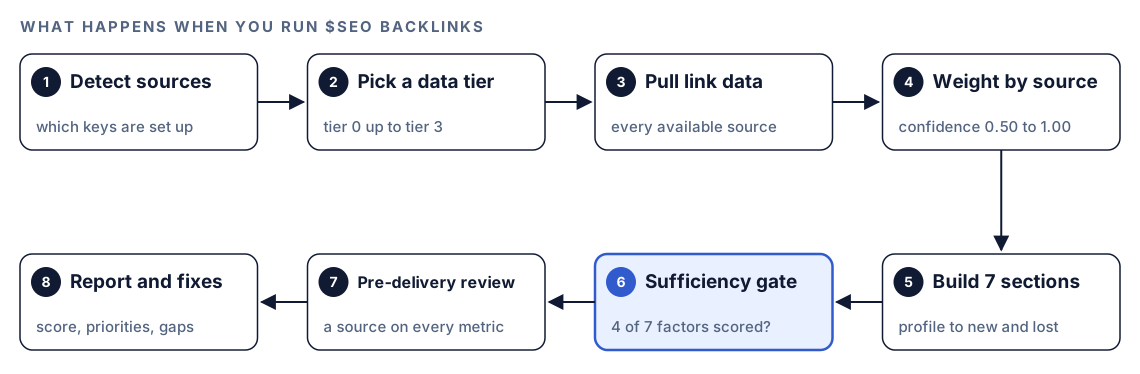
- Detect sources. The skill checks which backlink sources are configured.
- Pick a data tier. Tier 0 is Common Crawl plus the verification crawler. Tier 1 adds Moz, tier 2 adds Bing, and tier 3 adds DataForSEO.
- Pull link data from every available source. Moz allows one request every 10 seconds on its entry tier, and the skill paces its calls.
- Weight by source. When DataForSEO and Moz disagree, it trusts DataForSEO and notes the gap.
- Build the seven sections, each from the best source available.
- Apply the sufficiency gate. Fewer than four scored factors means no numeric score.
- Review before delivery. Every metric needs a source label, and inferences are never stated as fact.
- Write the report with the score, prioritized issues and link opportunities.
| Source | What it adds | Confidence | Needs |
|---|---|---|---|
| DataForSEO | Totals, anchors, referring domains, spam scores, new and lost links | 1.00 | Optional extension and an account |
| Verification crawler | Whether a known link is still on the page | 0.95 | A file of known links |
| Moz API | Domain Authority, Page Authority, Spam Score, anchors, top pages | 0.85 | A Moz API key |
| Bing Webmaster Tools | Inbound links, anchor details, country data, competitor comparison | 0.70 | A verified site and an API key |
| Common Crawl | Referring domain count, PageRank and harmonic centrality at domain level | 0.50 | Nothing |
The report also notes freshness: Moz runs about three days behind, Bing is close to real time, and Common Crawl updates quarterly.
What Codex checks in each section
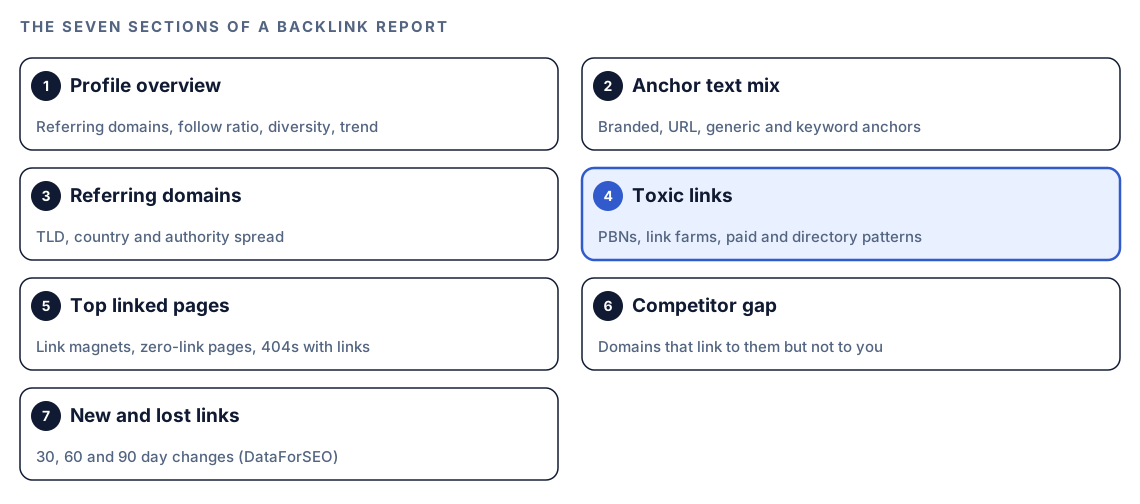
The seven sections run in the same order every time, so reports from different months line up.
Profile overview and referring domain quality
The overview checks concentration: no single domain above 5% of your links is healthy, one above 10% is a warning, and one above 25% is critical. A drop of more than 20% in a quarter counts as rapid decline. The quality section looks at the spread of top-level domains, countries and authority tiers. If 80% or more of your links come from countries outside your market, the skill flags a PBN signal.
Toxic link detection
High-risk indicators get flagged immediately:
- Links from known PBN domains, or from penalized and deindexed sites.
- A domain whose links all use the same exact match anchor.
- Mass directory submissions, set at 50 or more directory links.
- Link farms, set at pages with 10,000 or more outbound links.
- Paid link patterns, such as footer or sidebar links on every page of a domain.
Medium-risk items need a human look: unrelated niches, reciprocal link swaps, thin pages under 100 words, and more than 50 backlinks from one domain. With Moz connected, a Spam Score above 11% counts as high risk.
Top linked pages
This section finds your link magnets, pages with no backlinks, and 404 pages that still have backlinks. That last group is the quickest win, because a redirect puts those links back to work.
Competitor gap and link velocity
$seo backlinks gap sorts domains into three groups: those linking to the competitor but not to you (opportunities), those linking to both (relationships to keep), and those linking only to you (your advantage). You get the top 20 opportunities with authority scores.
New and lost links over 30, 60 and 90 days need DataForSEO, because the other sources only give snapshots. Red flags are a sudden spike of new links, which can signal a negative SEO attack, a sudden loss of many links, and a decline lasting three months or more.
How the Backlink Health Score works
The score runs from 0 to 100 and combines seven weighted factors.
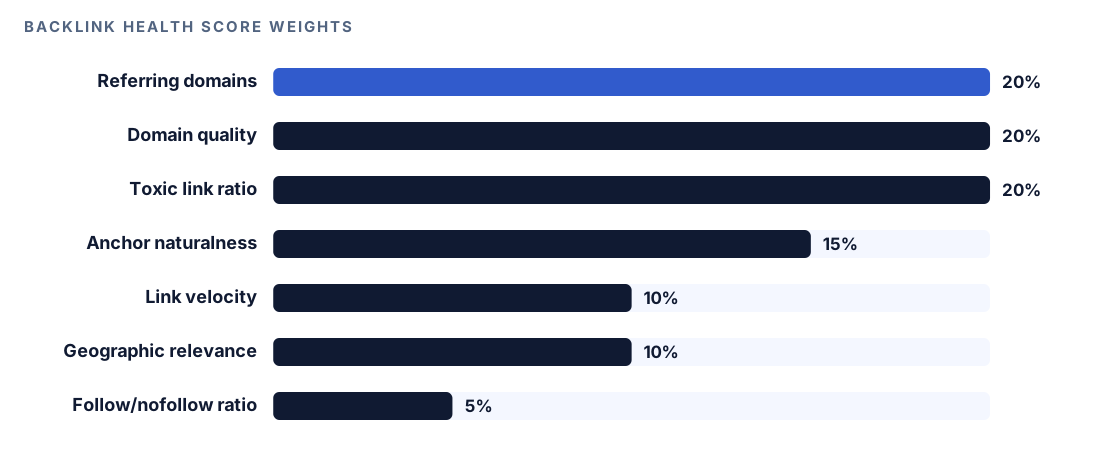
Two rules keep it honest. A factor with no data source has its weight shared among the others, and the report lists what was skipped. With fewer than four scored factors, there is no number at all. A low score caused by missing data would describe a problem that doesn't exist.
Run it in Codex, step by step
- Install the kit from the install section, restart Codex, and open a new task in your project. Our guide to installing SEO skills in Codex has the details.
- Check your permission mode. The command calls data sources and fetches live pages, so depending on your mode, Codex may ask before it uses the internet. Approve it for the sites you're checking.
- See which sources you can add. This prints setup steps for the Moz and Bing APIs:
$seo backlinks setup- For Bing data, verify your site in Bing Webmaster Tools first. For the top tier, add the DataForSEO extension, covered in our DataForSEO in Codex guide.
- Run the full analysis:
$seo backlinks https://example.com- Or ask in plain language, and Codex picks the skill when your request matches it:
Audit the backlink profile for example.com. Show referring domains, the anchor text mix and any risky links, and tell me which sources you used.- Use the subcommands for focused jobs:
$seo backlinks gap https://example.com https://competitor.com
$seo backlinks toxic https://example.com
$seo backlinks new https://example.com
$seo backlinks verify https://example.com --links known-links.txt
gap compares two domains. toxic focuses on risky links and disavow recommendations. new needs DataForSEO. verify checks that each known backlink is still on its page by reading the raw HTML, which keeps bulk checks fast.
Reading the report
The report opens with the score and one row per section, each naming its source and confidence:
### Backlink Health Score: XX/100

| Section | Status | Score | Data Source |
|---------|--------|-------|-------------|
| Profile Overview | warn | XX/100 | Moz (0.85) |
| Anchor Distribution | pass | XX/100 | Moz (0.85) |
| Referring Domain Quality | warn | XX/100 | CC (0.50) |
| Toxic Links | fail | XX/100 | Moz Spam (0.85) |
| Top Pages | info | N/A | Moz (0.85) |
| Link Velocity | pass/warn/fail | XX/100 | DataForSEO only |

### Critical Issues (fix immediately)
### High Priority (fix within 1 month)
### Medium Priority (ongoing improvement)
### Link Building Opportunities (top 10)
- [domain] links to [competitor.com] but not to you, authority XX
With too little data, the header reads Backlink Health Score: INSUFFICIENT DATA (X/7 factors scored). That isn't a bad grade; it means you need another source, usually Moz. Work through findings in this order:
- Critical issues such as PBN links, paid patterns and link farms.
- Linked 404 pages, because redirects reclaim value you already earned.
- Anchor over-optimization. Stop adding exact match anchors.
- Gap opportunities, starting with domains that link to several competitors.
Treat Common Crawl counts at 0.50 confidence as direction, not exact totals. And when a page that should link to you is rendered by JavaScript, the skill marks it unverifiable instead of calling the link removed.
Apply the fixes with Codex
Most link work happens off your site, but the fixes that reclaim value live in your codebase. Start with linked 404 pages. On a host that reads redirects from vercel.json, permanent redirects look like this:
{
  "redirects": [
    { "source": "/old-pricing-guide", "destination": "/pricing", "permanent": true },
    { "source": "/blog/2019-checklist", "destination": "/blog/seo-checklist", "permanent": true }
  ]
}
Other stacks keep redirects in server config or a redirects file, and Codex can find the right place:
Use the Top Pages section of the backlink report. For each 404 URL that still has backlinks, find the closest live page and add a permanent redirect (301 or 308) in the file this project uses for redirects. Don't send everything to the homepage. Add one descriptive internal link from our most linked page to each page the report lists with no backlinks. Show me the diff, then run the build.For toxic links you have reviewed, Codex can draft the disavow file. Google's format is one URL or domain: entry per line:
domain:spam-network-example.com
domain:link-farm-example.net
https://directory-example.org/listing/12345
Read every line before you upload it in Google Search Console yourself, since a wrong domain: entry can discard good links. Once the redirects are live, run $seo backlinks again after your sources refresh to confirm the linked 404s have dropped out of Top Pages.
Make it repeatable
Links change without anyone touching your site. A monthly codex exec run catches a lost partner link or a burst of spammy ones early, and -o saves the final report:
codex exec '$seo backlinks verify https://example.com --links data/known-links.txt' -o reports/link-check.md
codex exec '$seo backlinks toxic https://example.com' -o reports/toxic-links.md
The default sandbox is read-only, which suits a run that reports; if Codex needs to write working files, add --sandbox workspace-write. The runs need internet access, so make sure your sandbox and permission setup allows the network access the task needs (see the Codex sandboxing docs). Run them where your backlink sources are set up, or the report drops to a lower tier. Keep data/known-links.txt in the repository and add links as you earn them. For schedules and CI, see automating SEO checks with codex exec.
Without the skill: a plain Codex prompt
If you already export backlinks from another tool, Codex can analyze the file:
Read backlinks-export.csv. Count referring domains, group anchors into branded, URL, generic, exact match, partial match and long-tail, and show each group's share. Flag any domain sending more than 50 links, an exact match share above 15%, and any target URL that returns a 404 on our site.To check links you know about:
Fetch each URL in known-links.txt and check whether the raw HTML links to example.com. Report found, missing or error for each, and mark JavaScript-rendered pages as unverifiable instead of missing.What the skill adds is structure: source tiers, confidence labels, fixed thresholds, a score that refuses to guess, and the same seven-section report every time.
Pitfalls to avoid
- Disavowing on a spam score alone. Review each domain first.
- Treating Common Crawl counts as exact totals.
- Chasing exact match anchors, which push your profile toward the pattern link spam systems target.
- Counting a sitewide footer link as hundreds of wins. It is one referring domain and may look paid.
- Calling a link lost because a JavaScript page hid it from a raw fetch.
- Redirecting every dead URL to the homepage instead of the closest matching page.
Keep going
- Pull Ahrefs data into Codex if you have an Ahrefs API token.
- Live SERP and keyword data with DataForSEO explains the extension behind the top tier.
- Run a full SEO audit with Codex to see backlinks next to technical and content checks.
- Browse every Codex SEO and Codex Blog skill to find the rest of the kit.
FAQ
What is a backlink analysis?
It reviews the links pointing at your site: how many domains link to you, what anchor text they use, how trustworthy those sites are, and whether any links look manipulative. The goal is to find risks and opportunities, not just to count links.
What makes a backlink toxic?
A link is risky when it looks arranged rather than earned: links from private blog networks, link farms, mass directory submissions, paid sitewide footer links, or domains whose every link uses the same keyword anchor. Links from unrelated niches or thin pages deserve a manual review.
Should I disavow toxic backlinks?
Usually not. Google ignores many spammy links on its own, and its guidance is that most sites don't need to disavow. Consider it when you have a manual action for unnatural links or know you arranged links that pass ranking credit, and review every entry first.
Can Codex check backlinks without any API keys?
Yes. Common Crawl and the verification crawler need no keys, so $seo backlinks always produces a report. With only those sources, expect INSUFFICIENT DATA instead of a score; adding Moz or Bing Webmaster Tools fills in more factors.
How often should I run a backlink audit?
A full audit each quarter suits most sites, with a monthly verify run on the links you care about most. Review toxic links sooner if rankings drop suddenly or new links spike.