
Local SEO
Google Maps Rank Tracking with Codex Geo-Grids
Track Google Maps rankings with Codex geo-grids: 49-point scans, Share of Local Voice, review and NAP checks, and the fixes to apply in your own site.
Google Maps rank tracking shows where a business appears in map results from many points around it, not from one spot, and Codex can run that scan with the $seo maps command from RankCue's Codex SEO kit. The command lays a grid of 49 points over your area, checks your position at each one through DataForSEO, and turns the results into a Share of Local Voice score and a heatmap, next to profile, review, competitor and NAP checks. This guide explains how geo-grid tracking works, what each subcommand needs, and how to act on the results.
Key takeaways
$seo maps grid <keyword> <location>checks your map rank at 49 points (a 7x7 grid with a 5 km radius by default) and reports Share of Local Voice, the share of points where you rank in the top three.- Grid scans, review intelligence and the live profile audit need DataForSEO. Before every scan the skill shows a cost estimate and waits for your yes, and DataForSEO's own pricing applies.
- Without DataForSEO, the command still maps nearby competitors, compares your listing details across map platforms, and generates LocalBusiness JSON-LD.
- The report scores maps health out of 100 across six dimensions and states which capability tier it ran at.
- Codex can take the generated schema and the NAP fixes straight into your site's code.
The maps command at a glance
| Item | Details |
|---|---|
| Command | $seo maps [command] [args], for example $seo maps grid <keyword> <location> |
| What you give it | A website URL, a business name, or a keyword plus a location, depending on the subcommand |
| What Codex reads | DataForSEO map results when connected, OpenStreetMap services, Bing Maps, your website, and Google Places data if you add a key |
| What you get back | A MAPS-ANALYSIS-<domain>.md report: health score, tier, heatmap, profile, review and competitor findings, NAP status, schema and ten actions |
| Needs | Internet access. A DataForSEO account for grid, review and live profile data; optional Google Maps Platform and Geoapify keys. Each provider's own pricing applies |
| Best for | Local businesses and agencies that need to see map visibility across a whole service area |
The command has seven forms:
| Subcommand | What it does | Needs DataForSEO |
|---|---|---|
$seo maps <url> | The whole audit, at the best tier you have | No |
$seo maps grid <keyword> <location> | Your rank at 49 map points, one keyword by default | Yes |
$seo maps reviews <business> <location> | Review rate, ratings and replies on Google, Tripadvisor and Trustpilot | Yes |
$seo maps competitors <keyword> <location> | Who else operates near you | No |
$seo maps nap <business-name> | Your listing details compared across four map platforms | No |
$seo maps schema <business-name> | A ready-to-paste LocalBusiness block | No |
$seo maps gbp <business> <location> | How complete your Google profile is | For live data |
Why Google Maps rank tracking needs a grid
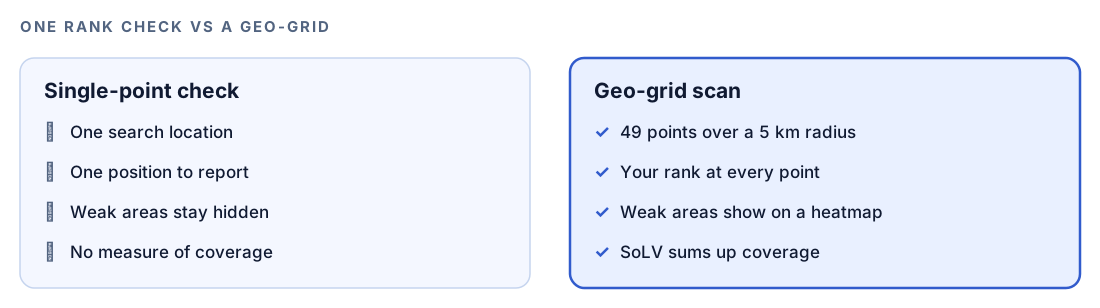
A normal rank check runs one search from one place and gives you one number. That's reasonable for many organic results, which vary less by location. Map results are different. Distance between the searcher and the business is one of the main things Google weighs for local results, so the same search can put you first outside your door and nowhere a few kilometers away. Customers search from across your service area, so one number tells you very little about what most of them see.
What a geo-grid is
A geo-grid replaces the single check with many. The skill takes your business address, turns it into coordinates (geocoding), and spreads a 7x7 grid of points around it with a 5 km radius by default. It places the points with the Haversine formula, which measures distance on a sphere, so the spacing stays even on a curved Earth. Each point then becomes a simulated Google Maps search from that exact location, and the skill records where your business ranks in each result.
Share of Local Voice
Forty-nine positions are hard to compare from month to month, so the skill summarizes them with Share of Local Voice (SoLV):
SoLV = (points where you rank in the top 3 / total points) x 100As a worked example of the formula only: if you placed in the top three at 14 of the 49 points, your SoLV would be about 29. The top three matters because the local pack usually shows three businesses. The report adds your average rank, and the heatmap shows where you're strong and weak. Grid position is the outcome; the rest of the command measures the inputs you can change, such as your profile, reviews and listings.
How the geo-grid scan runs inside Codex
When you run $seo maps grid in a Codex task, the skill works through a fixed sequence, and you can follow each step in the task log.
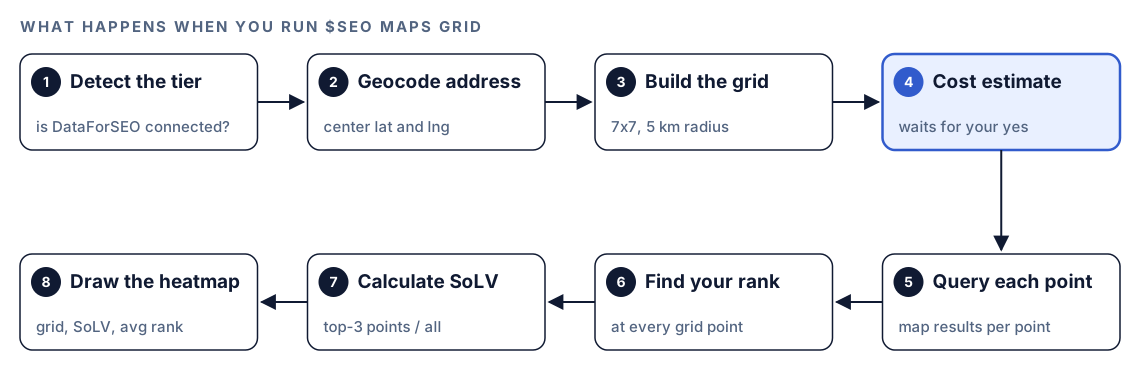
- Detect the tier. The skill checks whether DataForSEO's tools are available and tells you which tier it's running at before anything else.
- Geocode the address. It turns the business address into a center point. If geocoding fails, it asks you for coordinates or a more specific address.
- Build the grid. It generates the 7x7 grid of points around that center.
- Show the cost and wait. Every scan uses DataForSEO credits, so the skill prints an estimate and asks you to confirm.
- Query each point. It requests Google Maps results from DataForSEO with each point's coordinates.
- Find your rank. It locates your business in each result set.
- Calculate SoLV. Top-three points divided by all points, times 100, plus your average rank.
- Draw the heatmap. A text grid of your positions goes into the report.
The confirmation in step 4 looks like this:
Geo-Grid Scan: [keyword] at [location]
Grid: 7x7 (49 points) | Keywords: [N] | Est. cost: $[amount]
DataForSEO credits will be consumed. Proceed?
If the business isn't in the map results, the skill tries a lookup by name and says so plainly if that fails too. If DataForSEO hits a rate limit, it suggests waiting or using the slower queued method.
What Codex checks: the maps health score
The full audit, $seo maps <url>, scores six dimensions out of 100.
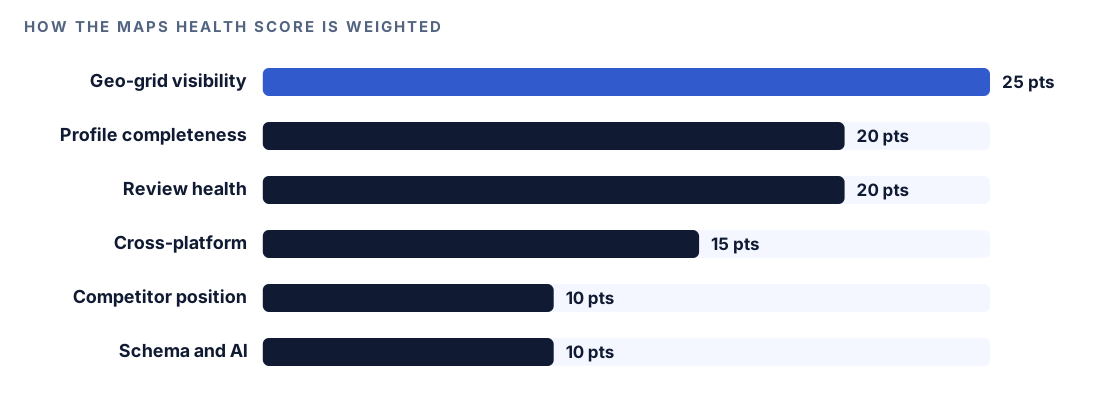
With no DataForSEO connection there's no grid to score, so the skill hands those 25 points on: 10 extra to profile completeness, 10 to review health and 5 to cross-platform presence.
Profile completeness (20 points)
The profile audit looks at 25 fields of your Google Business Profile. A field that's filled in and optimized scores 2, one that's filled in but basic scores 1, and an empty one scores 0. Weights shift by industry, then the total becomes a score out of 100. With DataForSEO the skill reads your live profile, including posts and Q&A. Without it, the skill reads your website for profile clues and labels the fields it can't see as unknown, so you know where the blind spots are.
Review health (20 points)
The review module sorts your Google reviews newest first and works out your monthly review rate across the past six months. It flags any stretch of three weeks or more with no new review, checks that your ratings form a healthy curve leaning toward five stars, and divides owner replies by total reviews to get your response rate. Tripadvisor and Trustpilot join the comparison table when they're available.
It also screens for fake reviews. A review gets flagged when two or more warning signs line up: bursts landing on the same day or hour, reviewers whose accounts have almost no history, reviewers based far from the business, an all-five-star surge against the usual baseline, copy-paste wording, or a jump in volume that no campaign explains.
Cross-platform presence (15 points)
People find businesses on more than Google. The NAP check reads your name, address and phone from Google, Bing Places, Apple Maps and OpenStreetMap and grades each platform: matching exactly, matching partly, absent, or contradicting your details. Severity follows the field, so a different name is Critical, a different address High and a different phone Medium. Apple offers no public lookup, so the skill leaves it as a manual check and recommends claiming the listing in Apple Business Connect.
Competitor position (10 points)
Without DataForSEO, the skill asks OpenStreetMap for businesses tagged with your category inside the radius and sorts them by distance. With DataForSEO, it pulls the 20 strongest competitors from the map results, lines up their ratings, review counts, categories, photos and attributes against yours, and measures how crowded the area is in competitors per square kilometer.
Schema and AI readiness (10 points)
The skill checks your LocalBusiness markup, and $seo maps schema builds a block from what it collected. It refuses to write review markup about your own business, since Google disregards that kind of self-serving rating. Only third-party reviews that visitors can see on the page are worth marking up.
Run it in Codex, step by step
- Install the kit from the install section, restart Codex, and open a new task in your website's project folder. Installing SEO skills in Codex covers the details.
- Check your permission mode. The command calls map services and fetches web pages, so depending on your mode, Codex may ask before it uses the internet. Approve it for the services the scan needs.
- Connect DataForSEO if you want grid, review and live profile data. Our DataForSEO in Codex guide walks through it. On top of DataForSEO, a Google Maps Platform key unlocks the top tier: place details, real-time business status, place summaries and photo analysis. Each provider bills you on its own terms.
- Start with the full audit to see your baseline:
$seo maps https://example.com- Then run a grid scan for the search that matters most, and confirm the cost estimate when Codex shows it:
$seo maps grid "emergency plumber" "Springfield, IL"- Or ask in plain language:
Track our Google Maps rankings for "emergency plumber" across Springfield with a geo-grid. Show me our Share of Local Voice and the weakest areas.If the site has several locations, Codex asks which one to analyze or offers a batch run with a cost estimate for each location.
Reading the report
The report follows a fixed structure. A trimmed outline:
## Maps Analysis: example.com

Maps Health Score: XX/100
Capability tier: [Tier 0 / Tier 1] and what it covers

## Geo-Grid: [keyword]
[7x7 grid of your position at each point]
SoLV: XX | Average rank: X.X

## GBP Profile Audit
| Field | Status | Points |
|---|---|---|
| [field] | [Present + optimized / Present / Missing] | X |

## Top 10 Actions
1. [Critical] [action]

## Cost Report
DataForSEO credits used: [amount]

## Limitations
[what this tier could not assess]
The full report also covers reviews, the competitor landscape with the top five rivals, cross-platform listing status, and a generated LocalBusiness block if yours is missing or thin.
Read it in this order:
- Tier and limitations first. They tell you what the score is based on.
- Critical NAP conflicts. A name mismatch on any platform comes before anything else.
- The heatmap. Note which side of town is weak, and whether a competitor cluster sits there.
- Review gaps and response rate. These are the inputs you can change fastest.
- Profile fields marked missing or unknown. Fill what you can, then rescan later with the same settings.
Apply the fixes with Codex
Some recommendations happen in Google's and Apple's dashboards, and you make those yourself. Codex helps with the parts that live in your website: LocalBusiness markup, NAP in templates, and your service-area pages.
A generated block for a plumber with a shop and a service area might look like this:
{
  "@context": "https://schema.org",
  "@type": "Plumber",
  "@id": "https://example.com/#business",
  "name": "Example Plumbing",
  "image": "https://example.com/images/van.jpg",
  "url": "https://example.com/",
  "telephone": "+1-555-010-0142",
  "address": {
    "@type": "PostalAddress",
    "streetAddress": "45 Oak Avenue",
    "addressLocality": "Springfield",
    "addressRegion": "IL",
    "postalCode": "62704",
    "addressCountry": "US"
  },
  "geo": { "@type": "GeoCoordinates", "latitude": 39.77105, "longitude": -89.68421 },
  "areaServed": [
    { "@type": "City", "name": "Springfield" },
    { "@type": "City", "name": "Chatham" }
  ],
  "sameAs": ["https://www.yelp.com/biz/example-plumbing-springfield"]
}
Then ask Codex to put it in place:
Take the LocalBusiness JSON-LD from the MAPS-ANALYSIS report and compare it with what our site outputs today. Merge them into the layout template, rendered on the server, using the values in our business details file rather than the report where they differ. Don't add review markup. Fix any NAP mismatches the report found in the footer and contact page. Show me the diff and run the build.The heatmap is a different kind of finding. You can't change where searchers stand, and Codex can't move your pin. What you can do is strengthen relevance and prominence in the weak areas: accurate service-area details, real local content where you do work there, and more reviews over time. Rescan with the same keyword and grid afterwards so the comparison is fair.
Make it repeatable
Tracking only works when scans are comparable, so the center, the grid and the keywords have to stay the same. An AGENTS.md file in your project gives Codex those settings on every task:
## Maps tracking
- Geo-grid scans for Example Plumbing use the default 7x7 grid centered on 45 Oak Avenue, Springfield, IL.
- Track these keywords, one scan each: "emergency plumber", "water heater repair".
- Save each report in reports/maps/ with the scan date in the file name.
- After a scan, compare SoLV and average rank with the latest earlier report and list what changed.
- Don't add keywords or locations to a scan without asking me; each one adds cost.
Codex reads AGENTS.md before it starts work, so a plain "run this month's maps scan" picks up the same settings every time (AGENTS.md docs). Keep grid scans in interactive tasks, because the skill stops to ask you to confirm the cost. Our guide to AGENTS.md rules for SEO shows more standing rules.
Without the skill: a plain Codex prompt
Without a rank data provider, Codex can't see map positions, but it can still do useful groundwork:
Search Bing Maps and OpenStreetMap for "Example Plumbing, Springfield IL". Extract the name, address and phone from each listing, compare them with the footer of our site, and give me a table marking each as exact match, partial match, missing or conflicting.If you have your own rank data source:
Write a Python script that takes a center latitude and longitude and returns a 7x7 grid of points within a 5 km radius, using Haversine offsets. Output the points as CSV with row, column, latitude and longitude.What the skill adds is the whole pipeline: tier detection, DataForSEO lookups with a cost check before every scan, SoLV and heatmap output, the 25-field profile checklist, fake review signals, and one report format you can compare month to month.
Pitfalls to avoid
- Comparing scans with a different center, radius or keyword list.
- Quoting one grid point, usually the one at your door, as "our ranking".
- Adding many keywords to a scan without reading the cost estimate.
- Marking up your own reviews in LocalBusiness schema.
- Ignoring Bing Places and Apple Business Connect because Google matters most.
- Collecting reviews in bursts. Same-day clusters and repeated text are exactly what the fake review check flags.
Keep going
- Local SEO audit with Codex checks the website side of local search: NAP, local schema and location pages.
- Schema markup with Codex validates the LocalBusiness block once it's live.
- DataForSEO in Codex explains the account behind grid scans and review data.
- Every Codex SEO and Codex Blog skill lists the other commands in both kits.
FAQ
What is geo-grid rank tracking?
It checks where a business ranks in Google Maps from many points across an area instead of one. The $seo maps grid command uses a 7x7 grid with a 5 km radius by default, so you get 49 positions and a heatmap.
What is Share of Local Voice?
Share of Local Voice is the percentage of grid points where your business ranks in the top three. The skill calculates it as top-three points divided by total points, times 100, and reports it with your average rank.
Why does my Google Maps ranking change depending on where I search?
Distance between the searcher and the business is one of the main factors in local results, so a search from your street and one from across town can return different businesses.
Do I need DataForSEO to track Google Maps rankings in Codex?
For grid scans, yes. Grid scans, review intelligence and the live profile audit use DataForSEO, at its own pricing. Without it, the command still finds competitors, checks NAP across map platforms and generates LocalBusiness schema.
Can Codex track rankings for several locations?
Yes. With more than one location, Codex asks which to analyze or offers a batch run with a cost estimate per location before it spends credits.