
E-commerce SEO
Ecommerce SEO with Codex: Products, Schema and Shopping
Ecommerce SEO with Codex: score product pages, fix Product schema in your templates, and add Google Shopping and keyword gap data with DataForSEO.
Ecommerce SEO with Codex starts at the product page: Codex fetches it, checks the title, images, copy, internal links and Product schema against a fixed checklist, and then fixes the template that renders every product in your store. RankCue's Codex SEO kit packs that into $seo ecommerce <url>, and with a DataForSEO account the same skill adds Google Shopping prices, seller data and keyword gaps between organic and Shopping results. This guide explains what product pages need, how the command works, and how to apply its fixes in your codebase.
Key takeaways
$seo ecommerce <url>scores a product page out of 100 across six categories, and Product schema completeness carries the most weight (25 points).- Schema has its own ladder: the required fields earn 50, and ratings, identifiers, shipping, returns and three or more reviews lift it to 100.
- The usual schema errors are small: a currency symbol inside
price, a shortavailabilityvalue instead of the full Schema.org URL, or a brand set to "N/A".- Shopping analysis (
products) and the organic-versus-Shopping gap report (gaps) need DataForSEO and run a cost check before every call. The page and schema checks don't.- Codex fixes the product template once, so every product page gets the change, and runs your build before you accept the diff.
The ecommerce command at a glance
| Item | Details |
|---|---|
| Command | $seo ecommerce <url>, plus the products, gaps and schema subcommands |
| What you give it | A product page URL, a keyword for Shopping research, or your domain for the gap report |
| What Codex reads | The page HTML, raw and rendered, plus Google Shopping and Amazon data from DataForSEO when connected |
| What you get back | A report with an overall score, page sub-scores, marketplace tables when available, and ranked recommendations |
| Needs | Internet access. DataForSEO for Shopping, Amazon and gap data, at DataForSEO's own pricing |
| Best for | Shopify, WooCommerce, Magento and headless stores |
| Subcommand | What it does | Needs DataForSEO |
|---|---|---|
$seo ecommerce <url> | Checks a product page or store end to end | Optional |
$seo ecommerce products <keyword> | Shows who sells what, at which price, in Google Shopping | Yes |
$seo ecommerce gaps <domain> | Finds keywords where you appear in organic or Shopping but not both | Yes |
$seo ecommerce schema <url> | Validates and completes Product markup | No |
Why ecommerce SEO matters for search
One search can surface a product in several places: a plain organic result, an organic result enriched with price, stock and stars, and Google Shopping results built from Merchant Center data. Each reads your product information a little differently, and the product page is the source behind all of them.
What a product page needs
A search engine wants to know what the product is, why this page is a good place to buy it, and the facts shoppers compare: price, stock and reviews. In practice that means a clear title and H1, copy written for this product, good photos, a specs table, visible reviews, and structured data that repeats those facts in machine-readable form.
Duplicate copy and variants
Pasting the manufacturer's description means your page says exactly what hundreds of other stores say. The skill flags that and asks for at least 200 words written by you. Variants cause a second kind of duplication: when every color or size has its own URL with the same H1, those pages compete with each other.
Product markup and feeds
Product markup uses the Schema.org Product type with a nested Offer for price and availability. Google's product structured data documentation explains how it makes pages eligible for product rich results. If you also send a feed to Merchant Center, the page, the markup and the feed should agree on price and stock. The command doesn't read your feed file; it checks the page and its markup, and with DataForSEO it shows how you appear in Shopping.
Server-rendered or injected markup
Many storefronts, especially headless builds, add product schema with JavaScript. The skill renders the page and compares it with the raw HTML, so you learn whether your JSON-LD ships in the server response or appears only after scripts run. For prices and stock, server-rendered markup is the safer choice.
How the ecommerce command runs inside Codex
When you run $seo ecommerce https://example.com/products/trail-runner-2 in a Codex task, the skill works through a fixed sequence that you can follow in the task log.
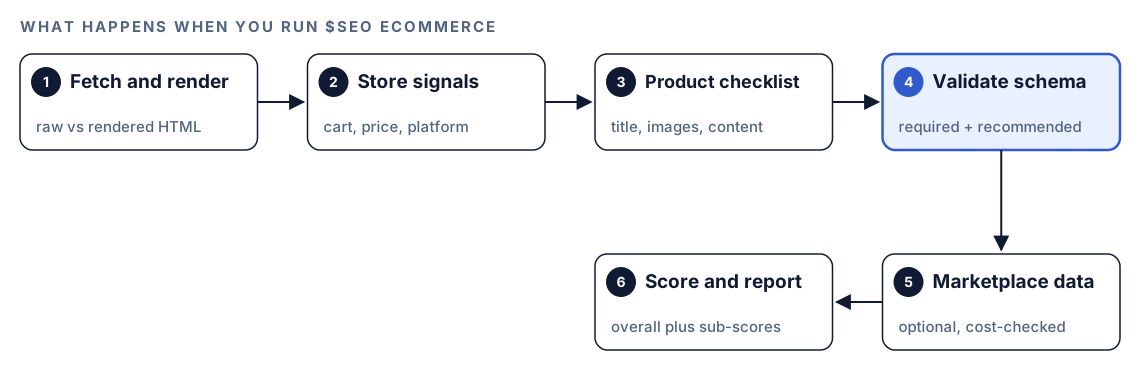
- Fetch and render. Codex downloads the page and renders it, keeping both versions so it can tell server-rendered markup from injected markup.
- Detect store signals. Product schema, prices, add-to-cart buttons, product grids, and Shopify, WooCommerce or Magento markers. On a category page or homepage, it adjusts the scope and suggests
$seo ecommerce schemainstead. - Run the product checklist. Title, meta description, headings, images, internal links and content.
- Validate Product schema. Required and recommended properties, value formats, and the completeness ladder. If no Product schema exists, it reads the page content and generates recommended markup.
- Add marketplace data. Only when DataForSEO is connected, and only after a cost check.
- Score and report. An overall score, sub-scores, and recommendations ranked Critical to Low, with each data source labeled live or static.
What Codex checks on a product page
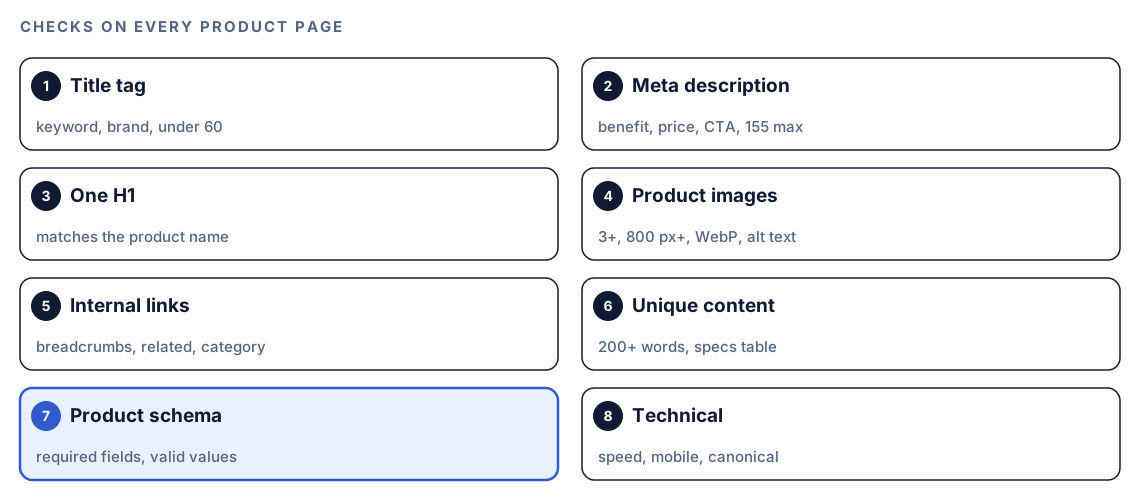
The page score splits into six weighted categories: schema completeness 25 points, image optimization 20, content quality 20, title and meta 15, internal linking 10, and technical health 10.
Title, meta description and headings (15 points)
A strong product title leads with the product keyword, names the brand, fits within 60 characters so Google doesn't truncate it, and reads like [Product Name] - [Key Feature] | [Brand]. The meta description should sell one benefit, show a price or "from" price, include an action such as "Shop now", and stay below 155 characters. One H1 should carry the product name, with H2s for features, specs, reviews and related products, and variants shouldn't share an H1.
Product images (20 points)
Good alt text names the product plus the detail that distinguishes the shot, such as the color or the angle. File names should describe the product rather than read IMG_001.jpg. The skill wants WebP served with a JPEG fallback, a minimum of three photos (hero, close-up, in use), dimensions of at least 800 px for Google Shopping eligibility, and lazy loading kept to images below the fold. For AI-generated product photos, the skill notes that Merchant Center expects the IPTC TrainedAlgorithmicMedia source label. Our image SEO guide goes further.
Content and internal links (20 and 10 points)
For content, the skill looks for your own description of 200 words or more, specs laid out in a table, and customer reviews on the page itself. For links, it wants a breadcrumb trail from the homepage down through category and subcategory, a related products block, a descriptive link back to the parent category, and a link to the full reviews page when reviews live elsewhere.
Product schema (25 points)
The required set is name, image, description, brand, and an offers block holding url, priceCurrency, price, availability and seller. Seven value rules follow. Prices are bare numbers in a string, so "89.99" passes and "$89.99" fails. Availability is a full Schema.org URL. Images come as an array with at least one high-resolution URL. Currency is a three-letter ISO 4217 code. The brand name can't be blank or "N/A". A priceValidUntil date uses ISO 8601. A rating block needs both ratingValue and reviewCount.
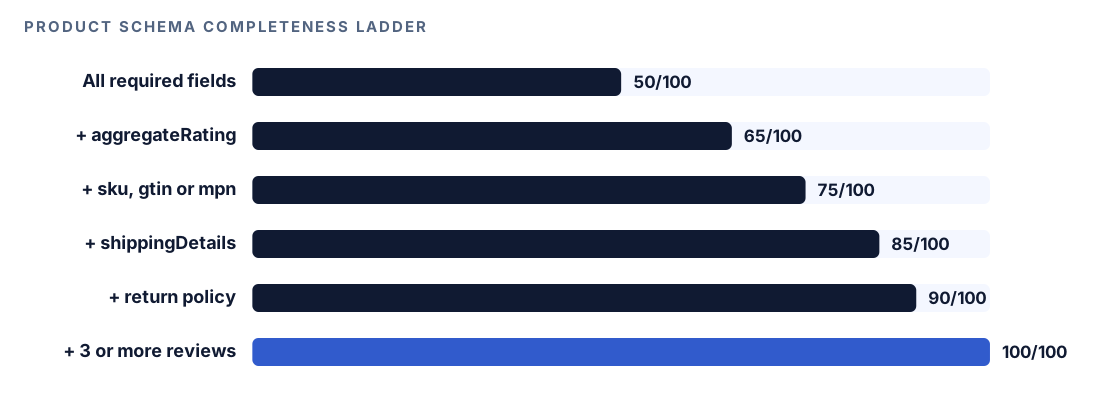
Recommended properties climb the ladder: aggregateRating, an identifier (sku, gtin13, gtin14 or mpn), shippingDetails, hasMerchantReturnPolicy, then three or more reviews. Variant attributes such as color and size round it out.
Technical health (10 points)
Page speed, mobile rendering and the canonical tag. The hero image often decides Largest Contentful Paint, which should land within 2.5 seconds. Our technical SEO audit guide covers performance in depth.
The skill can also look for a Universal Commerce Protocol profile at /.well-known/ucp, a Google-led standard that lets AI agents shop with merchants. Adoption is early, so a missing profile is reported as an opportunity, not a failure.
What DataForSEO adds: Shopping, Amazon and gaps
The marketplace side runs on DataForSEO's Merchant API, and every call is cost-checked first. An approved cost goes ahead. A cost that needs approval is shown to you with a question. A blocked call, such as one over a daily budget, stops the marketplace work and leaves you with the on-page analysis. Amazon lookups always ask first.
$seo ecommerce products <keyword> covers three areas. Pricing shows the price spread (low, high, median and the 25th to 75th percentile band), listings priced far from the median, and whether price tracks rating. Sellers shows the ten with the most listings, their ratings, how many offer free shipping, and new versus established merchants. Listing quality shows the title words top listings share, typical ratings and review counts, photos per listing and stock status. A side-by-side table then sets Google Shopping against Amazon.
$seo ecommerce gaps <domain> lines up your organic rankings with your Shopping presence and puts each keyword in one of four buckets:
| Bucket | Where you appear | Suggested move |
|---|---|---|
| Organic only | Organic results, not Shopping | Get those products into a Merchant Center feed |
| Shopping only | Shopping, but weak in organic | Publish buying guides or comparison pages |
| Both | Organic and Shopping | Keep prices in sync and enrich the markup |
| Neither | Nowhere yet | Skip unless the search volume is large |
Run it in Codex, step by step
- Install the kit from the install section, restart Codex, and open a new task in your store's project folder. See how to install SEO skills in Codex for details.
- Check your permission mode. The command fetches live pages, so depending on your mode, Codex may ask before it uses the internet. Approve it for your store's domain.
- Run the command on a representative product page:
$seo ecommerce https://example.com/products/trail-runner-2- Or ask in plain language, and Codex picks the skill when the request matches:
Audit the product page https://example.com/products/trail-runner-2 for SEO. Check the title, images, description, breadcrumbs and Product schema, and score it.- For a markup-only check, which also suits category pages, use
$seo ecommerce schema <url>. - With DataForSEO connected, run the marketplace commands. They need a DataForSEO account, its own pricing applies, and our DataForSEO in Codex guide covers the setup:
$seo ecommerce products "trail running shoes"
$seo ecommerce gaps example.com
Reading the report
The report has a fixed shape. A trimmed version with placeholders:
## E-commerce SEO Report: https://example.com/products/trail-runner-2

### Overall Score: XX/100

### Product Page SEO
- Schema Completeness: XX/100
- Title & Meta: XX/100
- Image Optimization: XX/100
- Content Quality: XX/100
- Internal Linking: XX/100

### Marketplace Intelligence (if DataForSEO available)
- Google Shopping Listings: N products found
- Price Range: $XX - $XX (median: $XX)

### Top Recommendations
1. [Critical] [recommendation]
2. [High] [recommendation]
Work through it in this order:
- Schema errors. A currency symbol in
priceor a shortavailabilityvalue can block product rich results, and one template fix repairs every product. - Missing required properties. Then climb the ladder with identifiers, shipping and returns.
- Images. Count, size and alt text affect both search and Shopping eligibility.
- Content. Replace manufacturer copy on your best sellers first.
- Marketplace findings. Use price outliers and gap types to plan feeds and content.
Apply the fixes with Codex
Product pages come from templates, so one fix in your codebase reaches every product.
Before, markup that breaks five of the seven rules:
{
  "@context": "https://schema.org",
  "@type": "Product",
  "name": "Trail Runner 2",
  "image": "/img/tr2.jpg",
  "brand": { "@type": "Brand", "name": "N/A" },
  "offers": {
    "@type": "Offer",
    "price": "$89.99",
    "priceCurrency": "US$",
    "availability": "InStock"
  }
}
After, with valid values, an identifier and a return policy:
{
  "@context": "https://schema.org",
  "@type": "Product",
  "name": "Trail Runner 2",
  "image": ["https://example.com/img/trail-runner-2-side.jpg", "https://example.com/img/trail-runner-2-sole.jpg"],
  "description": "Lightweight trail running shoe with a rock plate and a grippy outsole.",
  "sku": "TR2-BLU-42",
  "brand": { "@type": "Brand", "name": "Example Outdoor" },
  "offers": {
    "@type": "Offer",
    "url": "https://example.com/products/trail-runner-2",
    "price": "89.99",
    "priceCurrency": "USD",
    "availability": "https://schema.org/InStock",
    "seller": { "@type": "Organization", "name": "Example Outdoor" },
    "hasMerchantReturnPolicy": {
      "@type": "MerchantReturnPolicy",
      "applicableCountry": "US",
      "returnPolicyCategory": "https://schema.org/MerchantReturnFiniteReturnWindow",
      "merchantReturnDays": 30,
      "returnMethod": "https://schema.org/ReturnByMail"
    }
  }
}
Then ask Codex to make the change where the markup is generated:
Use the e-commerce SEO report. Find the template or component that renders Product JSON-LD and fix it for every product: price as a plain number string from the product data, priceCurrency from the store currency, availability as the full Schema.org URL mapped from stock status, brand from the vendor field, and image as an array of absolute URLs. Render it on the server. Add sku and gtin13 only where the product data has them; never invent identifiers or reviews. Show me the diff, then run the build and tests.Check one in-stock and one out-of-stock product in the diff, because availability mapping is where template fixes usually go wrong. After deploy, test a product URL in Google's Rich Results Test and run $seo ecommerce schema on it again.
For copy, Codex can list products whose descriptions match the manufacturer's text and draft replacements from your own spec sheets, but someone who knows the product should approve each one.
Make it repeatable
Product templates change with every theme update or redesign. A short AGENTS.md rule keeps Codex holding the line on every future task:
## Product pages
- Product JSON-LD is rendered on the server from product data, never typed by hand.
- price is a number string with no currency symbol; priceCurrency is an ISO 4217 code; availability is a full https://schema.org/ URL.
- brand.name is never empty or "N/A", and every image URL in schema is absolute.
- Product titles follow [Product Name] - [Key Feature] | [Brand] and stay under 60 characters.
- After changing a product template, run $seo ecommerce schema on one in-stock and one out-of-stock product and include the results in your summary.
Codex reads AGENTS.md before it starts work, so these rules apply without you repeating them. Keep the file short, since combined instructions have a size cap. Our guide to AGENTS.md rules for SEO shows a fuller setup.
Without the skill: a plain Codex prompt
You can get a solid first pass from Codex with no kit installed:
Fetch https://example.com/products/trail-runner-2, both the raw HTML and the rendered page. Extract the Product JSON-LD and check that price has no currency symbol, priceCurrency is ISO 4217, availability is a full https://schema.org/ URL, brand.name isn't empty, and image is an array of absolute URLs. Tell me whether the markup is in the raw HTML or only after JavaScript runs, and which template in this repo outputs it.What the skill adds is the full checklist with fixed weights, the schema completeness ladder, store and page-type detection, the cost-checked marketplace data, and the same report format on every product you test.
Pitfalls to avoid
- Writing
"price": "$89.99"instead of a plain number string. - Using
"InStock"instead of"https://schema.org/InStock". - Injecting price and stock markup only with JavaScript.
- Publishing the manufacturer's description word for word.
- Giving every variant URL the same H1 and title.
- Marking up reviews or ratings that shoppers can't see on the page.
- Letting the page, the schema and your Merchant Center feed show different prices.
Keep going
- Schema markup with Codex covers validating and generating JSON-LD of every type.
- Image SEO with Codex goes deeper on alt text, formats and file size for product photos.
- DataForSEO in Codex explains the account behind Shopping and gap analysis.
- The full list of Codex SEO and Codex Blog skills shows every command in both kits.
FAQ
What is ecommerce SEO?
It's the work of making product and category pages easy to find in search: clear titles, original descriptions, good images, sound internal links and accurate Product markup, plus how products appear in Google Shopping.
What schema does a product page need?
A Product with name, image, description and brand, plus an Offer with url, price, priceCurrency, availability and seller. Ratings, identifiers such as sku or gtin13, shipping details and a return policy make it more complete.
Should product pages use manufacturer descriptions?
It's better not to. The same text appears on every store selling the product, so it gives search engines no reason to prefer yours. The skill flags it and asks for 200 or more words of your own.
Do I need DataForSEO to run ecommerce SEO in Codex?
Not for the product page and schema checks. You need it, at its own pricing, for Google Shopping research, the Amazon comparison and the organic-versus-Shopping gap report.
Can Codex fix product schema on a Shopify store?
Yes, when your theme or storefront code is in the project Codex is working in. It edits the template that outputs the JSON-LD and shows you the diff, so one fix reaches every product.