
International SEO
Hreflang Audit in Codex: Validate Every Language Version
Run an hreflang audit with Codex: check return tags, x-default and ISO codes, generate a corrected set, and fix the template behind it.
An hreflang audit with Codex confirms that every language and regional version of a page lists all the others, uses valid codes, matches its canonical URL and offers a fallback for visitors you didn't target. In RankCue's Codex SEO kit, that check is one command, $seo hreflang <url>, which rates each problem by severity and hands back a corrected tag set you can apply in your own templates. This guide covers how hreflang works, what the command checks, how to read its report, and how to have Codex repair the code that prints the tags.
Key takeaways
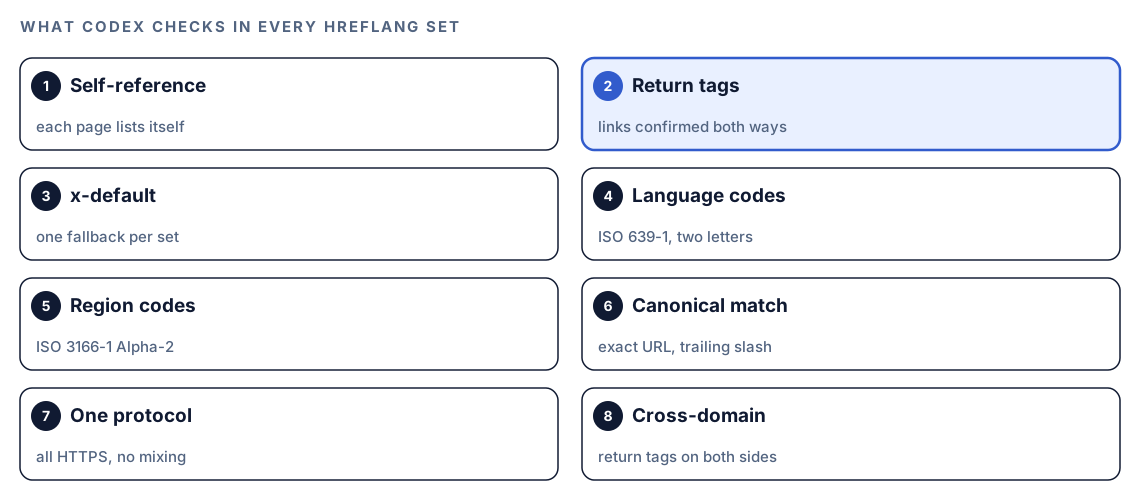
$seo hreflang <url>validates hreflang in HTML link tags, HTTP headers or an XML sitemap, and generates a correct set when a site has none.- Eight checks run on every set: self-references, return tags, x-default, language codes, region codes, canonical alignment, protocol and cross-domain setup.
- Missing self-references and missing return tags can sink a whole set, so the skill rates both as Critical.
$seo hreflang audit <directory-or-url>compares content parity between versions, including structure, localized SEO elements and stale translations.- Codex can fix the layout or sitemap generator that outputs hreflang once, so every locale gets the correction.
The hreflang command at a glance
| Item | Details |
|---|---|
| Command | $seo hreflang <url>, plus $seo hreflang audit <directory-or-url> for content parity |
| What you give it | A live URL from any language version, or a folder of translated content in your project |
| What Codex reads | Hreflang link tags, HTTP Link headers and sitemap entries, then the alternate pages they name |
| What you get back | A validation report with severity counts, a per-language results table, corrected hreflang code and recommendations |
| Needs | Internet access for live URLs; no third-party API keys |
| Best for | Multi-language and multi-region sites, cross-domain setups, and adding a new locale |
What is hreflang and why does it matter for search?
Hreflang is an annotation that tells search engines a page has equivalents in other languages or for other regions, and says where they are. It doesn't translate anything, and it isn't a ranking boost. Its job is matching. When someone searches in German, Google can show your German page instead of the English one. When you sell in the US and the UK at different prices, it can show each market its own page instead of treating two English pages as near-duplicates.
Every page in a set lists every version, itself included, with a language code and an optional region. Google treats these annotations as hints and only trusts a pair when both pages confirm it. Google's guide to localized versions of your pages sets out the rules the skill checks against.
Three ways to declare hreflang
- HTML link tags in the page
<head>. Visible in the source and simple to start with. The skill suggests them for pages with fewer than 50 language or region variants. - HTTP Link headers sent by your server or CDN. The only option for files with no
<head>, such as PDFs. - XML sitemap entries, where each
<url>carries anxhtml:linkelement per version. The skill recommends this for large sites, cross-domain setups and big sets, because one generated file is easier to keep consistent than thousands of page heads.
Choose one method. Declaring hreflang in both the HTML and the sitemap is flagged as a Low issue, because two sources of truth drift apart.
Language codes, region codes and x-default
Language codes come from ISO 639-1: two lowercase letters, such as en, de or ja. A region is optional and comes from ISO 3166-1 Alpha-2: two uppercase letters, such as GB or BR, joined with a hyphen to make en-GB or pt-BR. You can target a language alone, but never a region alone.
x-default names the page to show when no listed language or region fits the searcher, usually a language picker or your main version. Google calls it optional but recommended. The skill rates a missing x-default as High, since without it, visitors from markets you didn't list land wherever Google sends them.
Why hreflang sets break so easily
Each page carries its own copy of the set, so every page has to agree with every other page. Launch a Spanish page without updating the English one, and the pair no longer confirms itself. Move to HTTPS but miss the hreflang template, and the set mixes protocols. None of this is visible on the page, which is why it can go unnoticed for months.
How the hreflang command runs inside Codex
When you run $seo hreflang https://example.com/fr/tarifs in a Codex task, the skill works through the set in a fixed order and saves its findings in your project.
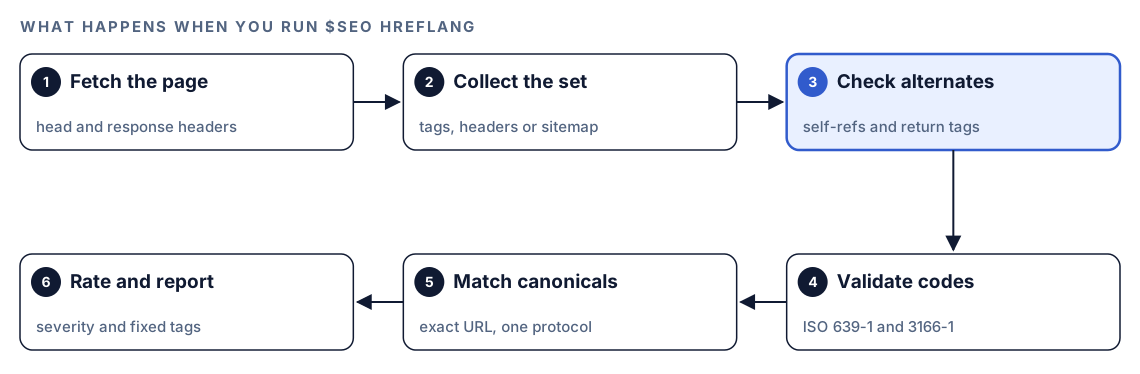
- Fetch the page. Codex loads the URL and reads its
<head>and response headers. - Collect the set. It gathers every hreflang annotation: link tags, Link headers or sitemap entries.
- Check every alternate. Each listed URL must list itself and link back to the others, so the set forms a full mesh.
- Validate the codes. Language codes are checked against ISO 639-1 and region codes against ISO 3166-1 Alpha-2.
- Match canonicals and protocols. Each hreflang URL must match that page's canonical exactly, and the set must use one protocol.
- Rate and report. Each issue gets a severity from Critical to Low, plus a corrected tag set.
If the page has no hreflang at all, the skill says so, looks for other signs of an international site (language subfolders, subdomains, country-code domains) and recommends a method. When you ask it to build a set, it detects languages from URL paths, subdomains, domains and the HTML lang attribute, maps equivalent pages, then writes tags with self-references, return links and an x-default.
What Codex checks in every hreflang set
Self-references and return tags
These two checks matter most. Every page needs an hreflang tag pointing to itself, using its exact canonical URL. Every relationship has to run both ways: if the English page lists the French page, the French page must list the English one. The skill rates either failure as Critical, because Google can ignore annotations the other page doesn't confirm. It checks the full mesh, so with five versions, all five must list all five. The same applies to x-default: one per set, with return tags from every version.
Language and region codes
The skill lists each invalid code with its replacement and gives you a corrected tag set:
| Code found | Problem | Use instead |
|---|---|---|
eng | A three-letter ISO 639-2 code | en |
jp | Not a language code | ja |
en-uk | UK isn't an ISO 3166-1 code | en-GB |
es-LA | Latin America isn't a country | A real country, such as es-MX |
zh alone | Ambiguous for Chinese | zh-Hans or zh-Hant |
It also flags a region with no language in front of it, and it expects the usual format of a lowercase language followed by an uppercase region.
Canonical alignment, protocol and trailing slashes
Hreflang belongs only on canonical URLs. If a page's rel=canonical points elsewhere, its hreflang is ignored. The skill compares each hreflang URL with the canonical character by character, so /fr/tarifs and /fr/tarifs/ count as different URLs. It also checks that the set uses one protocol, since mixed HTTP and HTTPS often survives a migration that updated the canonicals but not the hreflang template.
Cross-domain sets
Hreflang works across domains, such as example.com and example.de, but the return tags must exist on both. For these setups the skill recommends the sitemap method and reminds you to confirm both domains are verified in Google Search Console.
Beyond the tags: parity, culture and locale formats
Valid tags pointing at a half-translated page still let visitors down. The skill adds three layers:
- Content parity, with
$seo hreflang audit. It checks that each page exists in every declared language, that H2 and H3 structure matches, and that titles, meta descriptions and schema are localized. Its word count settings expect German to run 25 to 35 percent longer than English, and Japanese 10 to 25 percent shorter. It also spots stale translations from timestamps and scans for foreign brand names, wrong legal references and untranslated text. You get a parity matrix with per-page scores. - Cultural adaptation. Built-in profiles for DACH, Francophone, Hispanic and Japanese markets check calls to action, trust signals and brand references. Each version gets a Cultural Adaptation Score from 0 to 100.
- Locale formats. A price written
1,000.00on a German page should read1.000,00, and phone numbers should use international format with the country code.
Run it in Codex, step by step
- Install the kit with the setup steps in the install section, restart Codex, and open a new task in your site's project. Our guide to installing SEO skills in Codex walks through it.
- Check your permission mode. The command fetches live pages, so depending on your mode, Codex may ask before it uses the internet. Approve it for the site you're checking.
- Run the command on any page in the set. One page is enough to start, because its tags name the rest:
$seo hreflang https://example.com/fr/tarifs- Or describe the job in plain language. Codex picks the skill when your request matches it:
Check the hreflang tags on https://example.com/fr/tarifs. Confirm every language version links back, the codes are valid, and the URLs match the canonical tags.- To compare translations rather than tags, point the parity audit at a URL or at a content folder in your repository:
$seo hreflang audit content/- If the site has no hreflang yet, ask for a generated set and name the method: HTML link tags, HTTP header values or a sitemap. The sitemap method writes
hreflang-sitemap.xml, where every<url>entry carries the full set of alternates, split at 50,000 URLs per file.
Reading the report
The report opens with a summary, then gives one row per language version:
## Summary
- Total pages scanned: XX
- Language variants detected: XX
- Issues found: XX (Critical: X, High: X, Medium: X, Low: X)

## Validation Results
| Language | URL | Self-Ref | Return Tags | x-default | Status |
|----------|-----|----------|-------------|-----------|--------|
| en-US | https://example.com/pricing/ | ✅ | ✅ | ✅ | ✅ |
| fr | https://example.com/fr/tarifs/ | ❌ | ⚠️ | ✅ | ❌ |
| de | https://example.de/preise/ | ✅ | ❌ | ✅ | ❌ |

## Generated Hreflang Tags
[link tags, header values, or hreflang-sitemap.xml]

## Recommendations
- Missing implementations: [pages or locales]
- Incorrect codes: [invalid code and its replacement]
- Method changes: [for example, HTML tags to sitemap]
Work through it by severity. The skill assigns one to each kind of mistake:
- Critical: missing self-references and missing return tags. Fix these first, because they can void the set.
- High: a missing x-default, invalid language or region codes, and hreflang on non-canonical URLs.
- Medium: mixed HTTP and HTTPS, trailing-slash mismatches, and cultural adaptation findings.
- Low: hreflang declared in both HTML and the sitemap, and a language without a region where you target specific countries.
Apply the fixes with Codex
Hreflang errors rarely live in one page. They live in the layout, the i18n config or the sitemap generator that prints tags for every page, so Codex can fix the source once and every page follows.
Here's a typical broken head on a UK pricing page:
<link rel="alternate" hreflang="en-uk" href="http://example.com/uk/pricing" />
<link rel="alternate" hreflang="fr" href="https://example.com/fr/tarifs/" />
It uses an invalid region code, an HTTP URL for itself and no trailing slash where the canonical has one, and it never lists the US version or an x-default. The fixed set, printed the same way on all three pages:
<link rel="alternate" hreflang="en-US" href="https://example.com/pricing/" />
<link rel="alternate" hreflang="en-GB" href="https://example.com/uk/pricing/" />
<link rel="alternate" hreflang="fr" href="https://example.com/fr/tarifs/" />
<link rel="alternate" hreflang="x-default" href="https://example.com/pricing/" />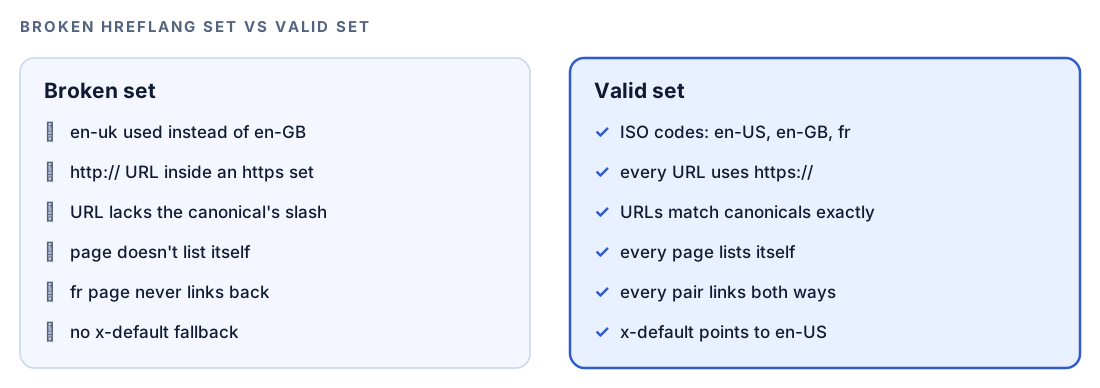
Then ask Codex to make the change at the source:
Use the hreflang report. Find where this project builds the alternate links for localized pages. Generate them from one locale map so every version prints the full set, including itself and an x-default that points to the en-US page. Use https and the exact canonical format, trailing slash included. Show me the diff, run the build, then print the hreflang tags from the built /uk/pricing/ and /fr/tarifs/ pages so I can compare them.Read the diff before you accept it, and check that each pair really is an equivalent page. After you deploy, run $seo hreflang again on the same URL. A report with no Critical or High issues confirms the fix is live.
Make it repeatable
Hreflang breaks when the site changes, such as a new locale or a renamed route. A short rule in your project's AGENTS.md file keeps Codex careful whenever it touches localized routes:
## Hreflang and locales
- Locales: en-US, en-GB, fr, de. x-default points to the en-US version.
- Alternate links come from the shared locale map. Never hard-code them in a page.
- Every localized page lists all versions, itself included, using its exact canonical URL.
- Language codes are ISO 639-1 and regions are ISO 3166-1 Alpha-2 (en-GB, never en-uk).
- When you add a locale or a localized route, update every version in the same change, then run $seo hreflang on one affected URL and report the summary.
Swap in your own locales. Codex reads AGENTS.md before it starts work, so the rule applies to every later task without you repeating it. Keep the file short, since combined instructions have a size cap. Our guide to AGENTS.md rules for SEO shows how to organize a fuller file.
Without the skill: a plain Codex prompt
You can get a useful first pass from Codex with no kit installed:
Fetch https://example.com/fr/tarifs and list every hreflang annotation in the HTML head and the HTTP headers. Then fetch each alternate URL and build a table showing, for each version, whether it lists itself, whether it links back to every other version, and whether its hreflang URL matches its canonical tag exactly. Flag any code that isn't ISO 639-1 for language or ISO 3166-1 Alpha-2 for region.For translated content in your repository:
Compare content/en/ and content/de/. List pages that exist in one language but not the other, pages whose number of H2 headings differs, and German pages whose title or meta description is still in English.What the skill adds is a fixed checklist with severity ratings, generation for all three methods, the parity and cultural checks with their settings, and the same report layout on every run.
Pitfalls to avoid
- Pointing hreflang at URLs that redirect or canonicalize elsewhere. Only final, canonical URLs belong in a set.
- Using country codes as language codes.
jpisn't a language, andukmeans Ukrainian, not British English. - Updating one version and forgetting the rest. Generating tags from one locale map prevents this.
- Pointing every alternate at the home page. A French product page should point to the English product page.
- Redirecting visitors automatically by IP address or browser language. Crawlers may never reach the other versions.
- Treating valid tags as finished localization. Untranslated titles and wrong currency formats still let visitors down.
Keep going
- Write and translate multilingual blog posts in Codex if you publish in several languages.
- Localize blog content for new markets to adapt, not just translate, the pages your set points to.
- Audit your XML sitemap with Codex to check the file that may carry your hreflang annotations.
- Every Codex SEO and Codex Blog skill, with the command for each one.
FAQ
What does an hreflang audit check?
It confirms that each language or regional version of a page lists itself and every other version, and that every link is returned. It also checks ISO codes, canonical alignment, the x-default and protocol consistency across the set.
Is x-default required in hreflang?
Google treats x-default as optional but recommends it, since it names the page to show when no listed language or region matches the searcher. The Codex SEO skill rates a missing x-default as High because of that fallback role.
Should hreflang go in the HTML or the XML sitemap?
Either works, so pick one. HTML link tags are simple when each page has a few versions, while a sitemap is easier to maintain on large or cross-domain sites. Use HTTP headers for non-HTML files such as PDFs.
What happens if hreflang return tags are missing?
If page A lists page B but page B doesn't list page A, Google can ignore the annotation for that pair. That's why the skill rates missing return tags as Critical and checks the whole mesh.
Can Codex add hreflang tags to my site?
Yes. $seo hreflang generates a corrected set as HTML tags, HTTP header values or an hreflang sitemap, and Codex can edit the template that outputs them when your permission mode allows edits. You review the diff and run your build before anything ships.