
International SEO
Multilingual Blog with Codex: Write, Translate, Hreflang
Run a multilingual blog with Codex: write once, translate with SEO-aware keyword mapping, localize, and generate hreflang tags and sitemap entries.
Running a multilingual blog with Codex means writing a post once and getting publication-ready versions in every language you target, along with the hreflang tags, sitemap entries and metadata that tell search engines how those versions relate. RankCue's Codex Blog kit covers it with two commands: $blog multilingual <topic> --languages <codes> writes, translates, localizes and builds the international SEO files in one pass, and $blog translate <file> --to <codes> translates a post you already have. Below: how multilingual SEO works, what each command does, and how Codex wires the new versions into your site.
Key takeaways
$blog multilingualwrites the original under the full$blog writerules, translates it, adapts it culturally, and then generates hreflang tags, a sitemap fragment and a JSON language map.$blog translateworks on an existing post and gives each target language its own translator agent, run in parallel where possible.- Translation is SEO-aware: keywords are kept or swapped per market, and titles, descriptions, slugs, alt text and chart labels are localized while code, URLs and personal names stay untouched.
- Before delivery, Codex checks each version against the source for structure, locale formats and machine-translation artifacts, and flags problems by file and line.
- Everything lands in your project as files, so Codex can add the hreflang tags to your layout, merge the sitemap and run your build.
The multilingual commands at a glance
| Item | Details |
|---|---|
| Command | $blog multilingual <topic> --languages <codes> for a new post, $blog translate <file> --to <codes> for an existing one |
| What you give it | A topic or a post file, plus ISO 639-1 language codes such as de, fr, es, ja or pt-BR |
| What Codex reads | Your project's content format and the source post, including front matter, headings, alt text, FAQs and chart labels |
| What you get back | One file per language, hreflang tags, a sitemap fragment, a JSON language map and a summary with quality checks |
| Needs | No third-party API keys; internet access for the research step when a new post is written |
| Best for | Launching a blog in new languages, or translating your strongest posts for new markets |
What is a multilingual blog, and how does multilingual SEO work?
A multilingual blog publishes the same content in more than one language, each version at its own URL. Search engines have to work out that a German page and an English page are equivalents for different readers. Multilingual SEO makes that relationship explicit and makes each version good enough to earn its place.
Language and region codes
Language versions are labeled with ISO 639-1 codes, the two-letter codes such as de for German, fr for French and ja for Japanese. An optional ISO 3166-1 region code narrows the audience, as in pt-BR for Brazilian Portuguese or es-MX for Mexican Spanish. Mixing the two is a classic mistake: jp is a country code, and the translate skill asks whether you meant ja.
Hreflang: telling search engines which version is which
Hreflang annotations list every language version of a page and its URL. Google's documentation on localized versions of your pages describes three places to put them: link tags in the HTML head, HTTP headers, or the XML sitemap. In a working set, each page lists every version including itself, every link is returned by the page it points to, and an x-default entry names the fallback for everyone else. Our hreflang audit guide covers what breaks.
Translation versus localization
Translation converts the language. Localization adapts the content to the culture: familiar brand examples, local calls to action, legal references and formality. In the kit, $blog translate handles language, $blog localize handles culture, and $blog multilingual runs both.
Keywords don't translate word for word
The phrase people search for in another market may be a literal translation, a different local term, or the English original. "Content Marketing" is the established term in German, so translating it would miss the searches. The translate skill keeps the source term when the market uses it, swaps in a local term when that has real search behavior, and applies the mapping to the title, meta description and headings.
How the multilingual command runs inside Codex
$blog multilingual is an orchestrator: it calls other skills in a fixed order you can follow in the task log.
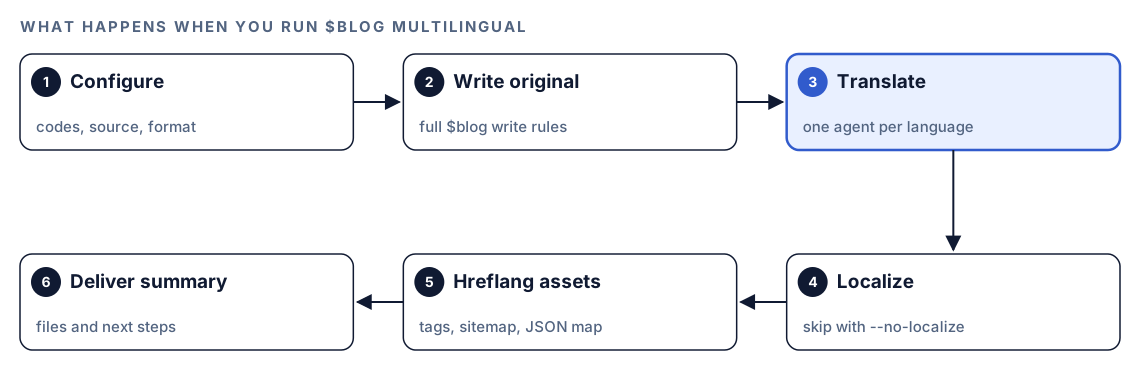
- Configure. Codex reads the topic, the target codes, the source language (English unless you pass
--source) and the format, which it detects from your project unless you set--format. It validates every code, drops any target that matches the source, and creates amultilingual/folder with one subfolder per language inside the project. - Write the original. The post goes through
$blog write, so its rules apply, from sourced statistics to FAQ schema, internal-link zones and images. - Translate. Each target language goes through
$blog translate, one agent per language, in parallel where the runtime supports it. - Localize. Unless you pass
--no-localize,$blog localizeadapts each translation in place: brand examples, calls to action, legal references and formality. - Build the hreflang assets. Codex writes copy-ready hreflang tags, a sitemap fragment with
xhtml:linkalternates, and a JSON map of every version's language, slug, file, title and description. If you ask, or a post's front matter setsschema: true, it also adds JSON-LD to each version withinLanguageandtranslationOfWork. - Deliver a summary of files, SEO assets and next steps.
If the Codex SEO kit is installed, hreflang validation goes to $seo hreflang. Without it, a built-in generator writes the tags with structural checks only, and the summary says so. If one translation fails, the rest still finish and Codex suggests a retry. Above ten target languages, the skill warns about run time and waits for your confirmation.
How the translate command handles each post
$blog translate is the engine underneath, and it also runs on its own for posts you already have.
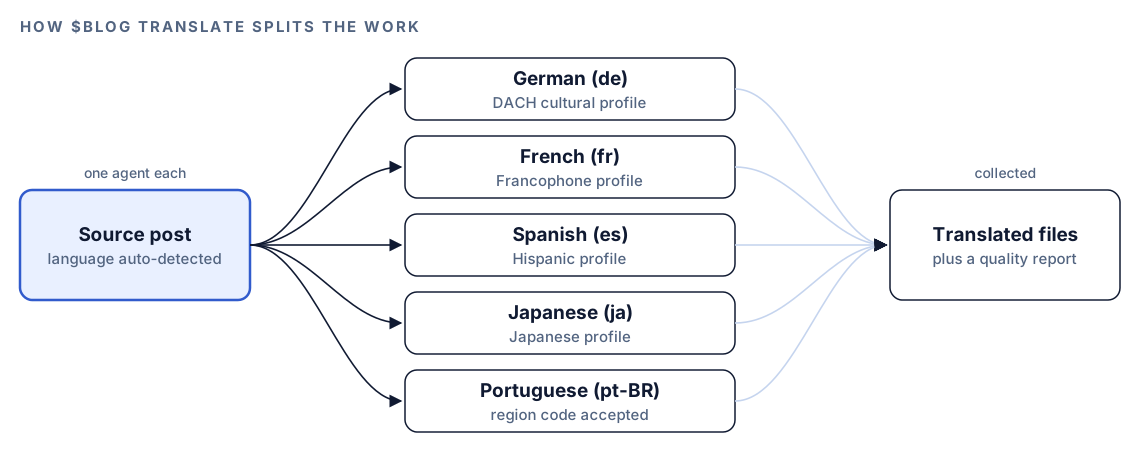
Codex detects the source language from the front matter lang field, then the HTML lang attribute, then the text itself. It builds the keyword map, then hands each language to a dedicated translator agent along with the source and, where one exists, a cultural profile. The kit has profiles for German-speaking (DACH), French-speaking, Spanish-speaking and Japanese markets.
What changes and what stays
| Translated and localized | Left exactly as written |
|---|---|
| Front matter title, description and tags | Front matter keys, image URLs and link URLs |
| Headings and body text | Markdown and HTML structure |
| Image alt text and figure captions | Code blocks, apart from meaningful comments |
| Text labels inside SVG charts | SVG attributes such as position, size and color |
| FAQ questions and answers | Personal names and source organizations in citations |
| Key takeaways, calls to action and link anchors | Internal-link markers and schema structure |
How the translator agent writes
The agent works to one test: would a native speaker write it this way? It matches the original's tone, keeps formal or informal address consistent, swaps idioms for local equivalents, and keeps the paragraph structure and sentence rhythm. It won't force English word order onto languages built differently, such as Japanese or Korean. Numbers, dates, currencies and quotation marks follow the target locale, so a German version writes 1.234,56 and 18.10.2026 where the English one wrote 1,234.56 and 10/18/2026.
Chart labels need care because translated text changes length. The skill plans for German labels up to 30% longer than English and for shorter Japanese and Chinese ones. Labels are never cut off; the agent widens the chart or shrinks the font instead.
Localized metadata
Each translated file gets front matter written for its market: a title of 50 to 60 characters with the localized keyword, a description of 150 to 160 characters, a slug in the target language, and lang, translatedFrom and translatedDate fields. If the source has JSON-LD, inLanguage is updated and translationOfWork points back to the original.
What Codex checks before delivery
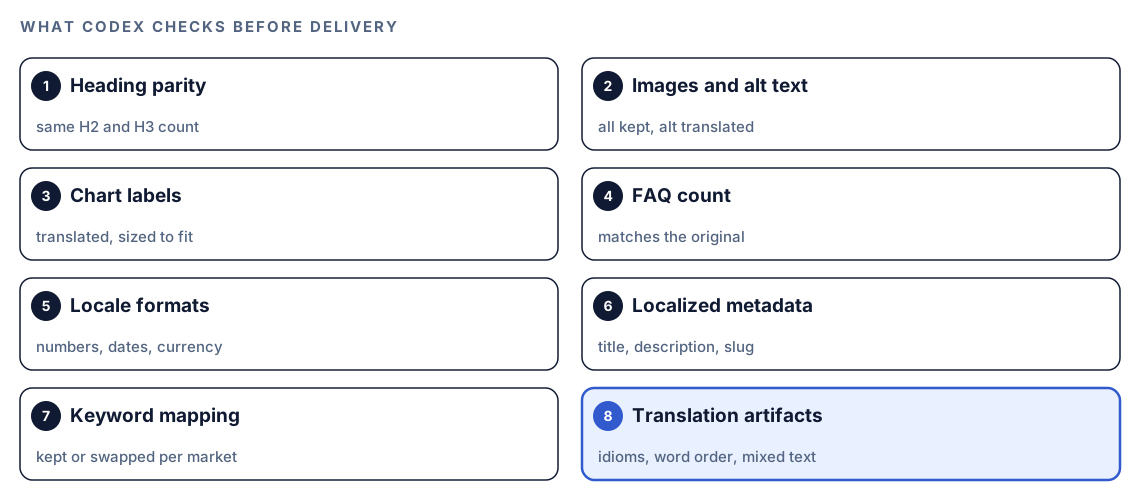
Errors are easy to miss in a language you don't read, so every version is checked first.
Structural parity
Each version must match the source's H2 and H3 count and FAQ count, with every image and chart present and its text translated. If the source uses citation capsules, the kit's short self-contained answer blocks, each H2 must still have one.
Machine-translation artifacts
Codex scans for the habits of raw machine output: literal idioms, unnatural word order, sentences that switch languages (loanwords such as "API" aside), source-format numbers and dates, and front matter left untranslated. Each problem is flagged with file path, line number and a suggested fix, and the agent reworks flagged passages before delivery.
Run it in Codex, step by step
- Install the Codex Blog kit with the steps in the install section, restart Codex, and open a new task in your blog's project folder. Our guide to installing skills in Codex has the details.
- Check your permission mode. A new post includes research for sourced statistics, so depending on your mode, Codex may ask before it uses the internet. Approve it for the task.
- To create a new post in several languages, give the topic and the codes:
$blog multilingual how to price a SaaS product --languages de,fr,es,ja,pt-BR- Add options when you need them.
--sourcesets the language of the original,--formatforces md, mdx or html, and--no-localizeskips cultural adaptation:
$blog multilingual how to price a SaaS product --languages de,fr --source en --format mdx --no-localize- To translate a post you already have, point the translate command at the file:
$blog translate content/blog/saas-pricing.md --to de,fr,es- Or ask in plain language. Codex picks the skill when your request matches it:
Translate content/blog/saas-pricing.md into German and Japanese, adapt the keywords for each market, and keep the markdown structure exactly as it is.If you leave out the codes, Codex asks once before starting. $blog translate saves to a translations/ folder with one subfolder per language; the multilingual command uses multilingual/.
Reading the delivery summary
The multilingual command ends with a summary in a fixed format:
## Multilingual blog complete: [Title]

### Translations
| Language | File | Localized | Keywords adapted |
|----------|------|-----------|------------------|
| de | multilingual/de/[localized-slug].md | yes | [N] |
| fr | multilingual/fr/[localized-slug].md | yes | [N] |

### International SEO assets
- multilingual/hreflang-tags.html
- multilingual/hreflang-sitemap.xml
- multilingual/hreflang-map.json

### Next steps
- Replace {url} placeholders in the hreflang tags with real URLs.
- Merge hreflang-sitemap.xml into your existing sitemap.
- Resolve [INTERNAL-LINK] placeholders with locale-specific URLs.
The translate command's summary adds a quality block with pass or fail per language for structure, localized meta tags and locale formats, plus counts of adapted keywords and flagged artifacts. Work through it in this order:
- Failed structure checks. A missing section or FAQ means the version isn't equivalent yet.
- Flagged artifacts and keyword choices. Have a fluent speaker read each flagged line and confirm the kept and swapped terms.
- Placeholders. No
{url}value or[INTERNAL-LINK]marker should reach production. - Deeper passes. Run
$blog localizeon any file that needs more cultural depth, and$blog locale-auditacross the folder.
Wire the language versions into your site with Codex
Codex can read your routing, templates and sitemap code, then make the change once for every language.
The generated tags arrive with placeholders:
<link rel="alternate" hreflang="en" href="{source-url}" />
<link rel="alternate" hreflang="de" href="{lang-1-url}" />
<link rel="alternate" hreflang="x-default" href="{source-url}" />
After Codex fills them from your real routes, every version carries the full, reciprocal set:
<link rel="alternate" hreflang="en" href="https://example.com/blog/saas-pricing/" />
<link rel="alternate" hreflang="de" href="https://example.com/de/blog/saas-preise/" />
<link rel="alternate" hreflang="fr" href="https://example.com/fr/blog/prix-saas/" />
<link rel="alternate" hreflang="x-default" href="https://example.com/blog/saas-pricing/" />
The localized JSON-LD on the German version links back to the original:
{
  "@context": "https://schema.org",
  "@type": "BlogPosting",
  "headline": "[Localized title]",
  "inLanguage": "de",
  "translationOfWork": {
    "@type": "BlogPosting",
    "inLanguage": "en",
    "url": "https://example.com/blog/saas-pricing/"
  }
}
Then ask Codex to publish:
Use multilingual/hreflang-map.json to publish the German and French versions of the SaaS pricing post. Move each file into our content folder following the site's locale routing. Generate the hreflang tags in the post layout from the map instead of hard-coding them, with absolute HTTPS URLs and our trailing-slash style. Add the alternates to our sitemap generator, and replace [INTERNAL-LINK] markers with posts that exist in that language. Show me the diff, then run the build.Generating the tags from data means a language added later gives every existing version its new return link automatically. After deploy, run $seo hreflang on one live URL if you have the Codex SEO kit, and see our XML sitemap audit guide to confirm the merged sitemap is valid.
Make it repeatable
The skill decides keyword and formality questions fresh on each run. Across dozens of posts you want them fixed, and a short AGENTS.md block does that:
## Translations
- Target languages: de, fr, es. Use $blog translate for existing posts and $blog multilingual for new ones.
- Keep these terms in English in every language: [Product name], API, SaaS.
- German uses formal address (Sie); French uses vous. Never mix forms within one post.
- Slugs are lowercase ASCII with hyphens; transliterate umlauts and accents.
- When a new language version ships, update hreflang on every existing version of that post.
Codex reads AGENTS.md before it starts work, so every translation task follows the same glossary and address rules without a reminder. Keep it short, since the combined instructions have a size cap. Our guide to AGENTS.md rules for SEO shows how to organize a longer file.
Without the skill: a plain Codex prompt
Codex can translate carefully with no kit installed if you spell out the rules:
Translate content/blog/saas-pricing.md into German. Keep the markdown structure, front matter keys, URLs, code blocks and personal names unchanged. Translate the title, description, headings, body, alt text and FAQ. For each keyword, decide whether German searchers use the English term or a German one, and tell me your choice. Use German number, date and quote formats and formal address throughout. Save it as translations/de/[german-slug].md with lang and translatedFrom in the front matter.And for the tags:
Write hreflang link tags for these URLs: [list]. Every page must list all versions including itself, use absolute HTTPS URLs, and include x-default pointing to the English version.The skill adds scale and checking: parallel agents, a keyword map, parity checks, an artifact scan with line numbers, cultural adaptation, the sitemap fragment and JSON map, and a fixed summary format.
Pitfalls to avoid
- Publishing without a fluent review. The checks catch structure and artifacts, not every wrong nuance.
- Adding a language to one page only. Return links have to be updated on every existing version.
- Shipping
{url}placeholders or[INTERNAL-LINK]markers to production. - Pointing
x-defaultat a random version instead of the source or a language picker. - Translating keywords literally when the market searches for the English term.
- Mixing formal and informal address in one post.
Keep going
- Run an hreflang audit with Codex once your versions are live.
- Localize blog content with Codex covers
$blog localizeand$blog locale-auditin depth. - Write a blog post with Codex explains the rules behind the original post.
- Every Codex Blog and Codex SEO command, listed in one place.
FAQ
What is a multilingual blog?
It's a blog that publishes the same posts in several languages, each at its own URL, with hreflang telling search engines which pages are versions of each other. Done well, every version reads as if it were written for its market.
Do I need hreflang tags for a multilingual blog?
Google asks site owners to tell it about localized versions of a page, and hreflang is the standard way to do it. The tags help search engines show each reader the right language and connect versions that would otherwise look unrelated. $blog multilingual generates the tags and a sitemap fragment for you.
Is machine translation good enough for SEO?
Raw machine output usually reads as translated, and readers notice. The translate skill works to a native-speaker standard and flags artifacts by line, but a fluent reviewer should still read each version before it goes live.
Should I translate URL slugs for each language?
Localized slugs read naturally to local visitors and can carry the local keyword, which is why the translate skill writes one. Whatever you choose, keep the pattern consistent and point hreflang at the final URLs.
What's the difference between translating and localizing a blog post?
Translating converts the language, formats and keywords. Localizing adapts examples, calls to action, legal references and formality to the culture. In Codex, $blog translate comes first, $blog localize follows, and $blog multilingual runs both.
How many languages can Codex translate a post into at once?
Both commands accept a comma-separated list of codes, and each language gets its own translator agent. The multilingual command warns you above ten languages, because run time grows with each one, and asks you to confirm.