
Technical SEO
XML Sitemap Audit with Codex: Check Every Listed URL
Run an XML sitemap audit with Codex: validate the file, find non-200, redirected and noindexed URLs, and fix the code that generates it.
An XML sitemap audit with Codex checks that your sitemap is valid XML within the protocol's limits, then requests every listed URL to confirm it returns 200, isn't redirected or noindexed, and is the version you want indexed. RankCue's Codex SEO kit runs the whole job with $seo sitemap <url>, saves a validation report in your project, and can also plan a new sitemap with quality gates for location pages. This guide explains what a healthy sitemap looks like, what the command checks, how to read the report, and how Codex fixes the code that generates the file.
Key takeaways
$seo sitemap <url>checks XML validity, the 50,000-URL limit per file, the status code of every listed URL,lastmodaccuracy, deprecated tags and the robots.txt reference.- It compares the sitemap with crawled pages, so you see pages missing from the sitemap and listed URLs that 404 or redirect.
- A clean sitemap lists only canonical, indexable HTTPS URLs that return 200. Non-200 and noindexed URLs are rated High; redirects are Medium.
- Google ignores
priorityandchangefreq, so the skill marks them as Info. Identicallastmoddates on every URL are a Low issue.- When it builds a new sitemap, the skill pauses on location pages: a warning at 30 and a hard stop at 50 until you justify them.
The sitemap command at a glance
| Item | Details |
|---|---|
| Command | $seo sitemap <url> |
| What you give it | Your site's URL, or the URL of the sitemap or sitemap index itself |
| What Codex reads | robots.txt, the sitemap files, and the response for every URL they list |
| What you get back | VALIDATION-REPORT.md with issues by severity and recommendations; when generating, sitemap.xml and STRUCTURE.md |
| Needs | Internet access; no third-party API keys |
| Best for | Finding broken, redirected or noindexed URLs in a sitemap, and planning one for a new or rebuilt site |
What does an XML sitemap do for search?
An XML sitemap is a file that lists the URLs you want search engines to crawl and index. Crawlers find most pages by following links, so a small, well-linked site can get by without one. Sitemaps matter most on large sites, new sites with few inbound links, and sites with deep or fast-changing content. Google's sitemaps overview explains when you need one.
A sitemap is a suggestion, not an order. Listing a URL doesn't make Google index it. The file tells crawlers which URLs you consider worth their time, so accuracy matters more than size. Redirects, errors and noindexed pages in it contradict the pages themselves.
What belongs in a sitemap
Every listed URL should pass five tests:
- Live: it returns HTTP 200, not a 404, a 410 or a server error.
- Final: it isn't a redirect. List the destination, not the old address.
- Indexable: it has no
noindexdirective. - Canonical: its canonical tag points to itself, not to another URL.
- Secure: it uses HTTPS.
If a URL fails one of these, either fix the page or take it out of the sitemap.
The protocol limits
The sitemaps protocol caps one file at 50,000 URLs and 50 MB uncompressed. Bigger sites use several files tied together by a sitemap index. The skill also suggests splitting by content type, such as pages, posts, images and videos, so problems are easier to place.
lastmod, priority and changefreq
lastmod tells crawlers when a page last changed in a meaningful way. Google uses it when it's consistently accurate, so a sitemap that stamps the build date on every URL teaches crawlers to ignore the field. priority and changefreq are older tags that Google ignores. The skill rates them Info: harmless clutter you can drop.
How crawlers find a sitemap
Search engines read the Sitemap: line in robots.txt, and you can also submit a sitemap in Google Search Console or Bing Webmaster Tools. If you give the skill only a domain, it tries the robots.txt reference and the common paths, /sitemap.xml and /sitemap_index.xml, before it reports that no sitemap exists.
How the sitemap command runs inside Codex
When you run $seo sitemap https://example.com in a Codex task, the skill moves through a fixed set of stages and writes its findings into your project.
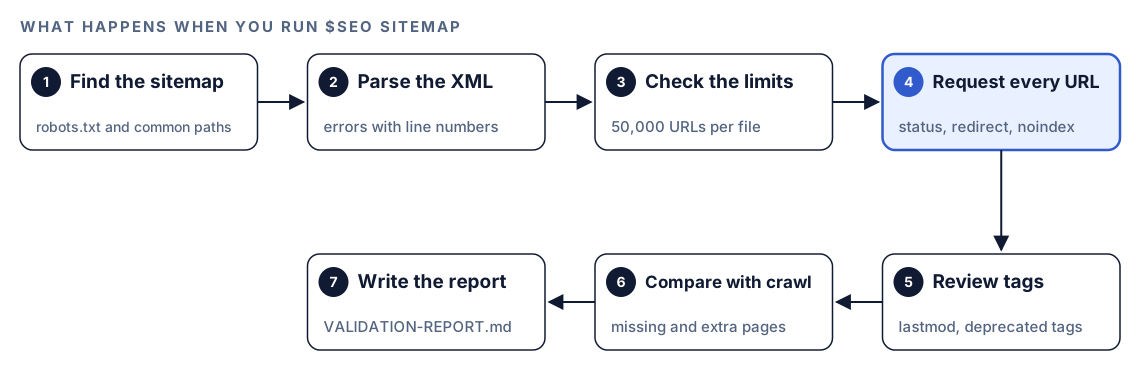
- Find the sitemap. It reads robots.txt and checks the common locations if you didn't give a sitemap URL.
- Parse the XML. If the file isn't valid XML, the report names the parsing errors with line numbers.
- Check the limits. Each file must stay under 50,000 URLs. Larger sets need a sitemap index.
- Request every URL. Each listed URL is checked for its status code, redirects, noindex, canonical target and protocol.
- Review tags and dates. It looks for identical
lastmodvalues and forpriorityandchangefreqtags. - Compare with the crawl. Crawled pages missing from the sitemap, and listed URLs that 404 or redirect, go into separate lists.
- Write the report. Findings land in
VALIDATION-REPORT.mdwith a severity for each issue.
If the server starts rate limiting, the skill backs off and reports partial results with a note on when to retry. If the site is unreachable, it reports the status code.
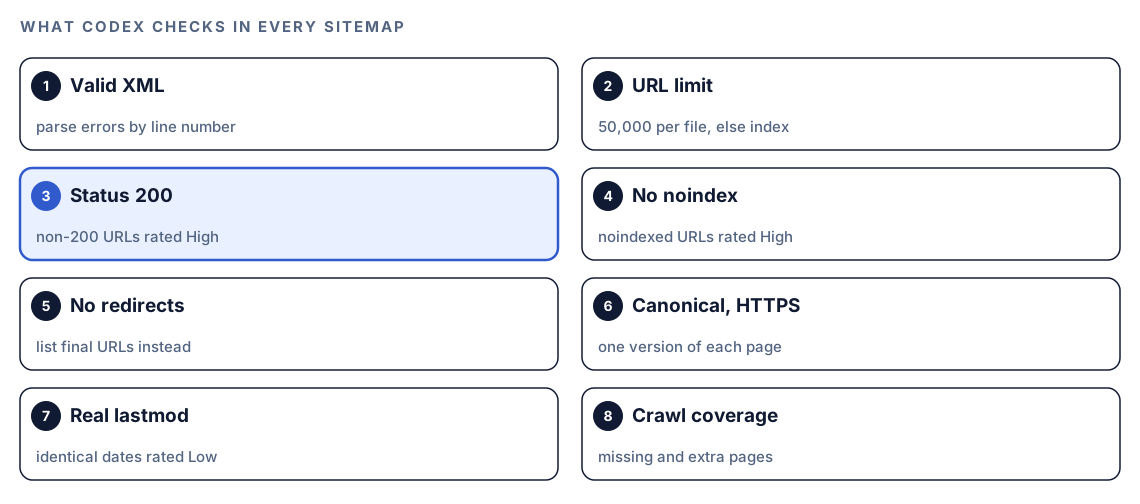
What Codex checks in every sitemap
Format and size
The file has to parse as valid XML. A single unescaped ampersand in a URL can break the whole file, which is why parsing comes first and errors are reported by line. Then comes the count: more than 50,000 URLs in one file is rated Critical, and the fix is a sitemap index that points to smaller files.
Status codes for every listed URL
This is the core of the audit. Pages get deleted, renamed and merged, while generators keep listing the old URLs. The skill expects every URL to return 200. Anything else is rated High, and the fix is to restore the page or remove it from the sitemap. Redirected URLs are rated Medium: they still work for visitors, but the sitemap should list the final address.
Indexability: noindex, canonicals and HTTPS
A noindexed URL in a sitemap is a contradiction. The sitemap says "index this" while the page says "don't", so the skill rates it High. The same logic applies to non-canonical URLs, where the page points search engines to a different address, and to HTTP URLs on an HTTPS site.
Dates and deprecated tags
If every lastmod in the file is identical, the dates almost certainly come from the build, not the content. The skill rates that Low and recommends real modification dates. priority and changefreq are rated Info, with removal as the fix.
Coverage and the robots.txt reference
The skill compares what a crawl of the site finds with what the sitemap lists. Pages that exist and are linked but aren't in the sitemap are listed as missing. Listed URLs that return 404 or redirect are listed as extra. It also confirms that robots.txt points to the sitemap, so crawlers can find it without a manual submission.
Need a new sitemap? Generation mode and quality gates
The same command can build a sitemap from scratch for a new site or a rebuild. Ask for one in plain language and the skill switches modes.
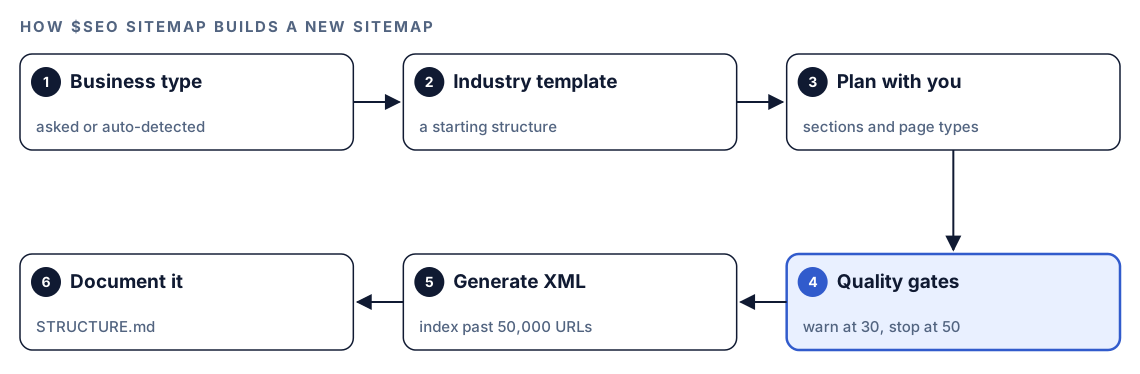
It asks for your business type or detects it from the existing site, loads an industry template as a starting structure, and plans the sections with you. Before it writes any XML, it applies quality gates to location pages:
- At 30 or more location pages, it warns you and requires at least 60 percent unique content on each page.
- At 50 or more, it stops and asks you to justify the plan before going further.
The reason is spam risk. Google's spam policies treat near-identical pages built to catch slight variations of a search as doorways, and a service page cloned for every nearby town is the textbook case. The skill draws a clear line. Pages that carry their own substance scale fine: integrations backed by setup docs, glossary entries with a real definition, product pages with their own specs. Pages that only swap a city, industry or competitor name into a template, with nothing specific behind it, do not.
Once the plan passes, it writes the XML, adds an index when the URL count calls for one, and records the architecture in STRUCTURE.md with a URL count.
Run it in Codex, step by step
- Install the kit using the install section, restart Codex, and open a new task in your website's project. Our guide to installing SEO skills in Codex has the details.
- Check your permission mode. The audit requests live URLs, so depending on your mode, Codex may ask before it uses the internet. Approve it for the site you're checking.
- Run the command with your domain or the sitemap URL:
$seo sitemap https://example.com/sitemap_index.xml- Or ask in plain language. Codex picks the skill when your request matches it:
Audit the XML sitemap for https://example.com. Tell me which listed URLs don't return 200, which redirect or are noindexed, and which important pages are missing.- To build a sitemap instead, describe the site and ask for one:
Plan and generate a new XML sitemap for this site. It's a SaaS product with docs, a blog and integration pages. Document the structure too.Reading the report
The layout can vary with what the skill finds, but the report covers a pass or fail for each check, the missing and extra pages, any quality gate warnings, and recommendations. In outline:
## Sitemap Validation: example.com
| Check | Result |
|-------|--------|
| Valid XML | Pass |
| URLs per file under 50,000 | Pass (XX URLs) |
| All URLs return 200 | Fail (XX URLs) |
| No noindexed URLs | Fail (XX URLs) |
| No redirected URLs | Fail (XX URLs) |
| Real lastmod dates | Fail (all identical) |
| priority and changefreq | Present (ignored by Google) |
| Referenced in robots.txt | Pass |

## Missing pages (crawled, not in sitemap)
- [URL]

## Extra pages (in sitemap, 404 or redirected)
- [URL] [status or final URL]

## Recommendations
- [one line per fix, highest severity first]
Work down the skill's severity scale:
| Finding | Severity | What to do |
|---|---|---|
| File won't parse | Critical | Repair the XML at the reported line |
| One file over the URL limit | Critical | Break it up under an index |
| URL returns 404, 410 or 5xx | High | Restore the page or drop the URL |
| URL carries noindex | High | Drop it, or lift the noindex if it was a mistake |
| URL redirects | Medium | Swap in the destination |
| Same lastmod on every URL | Low | Pull dates from real content changes |
| priority or changefreq tags | Info | Optional cleanup |
Look at the missing pages list with care. A page missing from the sitemap might be one you forgot, or one you deliberately keep out, such as a thank-you page. Decide which before you change the generator.
Apply the fixes with Codex
Very few sitemaps are written by hand. A framework route, a CMS plugin or a build script generates them, so editing the XML file directly only lasts until the next build. Codex can find the generator in your repository and fix the logic that produced the bad entries.
A typical entry the audit flags:
<url>
  <loc>http://example.com/old-pricing</loc>
  <lastmod>2026-10-18</lastmod>
  <changefreq>daily</changefreq>
  <priority>0.8</priority>
</url>
That URL uses HTTP, redirects to the new pricing page, carries the build date and lists two tags Google ignores. The fixed entry:
<url>
  <loc>https://example.com/pricing</loc>
  <lastmod>2026-09-02</lastmod>
</url>
Then ask Codex to change the source:
Read VALIDATION-REPORT.md. Find the code that generates our sitemap. Change it so it only includes routes that return 200, are indexable and canonical to themselves, and use https. Take lastmod from each page's real updated date, not the build time, and drop priority and changefreq. Show me the diff, run the build, and tell me how many URLs the new sitemap lists compared with the old one.The count comparison is a sanity check. A small drop after cleanup is normal; a drop by half usually means a filter is too aggressive. After deploy, run $seo sitemap again and resubmit the sitemap in Search Console if you use it.
Make it repeatable
Sitemaps drift as content changes, so a scheduled check pays off. codex exec runs Codex without the interactive UI, so a cron job or CI step can call it. Run this from your site's repository:
codex exec '$seo sitemap https://example.com' -o "reports/sitemap-$(date +%F).md"The single quotes keep the shell from expanding $seo, and -o saves Codex's final message to a dated file while still printing it. The default sandbox is read-only, which suits an audit. If you also want the skill's own VALIDATION-REPORT.md saved in the project, add --sandbox workspace-write. Unattended runs need internet access for the URL checks, so make sure your sandbox and permission setup allows the network access the task needs; the Codex sandboxing docs explain the options. codex exec also expects to run inside a Git repository.
To turn the dated reports into a weekly diff, follow up in the same session:
codex exec resume --last "Compare this report with the previous sitemap report in reports/ and list only issues that are new."Our guide to automating SEO checks with codex exec covers scheduling and CI in depth.
Without the skill: a plain Codex prompt
Codex can do a solid first pass with no kit installed:
Fetch https://example.com/robots.txt and find the sitemap. Parse it and any child sitemaps in an index. For every URL, request it without following redirects and record the status code, the redirect target, whether it has a noindex meta tag or X-Robots-Tag header, and whether its canonical tag points to itself. Give me a table of every URL that fails, grouped by problem.And for the code side:
Find the code in this repository that generates sitemap.xml. Explain which routes it includes, where lastmod comes from, and whether noindexed or redirected routes can end up in the file.What the skill adds is a fixed set of checks with severities, the crawl comparison, rate-limit handling, generation with quality gates, and a report file in the same format every time.
Pitfalls to avoid
- Stamping every URL with the build date as
lastmod. Crawlers learn to ignore dates that are never true. - Keeping old URLs after a migration. List the final addresses, not the ones that redirect.
- Listing pages you've noindexed, such as internal search results, tag archives or thank-you pages.
- Leaving HTTP URLs in the file after a move to HTTPS.
- Moving the sitemap and forgetting the
Sitemap:line in robots.txt. - Publishing hundreds of near-identical location pages because a generator made it easy.
- Treating a clean sitemap as proof of indexing. It's a hint; Google still decides.
Keep going
- Technical SEO audit with Codex puts the sitemap in context with robots rules, canonicals and indexability.
- Bing Webmaster Tools and IndexNow from Codex shows how to tell search engines about changed URLs quickly.
- Programmatic SEO with Codex goes deeper on publishing pages at scale without thin content.
- Hreflang audit with Codex checks language alternates, which many sites declare in the sitemap.
- All Codex SEO and Codex Blog skills, with every command in both kits.
FAQ
What should an XML sitemap include?
Only pages you want in search results, each at its final HTTPS address, answering with a 200 and pointing its canonical at itself. Everything else, from redirects to duplicates, stays out.
How many URLs can one sitemap contain?
One file can hold 50,000 URLs or 50 MB before compression, whichever comes first. Past that, you publish several files and tie them together with an index.
Does Google use priority and changefreq?
No, Google skips both, so the Codex SEO skill files them under Info. The date field is different: an honest lastmod can still help.
Should noindex pages be in my sitemap?
No. Listing a page invites indexing while noindex refuses it, and that mixed message is why the skill rates it High. Take the URL out, or remove the noindex if the page should rank.
Can Codex fix my sitemap automatically?
It can find the generator in your repository, change the logic that lets bad URLs in, show you the diff and run your build. You approve the change, and a second $seo sitemap run confirms it.