
SEO Automation
Programmatic SEO with Codex: Scale Pages Safely
Plan and audit programmatic SEO pages with Codex: check data, templates and URLs, enforce thin content gates, and fix the generator in your repo.
Programmatic SEO with Codex means using a coding agent to plan, build and review pages generated from a dataset, with quality gates that catch thin or duplicate pages before a search engine ever crawls them. RankCue's Codex SEO kit turns that review into one command, $seo programmatic, which checks the data behind your pages, the template, the URL pattern, internal links, canonicals, sitemaps and index controls, then scores the whole setup out of 100. This guide covers when generated pages are worth building, how the command runs inside Codex, the thresholds it enforces, and how to let Codex add those safeguards to the page generator in your own codebase.
Key takeaways
$seo programmatichas two modes: give it a URL to audit pages you already publish, or ask it toplana new page set from a dataset.- The report scores six areas: data quality, template uniqueness, URL structure, internal linking, thin content risk and index management.
- The quality gates are explicit settings: under 40% unique content is flagged as thin, under 300 words goes to review, and 500 or more pages without justification is a hard stop that needs your approval.
- The skill favors page types with real per-record value, such as integration, glossary and data pages, and warns against city-swap pages at scale.
- Because Codex works inside your repository, it can build the gates into your generator, so weak records are noindexed and kept out of the sitemap on every build.
The programmatic command at a glance
| Item | Details |
|---|---|
| Command | $seo programmatic <url> to audit a live section, $seo programmatic plan to design a new page set |
| What you give it | The URL of a generated section, or a description of the dataset and page type you want to build |
| What Codex reads | The pages in that section, or the data behind them: CSV or JSON files, API responses or database records |
| What you get back | A Programmatic SEO Score out of 100, six category scores, issues sorted by urgency, and recommendations |
| Needs | Internet access for live URLs; no third-party API keys |
| Best for | Integration directories, glossaries, template libraries, location pages and any build that outputs hundreds of URLs |
What is programmatic SEO?
Programmatic SEO means generating many pages from one template and one structured dataset. You define a page type, such as an integration page or a glossary entry, and a build step fills the template once for each record. A software company with hundreds of integrations can publish one page per integration.
The appeal is clear. Long-tail searches such as "[tool] integration with [platform]" each bring modest demand, but there are many of them, and one good template can serve them all. The risk is just as clear: a template that swaps a single word per page produces thousands of near-identical URLs, which is the pattern search engines treat as low value.
The three parts of every build
- The data source. A CSV or JSON file, an API, or a database table. Each record becomes a page, so the records set the ceiling for page quality.
- The template. The layout with injection points for the title, H1, body sections, meta description and schema. Some blocks are shared by every page; others change per record.
- The URL pattern. A rule such as
/integrations/[platform]or/glossary/[term]that turns each record into a stable, readable address.
Codex suits this work because all three parts usually sit in one repository, so it can read the data file, the template component and the build script in a single task.
Why scaled pages get into trouble
Google's spam policies include scaled content abuse: generating many pages mainly to manipulate rankings instead of helping people, however those pages were produced. That rule doesn't ban programmatic SEO. Pages built from data are fine when each one gives a visitor something the page next to it does not. Trouble starts when only a city or product name changes between otherwise identical paragraphs.
Index bloat is the quieter problem. When a site exposes far more URLs than it has useful pages, crawlers spend their time on filtered views, empty records and parameter variants instead of the pages you care about.
Pages that hold up at scale, and pages that don't
The skill keeps two lists: page types with real substance per record, and page types that only look different.
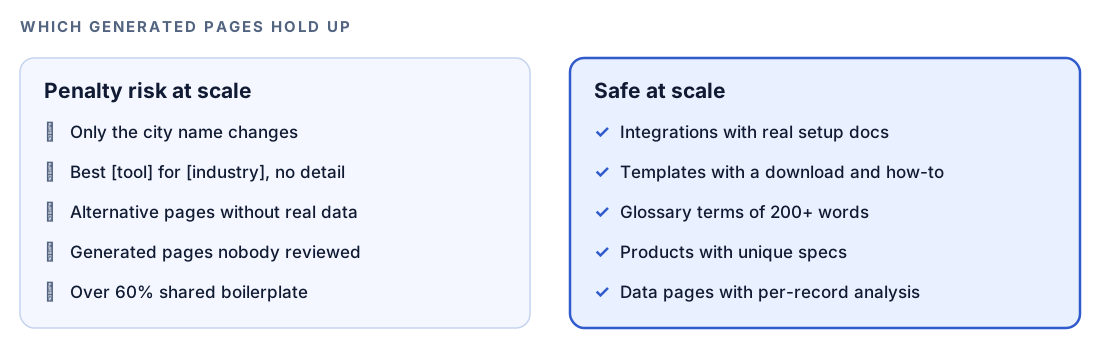
The glossary rule makes a handy benchmark: the skill expects definitions of 200 words or more, with examples and related terms. A one-line definition padded with a shared intro fails it.
How $seo programmatic runs inside Codex
The skill works through the same areas whether you point it at a live section or ask it to plan a new one. In audit mode it reads the pages you already publish. In plan mode it reads your dataset and your description of the page type, then applies the same rules to the design before anything is built.
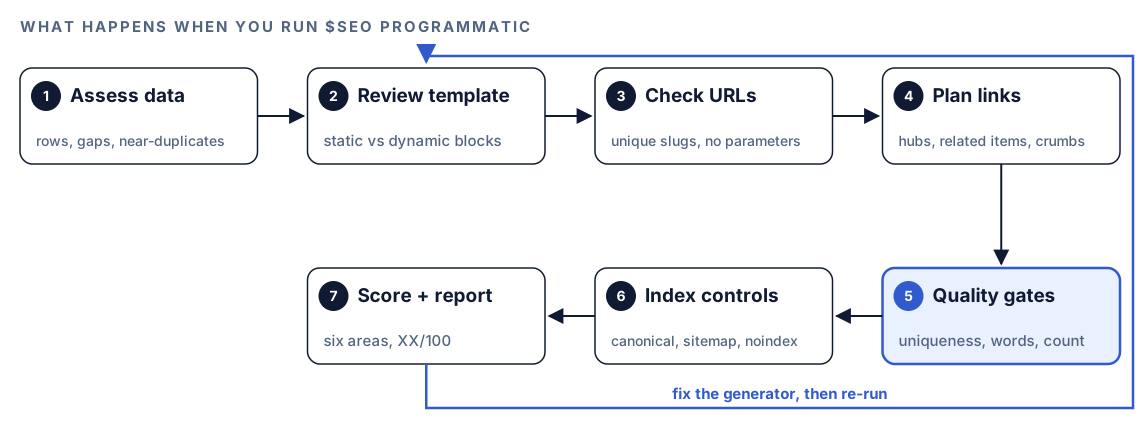
- Assess the data. Files are checked for row count, column uniqueness and gaps; APIs for response shape, freshness and rate limits; databases for record count, field completeness and update cadence. Two records sharing more than 80% of their fields are flagged as near-duplicates.
- Review the template. It separates fixed blocks from per-record ones, checks that empty data hides its section, and asks whether the changing parts add facts or only keyword variations.
- Check the URL pattern. Slugs should be lowercase, hyphenated, unique, under 100 characters, free of query parameters, and match the site's existing trailing-slash style.
- Plan internal links. It looks for category hubs, three to five related-item links per page, breadcrumbs with BreadcrumbList schema built from the path, and cross-links between pages that share an attribute.
- Run the quality gates. Page counts, uniqueness and word counts are measured against the thresholds below. This stage can stop the run.
- Check index controls. Self-referencing canonicals, sitemap coverage, and noindex for pages that miss the gates.
- Score and report. Each area gets a score, and each issue gets a priority.
When a hard stop triggers, Codex halts, shows what it found and waits for your explicit approval. Treat that pause as a real decision: should this batch of pages exist at all?
What Codex checks: the six scored areas
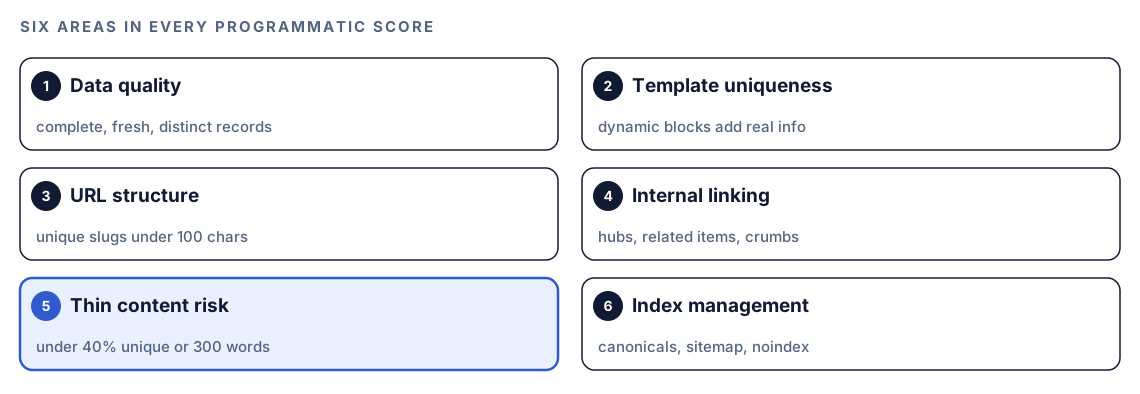
Every report rates the same six areas, so two runs are easy to compare.
Page count, uniqueness and word count
The skill's gates, written out as its own settings:
| What it counts | Trigger | Result |
|---|---|---|
| Generated pages nobody has reviewed | 100 or more | Warning, with a content check before launch |
| Generated pages with no stated reason to exist | 500 or more | Hard stop until you approve and a thin page review is done |
| Share of the page that is unique | Below 40% | Marked as thin |
| Words on the page | Below 300 | Marked for a closer look |
On top of the table, the skill suggests a stricter line: treat anything below 30% unique as a hard stop, not a warning.
How uniqueness is measured
Take the words that appear only on this page, divide by all the words on the page, and multiply by 100. The comparison runs against every other page in the set. Site-wide headers, footers and navigation are ignored, but template boilerplate is counted, so a long intro paragraph repeated on every page drags every page down.
Rollout rules
- Ship 50 to 100 pages at a time, then watch indexing and rankings for two to four weeks before the next batch.
- Have a person read a sample of 5 to 10% of generated pages before launch.
- Don't release 500 or more generated pages in one go without an explicit quality review.
- Ask of each page type: would this page be worth publishing if no similar pages existed?
- Avoid placing programmatic content on another company's high-authority domain, which can fall under Google's site reputation abuse policy.
Canonicals, sitemaps and index bloat
Each generated page carries a canonical tag pointing at itself, sort and filter variants point to the base URL, and where a generated page overlaps a hand-written one, the hand-written page wins.
Sitemaps should list every indexable generated page, split at the protocol limit of 50,000 URLs under a sitemap index, take <lastmod> from the record's real update time rather than the build time, skip noindexed pages, and be referenced in robots.txt. Against bloat, the skill suggests noindexing pages that fail the gates and faceted views, merging thin records into aggregate pages, watching crawl stats in Search Console past 10,000 generated pages, and comparing indexed and intended page counts every month.
Run it in Codex, step by step
- Install the kit using the setup steps in the install section, restart Codex, and open a new task in the project that holds your page generator and data. Our walkthrough on installing SEO skills in Codex covers the details.
- Check your permission mode. Audit mode fetches live pages, so depending on your mode, Codex may ask before it uses the internet. Approve it for the site you're checking.
- To audit a section you already publish, give it the hub URL:
$seo programmatic https://example.com/integrations/- To plan a new page set, use the plan mode and describe the data, the page type and the template in the same message:
$seo programmatic plan
Data: data/integrations.csv, one row per platform. Page type: integration pages at /integrations/[platform]. Template: src/templates/integration.tsx.- Or ask in plain language. Codex picks the skill when your request matches its description:
We generate glossary pages from content/glossary.json. Check whether they risk thin content or index bloat, and tell me which records to merge or noindex.If the skill finds no template-generated pages at the URL, it says so and suggests checking whether the URL points at the right section or the pages render only in the browser.
Reading the report
The report opens with the overall score and a status for each area, then lists issues by urgency:
## Programmatic SEO Score: XX/100

| Category | Status | Score |
|----------|--------|-------|
| Data Quality | ⚠️ | XX/100 |
| Template Uniqueness | ❌ | XX/100 |
| URL Structure | ✅ | XX/100 |
| Internal Linking | ⚠️ | XX/100 |
| Thin Content Risk | ❌ | XX/100 |
| Index Management | ⚠️ | XX/100 |

### Critical Issues (fix immediately)
- [issue, affected pages, threshold crossed]
### High Priority (fix within 1 week)
### Medium Priority (fix within 1 month)
### Low Priority (backlog)

### Recommendations
- Data source improvements: [records to enrich or merge]
- Template modifications: [sections to add or make conditional]
Work through it in this order:
- Hard stops and thin content. Pause new pages in the set until these are resolved.
- Data quality. A template can't show facts the records lack, so enrich or merge sparse records.
- Template uniqueness. Cut shared boilerplate and add sections that appear only when a record has data for them.
- Index management. Canonicals, noindex rules and sitemap entries.
- URLs and links. Slug changes need redirects, so batch them.
Apply the fixes with Codex
Programmatic problems are fixed once, in the generator, not page by page. Codex can open the data file, the template and the build script together and change all three in one diff.
The skill measures unique words. In a build step, comparing five-word sequences is a practical stand-in, since common words like "the" appear on every page. A Python gate might look like this:
import re
from collections import Counter

def shingles(text, n=5):
    words = re.findall(r"[a-z0-9']+", text.lower())
    return {" ".join(words[i:i + n]) for i in range(len(words) - n + 1)}

def apply_gates(pages, word_counts):
    """pages maps slug -> body text with header, footer and nav removed."""
    sets = {slug: shingles(body) for slug, body in pages.items()}
    seen = Counter(s for page_set in sets.values() for s in page_set)
    results = {}
    for slug, page_set in sets.items():
        unique_pct = 100 * sum(1 for s in page_set if seen[s] == 1) / max(1, len(page_set))
        thin = unique_pct < 40
        results[slug] = {
            "unique_pct": round(unique_pct),
            "noindex": thin,
            "in_sitemap": not thin,
            "needs_review": word_counts[slug] < 300,
        }
    return results
Then ask Codex to wire it in:
Use the programmatic SEO report. In our page generator, add a quality gate: pages under 40% unique content get a noindex robots meta tag and are left out of the sitemap, and pages under 300 words are written to a review list. Make every canonical self-referencing, take <lastmod> from each record's updated_at field, and fail the build if two records produce the same slug. Show me the diff, then run the build and tell me how many pages each rule affected.Read the diff before you accept it, and check which pages flipped to noindex. If an important page is caught, fix its data rather than loosening the gate. After deploy, run $seo programmatic on the section again and compare the six scores.
Make it repeatable
A coding agent can generate ten thousand pages as easily as ten, so programmatic work needs standing rules. Add a section to the project's AGENTS.md:
## Programmatic pages
- Before adding a new programmatic page type, run $seo programmatic plan and share the score.
- Ship new pages in batches of 50 to 100. Ask before any change that adds more than 100 indexable URLs.
- Pages under 40% unique content are noindexed and left out of the sitemap. Fix the data, not the gate.
- Slugs are lowercase, hyphenated, unique and under 100 characters, with no query parameters.
- Every page has a self-referencing canonical. <lastmod> comes from the record's update time, never the build time.
Codex reads AGENTS.md before it starts work, so the batch limit and the gate apply to every future task in the project. Keep it short; combined instructions have a size cap. Our guide to AGENTS.md rules for SEO shows how to organize rules like these across a larger site.
Without the skill: a plain Codex prompt
You can get a useful first look from Codex with no kit installed:
Read data/integrations.csv and src/templates/integration.tsx. For each row, estimate how much of the rendered page would be unique compared with the other pages. List rows with missing fields or near-duplicate values, and check the URL pattern for duplicate slugs, uppercase letters and query parameters. Recommend which records to enrich, merge or noindex.For a section that is already live:
Fetch https://example.com/glossary/ and five pages linked from it. Compare their body text, ignoring header, footer and navigation. Tell me which sentences repeat on every page and whether each page would be worth publishing on its own.What the skill adds is a fixed standard: the same thresholds on every run, a six-area score you can track, a hard stop that waits for your approval, and a report format that points straight at the generator fix.
Pitfalls to avoid
- Swapping a city or product name into identical paragraphs and calling each result a page.
- Writing a long shared intro. Boilerplate counts against uniqueness on every page.
- Using build time as
<lastmod>, which claims every page changed on every deploy. - Publishing the whole set at once instead of in batches you can watch.
- Letting sort orders and filters create indexable URLs.
- Leaving records with empty fields live instead of hiding the section or merging the record.
- Generating competitor alternative pages with no real comparison data.
Keep going
- Audit your XML sitemap with Codex to check the URLs your generator lists after each batch.
- Build comparison and alternatives pages with Codex if you plan "[competitor] alternative" pages, which need real data.
- Find keyword cannibalization with Codex when generated pages compete with hand-written ones.
- Run a full SEO audit with Codex to see programmatic issues next to technical and content checks, or browse every Codex SEO and Codex Blog skill.
FAQ
What is programmatic SEO?
Programmatic SEO is generating many pages from a template and a structured dataset, one page per record, as in integration directories, glossaries and location pages. It works when each record holds enough unique information to make its page useful alone.
Does Google penalize programmatic SEO?
Google doesn't penalize pages because a script built them. Its spam policies target scaled content made mainly to manipulate rankings, such as thousands of pages that differ by one swapped keyword. Pages that each answer a real question with real data are a different matter.
How many programmatic pages should I publish at once?
The skill's rollout rule is batches of 50 to 100 pages, followed by two to four weeks of watching indexing and rankings before you expand. It treats 500 or more pages without justification as a hard stop that needs explicit approval and a thin content audit.
How unique does each programmatic page need to be?
The skill flags pages under 40% unique content as thin and recommends treating anything under 30% as a hard stop. Uniqueness is measured against every other page in the set, with headers, footers and navigation excluded but template boilerplate included.
Can Codex build programmatic SEO pages from a spreadsheet?
Yes. Export the spreadsheet to CSV or JSON in your project, run $seo programmatic plan to check the data and the page design, and then ask Codex to build the template and generator. Keep the batch limits and quality gates in place, review the diff, and run your build before anything ships.