
SEO Automation
FLOW SEO Framework in Codex: Find, Leverage, Optimize, Win
Run the FLOW SEO framework in Codex: pick a stage, apply evidence-led prompts to your page, and turn each finding into a tested change in your repo.
The FLOW SEO framework breaks search work into four stages, Find, Leverage, Optimize and Win, and gives each stage its own set of structured prompts, so every analysis starts from evidence instead of an improvised question. In Codex, RankCue's kits run it with $seo flow for any site and $blog flow for blogs: you name the stage, give a URL or topic, and Codex applies that stage's prompts to your page. This guide explains what each stage is for, how the commands choose and apply prompts, and how to turn the findings into changes in your own project.
Key takeaways
- FLOW stands for Find, Leverage, Optimize and Win. The Codex SEO kit carries 41 prompts across five stages (a Local track is the fifth), and the Codex Blog kit carries the 30 that apply to blogs.
$seo flow find,leverage,optimize,winandlocaleach load only that stage's prompts and apply them to your URL or topic. Run$seo flowon its own for an overview and a nudge toward the right stage.- The Optimize stage holds 21 prompts, so the skill picks exactly 2 or 3 based on your industry, earlier skill output in the task and signals on the page, and it tells you why it chose them.
- Every finding names the evidence that would confirm it. That is what "evidence-led" means in practice: a finding is a hypothesis until the data backs it.
$blog flowleaves out the local prompts, routes findings to blog commands such as$blog rewriteand$blog seo-check, and keeps the library current with$blog flow sync.
The FLOW commands at a glance
| Item | Details |
|---|---|
| Command | $seo flow [stage] [url or topic] for any site; $blog flow with find, optimize, win, prompts or sync for blogs |
| What you give it | A stage name plus a URL or topic, or nothing at all for the overview |
| What Codex reads | The FLOW operating model, the prompt files for the chosen stage, the target page, and earlier output in the same task |
| What you get back | A stage-labeled analysis: the prompts applied and why, findings per prompt, and the evidence each finding needs |
| Needs | Internet access to fetch the page and to sync prompts; no third-party API keys |
| Best for | Deciding what to work on next and asking the right questions at the right stage |
What is the FLOW SEO framework?
FLOW is an evidence-led operating model for SEO, built for a time when people find answers in AI-generated summaries as well as in classic results.
Most SEO checklists are flat: a long list of things to check, in no particular order. FLOW is a loop. It asks where a page or topic sits in its life, then gives you questions that fit that moment. A topic you haven't written about needs demand research, not conversion tweaks. A page that already earns traffic but no sales needs the opposite.
The four stages, and a local track
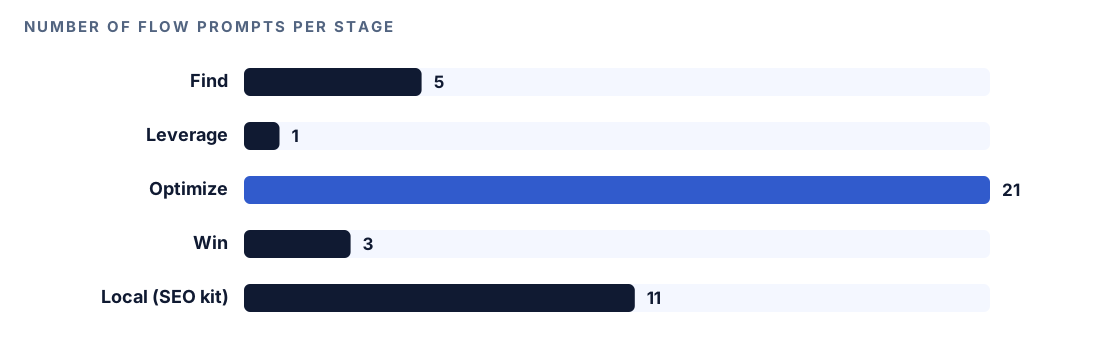
| Stage | The question it answers | Prompts |
|---|---|---|
| Find | Where is the demand, and what intent sits behind it? | 5 |
| Leverage | How do you build authority off your own site? | 1 |
| Optimize | What would make an existing page stronger? | 21 |
| Win | How do you turn visibility into results? | 3 |
| Local (SEO kit only) | How does a local business show up for nearby searches? | 11 |
Find covers keyword research, gap analysis and SERP intent mapping: working out what people search for and what the results reward. Leverage is about off-site authority, chiefly backlink strategy. Optimize is the largest stage because it covers the most ground: on-page work, technical fixes, E-E-A-T, freshness, citations, answer-first formatting and more. Win looks at the bottom of the funnel (BOFU, the pages people read right before they buy), conversion rate, and a dual-surface scorecard. Local covers Google Business Profile optimization, local titles and meta tags, and local audits.
Why evidence-led matters
An AI model will answer any SEO question you ask it, confidently. That's the risk. FLOW's prompts are written to make the model show its working: each finding comes with a list of the data that would validate or strengthen it, such as Search Console queries, a crawl, backlink data or conversion numbers. The framework also keeps a bibliography of evidence sources, and Codex reads it only when a finding cites a study or statistic. The result is a list of hypotheses you can test, not a list of opinions you have to trust.
How the FLOW command runs inside Codex
When you run $seo flow optimize https://example.com/pricing, the skill loads the framework, works out which prompts fit, and applies them to your page.
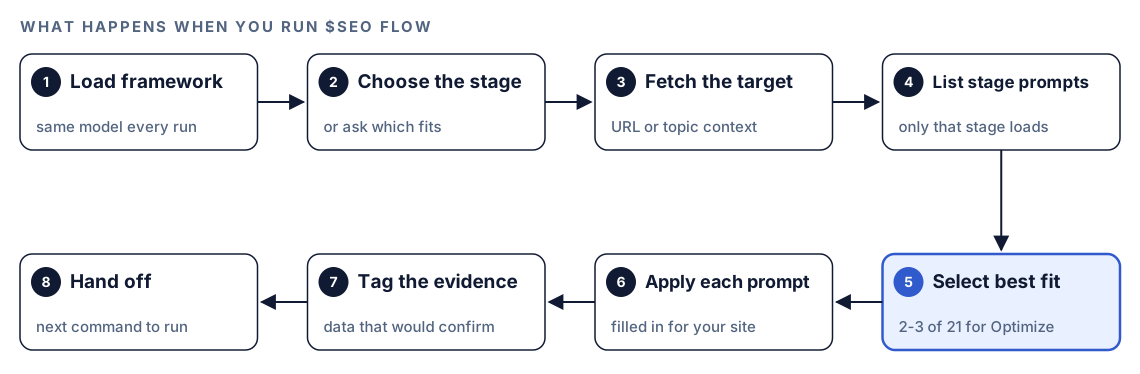
- Load the framework. Every activation starts by reading the FLOW operating model, so the stages mean the same thing on every run.
- Choose the stage. You name it in the command. With no stage, Codex shows a one-line summary of each and asks which matches your situation.
- Fetch the target. Codex retrieves the URL to understand the page and its industry signals. Fetched content is treated as untrusted data: it's analyzed, never executed.
- List the stage's prompts. Only the chosen stage's files load, which keeps the task's context small.
- Select the best fit. For Find, Win and Leverage, the stage's prompts are applied as they are. For Optimize, Codex reads the 21 file names and loads only the 2 or 3 that fit.
- Apply each prompt. Each one is filled in for this specific site, not answered in the abstract. The skill caps a single call at five prompts so each answer stays focused.
- Tag the evidence. Every finding lists the data that would confirm or weaken it.
- Point to the next command. Each stage hands off to a deeper tool, such as
$seo clusterafter Find or$seo sxoafter Win.
If the URL is unreachable, Codex reports the error and lists the prompts it would have applied, so you still know what to look at.
How Codex chooses Optimize prompts
Dumping 21 prompts on one page is noise. The skill always surfaces exactly 2 or 3, states which ones it picked, and explains why. It ranks three kinds of context in this order.
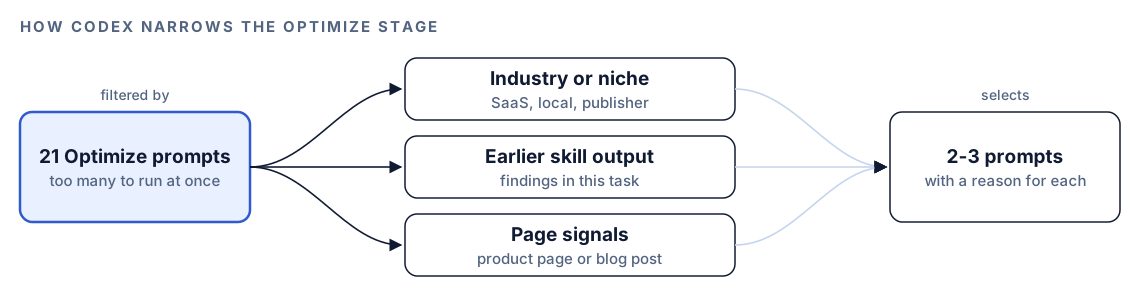
| Context | $seo flow optimize | $blog flow optimize |
|---|---|---|
| Industry or niche | SaaS leans on-page and technical; local leans citations and GBP; publishers lean E-E-A-T and freshness | SaaS and B2B blogs lean on-page and technical; lifestyle leans freshness and E-E-A-T; publishers lean authority and citations |
| Earlier skill output | Crawl issues from a technical check route to technical prompts; E-E-A-T gaps route to content prompts | E-E-A-T gaps from $blog analyze route to authority prompts; $blog seo-check failures route to on-page prompts; $blog geo gaps route to extraction-format prompts |
| Page signals | Product pages get conversion prompts; blog posts get freshness and authority prompts | Commercial pages get conversion prompts; informational posts get freshness and answer-first prompts |
The second row is the useful trick. Optimize reads earlier output in the same task, so running $seo content or $blog analyze first gives the selection real findings to work from. The prompts you didn't get remain one command away in the full index.
Run it in Codex, step by step
- Install the kit with the steps in the install section, restart Codex, and open a new task in your project. See the guide to installing SEO skills in Codex for details.
- Check your permission mode. FLOW fetches the page you name, so depending on your mode, Codex may ask before it uses the internet. Approve it for the site you're working on.
- Start with the overview if you're unsure where a page stands:
$seo flow- Run the stage that fits. Find works on a topic or a URL; the other stages take a URL:
$seo flow find "standing desks for small offices"
$seo flow leverage https://example.com
$seo flow optimize https://example.com/guides/standing-desks
$seo flow win https://example.com/pricing
$seo flow local https://example.com/locations/austin- Or ask in plain language. Codex picks the skill when the request matches it:
Use the FLOW framework on https://example.com/pricing. The page gets traffic but few sign-ups, so work through the Win stage and tell me what evidence I'd need for each finding.- For a blog, use the Codex Blog kit's version. It offers find, optimize and win, plus the full index and a sync:
$blog flow find "remote team rituals"
$blog flow optimize https://example.com/blog/remote-rituals
$blog flow prompts
$blog flow sync
$blog flow prompts lists all 30 blog prompts by stage with their trigger conditions, including the single Leverage prompt, which isn't a top-level blog command. sync pulls the latest prompt files and reports what was added, updated or left unchanged. $seo flow prompts and $seo flow sync do the same for the SEO kit's 41 prompts. If Codex says the FLOW reference files are missing, run the sync first.
Reading the FLOW report
Every run returns the same shape, labeled with the stage:
## FLOW Analysis: OPTIMIZE - example.com
[attribution line for the framework and prompts]

### Prompts Applied
- [prompt-file-name]: [one-line reason it was chosen]
- [prompt-file-name]: [one-line reason it was chosen]

### Findings: [Prompt name]
[Findings for this prompt, applied to the target URL]
**Evidence needed:** [data sources that would confirm these findings]
Read the "Prompts Applied" reasons first. If a reason doesn't match your page, say a conversion prompt chosen for a pure reference article, tell Codex and ask for a different selection. Then sort findings by how cheap their evidence is to get. A finding you can confirm from a Search Console export in five minutes deserves attention before one that needs a month of conversion data. Findings whose evidence you can't get at all are the ones to treat with the most caution.
Apply the fixes with Codex
Say the Optimize stage on a blog post picked an answer-first prompt and a freshness prompt. Both findings land in the same file, and Codex can make the edits directly. Before:
---
title: "Standing desk guide"
updated: 2023-04-02
---
Standing desks have become popular in recent years. In this post we will look at what to consider.
After:
---
title: "How to Choose a Standing Desk for a Small Office"
updated: [date of this revision]
---
For a small office, pick a desk whose height range fits both your tallest and shortest users and whose frame stays stable at full height. [One sentence on the budget trade-off, from your own product data.]
Then ask Codex to apply it across the post:
Apply the two Optimize findings from the FLOW report to content/blog/standing-desks.md. Rewrite the intro so it answers the title's question in the first two sentences. Update the date only if the content actually changed, and flag any statistic you can't trace to a source. Show me the diff and run the build. List every "Evidence needed" item you couldn't check from this repo.The last line matters. It turns the evidence list into a short checklist you can work through before you call the finding confirmed.
Make it repeatable
FLOW works best when choosing a stage becomes a habit rather than an afterthought. A few lines in your project's AGENTS.md make Codex name the stage before it starts SEO work:
## SEO workflow (FLOW)
- Before any SEO task, state the FLOW stage: Find, Leverage, Optimize or Win.
- New topic or keyword: run $blog flow find before drafting.
- Existing post that is losing clicks: run $blog analyze, then $blog flow optimize in the same task.
- Page with traffic but few conversions: run $seo flow win.
- End the summary with the "Evidence needed" items still open.
Codex reads AGENTS.md before it starts work, and a file closer to the folder you're working in overrides broader ones, so a content folder can carry its own version of the rule. Keep it brief, because the combined instructions have a size cap. The guide to AGENTS.md rules for SEO has more patterns.
Without the skill: a plain Codex prompt
You can borrow the shape of FLOW in a plain Codex task:
Act as an SEO analyst using a four-stage loop: Find (demand and intent), Leverage (off-site authority), Optimize (improving existing pages) and Win (conversion). Fetch https://example.com/pricing, tell me which stage this page is in and why, then give 3 findings for that stage. For each finding, list the specific data that would confirm or disprove it.What the skill adds is the library itself: 41 written prompts instead of one improvised one, rules for choosing the right 2 or 3 Optimize prompts from your context, hand-offs to the next command, and a sync that keeps the prompts current.
Pitfalls to avoid
- Running every stage on one page. Pick the stage that matches where the page is.
- Jumping to Optimize before Find. Polishing a page aimed at the wrong query wastes the polish.
- Treating findings as facts. Until the "Evidence needed" data is in, each one is a hypothesis.
- Running Optimize in an empty task. Without earlier output, the selection has less to go on.
- Expecting
$blog flowto cover local SEO. Local prompts live only in$seo flow local. - Ignoring a missing-files message. Run the sync, then repeat the command.
Keep going
- Build an SEO strategy plan with Codex sets the goals each FLOW stage works toward.
- Search intent and SXO analysis with Codex is where the Win stage hands off for persona scoring.
- Topic clusters with Codex goes deeper on the Find stage with SERP overlap.
- All Codex SEO and Codex Blog commands are listed on the skills page.
FAQ
What does FLOW stand for in SEO?
FLOW stands for Find, Leverage, Optimize and Win. Find covers demand and intent research, Leverage covers off-site authority, Optimize covers improvements to existing pages, and Win covers conversion and bottom-of-funnel work.
How is the FLOW framework different from an SEO audit?
An audit lists what's wrong with a site at one point in time. FLOW is a loop that asks which stage a page or topic is in and gives you questions for that stage, each tied to the evidence that would confirm the answer. Audits feed FLOW well: their findings help the Optimize stage pick its prompts.
Which FLOW stage should I start with?
Start with Find for a new topic, Optimize for a page that already exists and ranks or once ranked, and Win for a page with traffic but weak results. If you're unsure, run $seo flow with no stage and Codex will summarize each one and ask which fits.
Can I run the FLOW framework in Codex?
Yes. With the Codex SEO kit, $seo flow runs all four stages plus a local track; with the Codex Blog kit, $blog flow runs the blog stages. Codex applies the prompts to your URL or topic and can then edit the affected files in your project.
What is the difference between $seo flow and $blog flow?
$seo flow covers all 41 prompts, including 11 for local businesses, and hands off to SEO commands. $blog flow covers the 30 prompts that apply to blogs, leaves out the local track, and hands off to blog commands such as $blog rewrite, $blog schema and $blog factcheck.