
SEO Automation
SEO Strategy with Codex: Build a 12-Month Plan
Build an SEO strategy with Codex: competitor analysis, site structure, content calendar and a four-phase roadmap, saved as files you can act on in your repo.
To build an SEO strategy with Codex, start with $seo plan <type>: you name your kind of business, add your goals and rivals, and Codex writes a complete plan into your project as Markdown files. On the way it studies the competition, sketches the site's structure, maps what content and technical work you need, and sets out a twelve-month roadmap with KPI targets. Below we cover what belongs in a real strategy, how the command assembles one, and how Codex turns the plan into actual pages, links and schema in your codebase.
Key takeaways
- Name your business type and
$seo plan <type>starts from a matching industry template (SaaS, local service, e-commerce, publisher or agency), or a general one if none fits.- Five Markdown files come back, covering strategy, competitors, a content calendar, the roadmap and the site structure, along with KPI targets.
- The roadmap spans a year in four stages, starting with groundwork and ending with authority building.
- No site yet? Leave out the URL and Codex plans from scratch.
- The plan sits in your repository, so Codex can check it against your real routes and build what's missing.
The plan command at a glance
| Item | Details |
|---|---|
| Command | $seo plan <type> |
| What you give it | Your business type, plus your site URL, audience, competitors, goals, budget and timeline |
| What Codex reads | Your current site if one exists, competitor sites, and the industry template for your type |
| What you get back | Five planning files and a KPI target table |
| Needs | Internet access to review live sites; DataForSEO is optional for measured competitor and keyword data |
| Best for | Launching a new site, resetting an old strategy, or giving a team one shared plan |
What is an SEO strategy?
An SEO strategy is a decision about where search traffic should come from and what you'll build to earn it. It answers four questions. Who are you trying to reach? Which searches matter to them? What pages and content will answer those searches better than competitors do? And in what order will you build it, with what resources?
A strategy is not an audit. An audit tells you what's wrong with the site you have. A strategy tells you what site you need. The two work together: if your site already exists, an audit gives the strategy an honest starting point.
The parts of a strong plan
Every useful SEO plan covers the same ground, whatever the business:
- Audience and goals. What a visitor from search should do, and how you'll measure it.
- Competitive landscape. Who already ranks, what they publish, and where they leave gaps.
- Site architecture. The URL hierarchy, content pillars and internal links that tell search engines how topics relate.
- Content plan. Which page types you need, how many, and how often you'll publish.
- Technical foundation. Hosting, performance targets, structured data and mobile readiness.
- Roadmap and KPIs. What happens in which order, and the numbers that show whether it's working.
Google's SEO starter guide covers the basics behind each of these. The hard part is choosing among them, because no team can do everything at once.
Why business type changes the plan
A SaaS company, a plumber and an online store need different sites. Software buyers search for features, integrations, comparisons and documentation. A local service business lives or dies on location pages, reviews and its Google Business Profile. A store needs category and product pages that scale. A publisher needs topic hubs and clear authorship. An agency needs case studies and service pages that prove results.
That's why the command asks for a type. The skill loads a template for your industry before it designs the architecture, so the plan starts from the page types your kind of business usually needs instead of a generic checklist.
How $seo plan runs inside Codex
When you run the command in a Codex task, the skill works through six planning stages in order, then saves the results.
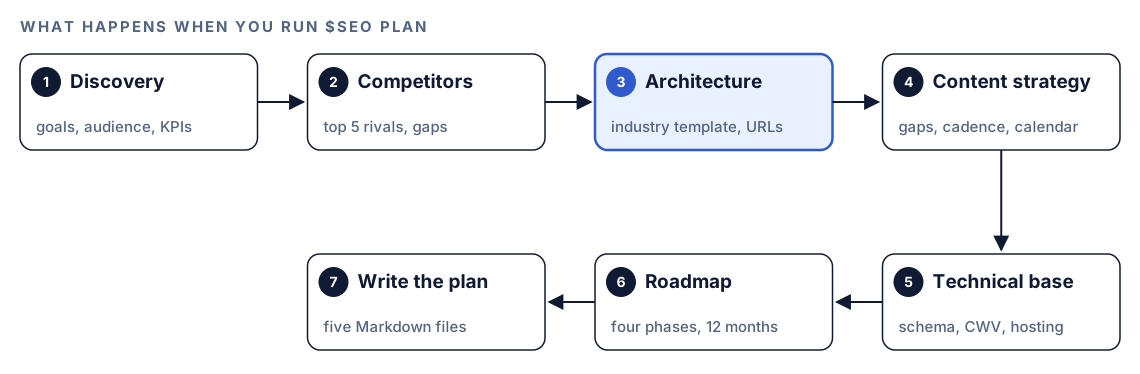
- Discovery. Codex pins down the basics: what kind of business this is, who it serves, who it competes with, and what success looks like. It also records the constraints, meaning money, time and the numbers you'll report on. When a site already exists, it reviews how that site stands today.
- Competitor analysis. Five rivals get a close look. Codex studies what each one publishes, which structured data it uses and how its site is built, then notes searches they cover and you don't. It also weighs how much trust their content signals and gives a rough estimate of each domain's strength.
- Architecture. Here the industry template comes in. From it, Codex sketches the URL tree, the content pillars at the top of it, how pages should link to each other, the sitemap layout, and the routes a visitor takes from first visit to conversion.
- Content strategy. Codex compares your planned coverage with the rivals', estimates how many pages of each type you'll need, proposes blog topics with a publishing rhythm, and plans how you'll show expertise: author bios, credentials and proof of first-hand experience.
- Technical foundation. It writes down what the site needs underneath: speed and hosting requirements, which schema type each kind of page gets, Core Web Vitals targets, readiness for AI search, and a mobile-first design.
- Roadmap. All of that becomes four phases, each with goals you can measure, the people and time it needs, what it depends on, and what could go wrong.
- Write the plan. Five Markdown files land in your project.
The sitemap structure follows the kit's quality gates. For location pages, the kit warns once a plan reaches 30 and stops at 50 until you justify the scale, because large sets of near-identical city pages are a common way to end up with thin content.
What you get back
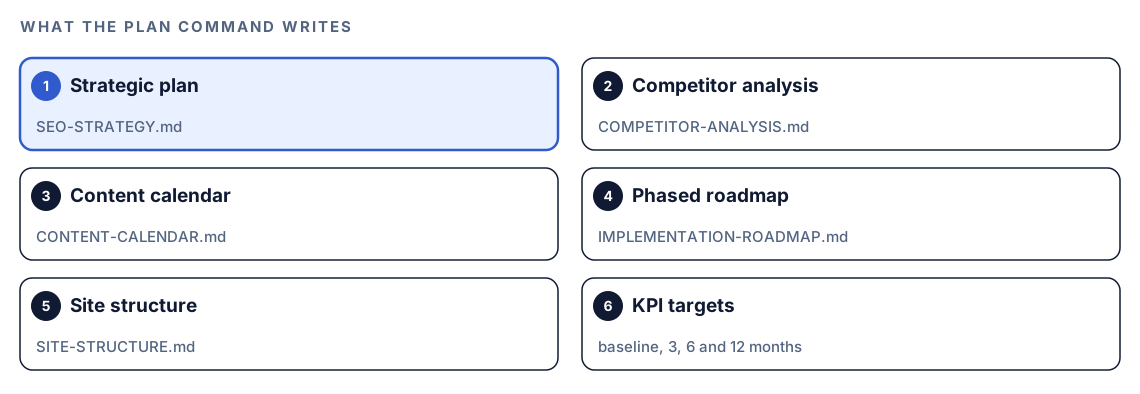
The command writes five files, plus a KPI target table.
The strategy and the competitor analysis
SEO-STRATEGY.md is the complete plan in one document. COMPETITOR-ANALYSIS.md holds what Codex learned about each rival: what they publish, how they use schema, how their sites are built, and where the gaps are. Read this one closely. A gap a competitor left open is often the fastest place to win.
The calendar, roadmap and structure
CONTENT-CALENDAR.md lists topics with priorities and a publishing rhythm. IMPLEMENTATION-ROADMAP.md breaks the work into phases with dependencies. SITE-STRUCTURE.md lays out the URL hierarchy and how sections link to each other. This last file is the one Codex can act on most directly, as you'll see below.
KPI targets
The KPI table sets targets at baseline, 3, 6 and 12 months for organic traffic, keyword rankings, domain authority, indexed pages and Core Web Vitals:
| Metric | Baseline | 3 Month | 6 Month | 12 Month |
|--------|----------|---------|---------|----------|
| Organic Traffic | [from analytics] | [target] | [target] | [target] |
| Keyword Rankings | [tracked terms] | [target] | [target] | [target] |
| Domain Authority | [current] | [target] | [target] | [target] |
| Indexed Pages | [from Search Console] | [target] | [target] | [target] |
| Core Web Vitals | [field data] | [target] | [target] | [target] |
Fill the baseline column from your own analytics and Search Console, not from estimates. A target is only useful if you know where you started.
Run it in Codex, step by step
- Install the Codex SEO kit from the install section, restart Codex, and open a new task in your website's project folder.
- Check your permission mode. The command reviews live sites, so depending on your mode, Codex may ask before it uses the internet. Approve it for your site and the competitors you name.
- Run the command with your business type:
$seo plan saas- Give it real context in the same message. Discovery is only as good as what you tell it:
$seo plan saas
Site: https://example.com
Audience: [who buys from you and what problem they have]
Competitors: [competitor-one.com], [competitor-two.com]
Goal: [for example, more demo requests from organic search]
Budget and timeline: [people, hours per month, 12 months]- Or ask in plain language. Codex picks the skill when the request matches it:
Build a 12-month SEO strategy for our online store at https://example.com, with a site structure, content calendar and phased roadmap.- Planning a site that isn't live yet? Simply omit the URL. Codex then plans from scratch and leaves out the parts that depend on crawling an existing site.
- A business that matches none of the five types still gets a plan. Codex falls back to a general-purpose template and says that it did.
- To swap estimates for measured numbers, connect DataForSEO. Codex can then pull rival domains, the keywords two domains share, traffic and search volume figures, keyword difficulty and local listings from it. That needs your own DataForSEO account, billed at their rates. Our guide to DataForSEO in Codex covers the setup.
Reading the plan
Start with the roadmap, because it decides what happens first.

- Foundation, weeks 1 to 4. Get the infrastructure right and ship the pages every site needs, like home, about, contact and your main services. Add the essential structured data and make sure analytics records from day one.
- Expansion, weeks 5 to 12. Write the primary pages properly, launch the blog with its first posts, wire up internal links, and set up local SEO if you serve a physical area.
- Scale, weeks 13 to 24. Go deeper on content, start earning links through outreach, prepare pages for AI search, and tune speed.
- Authority, months 7 to 12. Publish thought leadership, pursue press coverage, extend your structured data, and keep improving what's live.
Then check the plan against reality before you commit:
- Is discovery right? If the audience or goals are wrong, everything downstream is wrong too.
- Are the competitors real competitors? The sites that rank for your target searches may not be the companies you compete with for sales.
- Are the estimates labeled? Without DataForSEO, domain authority and traffic figures are estimates. Treat them as rough guides.
- Does the timeline fit your team? A plan that assumes a writer you don't have will slip in week 2.
Turn the plan into work with Codex
A strategy document in a shared drive tends to go stale. A strategy in your repository can drive real changes, because Codex can read the plan and the code side by side.
The site structure file describes the target hierarchy, something like this:
/                      Home
/features/             Features hub
/features/[feature]/   One page per core feature
/integrations/         Integrations hub
/compare/              Comparison hub
/blog/                 Blog, grouped by pillar topic
Ask Codex to measure the gap first, without editing anything:
Read SITE-STRUCTURE.md. Compare it with the routes that exist in this repo. List the planned sections that don't exist yet, existing pages that don't fit the structure, and hub pages that don't link to their children.Then build the foundation phase in small batches:
Create the /features/ hub page and its breadcrumb navigation using our existing page template. Add the JSON-LD that the schema plan in SEO-STRATEGY.md assigns to hub pages. Don't invent copy; leave clearly marked placeholders for anything the plan doesn't state. Show me the diff, then run the build.For the content calendar, turn each entry into a brief before anyone writes. $seo content-brief builds a detailed brief for one topic, and $blog brief does the same with the Codex Blog kit. Review every diff before you accept it. The plan says what to build; you still decide whether each change is right for your business.
Make it repeatable
The risk with any strategy is drift: six months later, new pages ignore the structure and posts stop linking to their pillars. A short rule in your project's AGENTS.md keeps Codex working inside the plan on every future task:
## SEO strategy
- SITE-STRUCTURE.md is the source of truth for URLs. New pages must fit it.
  If a page doesn't fit, propose an update to SITE-STRUCTURE.md first.
- Every new blog post links to its pillar page and to one related post.
- Add the schema type that SEO-STRATEGY.md assigns to the page type.
- Before suggesting new topics, check CONTENT-CALENDAR.md for duplicates.
Codex reads AGENTS.md files before it starts work, so the rule applies without you repeating it. Keep it short, because the combined instructions have a size cap. The AGENTS.md documentation explains how files in different folders combine, and our guide to AGENTS.md rules for SEO shows a fuller example. Re-run $seo plan when your goals or market change, and commit the new files so the diff shows what moved.
Without the skill: a plain Codex prompt
You can get a reasonable first draft from Codex with no kit installed:
Act as an SEO strategist. Our business: [type, audience, goal]. Our site: https://example.com. Competitors: [list]. Review our site and the competitors' sites. Then write SEO-PLAN.md with: target audience and goals, a URL hierarchy with content pillars, an internal linking plan, the page types we need with rough counts, a schema type per page type, and a four-phase roadmap over 12 months. Mark every estimate as an estimate.What the skill adds is structure: industry templates, the same six planning stages every time, the quality gates for location pages, separate files for each part of the plan, a fixed KPI table, and optional measured data from DataForSEO.
Pitfalls to avoid
- Skipping discovery details. Vague goals produce a vague plan.
- Treating estimated competitor metrics as measured data.
- Copying a competitor's whole structure. Their gaps are your opportunity; their site isn't your blueprint.
- Planning more content than your team can publish. A smaller calendar you keep beats a big one you abandon.
- Generating dozens of near-identical location pages. The quality gates exist for a reason.
- Leaving the plan in a folder nobody opens. Put the rules in
AGENTS.mdand check progress against the roadmap each month.
Keep going
- Run a full SEO audit with Codex first if your site already exists, so the plan starts from real findings.
- Keyword research with Codex helps you choose the searches each pillar should target.
- Build topic clusters with Codex turns content pillars into groups of related pages.
- The full list of Codex SEO and Codex Blog skills shows every command you can use to carry out the plan.
FAQ
What should an SEO strategy include?
It should say who you want to reach and why, who you're up against, how the site is organized into pillars, what content you'll publish and how often, what the site needs technically, and the order you'll do it in with numbers to judge progress. Leave out the order and the numbers, and you have a wish list.
How long does an SEO strategy take to show results?
That depends on your site, your market and how consistently you publish, so be wary of anyone who promises a date. The roadmap in the plan stretches over a year for that reason: groundwork comes first, and authority work fills the second half.
Can Codex create an SEO strategy for a new website?
Yes. Give $seo plan your business type and no URL. Codex plans the site from scratch, drops the steps that need something live to inspect, and still delivers the structure, calendar and roadmap.
What is the difference between an SEO audit and an SEO strategy?
An audit looks backward at the site you already run and lists what's broken. A strategy looks forward: what the site should become, which searches to chase, and what to build first. If you already have a site, audit it and bring those findings into the plan.
Do I need DataForSEO to use the plan command?
No. The plan works without it, though figures like a rival's authority or traffic are then educated guesses. Connect your own DataForSEO account and Codex uses measured competitor, keyword and traffic numbers instead, billed at DataForSEO's own rates.