
AI Search
AI Citation Tracking in Codex with Profound
Track how often ChatGPT, Perplexity and other AI models cite your brand, catch drops early, and turn missed prompts into page fixes with Codex.
AI citation tracking measures how often AI assistants such as ChatGPT and Perplexity name your brand in their answers, and whether that rate is rising or falling. In Codex, the Profound extension for RankCue's Codex SEO kit puts that data one command away: $seo profound [cmd] <brand> returns citation rates per model, the prompts that do and don't surface you, the brands cited next to you, and alerts when the numbers jump. This guide explains what the metric means, how the command runs, how to read the output, and how Codex turns a citation gap into a change on your own pages.
Key takeaways
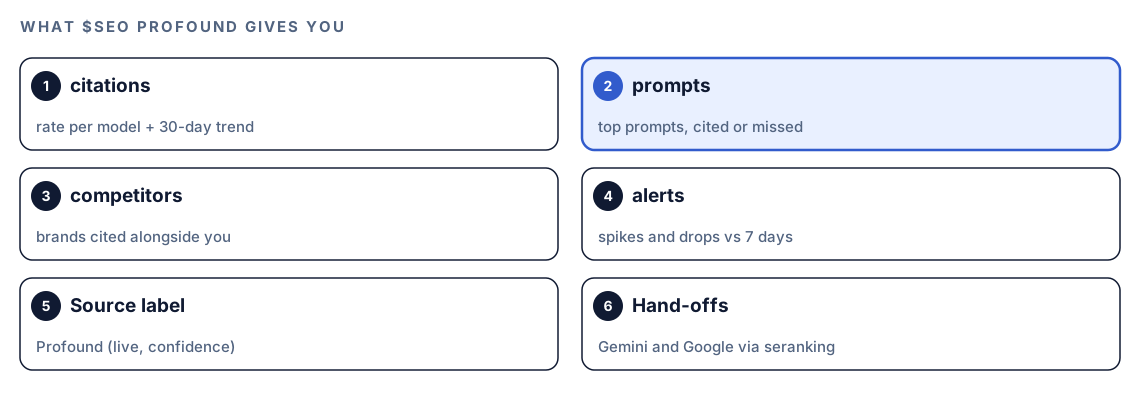
$seo profoundhas four subcommands:citationsfor rates and a 30-day trend per model,promptsfor the questions that surface your brand or skip it,competitorsfor brands cited alongside you, andalertsfor spikes and drops against a 7-day baseline.- Profound polls AI models continuously, so the skill reads a time series instead of a one-off sample. The trend matters more than any single reading.
- It needs the Profound extension and your own Profound API key, and Profound's pricing applies. Every number in the report carries its source and a confidence value.
- Profound covers ChatGPT and Perplexity natively. For Gemini, Google AI Overviews and AI Mode, the skill sends you to
$seo seranking.- The data shows where you're missing.
$seo geoand Codex's edits in your repository are how you fix the pages behind the gap.
The profound command at a glance
| Item | Details |
|---|---|
| Command | $seo profound [cmd] <brand>, where the subcommand is citations, prompts, competitors or alerts |
| What you give it | A brand name |
| What Codex reads | Profound's live citation data for that brand, pulled through the Profound API |
| What you get back | Citation rates per AI model with a trend, prompt lists, co-cited competitors or alerts, each metric labeled "Profound (live)" with a confidence value |
| Needs | The optional Profound extension, a Profound API key, and internet access. Profound's own pricing applies |
| Best for | Watching brand presence in AI answers over weeks, catching sudden drops, and finding prompts where rivals are cited instead of you |
What is AI citation tracking?
Ask an AI assistant "which tool should I use for X?" and the answer usually names a handful of products, often with links to its sources. Being one of those names is the AI-era version of a first-page ranking. AI citation tracking measures that presence on purpose: which assistants mention you, for which questions, how often, and next to whom.
Mentions, citations and citation rate
A mention is your brand name appearing in an answer. A citation is the answer pointing at you as a source, often with a link to one of your pages. A mention puts your name in front of the reader, and a citation can also send a visit. The headline metric in the Profound skill is the citation rate, which you can read roughly as the share of tracked prompts in which a given model's answer cites your brand. The skill reports it per model, so ChatGPT and Perplexity each get their own figure.
Why a single spot check tells you little
AI answers aren't fixed. Ask the same question twice and you may get a different list of brands, in a different order, with different sources. Answers also drift as models are updated and as the web content they draw on changes. So manual checks mislead both ways: one good answer can hide a slow slide, and one bad answer can start a panic.
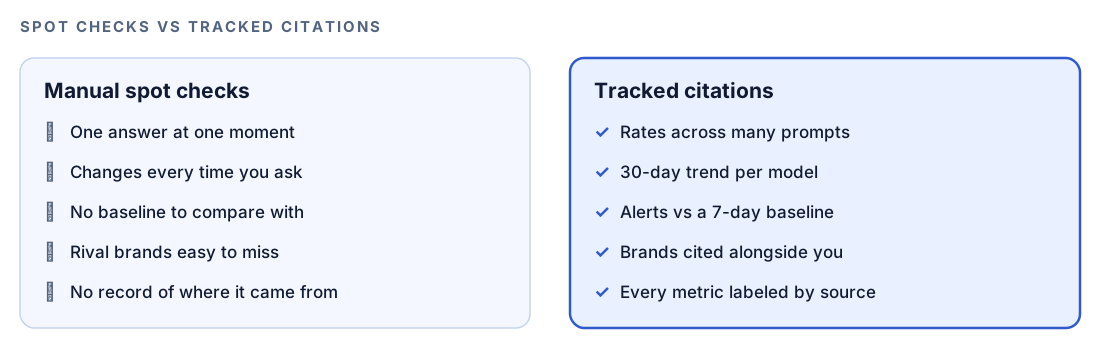
Profound is built for this. The skill describes it as polling the models continuously and publishing a time series, so week-over-week and month-over-month changes come with the data.
Prompts are the new keyword list
Rank tracking starts with keywords. Citation tracking starts with prompts: the full questions people type into an assistant, such as "which accounting software works for a three-person agency?" The brands cited can change completely between two prompts that look alike, which is why the prompts subcommand matters as much as the headline rate.
Each AI platform cites differently
ChatGPT, Perplexity, Gemini, Google AI Overviews and AI Mode don't choose sources the same way. The kit's GEO guidance stresses that the domains one platform cites can differ sharply from those another cites, so a strong showing in one place proves little about the rest. Profound covers ChatGPT and Perplexity natively. For Gemini, AI Overviews and AI Mode, the skill hands off to the SE Ranking extension, and for AI Overviews it also suggests cross-checking DataForSEO's AI visibility data when you have it.
How $seo profound runs inside Codex
Type $seo profound citations "Example Co" in a Codex task and the skill works through a short, fixed sequence. You can follow each step in the task log.
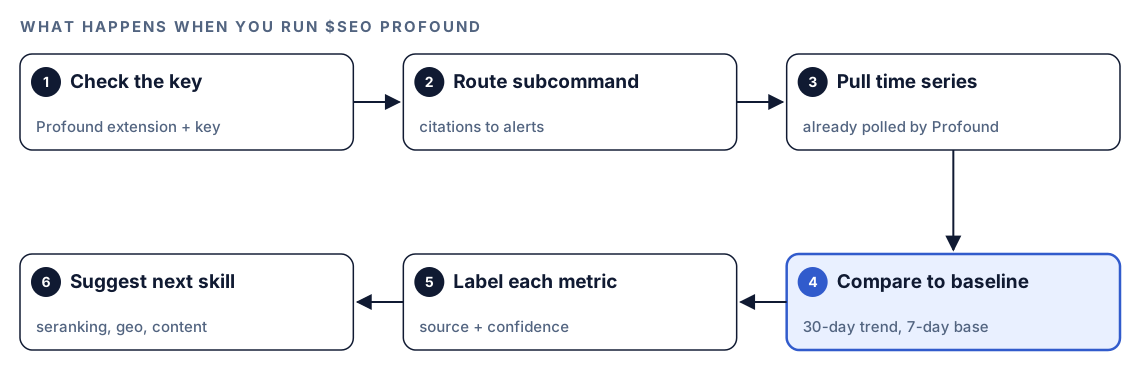
- Check the key. Before any call, the skill confirms your Profound API key is available, so a missing key surfaces before any request goes out.
- Route the subcommand.
citations,prompts,competitorsandalertseach answer a different question about your brand. - Pull the time series. Profound polls continuously, so the skill reads existing history rather than sampling answers on the spot.
- Compare against a window. Citation rates come with a 30-day trend, and alerts compare the latest numbers with a 7-day baseline.
- Label every metric. Each figure carries its source and a confidence value in the form "Profound (live, confidence 0.90)", so you always know where a number came from and how firm it is.
- Point to the next skill. For models Profound doesn't cover, it refers you to
$seo seranking. For a full AI search audit of a page, it hands back to$seo geo, and for help designing the prompt set itself, to$seo content.
The source label keeps reports honest once you combine tools. A Profound citation rate and an SE Ranking share-of-voice figure measure related but different things, and an unlabeled chart invites someone to compare them directly.
What each subcommand tells you
citations: the headline rate and its trend
citations <brand> gives the current citation rate for each model Profound tracks, plus the trend over the last 30 days. Start here. The direction of the line says more than its height: a modest rate that's climbing beats a high rate that has slipped for three weeks.
prompts: where you show up and where you don't
prompts <brand> lists the top prompts that surface your brand and, just as useful, the ones that fail to. The second list is your to-do list. A prompt where you're absent but clearly belong usually points to one of three things: a page that doesn't exist yet, a page that buries the answer, or a page AI crawlers can't read.
competitors: who gets cited next to you
competitors <brand> shows which brands appear alongside yours for the same prompts. Sometimes that's the rival you expected. Often it's a review site, a marketplace or a niche player, and those names tell you what kind of source the models lean on for your topic.
alerts: spikes and drops against a baseline
alerts <brand> flags sudden movements compared with a 7-day baseline. A drop might follow a migration that blocked a crawler or a redesign that cut the answer from a key page. The alert tells you when to look; the other subcommands tell you where.
Run it in Codex, step by step
- Install the Codex SEO kit from the install section, restart Codex, and open a new task in your website's project. Our walkthrough on installing SEO skills in Codex covers each step.
- Install the Profound extension that ships with the kit and give it your Profound API key, then restart Codex so the change is picked up. You need a Profound account, and Profound bills API use at its own prices.
- Check your permission mode. Every subcommand calls Profound over the internet, so depending on your mode, Codex may ask before it goes online. Approve it for this task.
- Run the subcommands you need:
$seo profound citations "Example Co"
$seo profound prompts "Example Co"
$seo profound competitors "Example Co"
$seo profound alerts "Example Co"- Or ask in plain language. Codex picks the skill when your request matches its description:
How often do ChatGPT and Perplexity cite Example Co, and has that changed over the last month? Use Profound data and label every number with its source.- Work from broad to narrow:
citationsandalertsfirst, thenpromptsandcompetitorsto find the gaps worth fixing.
Reading the report
The layout depends on the subcommand, but every metric carries the source label. A combined view of citations, prompts and alerts looks something like this:
## AI citations: Example Co
Source: Profound (live, confidence 0.XX)

| Model | Citation rate | 30-day trend |
|---|---|---|
| ChatGPT | XX% | [up / flat / down] |
| Perplexity | XX% | [up / flat / down] |

## Prompts that skip the brand
| Prompt | Brands cited instead |
|---|---|
| [prompt text] | [brand], [brand] |
| [prompt text] | [brand] |

## Alerts (vs 7-day baseline)
- [model]: [spike / drop] for [prompt or prompt group]
Work through it in this order:
- Drops in alerts. A sharp fall usually has a cause you can trace, and it's easiest to find early.
- Missed prompts with buying intent. Questions that match what you sell, where rivals are cited and you aren't.
- Trend before level. A falling 30-day line deserves attention even when the current rate looks healthy.
- Low-confidence figures last. Watch them; don't rewrite pages over them.
Apply the fixes with Codex
Tracking tells you where you're missing; the fix happens on your pages. The same Codex task that read the report can open the page that should have been cited, diagnose it and edit it.
Start with a missed prompt and the page that ought to answer it. Run the kit's GEO audit on that URL:
$seo geo https://example.com/guides/agency-accountingThe GEO agent checks robots.txt for AI crawler rules, looks for /llms.txt, scores passage citability, reviews authority signals such as authorship and dates, and checks whether the main content is server-rendered or only appears after JavaScript runs. Most content fixes come from its citability checks. It looks for a direct answer in the first 40 to 60 words of each section, headings phrased as questions, statistics that name their source, and self-contained blocks that still make sense when lifted out of the page. It treats passages of roughly 134 to 167 words as the target length for citation.
A typical rewrite. Before:
## Our approach

Every agency is different, and over the years we've seen many ways of handling the books. Before we get into the details, it's worth stepping back to look at why this matters so much...
After:
## Which accounting software suits a small agency?

A three-person agency needs software that invoices by project, tracks time against client budgets and connects to its bank feed. [Product] does all three. The rest of this section compares setup time, pricing model and reporting for each option, with [named source] for every figure.
Then hand the job to Codex:
The Profound prompts report shows we aren't cited for "which accounting software suits a small agency". Find the page in this repo that targets that question. Rewrite the opening of each main section so it answers directly in the first 40 to 60 words, turn vague headings into the questions people ask, and keep every claim true to our product. Don't invent statistics; mark each spot where a sourced figure would help. Also check robots.txt for rules that block AI search crawlers. Show me the diff, then run the build.The crawler check matters. The GEO agent's list of crawlers to allow for AI search includes GPTBot, OAI-SearchBot and PerplexityBot, and it treats training-only crawlers such as CCBot as optional to block. Block a search crawler and that assistant may never read the page, however well it's written.
Read the diff before you accept it, and check that every sentence is true for your business. Assistants pick up changes on their own schedules, so judge the result on the 30-day trend from citations, not the next morning's alerts.
Make it repeatable
Alerts only help if someone sees them. codex exec runs a task without the interactive UI, and -o writes the final message to a file, so a weekly job can save the alert report where your team will find it:
codex exec '$seo profound alerts "Example Co"' -o reports/ai-citations/alerts-$(date +%F).mdWhen a report shows a drop, continue that run with a follow-up instead of starting from scratch:
codex exec resume --last "Compare these alerts with last week's file in reports/ai-citations. List the prompts where we lost citations and the page in this repo that targets each one."codex exec expects a Git repository, which also makes the weekly files easy to diff. The run needs your Profound key, and every run uses Profound API calls, so a weekly schedule that matches the 7-day baseline is a sensible rhythm. Make sure your sandbox and permission setup allows the network access the task needs. The Codex non-interactive mode docs list the options, and our guide to automating SEO checks with codex exec covers scheduling and CI.
Without the skill: a plain Codex prompt
Without a data source, Codex can't see how AI assistants answered last week, but it can build the parts of tracking that don't need live data. Start with a prompt set:
Read our product pages, pricing page and docs in this repo. Write 30 questions a potential customer might ask an AI assistant before buying a product like ours, grouped by stage: problem, comparison and purchase. Save them to prompts.csv with the columns prompt, stage and page_that_should_answer.Then, if you collect answers by hand:
The files in answers/ hold AI assistant answers I copied for the prompts in prompts.csv, one file per prompt, with the assistant name and date on the first line. For each prompt, list which brands are named and which domains are linked, and mark whether Example Co appears. Output a table, then list the prompts where competitors appear and we don't.What the skill adds is the data you can't gather by hand at a useful scale: Profound's continuous polling, a 30-day trend per model, alerts against a baseline, co-cited competitors, and a source and confidence label on every figure.
Pitfalls to avoid
- Treating one screenshot, or a single-day spike, as a trend. Check movements against the 7-day baseline.
- Comparing a Profound citation rate with an SE Ranking share-of-voice figure as if they were the same metric.
- Assuming Profound numbers describe Google. For Gemini, AI Overviews and AI Mode, use
$seo seranking. - Watching only the headline rate and never reading the prompts that skip you.
- Blocking an AI search crawler in robots.txt during a migration, then blaming your content for the drop.
- Committing your Profound API key to the repository. Keep keys out of tracked files.
Keep going
- Measure AI search visibility with SE Ranking fills in Gemini, Google AI Overviews and AI Mode.
- The generative engine optimization guide explains what makes a page easy for AI systems to cite.
- Live SERP and AI data with DataForSEO adds a cross-check for AI Overview citations.
- Browse every skill and extension in both kits to find the other AI search commands.
FAQ
What is AI citation tracking?
AI citation tracking measures how often AI assistants such as ChatGPT and Perplexity name or cite your brand in their answers, for which prompts, and how that changes over time. It's the AI search counterpart to rank tracking, with prompts in place of keywords.
How can I check whether ChatGPT mentions my brand?
You can ask it yourself, but answers vary from one run to the next, so a single check is unreliable. A tracker such as Profound polls the model repeatedly and reports a citation rate with a trend, and $seo profound citations <brand> brings that data into Codex.
What is the difference between an AI mention and an AI citation?
A mention is your brand name appearing in an answer. A citation points to you as a source, usually with a link to one of your pages, so it can also send traffic.
Do I need a Profound account to track citations in Codex?
Yes. The $seo profound command needs the Profound extension and your own Profound API key, and Profound's pricing applies to the calls it makes. For Gemini, AI Overviews and AI Mode, the kit's SE Ranking extension needs an SE Ranking key.
How do I get my brand cited more often in AI answers?
Make sure AI search crawlers can reach your pages, then make each page easy to quote: direct answers near the top of each section, question-style headings, sourced facts and passages that stand alone. $seo geo <url> checks all of this, and Codex can make the edits. Nothing guarantees a citation, so judge the work by the trend over weeks.