
AI Search
AI Search Visibility with SE Ranking and Codex
Measure your brand's share of voice in ChatGPT, Gemini, Perplexity, AI Overviews and AI Mode with one Codex command, then fix the weak spots.
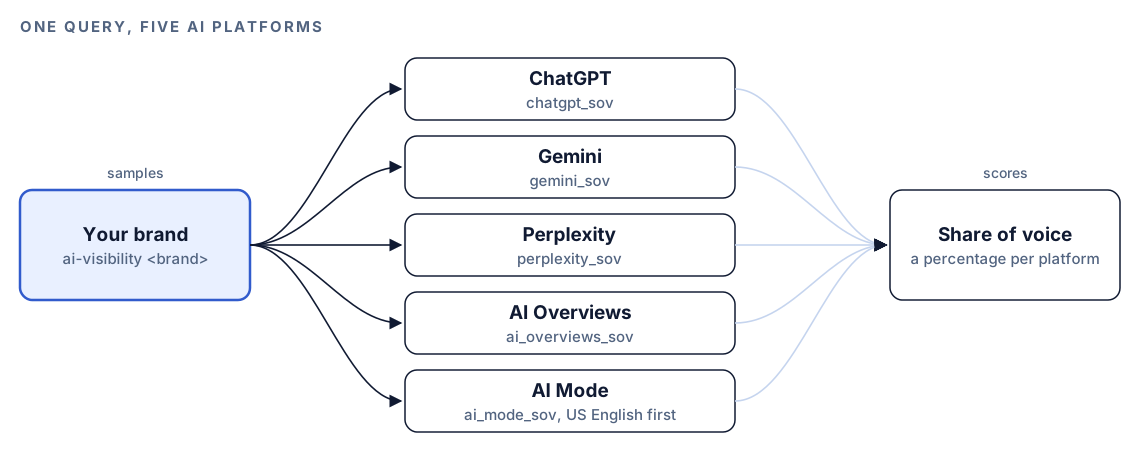
AI search visibility is how often your brand appears in the answers AI platforms give, measured across ChatGPT, Gemini, Perplexity, Google AI Overviews and Google AI Mode. The SE Ranking extension for RankCue's Codex SEO kit measures it from inside Codex: $seo seranking ai-visibility <brand> returns a share-of-voice figure for all five platforms in one query, and three more subcommands cover organic rankings, backlinks and competitors. This guide explains what the numbers mean, how the command runs, how to read the report, and how Codex turns a weak platform score into changes in your project.
Key takeaways
$seo seranking ai-visibility <brand>samples answers from ChatGPT, Gemini, Perplexity, AI Overviews and AI Mode and reports one share-of-voice percentage per platform.- Every percentage comes with a confidence note based on sample size, so you can tell a firm number from a thin one.
- The same command also runs
serp <keyword>for the top 100 organic results and SERP features,backlinks <url>for a link profile, andcompetitors <url>for your top 10 organic competitors and shared-keyword gaps.- It needs the SE Ranking extension and your own SE Ranking API key. SE Ranking counts usage in API units, and its own pricing applies.
- A weak platform score is a symptom.
$seo geofinds the cause on your pages, and Codex makes the fix in your repository.
The seranking command at a glance
| Item | Details |
|---|---|
| Command | $seo seranking [cmd], where the subcommand is ai-visibility, serp, backlinks or competitors |
| What you give it | A brand name for ai-visibility, a keyword for serp, or a URL for backlinks and competitors |
| What Codex reads | Live data from the SE Ranking REST API |
| What you get back | Share of voice per AI platform with confidence notes, or tables of organic positions, backlinks or competitors |
| Needs | The optional SE Ranking extension, an SE Ranking API key, and internet access. SE Ranking's own pricing applies |
| Best for | One regular reading of brand visibility across five AI answer surfaces, next to your organic data |
What is AI search visibility?
Search used to have one scoreboard: your page's position for a keyword. A ChatGPT reply or a Google AI Overview has no positions 1 to 10, just an answer that names some brands and not others. AI search visibility measures how often you're in that answer.
Share of voice, explained
SE Ranking expresses visibility as share of voice. The skill defines it plainly: the percentage of sampled prompts where the brand appears in the platform's response. If a platform was asked a set of prompts about your category and your brand came up in some of them, that fraction is your share of voice there. For AI Overviews and AI Mode, the skill describes the figure as your brand's citation rate inside those Google features.
The number depends on the prompt set, so it means most when the prompts reflect what buyers actually ask, and it works better as a trend or comparison than as a grade.
Five platforms, five different answers
The five surfaces the skill covers work differently:
- ChatGPT answers in conversation and can cite sources when it searches the web.
- Gemini is Google's AI assistant, separate from the Google results page.
- Perplexity is built around search and shows its sources with each answer.
- Google AI Overviews are AI summaries shown above the regular results on some searches, with links to pages they draw on.
- Google AI Mode is a conversational search mode inside Google. The skill notes that its AI Mode coverage starts with US English.
Because each surface finds and picks sources its own way, the kit's GEO guidance warns that the domains one platform cites often differ from those another cites. A brand can be prominent in Perplexity and nearly absent from AI Overviews. Measuring all five side by side is how you see that.
Why sample size matters
AI answers vary between runs, so share of voice is an estimate from a sample. A percentage built on few prompts can swing a long way by chance, which is why the skill attaches a confidence note based on sample size to every figure.
Visibility next to rankings
AI visibility doesn't replace organic rankings; it sits beside them. AI Overviews appear on the same page as the regular results, so a brand can rank well and still be missing from the summary above, or the other way round. The serp subcommand gives you the top 100 organic positions and SERP features for a keyword in the same session, so you can compare both views for the topics that matter.
How $seo seranking runs inside Codex
Type $seo seranking ai-visibility "Example Co" in a Codex task and the skill works through these steps, each visible in the task log:
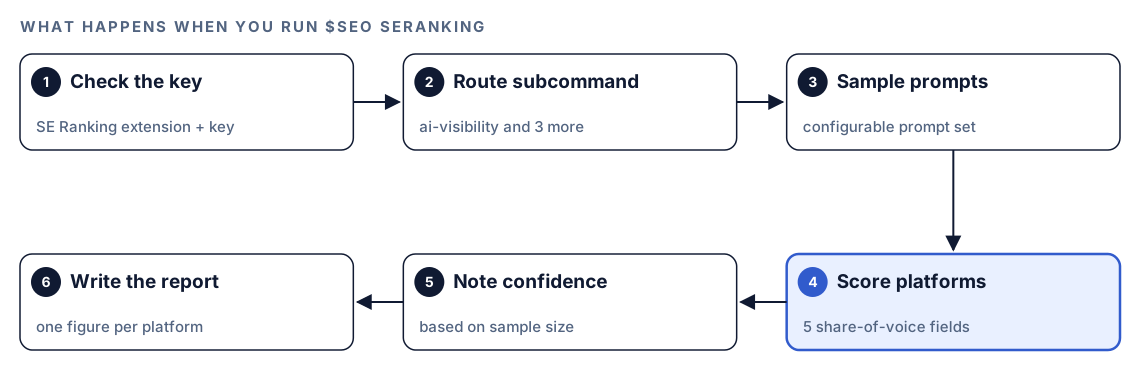
- Check the key. Before any call, the skill confirms that your SE Ranking API key is available. If it's missing, the skill tells you to run the extension's installer.
- Route the subcommand.
ai-visibility,serp,backlinksandcompetitorseach call a different part of the SE Ranking API. - Sample the prompt set. For AI visibility, SE Ranking samples each platform's responses for brand mentions across a configurable set of prompts.
- Score each platform. Results come back as five fields:
chatgpt_sov,gemini_sov,perplexity_sov,ai_overviews_sovandai_mode_sov. - Note confidence. Each percentage gets a note on how firm it is, based on how many prompts were sampled.
- Write the report. You get one percentage per platform with its note, or the table for whichever other subcommand you ran.
SE Ranking counts API usage in units. The skill's cost note puts one AI visibility query at about five units, one per platform. What a unit costs is set by SE Ranking's pricing.
What each subcommand returns
ai-visibility: share of voice on five platforms
The core output: five percentages with confidence notes. Look at the spread first. Low scores everywhere usually point to content or authority. A brand that's strong on two platforms and weak on three may have a platform-specific issue, such as a blocked crawler or content that only appears after JavaScript runs.
serp: the classic results page
serp <keyword> returns the top 100 organic positions and the SERP features for a keyword. Use it to see which pages hold the organic positions, and which features crowd the page, for the same topics your prompts cover.
backlinks: the link profile
backlinks <url> returns a backlink profile from SE Ranking's data, an alternative source to Ahrefs or DataForSEO if you already use SE Ranking. For a full link audit, the skill points you to $seo backlinks, which our guide to backlink analysis with Codex covers.
competitors: your organic rivals
competitors <url> lists your top 10 organic competitors and the keyword gaps you share with them. Run ai-visibility on the strongest two or three too, to see whether the brands that beat you in organic search also beat you in AI answers.
Run it in Codex, step by step
- Install the Codex SEO kit from the install section, restart Codex, and open a new task in your project.
- Install the SE Ranking extension that ships with the kit and provide your SE Ranking API key, then restart Codex. You need an SE Ranking account with API access, and SE Ranking's pricing applies.
- Check your permission mode. Every subcommand calls the SE Ranking API over the internet, so depending on your mode, Codex may ask before it goes online. Approve it for this task.
- Run the subcommands:
$seo seranking ai-visibility "Example Co"
$seo seranking serp "project management software"
$seo seranking backlinks https://example.com
$seo seranking competitors https://example.com- Or ask in plain language. Codex picks the skill when your request matches it:
How visible is Example Co in ChatGPT, Gemini, Perplexity, Google AI Overviews and AI Mode right now? Give me share of voice per platform with a confidence note for each.- Measure one or two competitors the same way. Your own percentage means more when theirs sits next to it.
Reading the report
An AI visibility report looks something like this:
## AI share of voice: Example Co
Source: SE Ranking API, [date]

| Platform | Share of voice | Confidence |
|---|---|---|
| ChatGPT | XX% | [note on sample size] |
| Gemini | XX% | [note on sample size] |
| Perplexity | XX% | [note on sample size] |
| Google AI Overviews | XX% | [note on sample size] |
| Google AI Mode | XX% | [US English; note on sample size] |
Work through it in this order:
- Read the confidence notes first. Set aside any figure from a thin sample before you compare platforms.
- Find the weakest platform with a firm number. That's the clearest place to start.
- Compare with organic data. If you rank well for the topic but barely appear in AI Overviews, the page may not be easy to quote. If you don't rank at all, start with ordinary SEO.
- Compare with competitors. A low share in a category where nobody scores well is a different problem from a low share where one rival dominates.
- Watch the trend. The first reading is a baseline. The second, taken the same way, is your first real data point.
Apply the fixes with Codex
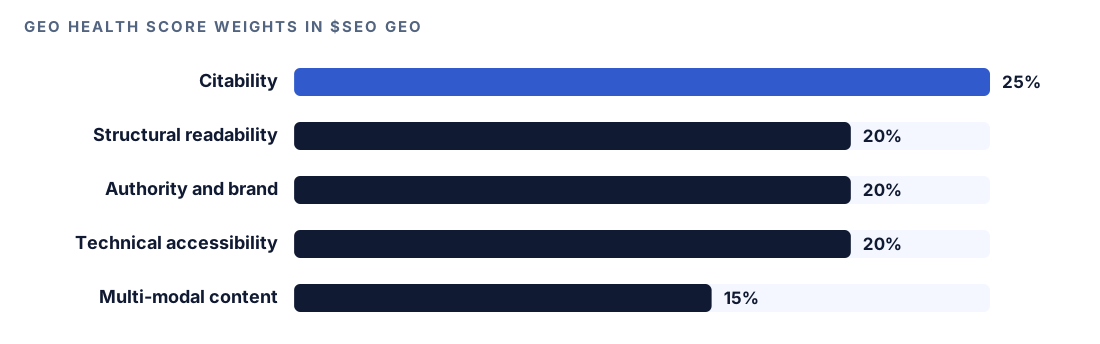
SE Ranking tells you where you're weak, not why. For the why, the skill points you to $seo geo, the kit's GEO audit. It fetches a page, checks how AI crawlers can reach it, and scores it from 0 to 100 across five weighted dimensions.
Run it on the page that should be winning the topic:
$seo geo https://example.com/product/project-managementThe report gives a GEO readiness score with that dimension breakdown, the allowed or blocked status of each AI crawler, whether llms.txt is present, missing or malformed, a brand mention analysis across Wikipedia, Reddit, YouTube and LinkedIn, the five highest-impact changes with effort estimates, and separate scores for Google AI Overviews, ChatGPT, Perplexity and Bing Copilot. Match those platform scores to your weakest share-of-voice figure and start there. Two checks are worth doing first.
Let AI search crawlers in
The GEO agent checks robots.txt for AI crawlers. Its list of crawlers to allow for AI search visibility includes GPTBot, OAI-SearchBot and PerplexityBot. It treats training-only crawlers such as CCBot as optional to block. A robots.txt that follows that split:
User-agent: GPTBot
Allow: /

User-agent: OAI-SearchBot
Allow: /

User-agent: PerplexityBot
Allow: /

User-agent: CCBot
Disallow: /
Google's robots.txt introduction explains how groups and rules work. Blocking a training-only crawler is a business decision, not an SEO requirement, so make it on purpose.
Put the answer in the HTML
The agent also checks whether the main content is server-rendered or only appears after JavaScript runs. A crawler that doesn't execute scripts sees only the raw HTML, so an answer loaded client-side is invisible to it. Codex can move key content into the server response across a whole template.
Then hand the work to Codex:
The SE Ranking report shows low share of voice for Example Co in Perplexity and Google AI Overviews. Run $seo geo on https://example.com/product/project-management. For every finding that comes from this repo, such as robots.txt rules, content that only renders client-side, or sections that bury the answer, find the responsible file and fix it there. List anything outside the repo separately. Show me the diff, then run the build.Read the diff closely, especially robots.txt, where one wrong line can block a crawler from the whole site. After deploy, give the platforms time, then take your next reading the same way as the first.
Make it repeatable
Share of voice only becomes useful as a series. codex exec runs Codex without the interactive UI, and --output-schema asks for a final answer that matches a JSON Schema, so every snapshot has the same fields. Build the schema on the skill's five fields and save it as sov-schema.json:
{
  "type": "object",
  "additionalProperties": false,
  "required": ["brand", "pulled_at", "chatgpt_sov", "gemini_sov", "perplexity_sov", "ai_overviews_sov", "ai_mode_sov", "confidence_notes"],
  "properties": {
    "brand": { "type": "string" },
    "pulled_at": { "type": "string" },
    "chatgpt_sov": { "type": "number" },
    "gemini_sov": { "type": "number" },
    "perplexity_sov": { "type": "number" },
    "ai_overviews_sov": { "type": "number" },
    "ai_mode_sov": { "type": "number" },
    "confidence_notes": { "type": "string" }
  }
}
Then schedule a monthly run:
codex exec --output-schema sov-schema.json '$seo seranking ai-visibility "Example Co"' -o reports/ai-visibility/$(date +%Y-%m).jsonCommit each file, and after a few months ask Codex to chart the five series from that folder. Each run spends roughly five SE Ranking units and needs your API key, and codex exec expects a Git repository. Make sure your sandbox and permission setup allows the network access the task needs. Our guide to automating SEO checks with codex exec covers scheduling.
Without the skill: a plain Codex prompt
Without a data source, Codex can't sample five AI platforms on a schedule, but it can do the analysis around the data. If you export visibility data from another tool, or log answers by hand:
Read visibility.csv (columns: date, platform, prompt, brand_mentioned). For each platform and month, calculate the share of prompts where brand_mentioned is true, and say how many prompts each figure rests on. Flag figures based on too few prompts to trust, and tell me the threshold you used. Output a table and a short summary of the biggest changes.And for the page side:
Read content/product/project-management.md. Check that each H2 is phrased as a question a buyer would ask, that the first 40 to 60 words under it answer that question directly, and that each section still makes sense if quoted alone. Suggest rewrites for the sections that fail.What the skill adds is the measurement itself: live sampling across five platforms in one query, fixed share-of-voice fields, confidence notes tied to sample size, and organic, backlink and competitor data from the same source.
Pitfalls to avoid
- Comparing two readings taken with different prompt sets. The number only means something against the same prompts.
- Treating a big swing on a small sample as a real change.
- Reading AI Mode figures as global when coverage starts with US English.
- Assuming strong organic rankings mean strong AI visibility, or the reverse.
- Mixing SE Ranking share of voice and Profound citation rates in one chart without labels.
- Blocking an AI search crawler by accident while tightening robots.txt.
Keep going
- Track brand citations in AI answers with Profound adds a continuous time series and alerts for ChatGPT and Perplexity.
- The generative engine optimization guide covers what makes a page worth citing.
- Keyword research with Codex helps you choose the topics your prompt set should cover.
- Browse every skill and extension in the Codex SEO and Codex Blog kits.
FAQ
What is AI search visibility?
AI search visibility is how often your brand appears in AI-generated answers on platforms such as ChatGPT, Gemini, Perplexity, Google AI Overviews and AI Mode. It's usually measured as share of voice: the percentage of sampled prompts where the brand shows up in the response.
How do you measure share of voice in AI search?
You run a fixed set of prompts on each platform, check each answer for your brand, and divide the answers that mention you by the total. $seo seranking ai-visibility <brand> does this through SE Ranking for five platforms at once and adds a confidence note based on sample size.
Does ranking well in Google mean I'll appear in AI Overviews?
Not necessarily. An AI Overview links to a few supporting pages, and a page that ranks well can still be left out if it doesn't answer the question clearly. Compare your serp results with your AI Overviews share of voice to see where the two views split.
Do I need an SE Ranking account to use this in Codex?
Yes. The extension calls the SE Ranking API with your own API key, and SE Ranking's pricing applies. The skill notes that one AI visibility query uses about five units, one per platform.
Can Codex improve my AI search visibility?
Codex can't change what AI platforms say, but it can fix what's on your side. Run $seo geo on the pages that should be cited, then have Codex apply the fixes in your repository, such as robots.txt rules, server rendering and clearer answer passages. Review the diff before anything ships, and measure again the same way.